当我们开始一个新项目的时候,有一个很重要的步骤就是确定我们的APP首页框架,也就是用户从桌面点击APP 图标,进入APP 首页的时候展示给用户的框架,比如微信,展示了有四个Tab,分别对应不同的板块(微信、通讯录、发现、我),现在市面出了少部分的Material Design 风格的除外,大部分都是这样的一个框架,称之为底部导航栏,分为3-5个Tab不等。之前也采用了其它方式实现过(TabLayout + Fragment,RadioGroup + RadioButton等等),但总觉得不够优雅,今天我们采用 BottomNavigationView + Fragment 的方式实现。
首先,需要添加依赖库
implementation 'com.google.android.material:material:1.0.0-rc01'
如何在项目中快速引入BottomNavigationBar呢?
1. Add the JitPack repository to your build file
Add it in your root build.gradle at the end of repositories:
allprojects {
    repositories {
        ...
        maven { url 'https://jitpack.io' }
    }
}
2. Add the dependency
The latest version shall prevail.
dependencies {
    implementation 'com.github.huangziye:BottomNavigationBar:${latest_version}'
}
看看是不是很简单!!!
下面我们看看效果图
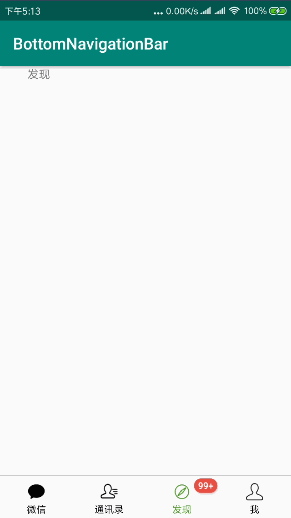
那么在代码中怎么使用呢?
xml
<?xml version="1.0" encoding="utf-8"?>
<RelativeLayout
        xmlns:android="http://schemas.android.com/apk/res/android"
        xmlns:tools="http://schemas.android.com/tools"
        android:layout_width="match_parent"
        android:layout_height="match_parent"
        tools:context=".MainActivity">

    <androidx.viewpager.widget.ViewPager
            android:id="@+id/viewpager"
            android:layout_above="@+id/bottom_navigation"
            android:overScrollMode="never"
            android:layout_width="match_parent"
            android:layout_height="match_parent"/>

    <View android:layout_width="match_parent"
          android:layout_height="1px"
          android:layout_above="@+id/bottom_navigation"
          android:background="@android:color/darker_gray"/>

    <com.google.android.material.bottomnavigation.BottomNavigationView
            android:id="@+id/bottom_navigation"
            android:layout_width="match_parent"
            android:layout_height="56dp"
            android:layout_alignParentBottom="true"/>


</RelativeLayout>
Kotlin 代码
BottomNavigationBar.Companion.Builder().with(this)
    .bottomNavigationView(bottom_navigation)
    .viewpager(viewpager)
    .addMenuItem(R.id.action_wechat, getString(R.string.wechat), R.mipmap.ic_wechat)
    .addMenuItem(R.id.action_contact, getString(R.string.contact), R.mipmap.ic_contact)
    .addMenuItem(R.id.action_find, getString(R.string.find), R.mipmap.ic_find)
    .addMenuItem(R.id.action_me, getString(R.string.me), R.mipmap.ic_me)
    .notCanScroll(false)
    .addFragment(WechatFragment())
    .addFragment(ContactFragment())
    .addFragment(FindFragment())
    .addFragment(MeFragment())
    .build()
设置未读消息
BadgeView(this).bindTargetView(itemView).setBadgeCount(120)
    .setOnDragStateChangedListener(object : Badge.OnDragStateChangedListener {
        override fun onDragStateChanged(dragState: DragState, badge: Badge, targetView: View) {
            if (dragState == DragState.STATE_SUCCEED) {
                Toast.makeText(this@MainActivity, "success", Toast.LENGTH_SHORT).show()
            }
        }
    })
BadegeView 方法说明
| 方法 | 说明 |
|---|---|
| setBadgeCount | 设置Badge数字 |
| setBadgeText | 设置Badge文本 |
| setBadgeTextSize | 设置文本字体大小 |
| setBadgeTextColor | 设置文本颜色 |
| setExactMode | 设置是否显示精确模式数值 |
| setBadgeGravity | 设置Badge相对于TargetView的位置 |
| setGravityOffset | 设置外边距 |
| setBadgePadding | 设置内边距 |
| setBadgeBackgroundColor | 设置背景色 |
| setBadgeBackground | 设置背景图片 |
| setShowShadow | 设置是否显示阴影 |
| setOnDragStateChangedListener | 打开拖拽消除模式并设置监听 |
| stroke | 描边 |
| hide | 隐藏Badge |
最后附上Github地址,如果你喜欢,欢迎Start~~~~。