

由于element UI中的tree可能不能满足项目中的样式需求,所以自己动手结合element中的checkbox全选功能实现了一个符合项目需求的tree。效果如下:
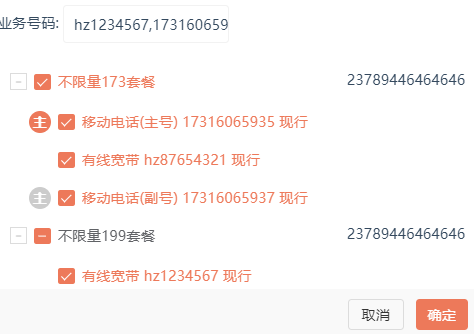
废话不多说,直接上代码
html部分
<template>
    <div class="tree-container">
        <div v-for="(item,index) in menus" :key="index">
            <p class="toggleIcon" @click="toggleShow(item)">{{item.isShowAll?'-':'+'}}</p>
            <el-checkbox :indeterminate="item.isIndeterminate" v-model="item.checkAll" @change="((val)=>{handleCheckAllChange(item,val)})">
                {{item.name}}
            </el-checkbox>
            <span class="checkBox-num">{{item.num}}</span>
            <el-checkbox-group v-model="item.checkedCities" @change="((val)=>{handleCheckedCitiesChange(item,val)})" class="checkGroup"  v-if="item.isShowAll">
                <el-checkbox v-for="(it,i) in item.userList" :key="i" :label="it.num" @change="((val)=>{handleCheckedOne(it,val)})">
                    <label class="icon-zhu" v-if="it.telType == '移动电话' && numList.indexOf(it.num)>=0 ">
                        <span :class="numList[0] === it.num?'colorful-icon':''">主</span>
                    </label>
                    <label class="tree-text">
                        {{it.telType}}
                        <span v-if="it.cardType">({{it.cardType}})</span>
                    </label>
                    <label class="tree-text">{{it.num}}</label>
                    <label class="tree-text">{{it.label}}</label>
                </el-checkbox>
            </el-checkbox-group>
        </div>
    </div>
</template>
js部分
export default {
	name: "Tree",
	props: ["menus", "formData", "numList"],
	methods: {
		// 是否展开checkbox
		toggleShow(item) {
			item.isShowAll = !item.isShowAll;
		}, handleCheckAllChange(item, val) {
			if (val) {
				item.userList.map(it = > {
					let numIndex = this.numList.indexOf(it.num);
					item.checkedCities.push(it.num);
					this.formData.userNum = Array.from(new Set(this.formData.userNum.concat(item.checkedCities)));
					if (it.telType == "移动电话") {
						this.numList.push(it.num);
					}
				});
			} else {
				item.userList.map(it = > {
					let Index = this.formData.userNum.indexOf(it.num);
					let numIndex = this.numList.indexOf(it.num);
					if (Index > -1) {
						this.formData.userNum.splice(Index, 1);
					}
					if (numIndex > -1) {
						this.numList.splice(numIndex, 1);
					}
				});
				item.checkedCities = [];
			}
			item.isIndeterminate = false;
		}, handleCheckedCitiesChange(item, val) {
			let checkedCount = val.length;
			item.checkAll = checkedCount === item.userList.length;
			item.isIndeterminate = checkedCount > 0 && checkedCount < item.userList.length;
		}, handleCheckedOne(item, val) {
			let Index = this.formData.userNum.indexOf(item.num);
			let numIndex = this.numList.indexOf(item.num);
			//如果找到了,有此值
			if (Index > -1) {
				this.formData.userNum.splice(Index, 1);
			} else {
				this.formData.userNum.push(item.num);
			}
			if (item.telType == "移动电话") {
				if (numIndex > -1) {
					this.numList.splice(numIndex, 1);
				} else {
					this.numList.push(item.num);
				}
			}
		}
	}
};
css样式
<style lang="scss" scoped>  @import "../../../assets/css/base.scss";
  .tree-container {
      width: 100%;
      position: relative;
      padding: 10px;
      &>div {
	margin-left: 20px;
      }

    .toggleIcon {
	width: 14px;
	height: 14px;
	border: 1px solid #dcdcdc;
	@include wordStyle(#dcdcdc, 14px, 600);      text-align: center;
	line-height: 11px;
	cursor: pointer;
	position: absolute;
	left: 10px;
	margin-top: 10px;
    }

    .checkGroup {
	display: flex;
	flex-direction: column;
	padding-left: 20px;
    }
    /deep/ .el-checkbox {
	&+.el-checkbox {
	    margin-left: 0;
	}
    }
    /deep/ .el-checkbox__inner {
	&: hover {
	    border-color: #ed795a;
	}
	&:focus {
	    border: 1px solid #dcdfe6;
	    outline: none;
	}
    }
    /deep/ .el-checkbox__input {
	&.is-checked,&.is-indeterminate {
	    .el-checkbox__inner {
		background-color: #ed795a;
		border-color: #ed795a;
	    }
	}
	&.is-checked {
	    &+.el-checkbox__label {
	        color: #ed795a;
	    }
	}
    }
    /deep/ .el-checkbox__label {
	font-size: 12px;
	padding-left: 0;
    }
    /deep/ .el-checkbox {
	position: relative;
    }

    .icon-zhu {
	position: absolute;
	left: -24px;
	span {        display: inline-block;
	width: 18px;
	height: 18px;
	line-height: 18px;
	text-align: center;
	border-radius: 100%;
	color: #fff;
	font-weight: bold;
	background-color: #ccc;
    }

    .colorful-icon {
	background-color: #ed795a;
    }
    .checkBox-num {
	position: absolute;
	right: 10px;
	font-size: 12px;
    }
}
</style>
数据类型如下
menus: [{
	id: "1",
	name: "不限量173套餐",
	num: "23789446464646",
	checkAll: false,
	checkedCities: [],
	//v-model绑定
	isIndeterminate: false,
	//设置 indeterminate 状态,只负责样式控制
	isShowAll: true,
	//控制展开和收缩的状态
	userList: [{
		id: "1.1",
		username: "html",
		role: "主管",
		telType: "移动电话",
		cardType: "主号",
		label: "现行",
		num: "17316065935"
	}, {
		id: "1.2",
		username: "vue",
		role: "普通",
		telType: "有线宽带",
		cardType: "",
		label: "现行",
		num: "hz87654321"
	}, {
		id: "1.3",
		username: "vue",
		role: "普通",
		telType: "移动电话",
		cardType: "副号",
		label: "现行",
		num: "17316065937"
	}]
}, {
	id: "1",
	name: "不限量199套餐",
	num: "23789446464646",
	checkAll: false,
	checkedCities: [],
	//v-model绑定
	isIndeterminate: false,
	//设置 indeterminate 状态,只负责样式控制
	isShowAll: true,
	userList: [{
		id: "1.1",
		username: "html",
		role: "主管",
		telType: "有线宽带",
		cardType: "",
		label: "现行",
		num: "hz1234567"
	}, {
		id: "1.2",
		username: "vue",
		role: "普通",
		telType: "移动电话",
		cardType: "副号",
		label: "现行",
		num: "19916065934"
	}, {
		id: "1.3",
		username: "vue",
		role: "普通",
		telType: "移动电话",
		cardType: "副号",
		label: "现行",
		num: "19916065936"
	}]
}]
