

在iOS中布局UI常用的几种方式
- 通过设置视图的frame
CGRectMake(<#CGFloat x#>, <#CGFloat y#>, <#CGFloat width#>, <#CGFloat height#>)
设置view.frame会立即生效,但明显这种方式会将视图固定死,如果要在不同尺寸的屏幕上都显示完美比较难,可能需要些几套UI或者设置比例。
-
使用Autoresizing来适配父视图bounds发生改变的情况

-
使用AutoLayout自动布局技术 苹果自iOS 6开始引入AutoLayout自动布局技术,经过一系列的优化,开发效率大大提高,苹果官方也推荐使用AutoLayout自动布局技术来布局UI界面。使用AutoLayout布局时,可以指定一系列的视图约束,如:高度、宽度。整个界面上的所有约束组合在一起就明确的定义了整个界面的布局。
自动布局AutoLayout
功能实现
- 利用NSLayoutConstraint类给视图创建具体的约束对象:
NSLayoutConstraint *layoutConstraint = [NSLayoutConstraint constraintWithItem:view1 attribute:NSLayoutAttributeLeft relatedBy:NSLayoutRelationEqual toItem:view2 attribute:NSLayoutAttributeRight multiplier:1 constant:20.f];
公式:
view1.attribute = view2.attribute * multiplier + constant;
- 添加约束到相应的视图上:
API:
- (void)addConstraint:(NSLayoutConstraint *)constraint;
- (void)addConstraints:(NSArray *)constraints;
约束添加规则:
- 对于两个相同层级上的视图之间的约束关系(约束对象),添加到它们的父视图上。
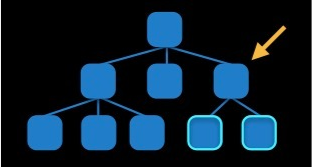
- 对于两个不同层级上的视图之间的约束关系,添加到它们最近的共同父视图上。
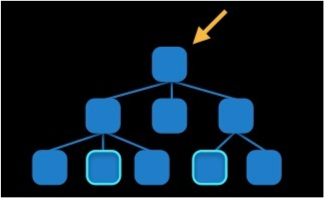
- 对于两个有层级关系的视图之间的约束,添加到层级较高的父视图上。
- 注意事项
- 使用autolayout就要禁止autoresizing功能:
view.translatesAutoresizingMaskIntoConstraints = NO; - 由上面的约束添加规则可知:添加约束之前,必须要确定视图之间的层级关系,因此一定要保证相关控件都已经被添加到了各自的父视图上。
- 不要重复对视图布局,即不需要再设置frame等。
实现原理
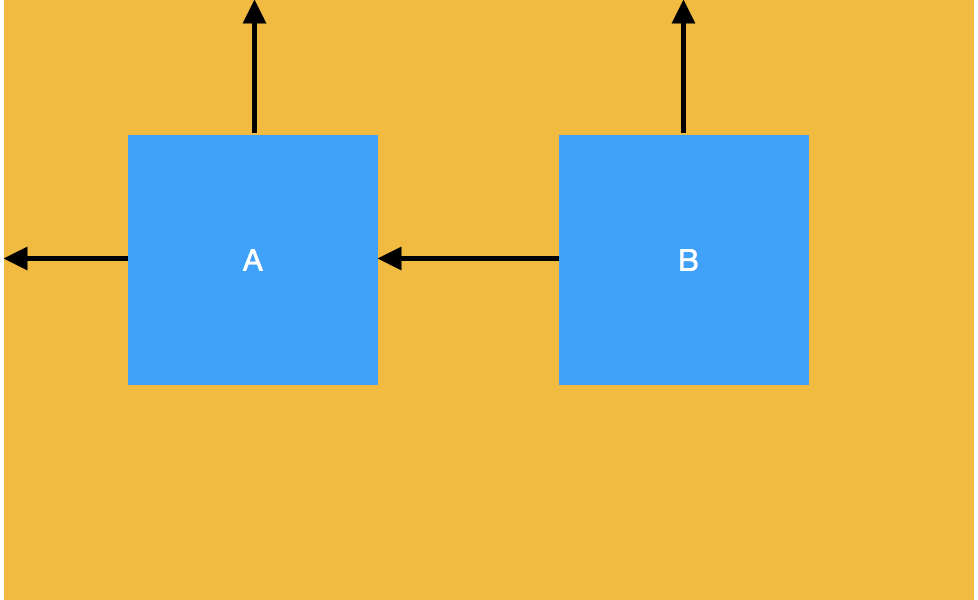
- x & y(相对父视图)
- width & height
只要直到了这些数据就可以固定一个视图了。 使用view.frame就是最直接的方式,而Auto Layout中大部分的约束都是描述性语言,表示视图间的相对距离。如上图:
    A.left = superView.left + 20;
    A.top = superView.top + 25;
    A.width = 100;
    A.height = 100;

    B.left = A.left + 20;
    B.top = A.top;
    B.width = A.width;
    B.height = A.height;
我们通过求解👆的八元一次方程组,是可以将A、B两个视图布局所需要的信息(x、y、width、height)求解出来的。实质上由AutoLayout引擎在运行时求解上述的方程组,最终使用frame来绘制视图。因此也可以知道AutoLayout不能立即生效的(systemLayoutSizeFitting可以获取自动布局结果),不同于直接设置frame。
Auto Layout 其实就是对 Cassowary(将布局问题抽象成线性等式和不等式约束进行求解) 算法的一种实现。
性能
使用AutoLayout布局,就是让整个界面上的所有约束(线性等式/不等式)在一起明确的、无冲突定义整个界面的布局。(当发生冲突时,AutoLayout会先尝试打破一些优先级低的约束,尽量满足优先级高的约束)
使用AutoLayout的过程是需要先求解方程组的,得到结果再设置frame。这样的时间复杂度就远高于直接设置frame了。当视图层级很深或者对性能要求较高的页面使用自动布局的性能就差强人意了。
第三方封装 Masonry
实现
- 使用AutoLayout布局代码:
NSLayoutConstraint *layoutConstraint1 = [NSLayoutConstraint constraintWithItem:view1 attribute:NSLayoutAttributeLeft relatedBy:NSLayoutRelationEqual toItem:view2 attribute:NSLayoutAttributeRight multiplier:1 constant:20.f];
NSLayoutConstraint *layoutConstraint2 = [NSLayoutConstraint constraintWithItem:view1 attribute:NSLayoutAttributeTop relatedBy:NSLayoutRelationEqual toItem:view2 attribute:NSLayoutAttributeTop multiplier:1 constant:0];
[view1 addConstraints:@[layoutConstraint1,layoutConstraint2]];
NSLayoutConstraint 布局约束对象
NSLayoutAttribute 布局属性对象(左右上下等)
NSLayoutRelation 布局关系对象(>、<、=等待)
- 使用Masonry编写相同约束:
 [view1 mas_makeConstraints:^(MASConstraintMaker *make) {
         make.left.equalTo(view2.mas_right).offset(20);
         make.top.equalTo(view2.mas_top);
 }];
可以看出两种方式是相似,Masonry的语言最后可以被转化成AutoLayout代码。
设计到一些关键词:
- makeConstraints:
- make:
- left\right\top...
- equalTo
- (NSArray *)mas_makeConstraints:(void(^)(MASConstraintMaker *))block {
    // 1. 要使用AutoLayout,需要关闭autoSizing
    self.translatesAutoresizingMaskIntoConstraints = NO;
    // 2. 创建ConstraintMaker对象(它负责创建相关约束)
    MASConstraintMaker *constraintMaker = [[MASConstraintMaker alloc] initWithView:self];
    // 3. 执行block,即创建各种约束:
    //   constraintMaker.left.equalTo(view2.mas_right).offset(20);
    //   constraintMaker.top.equalTo(view2.mas_top);
    block(constraintMaker);
    return [constraintMaker install];// 添加约束
}
MASConstraintMaker
// step 1
- (MASConstraint *)left {
    return [self addConstraintWithLayoutAttribute:NSLayoutAttributeLeft];
}
// step 2
- (MASConstraint *)addConstraintWithLayoutAttribute:(NSLayoutAttribute)layoutAttribute {
    return [self constraint:nil addConstraintWithLayoutAttribute:layoutAttribute];
}
// step 3
// MASViewAttribute对一个视图和它的布局属性的封装
// MASViewConstraint 一条 约束(view.left和view2.right)封装了两个MASViewAttributes:firstViewAttribute和secondViewAttribute,和之后的约束关系、offset等数值
// 返回约束对象MASViewConstraint

- (MASConstraint *)constraint:(MASConstraint *)constraint addConstraintWithLayoutAttribute:(NSLayoutAttribute)layoutAttribute {
    MASViewAttribute *viewAttribute = [[MASViewAttribute alloc] initWithView:self.view layoutAttribute:layoutAttribute];
    MASViewConstraint *newConstraint = [[MASViewConstraint alloc] initWithFirstViewAttribute:viewAttribute];

    if ([constraint isKindOfClass:MASViewConstraint.class]) {
        // constaint 存在(left),newConstraint(right)
        //采用了链式约束(make.left.right)就用组合约束(left.right)替换前面的旧约束(left),即用left和right的组合约束替换left约束
        NSArray *children = @[constraint, newConstraint];
        MASCompositeConstraint *compositeConstraint = [[MASCompositeConstraint alloc] initWithChildren:children];
        compositeConstraint.delegate = self;
        [self constraint:constraint shouldBeReplacedWithConstraint:compositeConstraint];
        return compositeConstraint;
    }
    if (!constraint) { // 将新约束加入到约束数组中
        newConstraint.delegate = self;
        [self.constraints addObject:newConstraint];
    }
    return newConstraint;
}
返回的MASViewConstraint对象继承自MASConstraint,这个约束对象仍然有left、top等布局属性。子类继承父类属性,并且它重写了addConstraintWithLayoutAttribute:方法。
// MASConstraint.m 父类
- (MASConstraint *)top {
    return [self addConstraintWithLayoutAttribute:NSLayoutAttributeTop];
}

// MASViewConstraint.m 子类
- (MASConstraint *)addConstraintWithLayoutAttribute:(NSLayoutAttribute)layoutAttribute {
    NSAssert(!self.hasLayoutRelation, @"Attributes should be chained before defining the constraint relation");
    // 它的代理就是MASConstraintMaker对象
    // 但是constraint不是nil而是当前的约束如make.left.top,当前约束是left,进入方法创建的是top约束,重回step3
    return [self.delegate constraint:self addConstraintWithLayoutAttribute:layoutAttribute];
}

// 在约束数组中找到旧约束,并用新的组合约束替换
- (void)constraint:(MASConstraint *)constraint shouldBeReplacedWithConstraint:(MASConstraint *)replacementConstraint {
    NSUInteger index = [self.constraints indexOfObject:constraint];
    NSAssert(index != NSNotFound, @"Could not find constraint %@", constraint);
    [self.constraints replaceObjectAtIndex:index withObject:replacementConstraint];
}
因此Masonry可以使用链式调用,如:make.left.top;且布局属性返回的都是MASConstraint对象,它还有布局关系属性equalTo(view2.right)等。 通过添加布局关系属性和后边的offset等,将约束对象MASViewConstraint的约束条件补充完整了。
这样一条条完整的约束就创建完成了。接下来需要将这些完整的约束添加到view上。即又回到了mas_makeConstaints方法上了,它最终执行[constraintMaker install]
- (NSArray *)install {
    if (self.removeExisting) {//remake 删除原有已经设置的所有约束
        NSArray *installedConstraints = [MASViewConstraint installedConstraintsForView:self.view];
        for (MASConstraint *constraint in installedConstraints) {
            [constraint uninstall];
        }
    }
    // self.constaints是之前方法中出现的约束数组:存储关于这个视图的所有约束语句,让每个约束都执行install方法
    NSArray *constraints = self.constraints.copy;
    for (MASConstraint *constraint in constraints) {
        constraint.updateExisting = self.updateExisting;// 是否是要updateConstraints
        [constraint install];
    }
    [self.constraints removeAllObjects];
    return constraints;
}
[constraint install]方法取出该约束对象中的所有约束条件,创建了约束对象MASLayoutConstraint,它继承自系统的NSLayoutConstaint:
 MASLayoutConstraint *layoutConstraint
        = [MASLayoutConstraint constraintWithItem:firstLayoutItem
                                        attribute:firstLayoutAttribute
                                        relatedBy:self.layoutRelation
                                           toItem:secondLayoutItem
                                        attribute:secondLayoutAttribute
                                       multiplier:self.layoutMultiplier
                                         constant:self.layoutConstant];
那么这个约束要被添加到哪个view上呢?
    // 查找要被添加约束的installView
    // 1. 设置secondView,则按照添加约束规则找出共同父视图
    if (self.secondViewAttribute.view) {
        MAS_VIEW *closestCommonSuperview = [self.firstViewAttribute.view mas_closestCommonSuperview:self.secondViewAttribute.view];
        NSAssert(closestCommonSuperview,
                 @"couldn't find a common superview for %@ and %@",
                 self.firstViewAttribute.view, self.secondViewAttribute.view);
        self.installedView = closestCommonSuperview;
    } else if (self.firstViewAttribute.isSizeAttribute) { // 2. 未设置secondView,但是当前布局属性是视图width、height。
        self.installedView = self.firstViewAttribute.view;
    } else { // 3. 以上都不是,则secondView应该默认是当前视图的父视图了
        self.installedView = self.firstViewAttribute.view.superview;
    }
如果想要更新某个约束呢?
 MASLayoutConstraint *existingConstraint = nil;
    if (self.updateExisting) { // 找出和要更新的约束同类型的已经设置的约束
        existingConstraint = [self layoutConstraintSimilarTo:layoutConstraint];
    }
    if (existingConstraint) { // 有,更新约束值
        // just update the constant
        existingConstraint.constant = layoutConstraint.constant;
        self.layoutConstraint = existingConstraint;
    } else { // 没有,直接添加
        [self.installedView addConstraint:layoutConstraint];
        self.layoutConstraint = layoutConstraint;
        [firstLayoutItem.mas_installedConstraints addObject:self];
    }
equalTo()和mas_equalTo()
#define mas_equalTo(...) equalTo(MASBoxValue((__VA_ARGS__)))
equalTo()参数是id类型,而mas_equalTo()参数可以是id、数值、CGSize等等,它就是一个宏,通过MASBoxValue函数将其中参数转化成id类型。
left和mas_left
- left是maker和MASConstraint的属性;而mas_left是UIView(MASAdditions)分类中给view添加的属性。因此mas_left可以用于equalTo(参数)参数。
- 两个属性最终都会被包装成MASViewAttribute布局属性。
总结
综上可以看出: MASConstraintMaker是一个简单工厂类(或者说工厂方法)用来生产MASConstraint约束对象。
外界通过给工厂传递不同的类型left、right等,从而生产出不同类型的约束对象(MASViewConstraint和MASCompositeConstraint),利用多态。
