

它们几乎完全相同,但是PureComponent通过prop和state的浅比较来实现shouldComponentUpdate,某些情况下可以用PureComponent提升性能
一、所谓浅比较(shallowEqual),即react源码中的一个函数,然后根据下面的方法进行是不是PureComponent的判断,帮我们做了本来应该我们在shouldComponentUpdate中做的事情
if (this._compositeType === CompositeTypes.PureClass) {
  shouldUpdate = !shallowEqual(prevProps, nextProps) || ! shallowEqual(inst.state, nextState);
}
而本来我们做的事情如下,这里判断了state有没有发生变化(prop同理),从而决定要不要重新渲染,这里的函数在一个继承了Component的组件中,而这里this.state.person是一个对象,你会发现,在这个对象的引用没有发生变化的时候也是会重新render的(即下面提到的第三点),所以我们可以用shouldComponentUpdate进行优化,这个方法如果返回false,表示不需要重新进行渲染,返回true则重新渲染,默认返回true
 shouldComponentUpdate(nextProps, nextState) {
    return (nextState.person !== this.state.person);
  }
二、上面提到的某些情况下可以使用PureComponent来提升性能,那具体是哪些情况可以,哪些情况不可以呢,实践出真知
1.如下显示的是一个App组件,设置了一个state是isShow,通过一个按钮点击可以改变它的值,结果是:初始化的时候输出的是constructor,render,而第一次点击按钮,会输出一次render,即重新渲染了一次,界面也会从显示false变成显示true,但是当这个组件是继承自PureComponent的时候,再点击的时,不会再输出render,即不会再重新渲染了,而当这个组件是继承自Component时,还是会输出render,还是会重新渲染,这时候就是PureComponent内部做了优化的体现
Component:
<!DOCTYPE html>
<html>
<head>
<meta charset="UTF-8" />
<title>React 实例</title>
<script src="https://cdn.staticfile.org/react/16.4.0/umd/react.development.js"></script>
<script src="https://cdn.staticfile.org/react-dom/16.4.0/umd/react-dom.development.js"></script>
<script src="https://cdn.staticfile.org/babel-standalone/6.26.0/babel.min.js"></script>
</head>
<body>
<div id="example"></div>

<script type="text/babel">
  class App extends React.Component {
    constructor() {
      super();
      this.state = {
        isShow: false,
      };
      console.log('constructor');
    }
    changeState = () => {
      this.setState({
        isShow: true,
      })
    };
    render() {
      console.log('IndexPage render');
      return (
        <div>
          <button onClick={this.changeState}>点击</button>
        </div>
      );
    }
  }

  ReactDOM.render(<App />, document.getElementById('example'));
多次点击:

PureComponent:
<script type="text/babel">
  class App extends React.PureComponent {
    constructor() {
      super();
      this.state = {
        isShow: false,
      };
      console.log('constructor');
    }
    changeState = () => {
      this.setState({
        isShow: true,
      })
    };
    render() {
      console.log('IndexPage render');
      return (
        <div>
          <button onClick={this.changeState}>点击</button>
        </div>
      );
    }
  }
  ReactDOM.render(<App />, document.getElementById('example'));
</script>
多次点击输出为:

2.同理也适用于string,number等基本数据类型,因为基本数据类型,值改变了就算改变了
3.当这个this.state.person是一个对象时,且这个组件是继承自PureComponent时,初始化依旧是输出constructor和render,但是当点击按钮时,界面上没有变化,也没有输出render,证明没有渲染,但是我们可以从下面的注释中看到,每点击一次按钮,我们想要修改的person的值已经改变,而这个值将去修改this.state.person,但是因为在PureComponent中浅比较这个对象的引用没有变化所以没有渲染
<script type="text/babel">
  class App extends React.PureComponent {
    constructor() {
      super();
      this.state = {
        person: {
          name: 'sxt'
        }
      };
      console.log('constructor');
    }
    changeState = () => {
      let { person } = this.state;
      person.name = 'sxt2';
      this.setState({
        person
      })
    };
    render() {
      console.log('IndexPage render');
      const { person } = this.state;
      return (
        <div>
          <button onClick={this.changeState}>点击</button>
        </div>
      );
    }
  }
  ReactDOM.render(<App />, document.getElementById('example'));
</script>
点击多次输出为:

4.但是当这个组件是继承自Component的时候,初始化依旧是输出constructor和render,但是当点击按钮时,界面上出现了变化,每点击一次按钮都会输出一次render,证明已经重新渲染,this.state.person的值已经更新,所以我们能在界面上看到这个变化
<script type="text/babel">
  class App extends React.Component {
    constructor() {
      super();
      this.state = {
        person: {
          name: 'sxt'
        }
      };
      console.log('constructor');
    }
    changeState = () => {
      let { person } = this.state;
      person.name = 'sxt2';
      this.setState({
        person
      })
    };
    render() {
      console.log('IndexPage render');
      const { person } = this.state;
      return (
        <div>
          <button onClick={this.changeState}>点击</button>
        </div>
      );
    }
  }
  ReactDOM.render(<App />, document.getElementById('example'));
</script>
点击多次输出为:

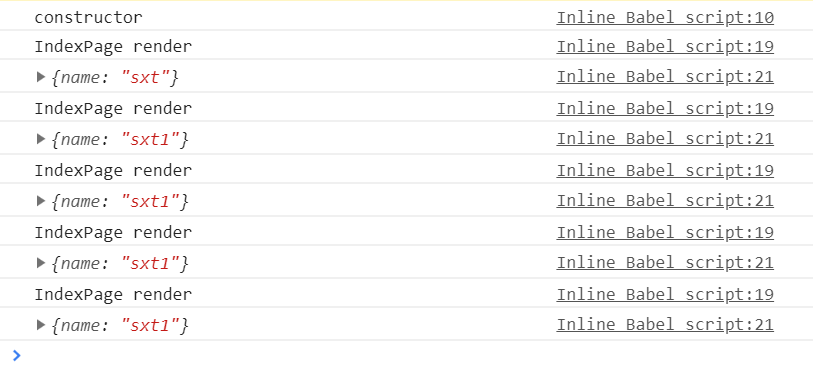
5.下面的例子用扩展运算符产生新对象,使this.state.person的引用发生了变化,所以初始化的时候输出constructor和render后,每次点击按钮都会输出render,界面也会变化,不管该组件是继承自Component还是PureComponent的
PureComponent:
<script type="text/babel">
  class App extends React.PureComponent {
    constructor() {
      super();
      this.state = {
        person: {
          name: 'sxt'
        }
      };
      console.log('constructor');
    }
    changeState = () => {
      const { person } = this.state;
      this.setState({
        person: { ...person, name: 'sxt1'}
      })
    };
    render() {
      console.log('IndexPage render');
      const { person } = this.state;
      console.log(person);
      return (
        <div>
          <button onClick={this.changeState}>点击</button>
        </div>
      );
    }
  }
  ReactDOM.render(<App />, document.getElementById('example'));
</script>
多次点击输出为:
Component:
<script type="text/babel">
  class App extends React.Component {
    constructor() {
      super();
      this.state = {
        person: {
          name: 'sxt'
        }
      };
      console.log('constructor');
    }
    changeState = () => {
      const { person } = this.state;
      this.setState({
        person: { ...person, name: 'sxt1'}
      })
    };
    render() {
      console.log('IndexPage render');
      const { person } = this.state;
      console.log(person);
      return (
        <div>
          <button onClick={this.changeState}>点击</button>
        </div>
      );
    }
  }
  ReactDOM.render(<App />, document.getElementById('example'));
</script>
多次点击输出为:
6.上面的情况同样适用于数组的情况
二.PureComponent不仅会影响本身,而且会影响子组件,所以PureComponent最佳情况是展示组件
1.我们让IndexPage组件里面包含一个子组件Example来展示PureComponent是如何影响子组件的
2.父组件继承PureComponent,子组件继承Component时:下面的结果初始化时输出为constructor,IndexPage render,example render,但是当我们点击按钮时,界面没有变化,因为这个this.state.person对象的引用没有改变,只是改变了它里面的属性值所以尽管子组件是继承Component的也没有办法渲染,因为父组件是PureComponent,父组件根本没有渲染,所以子组件也不会渲染
3.父组件继承PureComponent,子组件继承PureComponent时:因为渲染在父组件的时候就没有进行,相当于被拦截了,所以子组件是PureComponent还是Component根本不会影响结果,界面依旧没有变化
4.父组件继承Component,子组件继承PureComponent时:结果和我们预期的一样,即初始化是会输出constructor,IndexPage render,example render,但是点击的时候只会出现IndexPage render,因为父组件是Component,所以父组件会渲染,但是 当父组件把值传给子组件的时候,因为子组件是PureComponent,所以它会对prop进行浅比较,发现这个person对象的引用没有发生变化,所以不会重新渲染,而界面显示是由子组件显示的,所以界面也不会变化
5.父组件继承Component,子组件继承Component时:初始化是会输出constructor,IndexPage render,example render,当我们第一次点击按钮以后,界面发生变化,后面就不再改变,因为我们一直把它设置为sxt2,但是每点击一次都会输出IndexPage render,example render,因为每次不管父组件还是子组件都会渲染
6.所以正如下面第四条说的,如果state和prop一直变化的话,还是建议使用Component,并且PureComponent的最好作为展示组件 //父组件
import React, { PureComponent, Component } from 'react';
import Example from "../components/Example";

class IndexPage extends PureComponent{
  constructor() {
    super();
    this.state = {
      person: {
        name: 'sxt'
      }
    };
    console.log('constructor');
  }
  changeState = () => {
    let { person } = this.state;
    person.name = 'sxt2';
    this.setState({
      person
    })
  };
  render() {
    console.log('IndexPage render');
    const { person } = this.state;
    return (
      <div>
        <button onClick={this.changeState}>点击</button>
        <Example person={person} />
      </div>
    );
  }
}
//子组件
import React, { Component } from 'react';

class Example extends Component {

  render() {
    console.log('example render');
    const { person } = this.props;
    return(
      <div>
        {person.name}
      </div>
    );
  }
}
三.若是数组和对象等引用类型,则要引用不同,才会渲染 四.如果prop和state每次都会变,那么PureComponent的效率还不如Component,因为你知道的,进行浅比较也是需要时间 五.若有shouldComponentUpdate,则执行它,若没有这个方法会判断是不是PureComponent,若是,进行浅比较 1.继承自Component的组件,若是shouldComponentUpdate返回false,就不会渲染了,继承自PureComponent的组件不用我们手动去判断prop和state,所以在PureComponent中使用shouldComponentUpdate会有如下警告: IndexPage has a method called shouldComponentUpdate(). shouldComponentUpdate should not be used when extending React.PureComponent. Please extend React.Component if shouldComponentUpdate is used. 也是比较好理解的,就是不要在PureComponent中使用shouldComponentUpdate,因为根本没有必要
