

背景
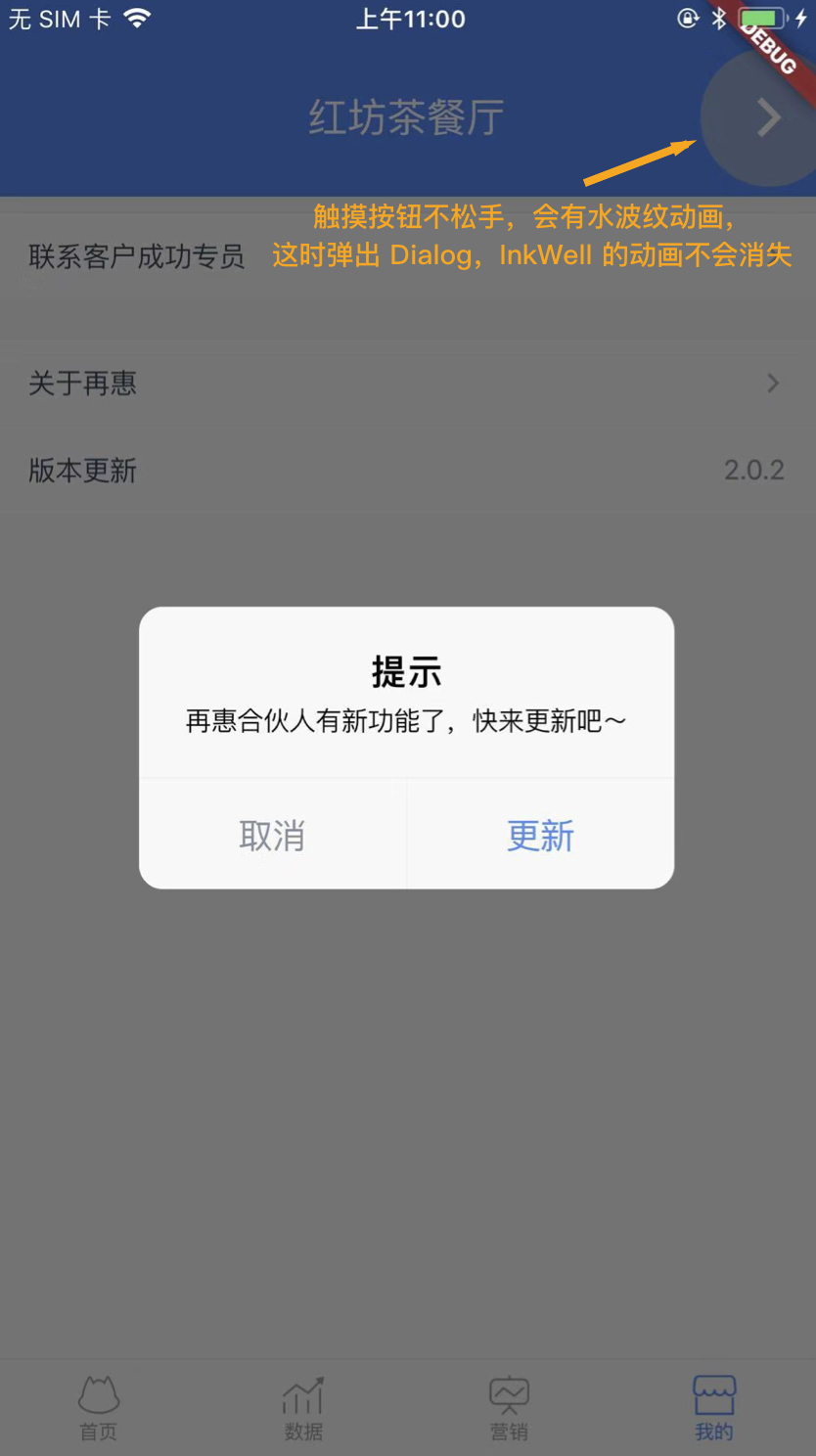
最近在开发 Flutter 项目过程中遇到了一个很有意思的 bug,如果页面在 InkWell 动画期间弹出一个 Dialog,那么 InkWell 的动画效果不会消失,如下图右上角所示。以此为契机对 InkWell 的源码进行了探索和浅析
概述
InkWell 是 Flutter 提供的一个用于实现 Material 触摸水波效果的 Widget,相当于 Android 里的 Ripple
InkWell 继承关系

InkWell 源码
class InkWell extends InkResponse {
  /// Creates an ink well.
  ///
  /// Must have an ancestor [Material] widget in which to cause ink reactions.
  ///
  /// The [enableFeedback] and [excludeFromSemantics] arguments must not be
  /// null.
  const InkWell({
    Key key,
    Widget child,
    ...省略
    bool enableFeedback = true,
    bool excludeFromSemantics = false,
  }) : super(
    key: key,
    child: child,
     ...省略
     containedInkWell: true,
     highlightShape: BoxShape.rectangle,
     ...省略
    enableFeedback: enableFeedback,
    excludeFromSemantics: excludeFromSemantics,
  );
}
源码非常简单,其实就是具有特定属性值的 InkResponse,即 InkResponse 的特例
InkWell 显示构成
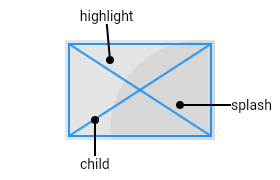
child、highlight 背景动画和 splash 水波纹动画构成
动画分析基于 InkResponse
分析思路
从显示效果来看,触摸 InkWell 之后动画就启动了,所以从 GestureDetector 入手
@override
Widget build(BuildContext context) {
  ...省略
  return GestureDetector(
    onTapDown: enabled ? _handleTapDown : null,
    onTap: enabled ? () => _handleTap(context) : null,
    onTapCancel: enabled ? _handleTapCancel : null,
    onDoubleTap: widget.onDoubleTap != null ? _handleDoubleTap : null,
    onLongPress: widget.onLongPress != null ? () => _handleLongPress(context) : null,
    behavior: HitTestBehavior.opaque,
    child: widget.child,
    excludeFromSemantics: widget.excludeFromSemantics,
  );
}
接着看 onTapDown 回调函数,_createInkFeature(details) 和 updateHighlight(true) 分别启动了 splash 水波纹动画和 highlight 背景动画
void _handleTapDown(TapDownDetails details) {
  final InteractiveInkFeature splash = _createInkFeature(details);
  _splashes ??= HashSet<InteractiveInkFeature>();
  _splashes.add(splash);
  _currentSplash = splash;
  if (widget.onTapDown != null) {
    widget.onTapDown(details);
  }
  updateKeepAlive();
  updateHighlight(true);
}
接着看 _createInkFeature(details) ,水波纹动画是以触摸点为中心向周边扩散的,_handleTapDown(TapDownDetails details) 的参数 TapDownDetails 提供了 pointer position;
这里用 Android Studio 看源码有个坑,点内部的 create 方法会直接进入 InteractiveInkFeature 源码,实际上它是个父类,动画实现是个空方法,真正实现 splash 水波纹动画的是它的子类 InkSplash
InteractiveInkFeature _createInkFeature(TapDownDetails details) {
   ...省略
   splash = (widget.splashFactory ?? Theme.of(context).splashFactory).create(
    referenceBox: referenceBox,
    position: position,
    ...省略
  );
  return splash;
}
接着看 updateHighlight(true),实现 highlight 背景动画的是 InkHighlight
void updateHighlight(bool value) {
    ...省略
    if (_lastHighlight == null) {
      final RenderBox referenceBox = context.findRenderObject();
      _lastHighlight = InkHighlight(
        controller: Material.of(context),
        referenceBox: referenceBox,
        ...省略
      updateKeepAlive();
    } else {
      _lastHighlight.activate();
    }
    ... 省略
  }
动画绘制
继承关系
可以看出这俩其实是兄弟,他们有共同的祖先


接着看 InteractiveInkFeature,它定义了两个空方法和实现了一个 ink color 的 get、set 方法,说明动画相关的接口定义还在上级接口,即 InkFeature
abstract class InteractiveInkFeature extends InkFeature {
  ... 省略
  void confirm() {
  }
  void cancel() {
  }
  /// The ink's color.
  Color get color => _color;
  Color _color;
  set color(Color value) {
    if (value == _color)
      return;
    _color = value;
    controller.markNeedsPaint();
  }
}
最终定位到关键接口方法就是 paintFeature(),接下来了解下 InkSplash、InkHighlight 的具体实现
abstract class InkFeature {
  ...省略
  ///
  /// The transform argument gives the coordinate conversion from the coordinate
  /// system of the canvas to the coordinate system of the [referenceBox].
  @protected
  void paintFeature(Canvas canvas, Matrix4 transform);
}
InkSplash、InkHighlight
@override
void paintFeature(Canvas canvas, Matrix4 transform) {
  // 获取背景色,_alpha 类型是 Animation<int>,splash 颜色由浅到深就是它控制的
  final Paint paint = Paint()..color = color.withAlpha(_alpha.value);
  // 水波纹效果中心点,由此向外扩散
  Offset center = _position;
  if (_repositionToReferenceBox)
    center = Offset.lerp(center, referenceBox.size.center(Offset.zero), _radiusController.value);
    // 矩阵变换
  final Offset originOffset = MatrixUtils.getAsTranslation(transform);
  canvas.save();
  if (originOffset == null) {
    canvas.transform(transform.storage);
  } else {
    canvas.translate(originOffset.dx, originOffset.dy);
  }
  // 定义水波纹边界
  if (_clipCallback != null) {
    final Rect rect = _clipCallback();
    if (_customBorder != null) {
      canvas.clipPath(_customBorder.getOuterPath(rect, textDirection: _textDirection));
    } else if (_borderRadius != BorderRadius.zero) {
      canvas.clipRRect(RRect.fromRectAndCorners(
        rect,
        topLeft: _borderRadius.topLeft, topRight: _borderRadius.topRight,
        bottomLeft: _borderRadius.bottomLeft, bottomRight: _borderRadius.bottomRight,
      ));
    } else {
      canvas.clipRect(rect);
    }
  }
  // 获取水波纹半径大小,_radius 类型是 Animation<double>,水波纹扩散效果就是它的值由小到大变化造成的
  canvas.drawCircle(center, _radius.value, paint);
  canvas.restore();
}
InkHighlight 相对比较简单,实现原理和 InkSplash 是一样的,只不过动画只改变了颜色透明度,就不具体分析了
动画开启
文章开头 InkWell 源码有这么一句注释,其实它是非常关键的信息,通过跟踪 InkFeature 的 paintFeature() 方法的调用方可以发现结果指向 _MaterialState
/// Must have an ancestor [Material] widget in which to cause ink reactions.
class _RenderInkFeatures extends RenderProxyBox implements MaterialInkController {
  ...省略
  List<InkFeature> _inkFeatures;

  // InkSplash、InkHighlight 构造函数末尾都调用 addInkFeature()
  @override
  void addInkFeature(InkFeature feature) {
    assert(!feature._debugDisposed);
    assert(feature._controller == this);
    _inkFeatures ??= <InkFeature>[];
    assert(!_inkFeatures.contains(feature));
    _inkFeatures.add(feature);
    markNeedsPaint();
  }

  // InkFeature dispose() 函数末尾调用 _removeFeature()
  void _removeFeature(InkFeature feature) {
    assert(_inkFeatures != null);
    _inkFeatures.remove(feature);
    markNeedsPaint();
  }

  @override
  void paint(PaintingContext context, Offset offset) {
    if (_inkFeatures != null && _inkFeatures.isNotEmpty) {
      final Canvas canvas = context.canvas;
      canvas.save();
      canvas.translate(offset.dx, offset.dy);
      canvas.clipRect(Offset.zero & size);
      // 循环遍历所有的 InkFeature 并调用它们的 _paint() 绘制显示效果
      for (InkFeature inkFeature in _inkFeatures)
        inkFeature._paint(canvas);
      canvas.restore();
    }
    super.paint(context, offset);
  }
}
class _MaterialState extends State<Material> with TickerProviderStateMixin {
  final GlobalKey _inkFeatureRenderer = GlobalKey(debugLabel: 'ink renderer');
  ...省略
  @override
  Widget build(BuildContext context) {
      ...省略
      onNotification: (LayoutChangedNotification notification) {
        // _MaterialState build 的时候绘制了 splash 水波纹动画和 highlight 背景动画,这也就印证了注释里要求 InkWell 在绘制树中必须有个 Material 祖先
        final _RenderInkFeatures renderer = _inkFeatureRenderer.currentContext.findRenderObject();
        renderer._didChangeLayout();
        return true;
      },
      child: _InkFeatures(
        key: _inkFeatureRenderer,
        color: backgroundColor,
        child: contents,
        vsync: this,
      )
    );
    ... 省略
  }
}
动画结束
动画结束主要有两种时机,回到 InkResponse 来看一段源码
class InkResponse extends StatefulWidget {
  ... 省略
  void _handleTap(BuildContext context) {
    _currentSplash?.confirm();
    _currentSplash = null;
    updateHighlight(false);
    if (widget.onTap != null) {
      if (widget.enableFeedback)
        Feedback.forTap(context);
      widget.onTap();
    }
  }

  void _handleTapCancel() {
    _currentSplash?.cancel();
    _currentSplash = null;
    if (widget.onTapCancel != null) {
      widget.onTapCancel();
    }
    updateHighlight(false);
  }

  void _handleDoubleTap() {
    _currentSplash?.confirm();
    _currentSplash = null;
    if (widget.onDoubleTap != null)
      widget.onDoubleTap();
  }

  void _handleLongPress(BuildContext context) {
    _currentSplash?.confirm();
    _currentSplash = null;
    if (widget.onLongPress != null) {
      if (widget.enableFeedback)
        Feedback.forLongPress(context);
      widget.onLongPress();
    }
  }

  @override
  void deactivate() {
    if (_splashes != null) {
      final Set<InteractiveInkFeature> splashes = _splashes;
      _splashes = null;
      for (InteractiveInkFeature splash in splashes)
        splash.dispose();
      _currentSplash = null;
    }
    assert(_currentSplash == null);
    _lastHighlight?.dispose();
    _lastHighlight = null;
    super.deactivate();
  }

  @override
  Widget build(BuildContext context) {
    ...省略
    return GestureDetector(
      onTapDown: enabled ? _handleTapDown : null,
      onTap: enabled ? () => _handleTap(context) : null,
      onTapCancel: enabled ? _handleTapCancel : null,
      onDoubleTap: widget.onDoubleTap != null ? _handleDoubleTap : null,
      onLongPress: widget.onLongPress != null ? () => _handleLongPress(context) : null,
      behavior: HitTestBehavior.opaque,
      child: widget.child,
      excludeFromSemantics: widget.excludeFromSemantics,
    );
  }

}
GestureDetector回调方法中直接或间接调用InkFeature的dispose()State生命周期deactivate()方法 (应用返回后台或者页面跳转会调用,弹出Dialog不会调用) 中直接或间接调用InkFeature的dispose()
总结
InkWell在响应GestureDetector的onTapDown()回调时创建了InkSplash、InkHighlight(均是InkFeature的子类,各自实现了paintFeature())InkSplash、InkHighlight创建时将自己添加到_RenderInkFeatures的InkFeature队列中InkWell的Material祖先在build()的时候会调用_RenderInkFeatures的paint()_RenderInkFeatures的paint()会遍历InkFeature队列并调用InkFeature的paintFeature()绘制动画效果GestureDetector回调方法或State生命周期deactivate()方法直接或间接调用InkFeature的dispose()InkFeature的dispose()将自己从_RenderInkFeatures的InkFeature队列中移除,动画效果结束
@123lxw123, 本文版权属于再惠研发团队,欢迎转载,转载请保留出处。
