前言
之前没太理解redux,在使用时总是照葫芦画瓢,看项目里别人如何使用,自己就如何使用,这一次彻底学习了下官方文档,记录。
在学习redux初时,有三个概念需要了解。
- action
- reducer
- store
Action
类型是一个Object
更改store中state的唯一方法,它通过store.dispatch将action传到store中
一个简单的action
function addTodo(text) {
  return {
    type: ADD_TODO,
    text
  }
}
dispatch(addTodo(text))
Reducer
根据action,来指定store中的state如何改变。
store
存储state
store.getState();
- 提供
getState()方法获取state - 提供
dispatch(action)更新state subscribe(listener)来注册、取消监听器
更新store的步骤
1.创建action,action中必须要有type 2.创建reducer,根据action中的type来更新store中的state 3.初始化store
理解不可变性
在reducer更新state时,不能改变原有的state,只能重新创建一个新的state。这里提供了几个方法可以来创建一个不同的对象。
- 使用immutable-js创建不可变的数据结构
- 使用JavaScript库(如Loadsh)来执行不可变的操作
- 使用ES6语法执行不可变操作
之前并不了解immutable-js,所以还是使用es6的语法来执行不可变操作。
let a = [1, 2, 3];              // [1, 2, 3]
let b = Object.assign([], a);   // [1, 2, 3]

// a !== b
上面和下面是相同的
// es6语法
let a = [1,  2, 3]; // [1, 2, 3]
let b = [...a];     // [1, 2, 3]

// a !== b
初始化store
在创建store时要将注意传入开发者工具相关参数
import { createStore, applyMiddleware, compose } from 'redux'
import thunk from 'redux-thunk'
import { createLogger } from 'redux-logger'
import api from '../middleware/api'
import rootReducer from '../reducers'
import DevTools from '../containers/DevTools'

const configureStore = preloadedState => {
  const store = createStore(
    rootReducer,
    preloadedState,
    compose(
      applyMiddleware(thunk, api, createLogger()),
      DevTools.instrument()
    )
  )

  // ..省略相关代码
  return store
}

export default configureStore
createStore
参数
- reducer (Function,必选):用于返回新的
state,给出当前的state和action - preloadedState (Any,可选):初始化
state, 你可以选择将其指定为通用应用程序中的服务器状态,或者还原以前序列化的用户会话,如果使用combineReducers生成reducer,则它必须是一个普通对象,其形状与传递给它的键相同。否则,您可以自由地传递reducer只要能够理解。 - enhancer (Function,可选),可以指定它使用第三方功能增强
store,例如中间件等等。随Redux一起提供的enhancer只有applyMiddleware(),传入的enhancer只能是一个。
返回值
(Store): 保存应用完整state的对象,只要dispatching actions才能改变它的state。你可以用subscribe它state的改变来更新UI。
Tips
- 最多创建一个
store在一个应用当中,使用combineReducers来创建根reducer - 你可以选择状态的格式,可以选择普通对象或类似
Immutable,如果不确定,先从普通对象开始 - 如果state是个普通对象,请确定永远不要改变它,例如从
reducers返回对象时,不要使用Object.assign(state, newData),而是返回Object.assign({}, state, newData)。这样就不会覆盖以前的状态,或者使用return {...state, ...newData} - 要使用多个
enhancer可以使用compose(), - 创建
store时,Redux会发送一个虚拟的action用来初始化store的state,初始化时第一个参数未定义,那么store的state会返回undefined
Enhancer
增强器
Middleware
官方文档中有提到,中间件是用来包装dispatch的
这里看一个官方的例子,从这个例子中就可以看到,传入参数是action,随后可以对这个action进行一些操作。
import { createStore, applyMiddleware } from 'redux'
import todos from './reducers'

function logger({ getState }) {
  return next => action => {
    console.log('will dispatch', action)

    // Call the next dispatch method in the middleware chain.
    const returnValue = next(action)

    console.log('state after dispatch', getState())

    // This will likely be the action itself, unless
    // a middleware further in chain changed it.
    return returnValue
  }
}

const store = createStore(todos, ['Use Redux'], applyMiddleware(logger))

store.dispatch({
  type: 'ADD_TODO',
  text: 'Understand the middleware'
})
// (These lines will be logged by the middleware:)
// will dispatch: { type: 'ADD_TODO', text: 'Understand the middleware' }
// state after dispatch: [ 'Use Redux', 'Understand the middleware' ]
使用applyMiddleware参数可以使多个中间件,最后返回的是一个enhancer
相关提示
- 有一些中间件可能只在某个特定环境下使用,比如日志中间件,可能在生成环境就不需要了。需要注意引用。
let middleware = [a, b]
if (process.env.NODE_ENV !== 'production') {
  const c = require('some-debug-middleware')
  const d = require('another-debug-middleware')
  middleware = [...middleware, c, d]
}

const store = createStore(
  reducer,
  preloadedState,
  applyMiddleware(...middleware)
)
Provider与connect
需要额外安装
yarn add react-redux
provider和connect必须一起使用,这样store可以作为组件的props传入。关于Provider和connect,这里有一篇淘宝的文章可以看下Provider和connect
大致使用如下,在root container当中,会加入Provider
const App = () => {
  return (
    <Provider store={store}>
      <Comp/>
    </Provider>
  )
};
在根布局下的组件当中,需要使用到connect。
mapStateToProps
connect方法第一个参数mapStateToProps是可以将store中的state变换为组件内部的props来使用。
const mapStateToProps = (state, ownProps) => {
  // state 是 {userList: [{id: 0, name: '王二'}]}
  // 将user加入到改组件中的props当中
  return {
    user: _.find(state.userList, {id: ownProps.userId})
  }
}

class MyComp extends Component {

  static PropTypes = {
    userId: PropTypes.string.isRequired,
    user: PropTypes.object
  };

  render(){
    return <div>用户名:{this.props.user.name}</div>
  }
}

const Comp = connect(mapStateToProps)(MyComp);
mapDispatchToProps
connect方法的第二个参数,它的功能是将action作为组件的props。
const mapDispatchToProps = (dispatch, ownProps) => {
  return {
    increase: (...args) => dispatch(actions.increase(...args)),
    decrease: (...args) => dispatch(actions.decrease(...args))
  }
}

class MyComp extends Component {
  render(){
    const {count, increase, decrease} = this.props;
    return (<div>
      <div>计数:{this.props.count}次</div>
      <button onClick={increase}>增加</button>
      <button onClick={decrease}>减少</button>
    </div>)
  }
}

const Comp = connect(mapStateToProps, mapDispatchToProps)(MyComp);
利用props使用store
import { setUser } from 'action';
// 在使用了connect的组件中 store在它的props当中
const { dispatch } = this.porps;

const user = ...;
// 直接分发设置user
dispatch(setUser(user));
异步场景下更新store
- Thunk middleware
- redux-promise
- redux-observable
- redux-saga
- redux-pack
- 自定义...
Redux-thunk
在没有使用Redux-thunk之前,当我们需要改变store中的state,只能使用使用dispath传入action的形式,这里有个官方的例子能够说明它的使用场景。
import { createStore, applyMiddleware } from 'redux';
import thunk from 'redux-thunk';
import rootReducer from './reducers';

// Note: this API requires redux@>=3.1.0
const store = createStore(
  rootReducer,
  applyMiddleware(thunk)
);

function fetchSecretSauce() {
  return fetch('https://www.google.com/search?q=secret+sauce');
}

// These are the normal action creators you have seen so far.
// The actions they return can be dispatched without any middleware.
// However, they only express “facts” and not the “async flow”.

function makeASandwich(forPerson, secretSauce) {
  return {
    type: 'MAKE_SANDWICH',
    forPerson,
    secretSauce
  };
}

function apologize(fromPerson, toPerson, error) {
  return {
    type: 'APOLOGIZE',
    fromPerson,
    toPerson,
    error
  };
}

function withdrawMoney(amount) {
  return {
    type: 'WITHDRAW',
    amount
  };
}

// Even without middleware, you can dispatch an action:
store.dispatch(withdrawMoney(100));

// But what do you do when you need to start an asynchronous action,
// such as an API call, or a router transition?

// Meet thunks.
// A thunk is a function that returns a function.
// This is a thunk.

function makeASandwichWithSecretSauce(forPerson) {

  // Invert control!
  // Return a function that accepts `dispatch` so we can dispatch later.
  // Thunk middleware knows how to turn thunk async actions into actions.

  return function (dispatch) {
    return fetchSecretSauce().then(
      sauce => dispatch(makeASandwich(forPerson, sauce)),
      error => dispatch(apologize('The Sandwich Shop', forPerson, error))
    );
  };
}

// Thunk middleware lets me dispatch thunk async actions
// as if they were actions!

store.dispatch(
  makeASandwichWithSecretSauce('Me')
);

// It even takes care to return the thunk’s return value
// from the dispatch, so I can chain Promises as long as I return them.

store.dispatch(
  makeASandwichWithSecretSauce('My wife')
).then(() => {
  console.log('Done!');
});
thunk可以让我们在dispatch执行时,可以传入方法,而不是原本的action。
我们可以看一下thunk的源码,当action是方法时,它会将action进行返回。
function createThunkMiddleware(extraArgument) {
  return ({ dispatch, getState }) => next => action => {
    // action的类型是方法时,放回action
    if (typeof action === 'function') {
      return action(dispatch, getState, extraArgument);
    }

    return next(action);
  };
}

const thunk = createThunkMiddleware();
thunk.withExtraArgument = createThunkMiddleware;

export default thunk;
经过这样,我们就可以理解为什么在上述的官方例子当中可以这么使用。
store.dispatch(
  makeASandwichWithSecretSauce('My wife')
).then(() => {
  console.log('Done!');
});
makeASandwichWithSecretSauce实际会返回fetch().then()返回值,而fetch().then()返回的是Promise对象。
Redux-saga
在开始讲述saga以前,先讲下与它相关的ES6语法 Generator函数
function* helloWorldGenerator() {
  // 可以将yield看成return,只不过yield时,还能继续
  yield 'hello';
  yield 'world';
  return 'ending';
}

var hw = helloWorldGenerator();

hw.next()
// { value: 'hello', done: false }

hw.next()
// { value: 'world', done: false }

hw.next()
// { value: 'ending', done: true }

hw.next()
// { value: undefined, done: true }
异步Generator函数
这里有2个方法,一个是通过回调写的,一个是通过generator来写的
fs.readFile('/etc/passwd', 'utf-8', function (err, data) {
  if (err) throw err;
  console.log(data);
});
function* asyncJob() {
  // ...其他代码
  var f = yield readFile(fileA);
  // ...其他代码
}
官方文档的一个例子如下
function render() {
  ReactDOM.render(
    <Counter
      value={store.getState()}
      onIncrement={() => action('INCREMENT')}
      onDecrement={() => action('DECREMENT')}
      onIncrementAsync={() => action('INCREMENT_ASYNC')} />,
    document.getElementById('root')
  )
}
在使用saga时,都会建立一个saga.js,其余的都是和普通的redux一样,需要创建action``reducer和store
import { delay } from 'redux-saga'
import { put, takeEvery } from 'redux-saga/effects'

// ...

// Our worker Saga: 将执行异步的 increment 任务
export function* incrementAsync() {
  yield delay(1000)
  yield put({ type: 'INCREMENT' })
}

// Our watcher Saga: 在每个 INCREMENT_ASYNC action spawn 一个新的 incrementAsync 任务
export function* watchIncrementAsync() {
  yield takeEvery('INCREMENT_ASYNC', incrementAsync)
}
当主动触发了onIncrementAsync回调之后,就会发送一个INCREMENT_ASYNC,在saga接受到这个action时候,就会incrementAsync,在这个方法当中会延迟1000毫秒,随后put(类似于dispatch)发送一个type为increment的事件,在reducer当中,可以根据这个action做出对store的state进行操作。
我们可以看到这里yield的使用更像是await。
两种其实都是通过不同的异步方式对store进行操作。thunk本身其实没有异步的功能,但是它能够拓展dispath,加入传入的是一个异步方法,那就让它能够具有异步的功能。
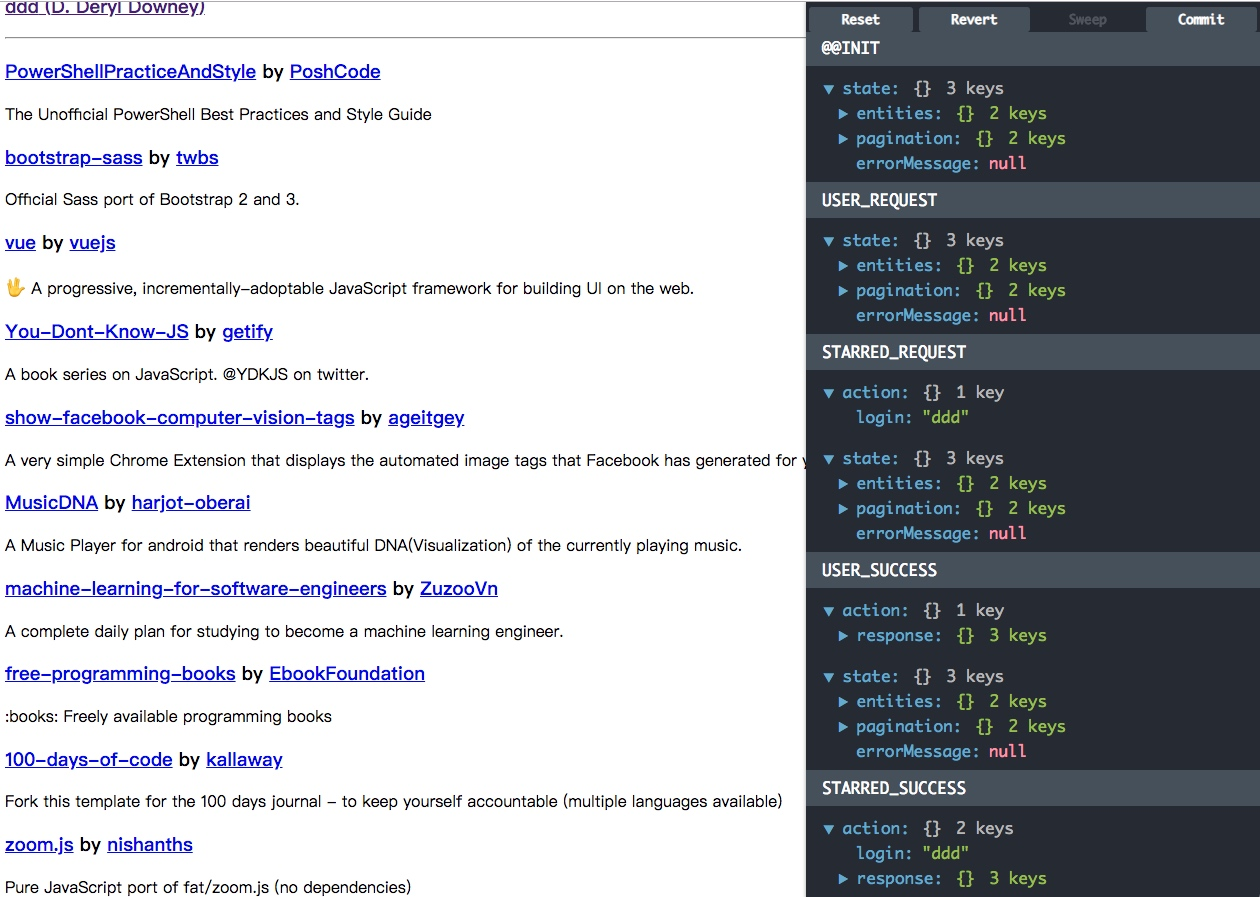
设置开发者工具
在官方Example当中有提到,创建一个DevTools文件,ctrl-h打开显示toggle,ctrl-w改变开发者工具的位置
import React from 'react'
import { createDevTools } from 'redux-devtools'
import LogMonitor from 'redux-devtools-log-monitor'
import DockMonitor from 'redux-devtools-dock-monitor'

export default createDevTools(
  <DockMonitor toggleVisibilityKey="ctrl-h"
               changePositionKey="ctrl-w">
    <LogMonitor />
  </DockMonitor>
)
然后将该组件放在根目录
import React from 'react'
import PropTypes from 'prop-types'
import { Provider } from 'react-redux'
import DevTools from './DevTools'
import { Route } from 'react-router-dom'
import App from './App'
import UserPage from './UserPage'
import RepoPage from './RepoPage'

const Root = ({ store }) => (
  <Provider store={store}>
    <div>
      <Route path="/" component={App} />
      <Route path="/:login/:name"
             component={RepoPage} />
      <Route path="/:login"
             component={UserPage} />
      <DevTools />
    </div>
  </Provider>
)

Root.propTypes = {
  store: PropTypes.object.isRequired,
}

export default Root
最后在createStore时需要传入
import DevTools from '../devtool'

const store = createStore(
    rootReducer,
    preloadedState,
    compose(
      applyMiddleware(thunk),
      DevTools.instrument()
    )
  )
效果图如下
实战
我们需要的要使用redux需要
- 建立action
- 建立对应reducer
- 创建store
同时,为了方便
- 需要有Provider
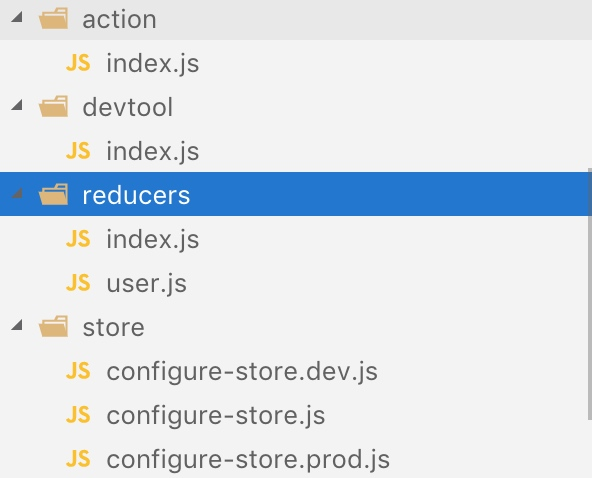
项目目录
项目目录如下所示
action/index.js
创建一个action,用于告知reducer,设置用户信息,增加一个type,让reducer根据type来更新store中的state。
export const TYPE = {
  SET_USER: 'SET_USER'
};

export const setUser = (user) => ({
  type: 'SET_USER',
  user
});
reducer/user.js
创建一个关于user的reducer
import {
  TYPE
} from '../action'

const createUser = (user) => user;

const user = (state = {}, action) => {
  console.log(action);
  switch (action.type) {
    case TYPE.SET_USER:
      // 根据type来更新用户信息
      return {...state, ...createUser(action.user)};
    default:
      return state;
  }
}

export {
  user
}
reducers/index.js
根reducer,用于将其他不同业务的reducer合并。
import { combineReducers } from 'redux';

import { user } from './user';

export default combineReducers({
  user
});
store/config-store.dev.js
store中有不同的初始化store的方法,dev中有开发者工具,而pro中没有。这里做了个区分。
import { createStore, applyMiddleware, compose } from 'redux'
import thunk from 'redux-thunk'
import rootReducer from '../reducers'
import DevTools from '../devtool'

const configureStore = preloadedState => {
  const store = createStore(
    rootReducer,
    preloadedState,
    compose(
      applyMiddleware(thunk),
      DevTools.instrument()
    )
  )

  if (module.hot) {
    // Enable Webpack hot module replacement for reducers
    module.hot.accept('../reducers', () => {
      store.replaceReducer(rootReducer)
    })
  }

  return store
}

export default configureStore
store/configure-store.prod.js
import { createStore, applyMiddleware } from 'redux'
import thunk from 'redux-thunk'
import rootReducer from '../reducers'

const configureStore = preloadedState => createStore(
  rootReducer,
  preloadedState,
  applyMiddleware(thunk)
)

export default configureStore
store/configure-store.js
根据不同环境读取不同的初始化store的文件。
if (process.env.NODE_ENV === 'production') {
  module.exports = require('./configure-store.prod')
} else {
  module.exports = require('./configure-store.dev')
}
devtool/index.js
开发者组件的配置文件。
import React from 'react'
import { createDevTools } from 'redux-devtools'
import LogMonitor from 'redux-devtools-log-monitor'
import DockMonitor from 'redux-devtools-dock-monitor'

export default createDevTools(
  <DockMonitor toggleVisibilityKey="ctrl-h"
               changePositionKey="ctrl-w">
    <LogMonitor />
  </DockMonitor>
)
index.js
在index.js中初始化store
import React from 'react';
import ReactDOM from 'react-dom';
import './index.css';
import App from './App';
import registerServiceWorker from './registerServiceWorker';
import configureStore from './store/store/configure-store';

const store = configureStore();

ReactDOM.render(

  <App store={store}/>

, document.getElementById('root'));
registerServiceWorker();
app.jsx
在根文件中,创建provider
import React, { Component } from 'react'
import './App.css'
import './reset.css'
import 'antd/dist/antd.css'
import Auth from './pages/auth'
import Star from './pages/star/star'
import { BrowserRouter, Route, Redirect } from 'react-router-dom'
import DevTools from './store/devtool'
import { Provider } from 'react-redux'


class App extends Component {
  constructor(props) {
    super(props)

    this.onClickAuth = this.onClickAuth.bind(this)
  }

  onClickAuth() {}

  /**
   * 渲染开发者工具
   */
  renderDevTools() {
    if (process.env.NODE_ENV === 'production') {
      return null;
    }
    return (<DevTools />)
  }

  render() {
    return (
      <Provider store={this.props.store}>
        <div className="App">
          <BrowserRouter basename="/">
            <div>
              <Route exact path="/" component={Auth} />
              <Route path="/auth" component={Auth} />
              <Route path="/star" component={Star} />
              { this.renderDevTools() }
            </div>
          </BrowserRouter>
        </div>
      </Provider>
    )
  }
}

export default App
更新用户信息
import React, { Component } from 'react';
import './star.scss';
import globalData from '../../utils/globalData';
import StringUtils from '../../utils/stringUtils';
import { List, Avatar, Row, Col } from 'antd';
import Api from '../../utils/api';
import Head from '../../components/Head/Head';
import ResInfo from '../../components/resInfo/resInfo';
import ControlList from '../../components/control/control-list';
import StarList from '../../components/star-list/star-list';
import Eventbus from '@/utils/eventbus.js';
import { connect } from 'react-redux';
import { setUser } from '../../store/action';

class Star extends Component {
  constructor(props) {
    super(props);

    this.state = {
      tableData: [],
      originTableData: [],
      userInfo: {},
      rawMdData: ''
    };
  }

  componentDidMount() {
    this.getUserInfo();
  }

  componentWillUnmount() {
  }

  getUserInfo() {
    Api.getAuthenticatedUser()
      .then(data => {
        this.handleGetUserInfoSuccessResponse(data);
      })
      .catch(e => {
        console.log(e);
      });
  }

  /**
   * 获取完用户信息
   */
  handleGetUserInfoSuccessResponse(res) {
    this.setState({
      userInfo: res.data
    });
    this.getStarFromWeb();
    this.refs.controlList.getTagsFromWeb();

    const { dispatch } = this.props;
    // 更新用户信息
    dispatch(setUser(this.state.userInfo));
  }

  // ...省略一些代码

  render() {
    return (
      <div className="star">
        <Head
          ref="head"
          head={this.state.userInfo.avatar_url}
          userName={this.state.userInfo.login}
        />
        <Row className="content-container">
          <Col span={3} className="control-list-container bg-blue-darkest">
            <ControlList
              ref="controlList"
              onClickRefresh={this.onClickRefresh}
              onClickAllStars={this.onClickAllStars}
              onClickUntaggedStars={this.onClickUntaggedStars}
            />
          </Col>
          <Col span={5} className="star-list-container">
            <StarList
              tableData={this.state.tableData}
              onClickResItem={this.onClickResItem.bind(this)}
            />
          </Col>
          <Col span={16}>
            <div className="md-container">
              <ResInfo resSrc={this.state.rawMdData} />
            </div>
          </Col>
        </Row>
      </div>
    );
  }
}

const mapStateToProps = (state, ownProps) => ({
  user: state.user
});

export default connect(mapStateToProps)(Star);