作者简介
常冉冉,携程租车高级前端开发工程师。拥有丰富的React技术栈及 Nodejs工程实践经验,喜欢前端新技术。
2013年JSConf大会上Facebook宣布React开源,其突破性的创新理念,声明式的代码风格,基于组件嵌套编码理念以及跨平台等优点,获得了越来越多前端工程师的热爱。同时将前端代码工程化提高到一个新的高度。
众所周知,React的核心理念是模块的组合,但是如果首屏依赖模块过多,或者使用到一些大型模块等,将会显著拖累首屏渲染速度,影响用户体验。
我们尝试通过首次加载模块时仅渲染部分内容,然后在其他模块延迟加载完毕后再渲染剩余部分的方式,提高首屏加载(渲染)速度。
本文将分享一些关于模块延迟加载(懒加载)实现的探索和经验(Reactjs,React-Native均适用,本文以Reactjs示例)。
比如现在我们有一个模块Hello,demo代码如下:
class Hello extends Component { constructor(props){ super(props) this.state = { } } render() { return ( <div className="container"> <div>{this.props.title}</div> </div> ); }}
核心思路:懒加载的核心就是异步加载。可以先展现给用户一个简单内容,或者干脆空白内容。同时在后台异步加载模块,当模块异步加载完毕后,再重新渲染真正的模块。
我们以上述Hello模块为例,实现一个简单的异步加载
class FakeHello extends Component { constructor(props){ super(props) this.state = { moduleLoaded:false } this._module = null } componentDidMount(){ if(!this.state.moduleLoaded){ setTimeout(()=>{ this._module= require('../hello').default this.setState({moduleLoaded:true}) },1000) } } render() { if(!this.state.moduleLoaded){ return <div>loading</div> }else{ let M = this._module return <M {...this.props} /> } }}
同时将添加一个button,通过在点击事件回调中修改state.show 值来控制Hello模块是否展示:
<btn onClick={this.load} > {this.state.show?'off':'on'}</btn>{this.state.show && <FakeHello title={"I'm the content"}/>}
看下效果:

可以看到第一次点击,Hello 模块显示加载中,1秒后显示实际模块内容。第二次渲染Hello模块时跳过loading,直接显示模块内容。
实验初步达到了我们的预期。
我们尝试封装一个通用模块LazyComponent,实现对任何React模块的懒加载:
let _moduleclass LazyComponent extends Component{ constructor(props){ super(props) this.state={ show:!!_module } } componentDidMount(){ setTimeout(()=>{ _module = this.props.render() this.setState({show:true}) },this.props.time) } render(){ if(!this.state.show){ return <div>will appear later</div> }else{ return _module } }}
LazyComponent 使用例子:
{ this.state.show && <LazyComponent time={1000} render={()=>{ let M = require('./components/hello').default return <M title={this.state.title} /> }} />}
LazyComponent 有2个属性,time用于控制何时开始加载模块,render表示加载具体某个模块的方法,同时返回一个基于该模块的react element对象。
我们再给LazyComponet添加default属性,该属性接受任何React element类型,为模块未加载时的默认渲染内容。
let _moduleclass LazyComponent extends Component{ constructor(props){ super(props) this.state={ show:!!_module } } componentDidMount(){ setTimeout(()=>{ _module = this.props.render() this.setState({show:true}) },this.props.time) } render(){ if(!this.state.show){ if(this.props.default){ return this.props.default }else{ return <div>will appear later</div> } }else{ return _module } }}
{ this.state.show && <LazyComponent time={1000} default={<div>loading</div>} render={()=>{ let M = require('./components/hello').default return <M title={this.state.title} /> }} />}
看下效果:
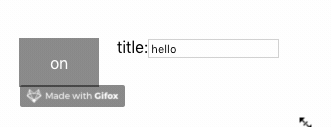
看上去完美了。
但是我们发现当父容器中title值发生改变时,LazyComponent包裹的Hello模块并没有正确更新。
Why?
我们再来看LazyComponet render属性,其返回的是一个包含了props值的element对象。这样当Hello模块首次渲染时,可以正确渲染title内容。但是当LazyComponent所在的容器state改变时,由于LazyComponet的props未使用state.title变量,React不会重新渲染LazyComponent组件,LazyComponent包裹的Hello组件当然也不会重新渲染。
解决办法是将所有Hello组件所要依赖的state数据通过LazyComponent的props再传递给Hello组件。
{ this.state.show && <LazyComponent time={1000} default={<div>empty</div>} realProps={{title:'hello'}} load={()=>require('./components/hello').default} />}
let Mclass LazyComponent extends Component{ constructor(props){ super(props) this.state={ show:!!M } } componentDidMount(){ if(!M){ setTimeout(()=>{ M = this.props.load() this.setState({show:true}) },this.props.time) } } render(){ if(!this.state.show){ if(this.props.default){ return this.props.default }else{ return <div>will appear later</div> } }else{ return <M {...this.props.realProps} /> } }}
再看下效果:

现在,我们已经实现了一个简单的LazyComponent组件。将懒加载组件代码同普通组件比较:
<LazyComponent time={1000} default={<div>loading</div>} realProps={{title:'hello'}} load={()=>require('./components/hello').default} /><Hello title={"hello"}/>
显而易见,虽然我们实现了懒加载,但是代码明显臃肿了很多,而且限制只能通过realProps传递真实props参数,给工程师带来记忆负担,可维护性也变差。
那么,能否更优雅的实现懒加载?
能否像写普通组件的方式写懒加载组件?
或者说通过工具将普通组件转换为懒加载模块?
我们想到了高阶组件(HOC),将传入组件经过包装后返回一个新组件。
于是有了下面的代码:
function lazy(loadFun,defaultRender=()=><div>loading</div>,time=17){ let _module return class extends Component{ constructor(props){ super(props) this.state={ show:!!_module } } componentDidMount(){ let that = this if(!_module){ setTimeout(()=>{ _module=loadFun() that.setState({show:true}) },time) } } render(){ if(!this.state.show){ return defaultRender() }else{ let M = _module return <M {...this.props} /> } } }}
使用方法:
const LazyHello = lazy(()=>require('./components/hello').default,()=><Loading />,1000)<LazyHello title={"I'm the content"}/>
总结
通过本次实践,我们得到了两种实现模块懒加载的解决方案:
A、使用LazyComponent组件,load属性传入需要懒加载模块的加载方法;
B、使用高阶函数lazy包装原始组件,返回支持懒加载特性的新组件。
【推荐阅读】