

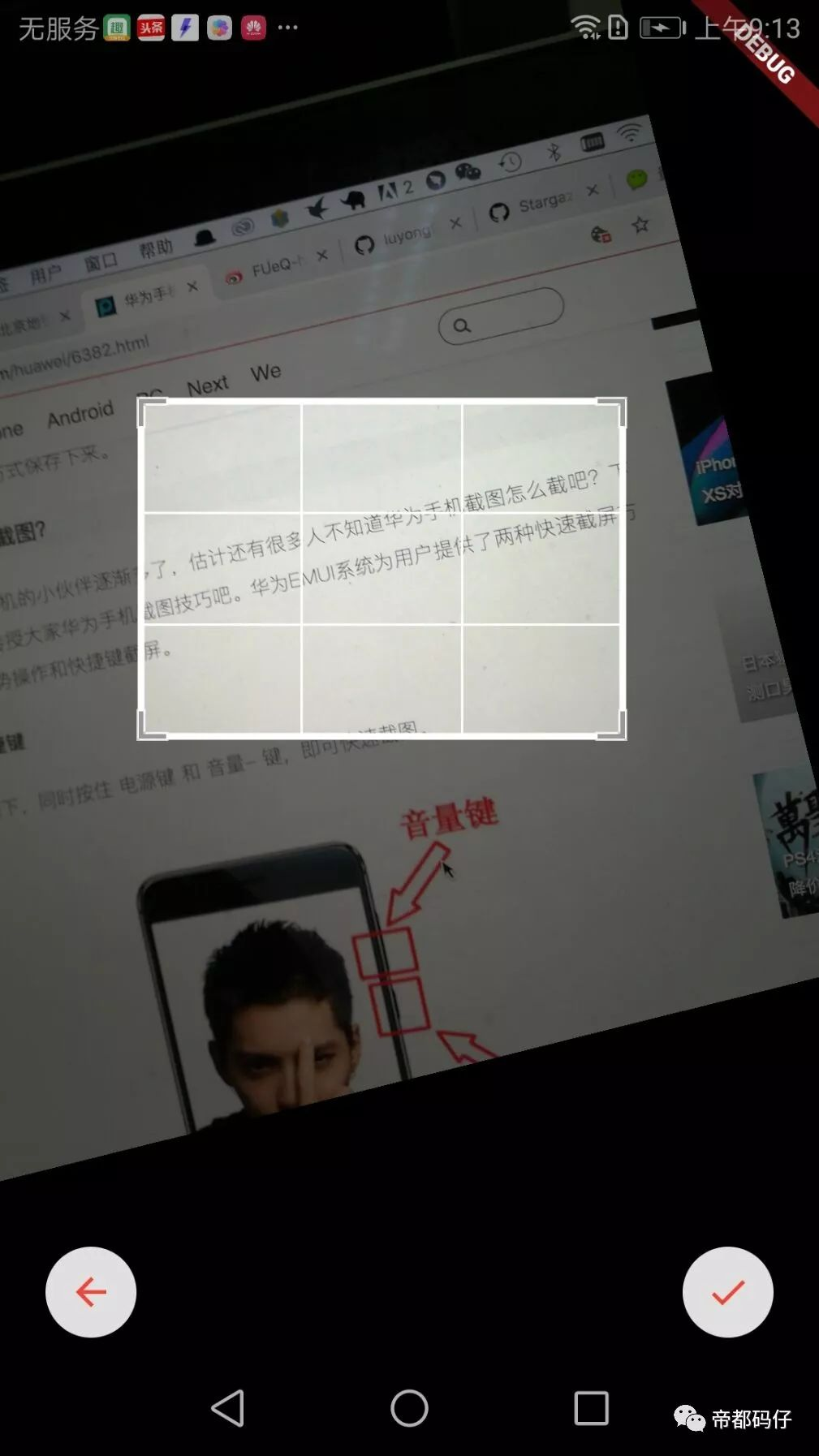
最近flutter1.0终于正式发布,从目前的布局看这个项目的野心很大,ios/android、桌面,甚至还有web都有相应的解决方案。我自己一直对flutter框架保持关注,并且非常看好。也尝试做了一个用flutter来实现ocr的开源项目:https://github.com/luyongfugx/flutter_ocr,大家也可以通过点击地下原文链接来查看代码。这篇文章主要讲的是在这个app里面如何实现拖拽选取。
1.如何实现一个中间透明的拖拽层
参考市面上的一些app,为了提高用户体验,我们要给用户一个精确选择要识别的文字的交互。一个透明的中间层其实是上、下、左、右、中几个层来组成的。这里面用到了flutter里的stack布局,有点类似css里的position:absolute(绝对定位),上下左右这几个层是半透明,中间这个层则是全透明或者透明度更高一些,代码如下:
new Stack( children: <Widget>[ new RawGestureDetector( gestures: <Type, GestureRecognizerFactory>{ ScaleRotateGestureRecognizer: new GestureRecognizerFactoryWithHandlers< ScaleRotateGestureRecognizer>( () => new ScaleRotateGestureRecognizer(), (ScaleRotateGestureRecognizer instance) { instance ..onStart = onScaleStart ..onUpdate = onScaleUpdate ..onEnd = onScaleEnd; }, ), }, child:new RepaintBoundary( key: globalKey, child:new Container( margin: const EdgeInsets.only( left: 0.0, top: 0.0, right: 0.0, bottom: 0.0), padding: const EdgeInsets.only( left: 0.0, top: 0.0, right: 0.0, bottom: 0.0), color: Colors.black, width: MediaQuery.of(context).size.width, height: MediaQuery.of(context).size.height, child: new CustomSingleChildLayout( delegate: new ImagePositionDelegate( imgWidth, imgHeight, topLeft), child: Transform( child: new RawImage( image: widget.image, scale: widget.imageInfo.scale, ), alignment: FractionalOffset.center, transform: matrix, ), ), ), ), ), new Positioned( left: 0.0, top: 0.0, width: MediaQuery.of(context).size.width, height: maskTop, child: new IgnorePointer( child: new Opacity( opacity: opacity, child: new Container( color: Colors.black, ), ))), new Positioned( left: 0.0, top: maskTop, width: this.maskLeft, height: this.maskHeight, child: new IgnorePointer( child: new Opacity( opacity: opacity, child: new Container(color: Colors.black), ))), new Positioned( right: 0.0, top: maskTop, width: (MediaQuery.of(context).size.width - this.maskWidth - this.maskLeft), height: this.maskHeight, child: new IgnorePointer( child: new Opacity( opacity: opacity, child: new Container(color: Colors.black), ))), new Positioned( left: 0.0, top: this.maskTop + this.maskHeight, width: MediaQuery.of(context).size.width, height: MediaQuery.of(context).size.height - (this.maskTop + this.maskHeight), child: new IgnorePointer( child: new Opacity( opacity: opacity, child: new Container(color: Colors.black), ))), new Positioned( left: this.maskLeft, top: this.maskTop, width: this.maskWidth, height: this.maskHeight, child: new GestureDetector( child: new Container( color: Colors.transparent, child: new CustomPaint( painter: new GridPainter(), ), ), onPanStart: onMaskPanStart, onPanUpdate: (dragInfo) { this.onPanUpdate(maskDirection, dragInfo); }, onPanEnd: onPanEnd ) ), new Positioned( //scan left: this.maskLeft, top: this.maskTop, width: this.maskWidth, height: this.maskHeight*_controller.value, child: new Opacity( opacity: 0.5, child: new Container(color: Colors.blue), ) ) ] )2.中间透明层的方格线如何画
查看上图的交互,中间透明的层是由方格线的,并且会随着拖拽变化而变化,这里我们利用了flutter的CustomPainter来实现:
class GridPainter extends CustomPainter { GridPainter(); @override void paint(Canvas canvas, Size size) { Paint paint = new Paint() ..color = Colors.white ..strokeCap = StrokeCap.round ..isAntiAlias = true; for (int i = 0; i <= 3; i++) { if (i == 0 || i == 3) { paint.strokeWidth = 3.0; } else { paint.strokeWidth = 1.0; } double dy = (size.height / 3) * i; canvas.drawLine(new Offset(0.0, dy), new Offset(size.width, dy), paint); } for (int i = 0; i <= 3; i++) { if (i == 0 || i == 3) { paint.strokeWidth = 3.0; } else { paint.strokeWidth = 1.0; } double dx = (size.width / 3) * i; canvas.drawLine(new Offset(dx, 0.0), new Offset(dx, size.height), paint); } } @override bool shouldRepaint(CustomPainter oldDelegate) { return true; }}3.如何实现拖拽放大缩小,旋转。
放大缩小其实就是根据用户的事件动态的计算上、下、左、右、中这几个层的大小和位置即可,需要特别说明的是旋转事件在我做这个项目的时候并没有,于是自己做了一个:
// Copyright 2015 The Chromium Authors. All rights reserved.// Use of this source code is governed by a BSD-style license that can be// found in the LICENSE file.import 'package:flutter/gestures.dart';import 'package:flutter/material.dart';import 'package:flutter/cupertino.dart';import 'dart:math' as math;/// The possible states of a [ScaleGestureRecognizer].enum _ScaleRotateState { /// The recognizer is ready to start recognizing a gesture. ready, /// The sequence of pointer events seen thus far is consistent with a scale /// gesture but the gesture has not been accepted definitively. possible, /// The sequence of pointer events seen thus far has been accepted /// definitively as a scale gesture. accepted, /// The sequence of pointer events seen thus far has been accepted /// definitively as a scale gesture and the pointers established a focal point /// and initial scale. started,}/// Details for [GestureScaleStartCallback].class ScaleRotateStartDetails { /// Creates details for [GestureScaleStartCallback]. /// /// The [focalPoint] argument must not be null. ScaleRotateStartDetails({ this.focalPoint: Offset.zero }) : assert(focalPoint != null); /// The initial focal point of the pointers in contact with the screen. /// Reported in global coordinates. final Offset focalPoint; @override String toString() => 'ScaleRotateStartDetails(focalPoint: $focalPoint)';}/// Details for [GestureScaleUpdateCallback].class ScaleRotateUpdateDetails { /// Creates details for [GestureScaleUpdateCallback]. /// /// The [focalPoint], [scale] and [rotation] arguments must not be null. The [scale] /// argument must be greater than or equal to zero. ScaleRotateUpdateDetails({ this.focalPoint: Offset.zero, this.scale: 1.0, this.rotation: 0.0, }) : assert(focalPoint != null), assert(scale != null && scale >= 0.0), assert(rotation != null); /// The focal point of the pointers in contact with the screen. Reported in /// global coordinates. final Offset focalPoint; /// The scale implied by the pointers in contact with the screen. A value /// greater than or equal to zero. final double scale; /// The Rotation implied by the first two pointers to enter in contact with /// the screen. Expressed in radians. final double rotation; @override String toString() => 'ScaleRotateUpdateDetails(focalPoint: $focalPoint, scale: $scale, rotation: $rotation)';}/// Details for [GestureScaleEndCallback].class ScaleRotateEndDetails { /// Creates details for [GestureScaleEndCallback]. /// /// The [velocity] argument must not be null. ScaleRotateEndDetails({ this.velocity: Velocity.zero }) : assert(velocity != null); /// The velocity of the last pointer to be lifted off of the screen. final Velocity velocity; @override String toString() => 'ScaleRotateEndDetails(velocity: $velocity)';}/// Signature for when the pointers in contact with the screen have established/// a focal point and initial scale of 1.0.typedef void GestureRotateScaleStartCallback(ScaleRotateStartDetails details);/// Signature for when the pointers in contact with the screen have indicated a/// new focal point and/or scale.typedef void GestureRotateScaleUpdateCallback(ScaleRotateUpdateDetails details);/// Signature for when the pointers are no longer in contact with the screen.typedef void GestureRotateScaleEndCallback(ScaleRotateEndDetails details);bool _isFlingGesture(Velocity velocity) { assert(velocity != null); final double speedSquared = velocity.pixelsPerSecond.distanceSquared; return speedSquared > kMinFlingVelocity * kMinFlingVelocity;}/// Defines a line between two pointers on screen.////// [_LineBetweenPointers] is an abstraction of a line between two pointers in/// contact with the screen. Used to track the rotation of a scale gesture.class _LineBetweenPointers{ /// Creates a [_LineBetweenPointers]. None of the [pointerStartLocation], [pointerStartId] /// [pointerEndLocation] and [pointerEndId] must be null. [pointerStartId] and [pointerEndId] /// should be different. _LineBetweenPointers({ this.pointerStartLocation, this.pointerStartId, this.pointerEndLocation, this.pointerEndId }) : assert(pointerStartLocation != null && pointerEndLocation != null), assert(pointerStartId != null && pointerEndId != null), assert(pointerStartId != pointerEndId); /// The location and the id of the pointer that marks the start of the line, final Offset pointerStartLocation; final int pointerStartId; /// The location and the id of the pointer that marks the end of the line, final Offset pointerEndLocation; final int pointerEndId;}/// Recognizes a scale gesture.////// [ScaleGestureRecognizer] tracks the pointers in contact with the screen and/// calculates their focal point, indicated scale and rotation. When a focal pointer is/// established, the recognizer calls [onStart]. As the focal point, scale and rotation/// change, the recognizer calls [onUpdate]. When the pointers are no longer in/// contact with the screen, the recognizer calls [onEnd].class ScaleRotateGestureRecognizer extends OneSequenceGestureRecognizer { /// Create a gesture recognizer for interactions intended for scaling content. ScaleRotateGestureRecognizer({ Object debugOwner }) : super(debugOwner: debugOwner); /// The pointers in contact with the screen have established a focal point and /// initial scale of 1.0. GestureRotateScaleStartCallback onStart; /// The pointers in contact with the screen have indicated a new focal point /// and/or scale. GestureRotateScaleUpdateCallback onUpdate; /// The pointers are no longer in contact with the screen. GestureRotateScaleEndCallback onEnd; _ScaleRotateState _state = _ScaleRotateState.ready; Offset _initialFocalPoint; Offset _currentFocalPoint; double _initialSpan; double _currentSpan; _LineBetweenPointers _initialLine; _LineBetweenPointers _currentLine; Map<int, Offset> _pointerLocations; /// A queue to sort pointers in order of entrance List<int> _pointerQueue; final Map<int, VelocityTracker> _velocityTrackers = <int, VelocityTracker>{}; double get _scaleFactor => _initialSpan > 0.0 ? _currentSpan / _initialSpan : 1.0; double _rotationFactor () { if(_initialLine == null || _currentLine == null){ return 0.0; } final double fx = _initialLine.pointerStartLocation.dx; final double fy = _initialLine.pointerStartLocation.dy; final double sx = _initialLine.pointerEndLocation.dx; final double sy = _initialLine.pointerEndLocation.dy; final double nfx = _currentLine.pointerStartLocation.dx; final double nfy = _currentLine.pointerStartLocation.dy; final double nsx = _currentLine.pointerEndLocation.dx; final double nsy = _currentLine.pointerEndLocation.dy; final double angle1 = math.atan2(fy - sy, fx - sx); final double angle2 = math.atan2(nfy - nsy, nfx - nsx); return angle2 - angle1; } @override void addPointer(PointerEvent event) { startTrackingPointer(event.pointer); _velocityTrackers[event.pointer] = new VelocityTracker(); if (_state == _ScaleRotateState.ready) { _state = _ScaleRotateState.possible; _initialSpan = 0.0; _currentSpan = 0.0; _pointerLocations = <int, Offset>{}; _pointerQueue = []; } } @override void handleEvent(PointerEvent event) { assert(_state != _ScaleRotateState.ready); bool didChangeConfiguration = false; bool shouldStartIfAccepted = false; if (event is PointerMoveEvent) { final VelocityTracker tracker = _velocityTrackers[event.pointer]; assert(tracker != null); if (!event.synthesized) tracker.addPosition(event.timeStamp, event.position); _pointerLocations[event.pointer] = event.position; shouldStartIfAccepted = true; } else if (event is PointerDownEvent) { _pointerLocations[event.pointer] = event.position; _pointerQueue.add(event.pointer); didChangeConfiguration = true; shouldStartIfAccepted = true; } else if (event is PointerUpEvent || event is PointerCancelEvent) { _pointerLocations.remove(event.pointer); _pointerQueue.remove(event.pointer); didChangeConfiguration = true; } _updateLines(); _update(); if (!didChangeConfiguration || _reconfigure(event.pointer)) _advanceStateMachine(shouldStartIfAccepted); stopTrackingIfPointerNoLongerDown(event); } void _update() { final int count = _pointerLocations.keys.length; // Compute the focal point Offset focalPoint = Offset.zero; for (int pointer in _pointerLocations.keys) focalPoint += _pointerLocations[pointer]; _currentFocalPoint = count > 0 ? focalPoint / count.toDouble() : Offset.zero; // Span is the average deviation from focal point double totalDeviation = 0.0; for (int pointer in _pointerLocations.keys) totalDeviation += (_currentFocalPoint - _pointerLocations[pointer]).distance; _currentSpan = count > 0 ? totalDeviation / count : 0.0; } /// Updates [_initialLine] and [_currentLine] accordingly to the situation of /// the registered pointers void _updateLines(){ final int count = _pointerLocations.keys.length; /// In case of just one pointer registered, reconfigure [_initialLine] if(count < 2 ){ _initialLine = _currentLine; } else if(_initialLine != null && _initialLine.pointerStartId == _pointerQueue[0] && _initialLine.pointerEndId == _pointerQueue[1]){ /// Rotation updated, set the [_currentLine] _currentLine = new _LineBetweenPointers( pointerStartId: _pointerQueue[0], pointerStartLocation: _pointerLocations[_pointerQueue[0]], pointerEndId: _pointerQueue[1], pointerEndLocation: _pointerLocations[ _pointerQueue[1]] ); } else { /// A new rotation process is on the way, set the [_initialLine] _initialLine = new _LineBetweenPointers( pointerStartId: _pointerQueue[0], pointerStartLocation: _pointerLocations[_pointerQueue[0]], pointerEndId: _pointerQueue[1], pointerEndLocation: _pointerLocations[ _pointerQueue[1]] ); _currentLine = null; } } bool _reconfigure(int pointer) { _initialFocalPoint = _currentFocalPoint; _initialSpan = _currentSpan; _initialLine = _currentLine; if (_state == _ScaleRotateState.started) { if (onEnd != null) { final VelocityTracker tracker = _velocityTrackers[pointer]; assert(tracker != null); Velocity velocity = tracker.getVelocity(); if (_isFlingGesture(velocity)) { final Offset pixelsPerSecond = velocity.pixelsPerSecond; if (pixelsPerSecond.distanceSquared > kMaxFlingVelocity * kMaxFlingVelocity) velocity = new Velocity(pixelsPerSecond: (pixelsPerSecond / pixelsPerSecond.distance) * kMaxFlingVelocity); invokeCallback<void>('onEnd', () => onEnd(new ScaleRotateEndDetails(velocity: velocity))); } else { invokeCallback<void>('onEnd', () => onEnd(new ScaleRotateEndDetails(velocity: Velocity.zero))); } } _state = _ScaleRotateState.accepted; return false; } return true; } void _advanceStateMachine(bool shouldStartIfAccepted) { if (_state == _ScaleRotateState.ready) _state = _ScaleRotateState.possible; if (_state == _ScaleRotateState.possible) { final double spanDelta = (_currentSpan - _initialSpan).abs(); final double focalPointDelta = (_currentFocalPoint - _initialFocalPoint).distance; if (spanDelta > kScaleSlop || focalPointDelta > kPanSlop) resolve(GestureDisposition.accepted); } else if (_state.index >= _ScaleRotateState.accepted.index) { resolve(GestureDisposition.accepted); } if (_state == _ScaleRotateState.accepted && shouldStartIfAccepted) { _state = _ScaleRotateState.started; _dispatchOnStartCallbackIfNeeded(); } if (_state == _ScaleRotateState.started && onUpdate != null) invokeCallback<void>('onUpdate', () => onUpdate(new ScaleRotateUpdateDetails(scale: _scaleFactor, focalPoint: _currentFocalPoint, rotation: _rotationFactor()))); } void _dispatchOnStartCallbackIfNeeded() { assert(_state == _ScaleRotateState.started); if (onStart != null) invokeCallback<void>('onStart', () => onStart(new ScaleRotateStartDetails(focalPoint: _currentFocalPoint))); } @override void acceptGesture(int pointer) { if (_state == _ScaleRotateState.possible) { _state = _ScaleRotateState.started; _dispatchOnStartCallbackIfNeeded(); } } @override void rejectGesture(int pointer) { stopTrackingPointer(pointer); } @override void didStopTrackingLastPointer(int pointer) { switch (_state) { case _ScaleRotateState.possible: resolve(GestureDisposition.rejected); break; case _ScaleRotateState.ready: assert(false); // We should have not seen a pointer yet break; case _ScaleRotateState.accepted: break; case _ScaleRotateState.started: assert(false); // We should be in the accepted state when user is done break; } _state = _ScaleRotateState.ready; } @override void dispose() { _velocityTrackers.clear(); super.dispose(); } @override String get debugDescription => 'scale';}以上所有代码都可以在https://github.com/luyongfugx/flutter_ocr里面找到
