此文首发于 lijing0906.github.io
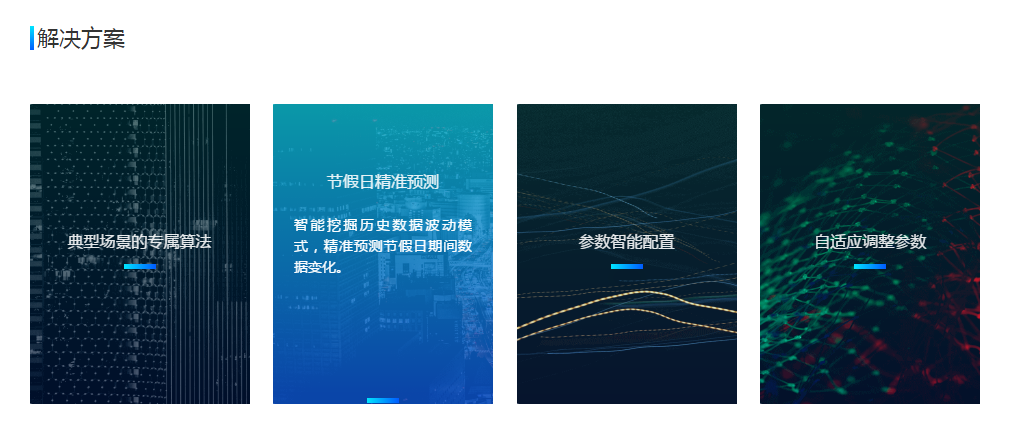
最近的一个项目的首页参考了两个网站的动画效果

代码实现
- HTML
<div id="testPage">
    <div class="topBar">
        <img class="ball" src="./css3anitran/0.png" alt="" srcset="">
    </div>
    <div class="bottomBar">
        <ul>
            <li>
                <img src="./css3anitran/1.png" alt="节假日节假日" srcset=""><!--左右移动的背景图-->
                <div class="mask"><!--遮罩层-->
                    <p class="title">节假日节假日</p><!--标题-->
                    <p class="introduce">节假日节假日节假日节假日节假日节假日节假日节假日节假日</p><!--简介-->
                    <img src="./css3anitran/5.png" alt="" srcset=""><!--小条-->
                </div>
            </li>
        </ul>
    </div>
</div>
- CSS
#testPage{
    width: 100%;
    .topBar{
        height: 420px;
        background-color: #17263d;
        position: relative;
        overflow: hidden;
        .ball{
            position: absolute;
            left: 50%;
            top: 14px;
            margin: 0 0 0 -440px;
            animation: spin 90s linear infinite;  //使用旋转动画,动画名称 完成时间 速度曲线(线性) 重复次数(无线循环)
        }
        @keyframes spin {   //定义旋转动画
            from { transform: rotate(0deg); }
            to { transform: rotate(360deg); }
        }
    }
    .bottomBar{
        padding-top: 80px;
        ul{
            width: 1280px;
            margin: 0 auto;
            padding: 0;
            display: flex;
            justify-content: space-between;
            li{
                list-style: none;
                width: 280px;
                height: 354px;
                overflow: hidden; //隐藏图片超出的部分
                position: relative; //父相对定位,子(背景img和遮罩层div.mask)绝对定位
                >img{
                    width: 460px; //图片宽比li大一些
                    height: 354px;
                    position: absolute;
                    top: 0;
                    left: -90px; //初始状态显示图片的中间位置,(460-280)/2=90
                    animation: imgmove 40s linear infinite;
                }
                @keyframes imgmove
                { 0% {left: -180px;}   50% {left: 0px;}   100% {left: -180px;} } //背景图片要移动到边界,需要向左或者向右2*90=180
                .mask{
                    position: absolute;
                    top: 0;
                    left: 0;
                    width: 216px;
                    height: 100%;
                    padding: 0 32px;
                    color: #fff;
                    font-family: Microsoft YaHei;
                    letter-spacing: 1px;
                    background: rgba(15,28,48,0.8); //初始背景色
                    transition: background 0.5s; //0.5s内变换背景色
                    .title{
                        font-size: 20px;
                        margin: 144px 0 0;
                        transition: margin-top 0.5s;
                    }
                    .introduce{
                        position: absolute; //绝对定位于.mask中,不然.title和小条img改变margin的时候会跟着滑动
                        left: 0;
                        top: 0;
                        text-align: left;
                        font-size: 14px;
                        line-height: 30px;
                        height: 120px;
                        color: #fff;
                        font-family: Microsoft YaHei;
                        margin: 116px 0;
                        padding: 0 42px;
                        opacity: 0; //初始透明度,完全透明
                        transition: opacity 0.5s; //0.5s内变换透明度
                    }
                    img{
                        margin: 20px 0 168px; //初始margin
                        transition: margin 0.5s;  //0.5s内变换外边距
                    }
                    &:hover{ //hover的时候要变成的样子
                        background: linear-gradient(rgba(0, 178, 217,0.8), rgba(13, 43, 111, 0.8));
                        .title{
                            margin-top: 78px;
                        }
                        .introduce{
                            opacity: 1;
                        }
                        img{
                            margin: 239px 0 1px;
                        }
                    }
                }
            }
        }
    }
}