View的触摸反馈
onTouchEvent
重写onTouchEvent(), 原本是长这样的,
@Override
public boolean onTouchEvent(MotionEvent event) {
  return super.onTouchEvent(event);
}

@Override
public boolean onTouchEvent(MotionEvent event) {
  //这样view就消费了事件
  return true;
}
一下这样的话,点击事件才有效果,如上什么都不处理就仅仅返回true,那么在外面添加 onClickListener事件是没有反馈的,这就说明onTouchEvent的优先级高于 OnClickListener.
@Override
public boolean onTouchEvent(MotionEvent event) {
  if (event.getActionMasked() == MotionEvent.ACTION_UP){
    performClick();
  }
  return true;
}
当触摸到黄色块的onTouchEvent 处理了返回true的时候,在它底下的绿色快以及父View的onTouchEvent()都不会收到事件
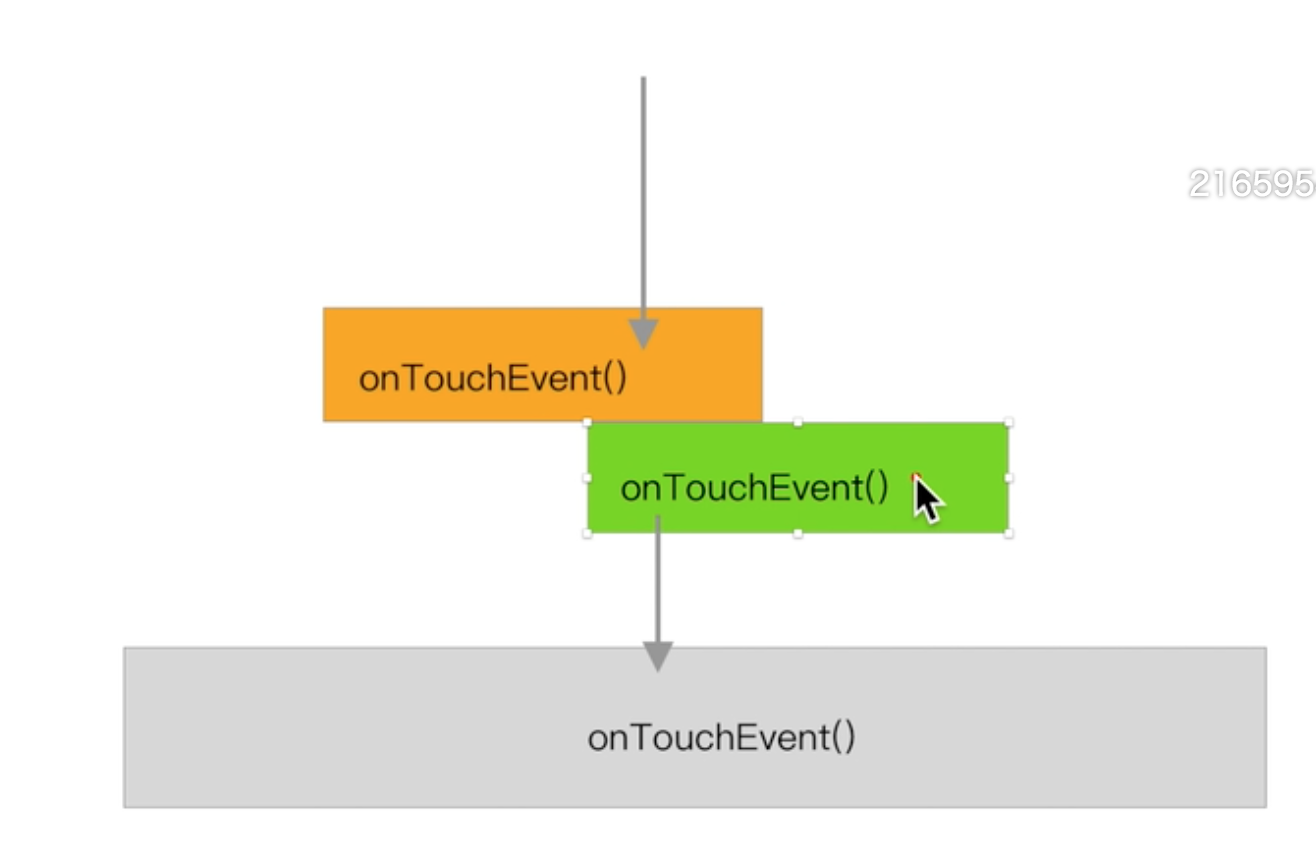
OnTouchEvent是事件组,只有在 down事件返回true的时候,后续的move、up事件都会传过来。跟上面的直接返回true是一样的。
 @Override
    public boolean onTouchEvent(MotionEvent event) {
        if (event.getActionMasked() == MotionEvent.ACTION_DOWN){
            return true;
        }
        return super.onTouchEvent(event);
    }
event.getAction() 其实包含了两个信息,down事件以
 @Override
    public boolean onTouchEvent(MotionEvent event) {
        if (event.getActionMasked() == MotionEvent.ACTION_UP){
            performClick();
        }
      	//包含两个信息,按下/抬起 , 第几个手指,处理需要逻辑。所以按下分两种MotionEvent.ACTION_DOWN, MotionEvent.ACTION_POINTER_DOWN。两个信息被压到一个变量里面,类似于MeasureDesc存储
        switch (event.getAction()){
            case MotionEvent.ACTION_UP:
            case MotionEvent.ACTION_DOWN:
            case MotionEvent.ACTION_MOVE:
        }
      	//这里只是包含点击事件
        switch (event.getActionMasked()){
            case MotionEvent.ACTION_POINTER_DOWN:
            case MotionEvent.ACTION_POINTER_UP:
        }
      	//第几个手指
      	switch (event.getActionIndex()){
        }
        return true;
    }
View的onTouchEvent
点击、长按,右键点击。
public boolean onTouchEvent(MotionEvent event) {
        final float x = event.getX();
        final float y = event.getY();
        final int viewFlags = mViewFlags;
        final int action = event.getAction();

        final boolean clickable = ((viewFlags & CLICKABLE) == CLICKABLE
                || (viewFlags & LONG_CLICKABLE) == LONG_CLICKABLE)
                || (viewFlags & CONTEXT_CLICKABLE) == CONTEXT_CLICKABLE;
//CONTEXT_CLICKABLE 是历史的长按菜单。
       if ((viewFlags & ENABLED_MASK) == DISABLED) {
         if (action == MotionEvent.ACTION_UP && (mPrivateFlags & PFLAG_PRESSED) != 0){
                setPressed(false);
            }
            mPrivateFlags3 &= ~PFLAG3_FINGER_DOWN;
            // A disabled view that is clickable still consumes the touch
            // events, it just doesn't respond to them.
         	//事件被consume,但是disabled,自己不能点,底下的父view也不能被点击
            return clickable;
        }
        if (mTouchDelegate != null) {//一般用在增大点击范围。
            if (mTouchDelegate.onTouchEvent(event)) {
                return true;
            }
        }
		//clickable这个View可点击,比如TextView就没有用。
        //(viewFlags & TOOLTIP) == TOOLTIP SDK 28引入的点击,解释性的。
        if (clickable || (viewFlags & TOOLTIP) == TOOLTIP) {
            switch (action) {
                 case MotionEvent.ACTION_DOWN:
                	//InputDevice.SOURCE_TOUCHSCREEN  TOOLTIP 提示文字远一点的距离
                    if (event.getSource() == InputDevice.SOURCE_TOUCHSCREEN) {
                        mPrivateFlags3 |= PFLAG3_FINGER_DOWN;
                    }
                    mHasPerformedLongPress = false;
                    if (!clickable) {//给提示性文字用的。
                        checkForLongClick(0, x, y);
                        break;
                    }
                	//检测鼠标右键点击
                    if (performButtonActionOnTouchDown(event)) {
                        break;
                    }

           // Walk up the hierarchy to determine if we're inside a scrolling container.
                //是否在滑动空间里。
                    boolean isInScrollingContainer = isInScrollingContainer();

              // For views inside a scrolling container, delay the pressed feedback for
                    // a short period in case this is a scroll.
                    if (isInScrollingContainer) {
                 //在滑动的父控件里面。点下去,有可能是滑动、或者仅仅是点击。记下来,暂时不处理为滑动,当
                        mPrivateFlags |= PFLAG_PREPRESSED;
                        if (mPendingCheckForTap == null) {
                            mPendingCheckForTap = new CheckForTap();
                        }
                        mPendingCheckForTap.x = event.getX();
                        mPendingCheckForTap.y = event.getY();
                        postDelayed(mPendingCheckForTap,
                             ViewConfiguration.getTapTimeout());
                    } else {
                        // Not inside a scrolling container, so show the feedback right away
                        setPressed(true, x, y);
                        checkForLongClick(0, x, y);
                    }
                    break;
                case MotionEvent.ACTION_UP:
                    mPrivateFlags3 &= ~PFLAG3_FINGER_DOWN;
                    if ((viewFlags & TOOLTIP) == TOOLTIP){
                      //TOOlTIP 延迟消失
                        handleTooltipUp();
                    }
                    if (!clickable) {//这个View仅仅处理 TOOlTI,释放返回
                        removeTapCallback();
                        removeLongPressCallback();
                        mInContextButtonPress = false;
                        mHasPerformedLongPress = false;
                        mIgnoreNextUpEvent = false;
                        break;
                    }
                    boolean prepressed = (mPrivateFlags & PFLAG_PREPRESSED) != 0;
                    if ((mPrivateFlags & PFLAG_PRESSED) != 0 || prepressed) {
                        // take focus if we don't have it already and we should in
                        // touch mode.
                        boolean focusTaken = false;
                       if (isFocusable() && isFocusableInTouchMode() && !isFocused()){
                            focusTaken = requestFocus();
                        }
                        if (prepressed) {
                            // The button is being released before we actually
                            // showed it as pressed.  Make it show the pressed
                            // state now (before scheduling the click) to ensure
                            // the user sees it.
                            setPressed(true, x, y);
                        }

                        if (!mHasPerformedLongPress && !mIgnoreNextUpEvent) {
                            // This is a tap, so remove the longpress check
                            removeLongPressCallback();

                    // Only perform take click actions if we were in the pressed state
                            if (!focusTaken) {
                                // Use a Runnable and post this rather than calling
                                // performClick directly. This lets other visual state
                                // of the view update before click actions start.
                                if (mPerformClick == null) {
                                    mPerformClick = new PerformClick();
                                }
                                if (!post(mPerformClick)) {
                                    performClickInternal();
                                }
                            }
                        }

                        if (mUnsetPressedState == null) {
                            mUnsetPressedState = new UnsetPressedState();
                        }

                        if (prepressed) {
                          //预按下,抬起设置延迟,稍微给人感觉到点击了。
                            postDelayed(mUnsetPressedState,
                                    ViewConfiguration.getPressedStateDuration());
                        } else if (!post(mUnsetPressedState)) {
                            // If the post failed, unpress right now
                            mUnsetPressedState.run();
                        }
                        removeTapCallback();
                    }
                    mIgnoreNextUpEvent = false;
                    break;
                case MotionEvent.ACTION_CANCEL:
                    if (clickable) {
                        setPressed(false);
                    }
                    removeTapCallback();
                    removeLongPressCallback();
                    mInContextButtonPress = false;
                    mHasPerformedLongPress = false;
                    mIgnoreNextUpEvent = false;
                    mPrivateFlags3 &= ~PFLAG3_FINGER_DOWN;
                    break;
                case MotionEvent.ACTION_MOVE:
                    if (clickable) {
                      //波纹效果
                      drawableHotspotChanged(x, y);
                    }
                    // Be lenient about moving outside of buttons
                	//移出去的宽容距离 mTouchSlop
                    if (!pointInView(x, y, mTouchSlop)) {
                        // Outside button
                        // Remove any future long press/tap checks
                        removeTapCallback();
                        removeLongPressCallback();
                        if ((mPrivateFlags & PFLAG_PRESSED) != 0) {
                            setPressed(false);
                        }
                        mPrivateFlags3 &= ~PFLAG3_FINGER_DOWN;
                    }
                    break;
            }
            return true;
        }
        return false;
    }
/**
     * @hide 任何级别的父View是否在滑动空间里。
     */
    public boolean isInScrollingContainer() {
        ViewParent p = getParent();
        while (p != null && p instanceof ViewGroup) {
            if (((ViewGroup) p).shouldDelayChildPressedState()) {
                return true;
            }
            p = p.getParent();
        }
        return false;
    }
//需要等待100ms的等待才触发按下。
 public boolean shouldDelayChildPressedState() {
        return true;
  }
ViewGroup的触摸反馈
ListView,ScrollView父view 拦截 onInterceptTouchEvent()
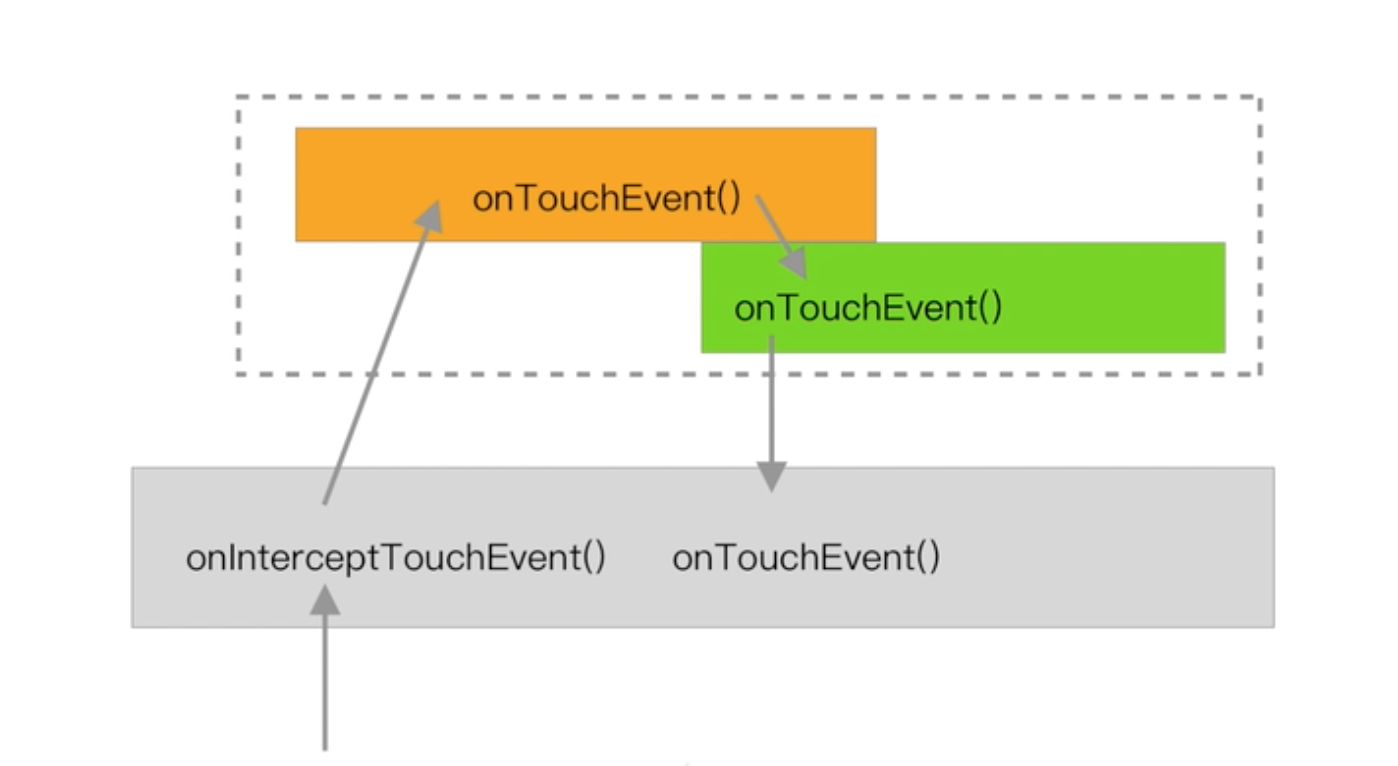
public boolean dispatchTouchEvent(MotionEvent ev){
  boolean consume = false;
  if(onInterceptTouchEvent(ev)){
    consume = onTouchEvent(ev);
  }else{
    consume = child.dispatchTouchEvent(ev);
  }
  return consume;
}
在OnInterceptTouchEvent中拦截,并记下拦截时候的坐标等事件。
@Override
    public boolean onInterceptTouchEvent(MotionEvent ev) {
        int delta = ev.getY() ????;//纵向距离
        if (Math.abs(delta) > SLOP) {
            //最后一次触发自己的onInterceptTouchEvent, 第一次去触发自己的
            return true;
        } else {
            //首先返回false,当满足条件后再返回 true。
            return false;
        }
    }


    @Override
    public boolean onTouchEvent(MotionEvent event) {
        return super.onTouchEvent(event);
    }
触摸反馈的流程
View的dispatchTouchEvent, 外挂的mOnTouchListener 优先级比onTouchEvent(event)更高。
public boolean dispatchTouchEvent(MotionEvent event) {
        // If the event should be handled by accessibility focus first.
        if (event.isTargetAccessibilityFocus()) {
            // We don't have focus or no virtual descendant has it, do not handle the event.
            if (!isAccessibilityFocusedViewOrHost()) {
                return false;
            }
            // We have focus and got the event, then use normal event dispatch.
            event.setTargetAccessibilityFocus(false);
        }
        boolean result = false;
        if (mInputEventConsistencyVerifier != null) {
            mInputEventConsistencyVerifier.onTouchEvent(event, 0);
        }
        final int actionMasked = event.getActionMasked();
        if (actionMasked == MotionEvent.ACTION_DOWN) {
            // Defensive cleanup for new gesture
           stopNestedScroll();
        }

        if (onFilterTouchEventForSecurity(event)) {
          if ((mViewFlags & ENABLED_MASK) == ENABLED && handleScrollBarDragging(event)){
                result = true;
            }
            //noinspection SimplifiableIfStatement
            ListenerInfo li = mListenerInfo;
          	//
            if (li != null && li.mOnTouchListener != null
                    && (mViewFlags & ENABLED_MASK) == ENABLED
                    && li.mOnTouchListener.onTouch(this, event)) {
                result = true;
            }

            if (!result && onTouchEvent(event)) {
                result = true;
            }
        }

        if (!result && mInputEventConsistencyVerifier != null) {
            mInputEventConsistencyVerifier.onUnhandledEvent(event, 0);
        }
        // Clean up after nested scrolls if this is the end of a gesture;
        // also cancel it if we tried an ACTION_DOWN but we didn't want the rest
        // of the gesture.
        if (actionMasked == MotionEvent.ACTION_UP ||
                actionMasked == MotionEvent.ACTION_CANCEL ||
                (actionMasked == MotionEvent.ACTION_DOWN && !result)) {
            stopNestedScroll();
        }
        return result;
    }
ViewGroup.dispatchTouchEvent()
-
如果是用户初次按下(Action_down),清空TouchTargets 和 DISALLOW_INTERCEPT标记(requestDisallow)
-
拦截处理
-
如果不拦截并且不是CANCEL事件,并且是DOWN或者POINTER_DOWN, 尝试把pointer(手指)通过 TouchTarget分配给子View;并且如果分配给了新的子View, 调用child.dispatchTouchEvent()把事件传给子View
-
看有没有TouchTarget(有哪些子View要消费事件。)
** 如果没有,调用自己的super.dispatchTouchEvent()
**如果有, 调用child.dispatchTouchEvent()把事件传给对应的子View(如果有的话)
-
如果是POINTER_UP, 从TouchTargets中清除POINTER信息;如果是UP或Cancel,重置状态。
dispatchTransformedTouchEvent:确定要分配给哪个子View
addTouchTarget:分配给哪个子View