QrcodeView
- 2.1. 卡顿方法-多个 CALayer 改变 frame
- 2.2. 其他方法-多个 CAShapeLayer 绘制 path
- 2.3. 卡顿方法-一个 CAShapeLayer 绘制 path
- 2.4. 卡顿方法- CGContextRef 绘制
- 2.5. 性能结果
- 2.6. 题外话-二维码扫描
一. 起因
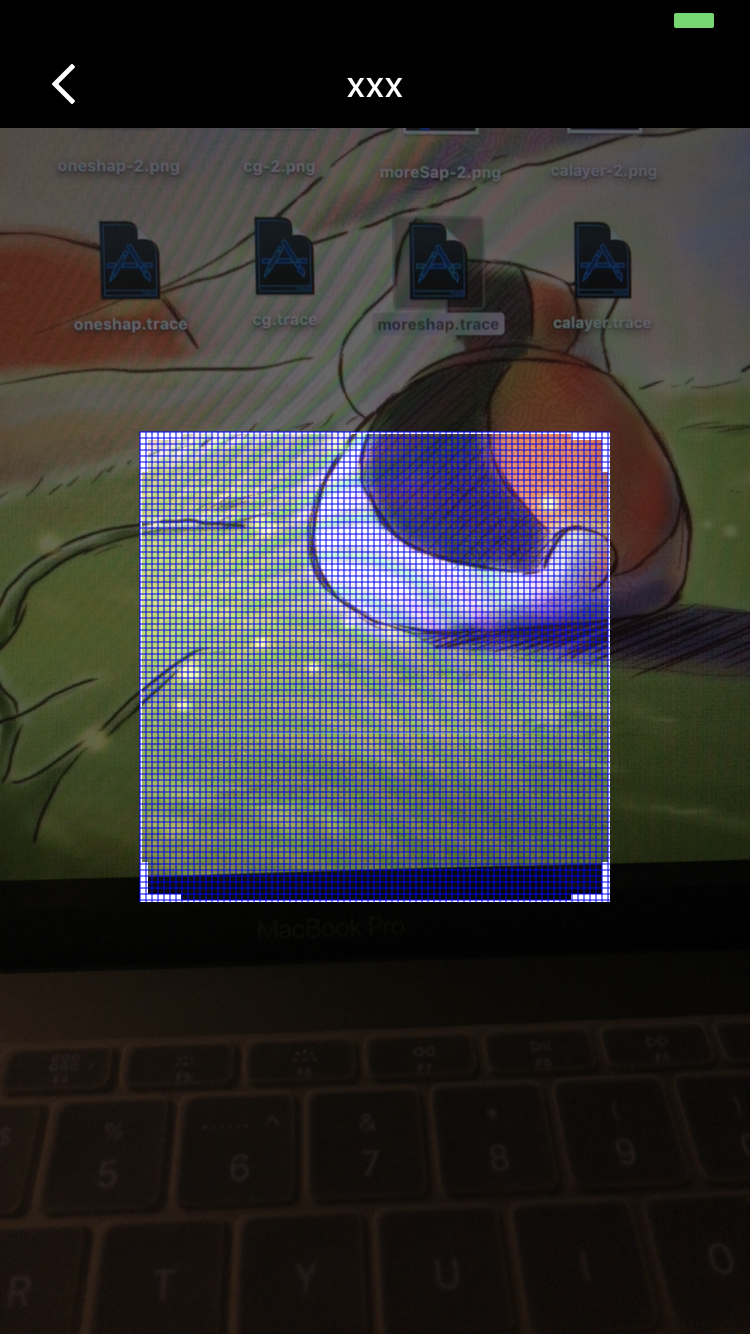
- 看到图中的网格线你会想到怎么去画呢?(问设计要图不算!)
- 今天隔壁的小伙伴碰上了一个 bug,就是扫描二维码的页面在ios 10 的手机上很卡,很卡。
- 扫描用的是苹果原生的,动画效果用的 UIView animateWithDuration 改变线条位置(这个动画效果也是,其实用 CADisplayLink 这种感觉会更好)。
- 分析了半天,最后发现原因既不是开启扫描的问题,也不是动画问题,而是那个网格绘制问题!(刚开始都没发现这货居然自己在绘制网格💧💧)
二. 经过
2.1. 卡顿方法-多个 CALayer 改变 frame_
void (^addLineWidthRect)(CGRect rect) = ^(CGRect rect) {
            CALayer *layer = [[CALayer alloc] init];
            [self.scanImgV.layer addSublayer:layer];
            layer.frame = rect;
            layer.backgroundColor = [[[UIColor whiteColor]colorWithAlphaComponent:0.5] CGColor];
        };
        for (int i=0; i<widthView; i+=size) {
            addLineWidthRect(CGRectMake(i, 0, 0.5, heightView));
        }
        for (int i=0; i<heightView; i+=size) {
            addLineWidthRect(CGRectMake(0, i, widthView, 0.5));
        }
2.2. 其他方法-多个 CAShapeLayer 绘制 path_
void (^addLineWidthRect)(CGPoint rect,CGPoint rects) = ^(CGPoint   rect,CGPoint rects) {
        UIBezierPath *pathLine = [UIBezierPath bezierPath];
        [pathLine moveToPoint:rect];
        [pathLine addLineToPoint:rects];

        CAShapeLayer *layerLine= [CAShapeLayer layer];
        layerLine.path=pathLine.CGPath;
        layerLine.lineWidth=0.5;
        layerLine.lineCap=kCALineCapRound;
        layerLine.strokeColor=[UIColor blueColor].CGColor;
        [self.scanImgV.layer addSublayer:layerLine];
    };

    for (int i=0; i<widthView; i+=size) {
        addLineWidthRect(CGPointMake(i, 0),CGPointMake(i, heightView));
    }
    for (int i=0; i<heightView; i+=size) {
        addLineWidthRect(CGPointMake(0, i),CGPointMake(widthView, i));
    }
2.3. 卡顿方法-一个 CAShapeLayer 绘制 path_
UIBezierPath *pathLine = [UIBezierPath bezierPath];
    void (^addLineWidthRect)(CGPoint rect,CGPoint rects) = ^(CGPoint rect,CGPoint rects) {
        [pathLine moveToPoint:rect];
        [pathLine addLineToPoint:rects];
    };
    for (int i=0; i<widthView; i+=size) {
        addLineWidthRect(CGPointMake(i, 0),CGPointMake(i, heightView));
    }
    for (int i=0; i<heightView; i+=size) {
        addLineWidthRect(CGPointMake(0, i),CGPointMake(widthView, i));
    }
    CAShapeLayer *layerLine= [CAShapeLayer layer];
    layerLine.path=pathLine.CGPath;
    layerLine.lineWidth=0.5;
    layerLine.lineCap=kCALineCapRound;
    layerLine.strokeColor=[UIColor blueColor].CGColor;
    [self.scanImgV.layer addSublayer:layerLine];
2.4. 卡顿方法- CGContextRef 绘制_
- (void)drawRect:(CGRect)rect {
    CGFloat widthView = CENTERRECT.size.width;
    CGFloat heightView = CENTERRECT.size.height;
    CGFloat size = 3;

    CGContextRef context =UIGraphicsGetCurrentContext();
    CGContextSetStrokeColorWithColor(context, [UIColor blueColor].CGColor);
    CGContextSetFillColorWithColor(context,[UIColor blueColor].CGColor);

    for (int i=0; i<widthView; i+=size) {
        CGContextMoveToPoint(context,i+CENTERRECT.origin.x,+CENTERRECT.origin.y);
        CGContextAddLineToPoint(context,i+CENTERRECT.origin.x,heightView+CENTERRECT.origin.y);
    }
    for (int i=0; i<heightView; i+=size) {
        CGContextMoveToPoint(context,0+CENTERRECT.origin.x,i+CENTERRECT.origin.y);
        CGContextAddLineToPoint(context,widthView+CENTERRECT.origin.x,i+CENTERRECT.origin.y);
    }
    CGContextSetLineWidth(context,1.0);
    CGContextStrokePath(context);
    CGContextFillPath(context);
//    CGContextRestoreGState(context);
}
2.5. 性能结果
| 绘制方法 |
CPU 占用 % |
时间占用最大 % |
内存占用% |
| 多个 CALayer |
4% |
35% |
0.74% |
| 多个 CAShapeLayer |
4% |
12% |
0.74% |
| 一个 CAShapeLayer |
4% |
9% |
0.74% |
| CGContextRef |
4% |
8% |
0.93% |
2.6. 题外话-二维码扫描
@protocol QrcodeViewDelegate <NSObject>
/** 返回参数 */
-(void)QrcodeViewBackStr:(NSString *)backStr ifSuccess:(BOOL)ifSuccess;
@end
@interface QrcodeView : UIView
@property (nonatomic, weak)id<QrcodeViewDelegate>qrcodeViewDelegate;
/** 初始化 */
-(instancetype)initWithFrame:(CGRect)frame scanImg:(UIImage *)scanImg lineImg:(UIImage *)lineImg;
/** 是否创建头部 */
-(void)createTopView:(NSString *)TopStr backImg:(UIImage *)backImg;
/** 头部返回事件 */
@property (nonatomic) dispatch_block_t backBlock;
/** 重新扫描 */
-(void)reStartRunning;
@end
三. 结果
- 由图表数据看很明显,在时间占用上 CGContextRef 最少,紧随其后是一个 CAShapeLayer,而多个 CALayer 明显很不好。
- 内存占用上 CGContextRef则显出其劣势。
- 所以结论是一个 CAShapeLayer 对性能最好。🎉🎉
四. 原理分析
- DrawRect:DrawRect 属于 CoreGraphic 框架,占用 CPU,消耗性能大。
- CAShapeLayer:CAShapeLayer 属于 CoreAnimation 框架,通过 GPU 来渲染图形,节省性能。动画渲染直接提交给手机GPU,不消耗内存。
- 待续。。。


