首发帖, 若有不足或错误或更优的方式,请指出,感谢
假设场景
当用户进入小程序之后, 需要在获取到头像昵称等相关信息授权之后才允许他进行其它交互操作;
由于微信小程序升级之后, 直接调用 wx.authorize({scope: "scope.userInfo"}),无法再弹出授权窗口;
需要变相使用 <button open-type="getUserInfo"/>来引导用户进行基本信息授权操作,
如自定义带遮盖层的对话框来引导用户授权信息, 如这样(请自动忽略打码部分)
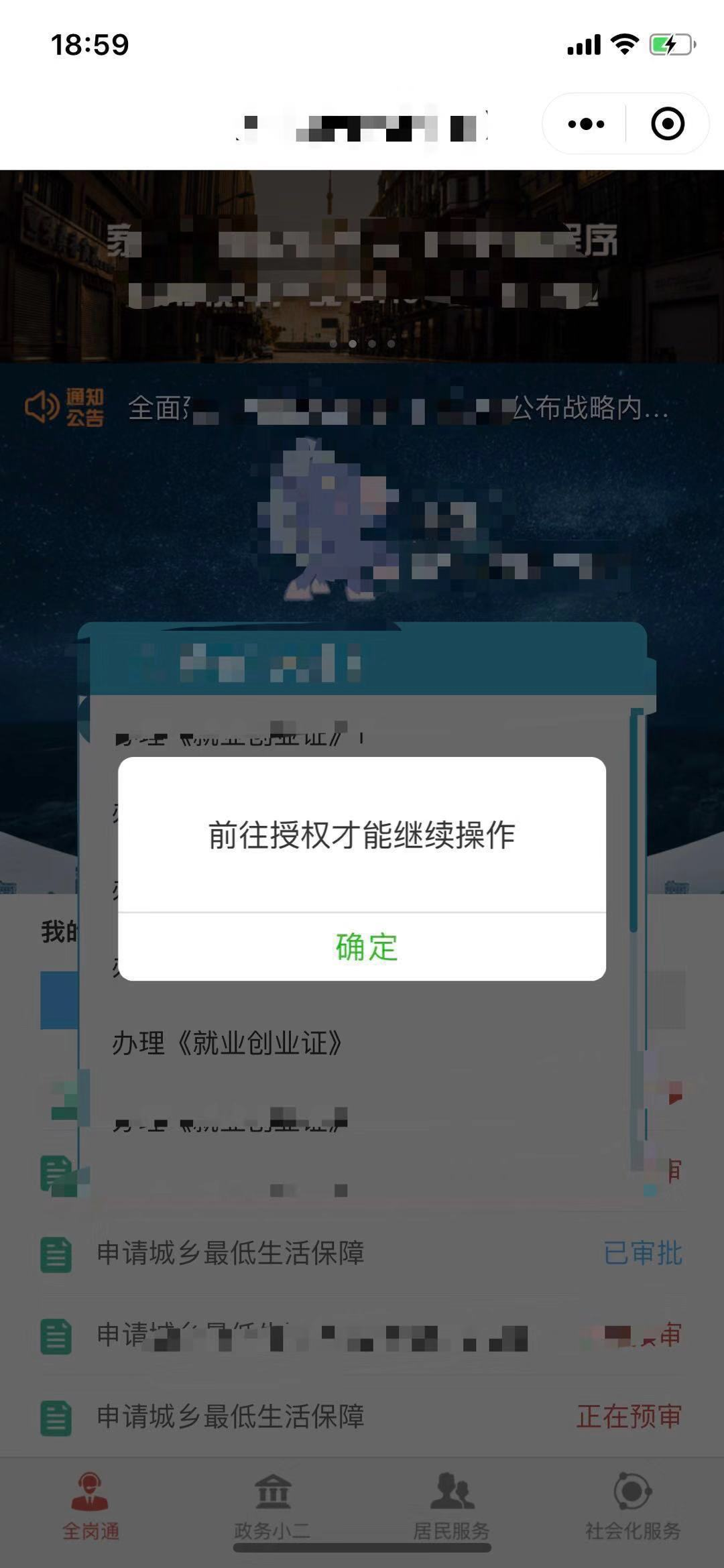
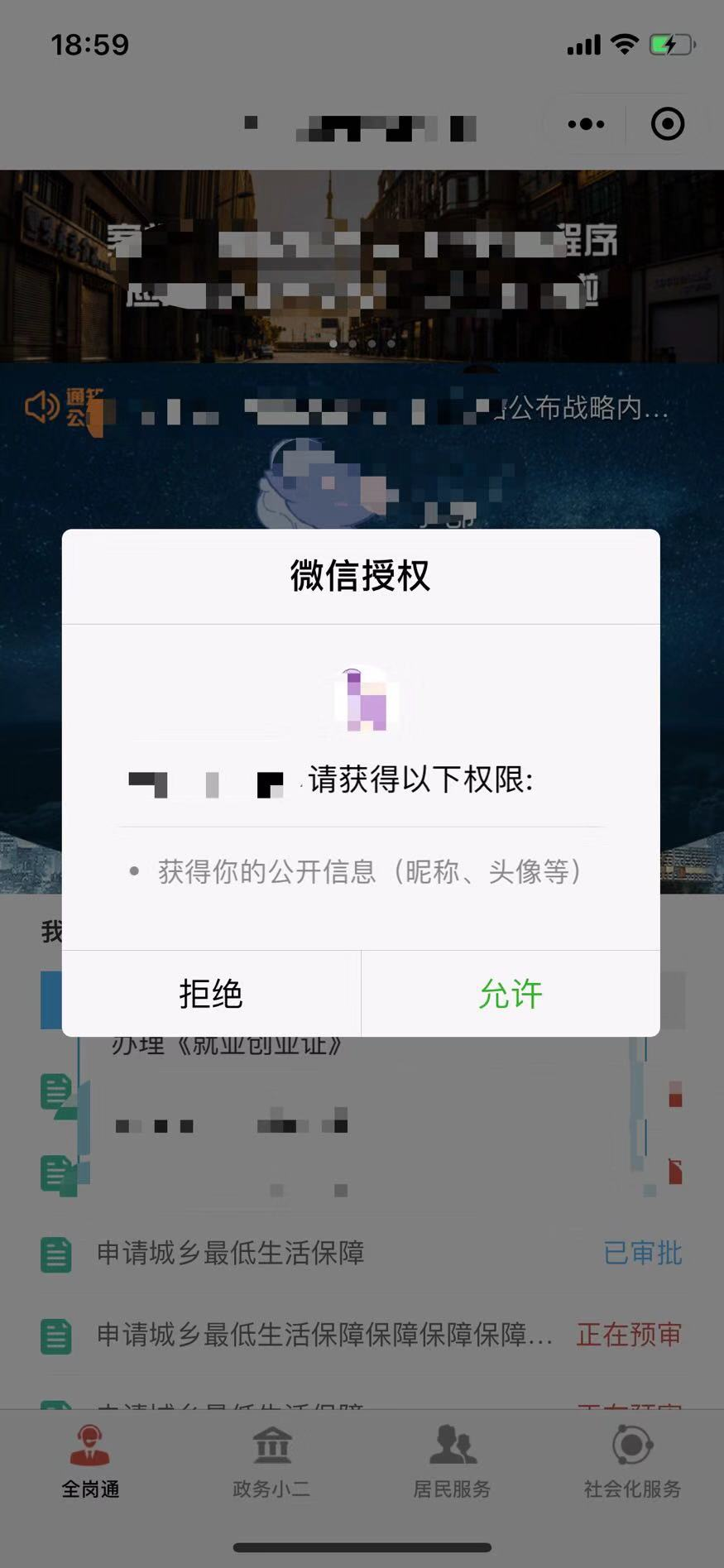
图中的确定按钮,即为 <button open-type="getUserInfo"/>, 点击后为下图
实现思路
我们知道, 微信小程序原生的tabbar只提供了wx.hideTabBar wx.showTabBar来控制其隐藏或显示, 而原生tabbar的层级总是在最顶层, 若tabbar处于显示状态, 那么自定义的遮盖层是无法遮挡挡它的
因此我的想法是用wx.hideTabBar在app的onLauch中先隐藏掉tabbar导航栏, 再使用一张与导航栏相同的图片占用导航栏的空位, 并置于遮盖层下层层级, 且随着遮盖层一起显示与隐藏
实现要点
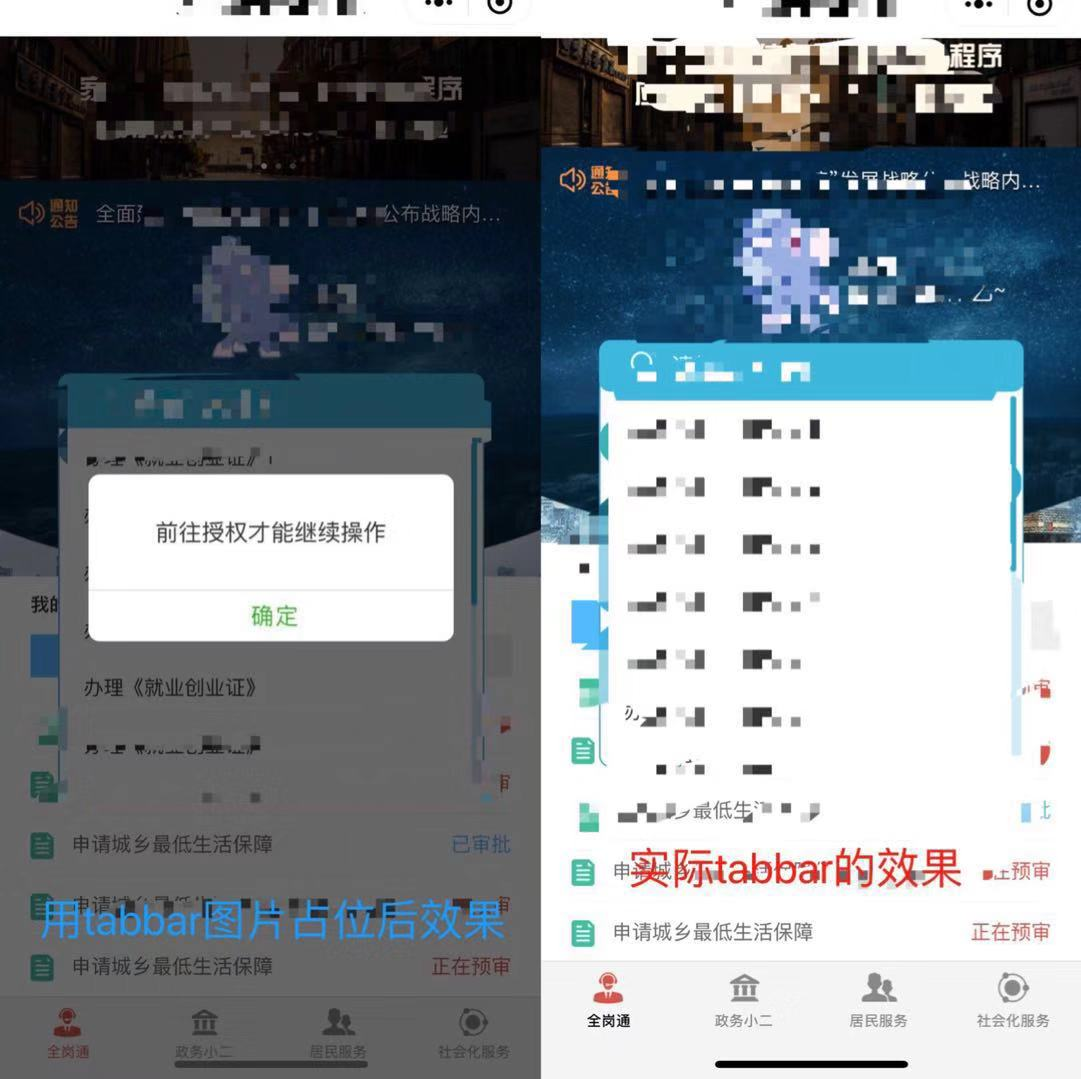
刚开始,我以为直接把占位的tabbar图片fixed后设置bottom为0就可以解决了, 虽然开发工具上没有任何问题, 但是真机效果是这样(iphone X):
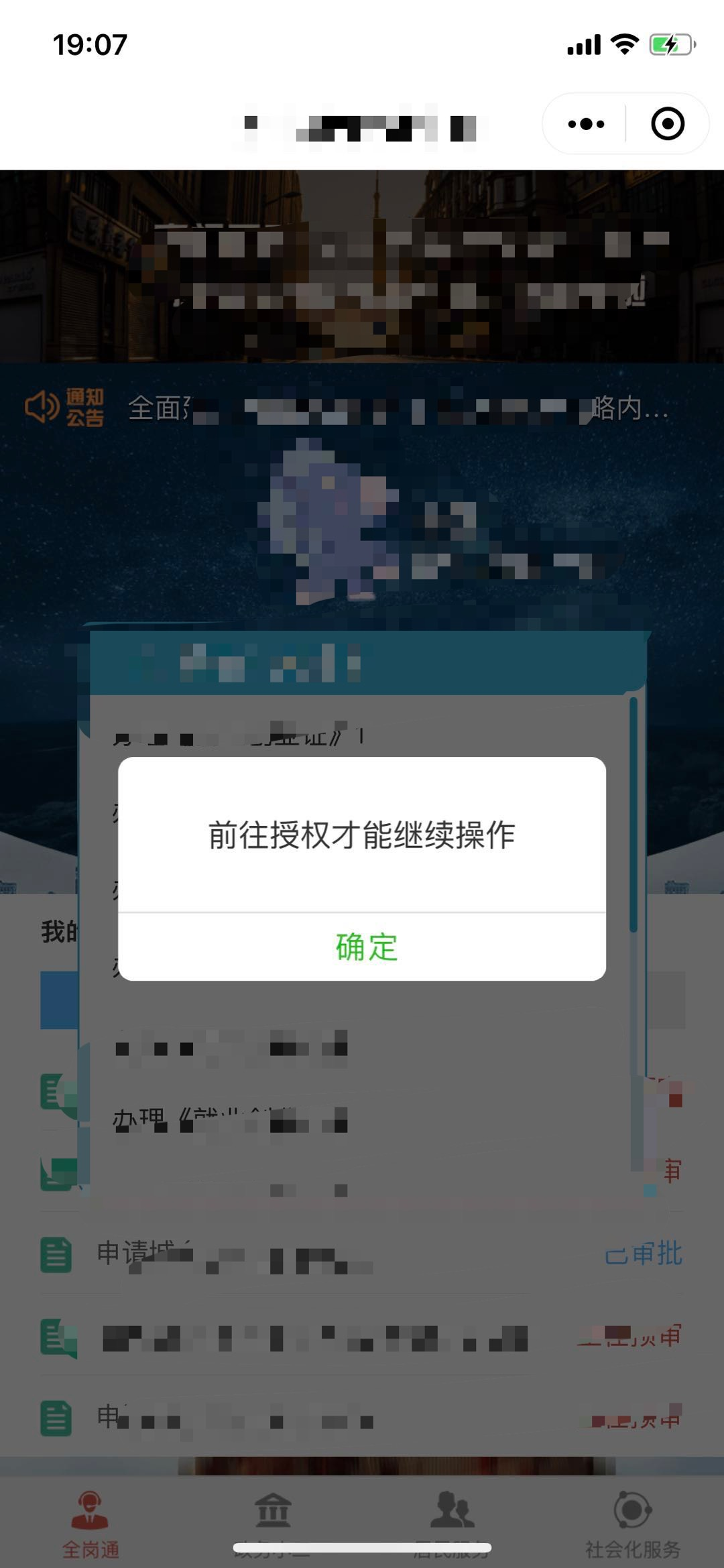
也就是说,真机中tabbar的位置并非是位于整个页面的最底部
于是我换了一种思路,通过微信小程序的wepy.getSystemInfoSync()来获取屏幕实际高度screenHeight, 通过 query.select('#fake-tabbar').boundingClientRect();query.exec(function(res) {}) 来获得之前设置高度为xx rpx的tabbar图片所在节点实际渲染出的高度;
两者相减后的差值,即为动态设置的占位tabbar图片的top值;
需要注意的地方: 占位tabbar 图片应该为两张, 一张为底图,一张为tabbar图, 如下:


底图位置与tabbar图的位置一致并位于它的下方, 为防止遇上像iphoneX 这样的长屏手机底端因tabbar高度不够出现缝隙, 故打底的这张背景图的高度稍微设置高一些
全部代码
使用的wepy, 直接写成了一个组件
<style lang="less" scoped>
/* 授权弹窗 */
.authorize_alert_wrapper {
  .cover {
    position: fixed;
    left: 0;
    right: 0;
    top: 0;
    bottom: 0;
    background-color: #000000;
    opacity: 0.6;
    z-index: 110;
  }
  .authorize_alert {
    width: 506rpx;
    height: 232rpx;
    box-sizing: border-box;
    padding-top: 40rpx;
    background: #ffffff;
    border-radius: 16rpx;
    position: fixed;
    top: 50%;
    left: 50%;
    transform: translate(-50%, -50%);
    overflow: hidden;
    z-index: 120;
    .authorize_alert_describe {
      font-family: 'PingFangSC-Regular', 'Microsoft Yahei', sans-serif;
      font-size: 32rpx;
      color: #333333;
      letter-spacing: 0;
      text-align: center;
      margin-top: 18rpx;
    }
    .confirm_cancel {
      position: absolute;
      width: 506rpx;
      height: 72rpx;
      box-sizing: border-box;
      bottom: 0;
      left: 0;
      .confirm {
        width: 100%;
        height: 72rpx;
        line-height: 72rpx;
        padding: 0;
        margin: 0;
        text-align: center;
        font-size: 32rpx;
        color: #999;
        border: none;
        border-radius: 0;
        border-top: 2rpx solid #e1e1e2;
        background-color: #fff;
        font-family: 'PingFangSC-Regular', 'Microsoft Yahei', sans-serif;
        float: right;
        letter-spacing: 1px;
        color: #21b922;
        &:after {
          border-radius: 0;
          border: none;
        }
      }
      .confirm_hover {
        background-color: #eee;
      }
    }
  }
}
.pre-fake-tabbar, .pre-fake-tabbar-bg {
  width: 100%;
  height: 96rpx;
  position: fixed;
  left: 0;
}

.pre-fake-tabbar-bg {
  height: 150rpx;
}

.show {
  opacity: 1;
}

.hide {
  opacity: 0;
}

</style>
<template>
<!-- 使用 wx.getUserInfo从2018年4月30日开始,小程序与小游戏的体验版、开发版调用 wx.getUserInfo 接口,将无法弹出授权询问框,默认调用失败, 以下为变通办法-->
    <view class="authorize_alert_wrapper {{showModal ? 'show' : 'hide'}}"  @touchmove.stop="catchTouchEvent">
        <image id="fake-tabbar_bg" class="pre-fake-tabbar-bg" src="{{fakeTabbarBgUrl}}" style="top:{{fakeTabbarTop}};"/>
        <image id="fake-tabbar" class="pre-fake-tabbar" src="{{fakeTabbarUrl}}" style="top:{{fakeTabbarTop}};"/>
        <view id="cover" class='cover'></view>
        <view class="authorize_alert">
            <view class="authorize_alert_describe">前往授权才能继续操作</view>
            <view class="confirm_cancel">
                <button class="confirm" hover-class="confirm_hover" @tap.stop="tap" data-btn-type="confirm" open-type="getUserInfo" lang="zh_CN" bindgetuserinfo="onGotUserInfo">
                    确定
                </button>
            </view>
        </view>
    </view>
</template>
<script>
import wepy from 'wepy';
const app = wepy.$instance;
export default class AuthModal extends wepy.component {
  data = {
    showModal: false,
    fakeTabbarUrl: '../images/index/fake_tabbar.png',
    fakeTabbarBgUrl: '../images/index/fake_tabbar_bg.png',
    fakeTabbarTop: null
  };
  methods = {
    tap() {
      this.hide();
    },

    onGotUserInfo(e) {
      const self = this;
      console.log('授权', e);
      if (e.detail.userInfo) {
        //授权成功
        console.log('授权成功', e);
        app.globalData.wxUserInfo = e.detail.userInfo;
        self.$apply();
        //通知主界面更新用户消息
        self.$emit('userinfo-update', e.detail.userInfo);
      } else {
        self.show();
      }
    },

    catchTouchEvent() {
      console.log('阻止触摸穿透')
    }
  };

  hide() {
    this.showModal = false;
    this.$apply();
    wepy.showTabBar();
  }

  show() {
    this.showModal = true;
    this.$apply();
    wepy.hideTabBar();
  }

  autoAdjustTabTop() {
    const res = wepy.getSystemInfoSync();
    const {screenHeight} = res;
    const self = this;
    const query = wepy.createSelectorQuery();
    query.select('#fake-tabbar').boundingClientRect();
    query.exec(function(res) {
      console.log('boundingClientRect', res);
      const resData = res[0];
      // 获取全屏的高度 获取fake-tabbar的实际高度 计算fake-tabbar距离顶端的真实距离
      const fakeTabbarTop = screenHeight- res[0].height;
      console.log('fakeTabbarTop', fakeTabbarTop)
      self.$apply();
    });
  }

  onLoad() {
    this.autoAdjustTabTop();
  }
}
</script>
探讨
小程序原生tabbar的高度因手机型号不同而发生改变, 但是微信小程序官方却并没有给出一个可获取tabbar高度的API, 这也使得在使用tabbar图片进行占位的效果与真实tabbar显示之后的实际效果有所差异