Hello,大家好!上次更新的也上拉刷新,下拉加载的效果,只不过今天用的是小程序scroll-view的组件。首先我们了解一下此组件的属性。
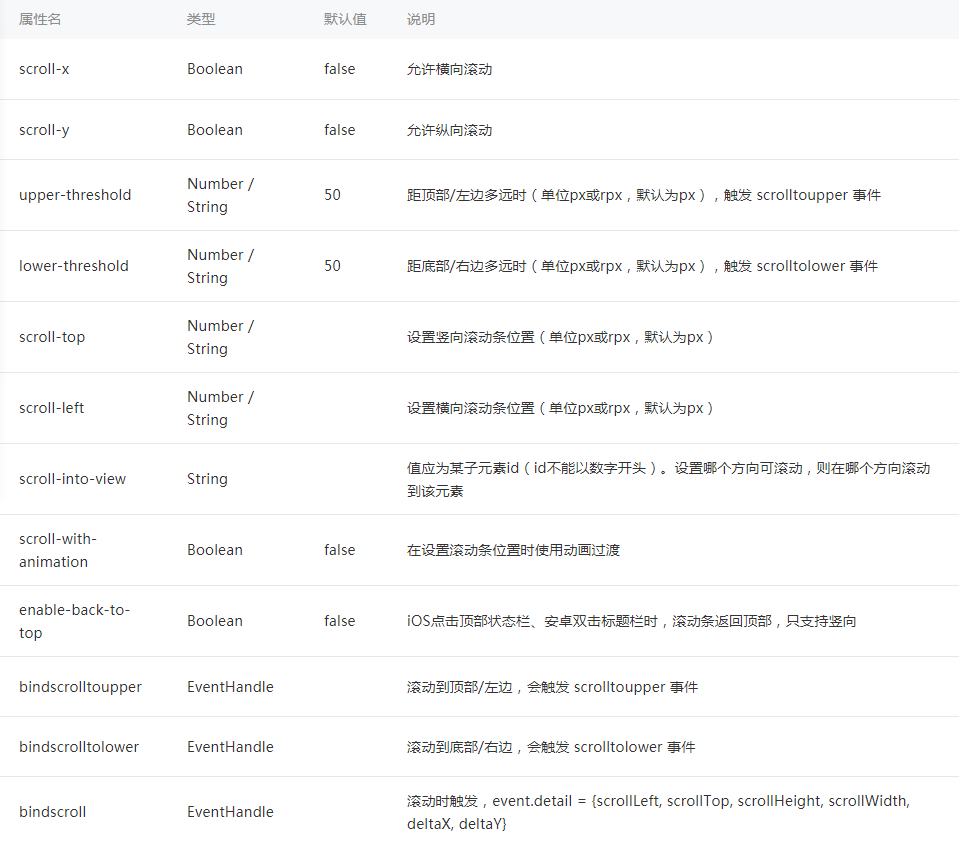
1、首先,要使用scroll-view组件,纵向滚动,我们要给scroll-view设置一个固定的高度。否则无法触发我们绑定的时间,这个是必须的。
2、我们先看一下代码吧,css代码我就不贴出来了,大家自己动手谢谢吧!
<scroll-view class="scroll_container" scroll-y="true" bindscrolltoupper="refresh" bindscrolltolower="loadMore">
<navigator class='box' hover-class='none' wx:for="{{list}}" data-id="{{item.id}}" >
<view class='box_left'><image src='{{item.itemIconUrl}}'></image></view>
<view class='box_right'>
<view class='over1 sname'>【{{item.sname}}】{{item.sdescription}}</view>
<view class='price'>
<view class='promotePrice'>¥{{item.promotePrice}}</view>
<view class='itemprice'>¥{{item.price}}<view class='line'></view></view>
</view>
<view class='makemoney'>
<view class='make'>¥{{item.promotePrice*0.05}}</view>
<view class='promote'>保险</view>
</view>
</view>
</navigator>
</scroll-view>
JS代码:
onLoad: function(options) {
var that = this;
var data = { doctorUserIdKey: '001' }
http.httpGet('doctor/getDoctorUserId', data, function (res) {
success: {
var doctorUserId = res.data.doctorUserId;
var data = { doctorUserId: doctorUserId, categoryId: 0, hot: 0}
http.httpGet('接口', data, function (res) {
console.log(res);
success:{
that.setData({
list:res.data.list,
page: res.data.page
})
}
})
}
})
},
refresh:function(e){
},
loadMore:function(e){
var that = this;
var page = that.data.page;
var page_size = page.page_size;
var all_count = page.all_count;
console.log(all_count);
console.log(page_size)
if(page_size<=all_count){
如果数据的总数大于每页的数据量,那么数据量每次+10,
弹窗显示数据正在加载,模拟原生加载。
var page_size = page_size+10;
var data = { doctorUserIdKey: '001' }
http.httpGet('接口', data, function (res) {
success: {
wx.showToast({
title: '数据正在加载',
icon: 'loading',
duration: 1000
})
var doctorUserId = res.data.doctorUserId;
var data = {参数}
http.httpGet('接口', data, function (res) {
console.log(res);
success: {
that.setData({
list: res.data.list,
page: res.data.page
})
}
})
}
})
} else if (page_size>all_count){
如果数据的总数小于每页的数据量,
弹窗显示数据没有更多,模拟原生加载。
wx.showToast({
title: '没有更多数据了',
icon: 'none',
duration:1000
})
}
},
共享知识,共同进步