1.下载postgresql-11 客户端、服务端、插件相关rpm包
1.1 客户端、服务端rpm

1.2 cstore_fdw 列引擎rpm

1.3 pg_cron 定时任务rpm


2.把所有rpm包上传linux服务器,比如/usr/postgres
3.通过yum localinstall ./*.rpm安装所有rpm包
yum localinstall ./*.rpm
4.初始化postgresql, 并设置自动启动
/usr/pgsql-11/bin/postgresql-11-setup initdb
systemctl enable postgresql-11
systemctl start postgresql-11
5.修改PostgreSQL数据库默认用户postgres的密码
5.1登录PostgreSQL
sudo -u postgres psql
5.2修改登录PostgreSQL密码
ALTER USER postgres WITH PASSWORD 'postgres';
5.3退出PostgreSQL客户端
\q
6. 开启远程连接
6.1 To be able to reach the server remotely you have to add the following line into the file: /var/lib/pgsql/data/postgresql.conf
listen_addresses='*'

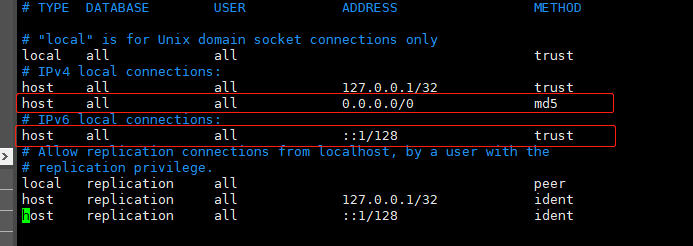
6.2 pg_cron通过ipv6连接, 修改IPV6下METHOD为trust,增加host all all 0.0.0.0/0 md5
7.挂载cstore_fdw 和 pg_cron到postgresql, 修改/var/lib/pgsql/data/postgresql.conf

8.重启pg
systemctl restart postgresql-11
9.用navicat测试是否正常连接到postgresql
10.let's log into Postgres, and run the following commands to create a column store foreign table:
-- load extension first time after install
CREATE EXTENSION cstore_fdw;

-- create server object
CREATE SERVER cstore_server FOREIGN DATA WRAPPER cstore_fdw;

-- create foreign table
CREATE FOREIGN TABLE customer_reviews
(
    customer_id TEXT,
    review_date DATE,
    review_rating INTEGER,
    review_votes INTEGER,
    review_helpful_votes INTEGER,
    product_id CHAR(10),
    product_title TEXT,
    product_sales_rank BIGINT,
    product_group TEXT,
    product_category TEXT,
    product_subcategory TEXT,
    similar_product_ids CHAR(10)[]
)
SERVER cstore_server
OPTIONS(compression 'pglz');
11.create the pg_cron functions and metadata tables using CREATE EXTENSION pg_cron
CREATE EXTENSION pg_cron;
select * from cron.job


