

Android P中对WMS部分有部分重构,其中一个是无锁动画——LockFreeAnimation
LockFreeAnimation对比O以及之前的版本,在系统执行窗口动画的时候是不需要获取WMS的大锁的,这无疑是一件提升系统性能的措施,保证动画的流畅执行。AMS和WMS的大锁是除去硬件性能之外软件层面限制系统性能的一个重要原因,P上的处理方式也提供了一类系统优化的思路。
下面先来对比下P的无锁动画对比之前的动画设计方式存在的优势,先不看代码,从一份桌面启动应用的systrace直观感受下
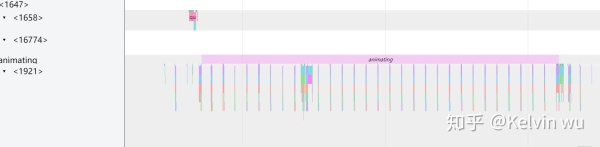
在系统窗口动画的执行都在WindowAnimator的animate函数中,这个函数的执行是需要获得WMS的大锁mWindowMap的
private void animate(long frameTimeNs) {

        synchronized (mService.mWindowMap) {
            if (!mInitialized) {
                return;
            }

            // Schedule next frame already such that back-pressure happens continuously
            scheduleAnimation();
        }

        // Simulate back-pressure by opening and closing an empty animation transaction. This makes
        // sure that an animation frame is at least presented once on the screen. We do this outside
        // of the regular transaction such that we can avoid holding the window manager lock in case
        // we receive back-pressure from SurfaceFlinger. Since closing an animation transaction
        // without the window manager locks leads to ordering issues (as the transaction will be
        // processed only at the beginning of the next frame which may result in another transaction
        // that was executed later in WM side gets executed first on SF side), we don't update any
        // Surface properties here such that reordering doesn't cause issues.
        mService.executeEmptyAnimationTransaction();

        synchronized (mService.mWindowMap) {
           ......//这里执行每一帧的窗口Surfacec变换
        }
因此就会存在风险,就是当其他线程长时间持有WMS大锁的时候,窗口动画的执行就会出现阻塞,导致掉帧。而P上的改进就是为了防止动画被阻塞,窗口动画的执行是不需要去拿WMS大锁的,如下图所示,为一个P上从桌面启动应用的systrace。
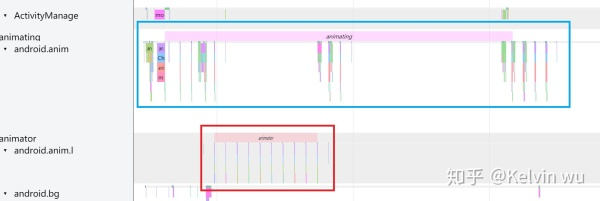
对比O来看,很明显动画由两部分组成,一个还是原先的android.anim线程(也就是WindowAnimator的animate函数中执行),另外一个是android.anima.l(名字应该被截掉了),第二个才是真正执行窗口动画的线程。对比来看蓝色方框中的"animating"流程中明显对比O少了很多帧,而少掉的帧都跑到红色方框中的"animator"中去执行了,而这个animator中执行窗口动画是无需获得WMS大锁的,所以理论上来讲会比原先的方案更优更加流畅。
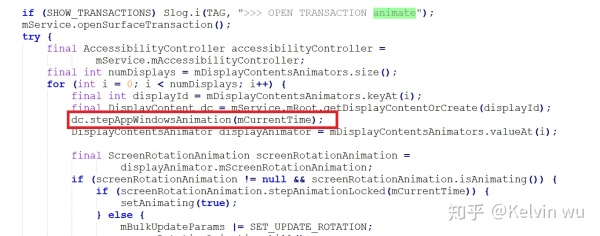
O中在WindowAnimator的animate函数中红色方框的部分是执行每个窗口的窗口动画的地方,所以要想动画执行,必须要拿到锁才行。
对比P,WindowAnimator类还保留着,但是拿掉了红色方框中的代码,也就是去掉了其负责窗口动画的功能。虽然拿掉了窗口动画,个人理解,这个animate函数还需要负责窗口的旋转动画,因此还是保留下来了。
那拿掉了WindowAnimator执行窗口动画的能力之后,窗口动画又由谁来负责呢?
对比了P和O的代码中wm目录下的文件增删,从这里出发找找看新的变化
动画相关的提交从SurfaceAnimator开始
* A class that can run animations on objects that have a set of child surfaces. We do this by
 * reparenting all child surfaces of an object onto a new surface, called the "Leash". The Leash
 * gets attached in the surface hierarchy where the the children were attached to. We then hand off
 * the Leash to the component handling the animation, which is specified by the
 * {@link AnimationAdapter}. When the animation is done animating, our callback to finish the
 * animation will be invoked, at which we reparent the children back to the original parent.
 */
class SurfaceAnimator {翻译:这个类可以针对那种存在多个child surface的对象进行动画,在执行动画的过程中会创建一个没有Buffer的Surface---“Leash”,将所有child surface绑定到leash上,leash同时也会绑定到原先这些child surface绑定的位置。然后我们将leash给到AnimationAdapter去执行动画,执行动画结束后会将所有child surface重新绑定到原先的父节点上
startAnimation@SurfaceAnimator.java
97    /**
98     * Starts an animation.
99     *
100     * @param anim The object that bridges the controller, {@link SurfaceAnimator}, with the
101     *             component responsible for running the animation. It runs the animation with
102     *             {@link AnimationAdapter#startAnimation} once the hierarchy with
103     *             the Leash has been set up.
104     * @param hidden Whether the container holding the child surfaces is currently visible or not.
105     *               This is important as it will start with the leash hidden or visible before
106     *               handing it to the component that is responsible to run the animation.
107     */
108    void startAnimation(Transaction t, AnimationAdapter anim, boolean hidden) {
109        cancelAnimation(t, true /* restarting */, true /* forwardCancel */);
110        mAnimation = anim;
           //step1.先获取当前需要执行动画的对象的surface
111        final SurfaceControl surface = mAnimatable.getSurfaceControl();
112        if (surface == null) {
113            Slog.w(TAG, "Unable to start animation, surface is null or no children.");
114            cancelAnimation();
115            return;
116        }
           //step2.使用step1创建的surface来构建一个leash
117        mLeash = createAnimationLeash(surface, t,
118                mAnimatable.getSurfaceWidth(), mAnimatable.getSurfaceHeight(), hidden);
119        mAnimatable.onAnimationLeashCreated(t, mLeash);
120        if (mAnimationStartDelayed) {
121            if (DEBUG_ANIM) Slog.i(TAG, "Animation start delayed");
122            return;
123        }
           //step3.将leash传给AnimationAdapter,启动动画
124        mAnimation.startAnimation(mLeash, t, mInnerAnimationFinishedCallback);
125    }
这个startAnimation的第一个参数是Transaction,所以一定是在打开一次transaction的情况下开始启动动画的
step1 这个getSurfaceControl是Animatable这个Interface中的一个接口,所有能够执行动画的对象都需要实现这个interface
401         * @return The surface of the object to be animated.
402         */
403        @Nullable SurfaceControl getSurfaceControl();
例如WC的定义,WC是WMS的层次框架的基础类,也就是WMS中很多对象都具有执行动画的能力
60class WindowContainer<E extends WindowContainer> extends ConfigurationContainer<E>
61        implements Comparable<WindowContainer>, Animatable {
WC中的实现
1110    @Override
1111    public SurfaceControl getSurfaceControl() {
1112        return mSurfaceControl;
1113    }
step2创建Leash(leash的英文就是狗绳的意思,就是用这个leash拴住这些child surface来跑动画,在SF中这些layer的层次结构不会出现异常)
300    private SurfaceControl createAnimationLeash(SurfaceControl surface, Transaction t, int width,
301            int height, boolean hidden) {
302        if (DEBUG_ANIM) Slog.i(TAG, "Reparenting to leash");
           //step2.1.通过makeAnimationLeash构造这个Surface
303        final SurfaceControl.Builder builder = mAnimatable.makeAnimationLeash()
304                .setParent(mAnimatable.getAnimationLeashParent())
305                .setName(surface + " - animation-leash")
306                .setSize(width, height);
307        final SurfaceControl leash = builder.build();

           //step2.2.设置transaction相关参数,show和reparent
           //show:这次transaction中显示leash
           //reparent:将leash reparent到当前Surface的父节点上
308        if (!hidden) {
309            t.show(leash);
310        }
311        t.reparent(surface, leash.getHandle());
312        return leash;
313    }
step2.1创建leash
同样,例如WC的相关实现 这个流程看样子会递归调用到根节点到DisplayContent中
1143    @Override
1144    public Builder makeAnimationLeash() {
1145        return makeSurface();
1146    }

895    SurfaceControl.Builder makeSurface() {
896        final WindowContainer p = getParent();
897        return p.makeChildSurface(this);
898    }

900    /**
901     * @param child The WindowContainer this child surface is for, or null if the Surface
902     *              is not assosciated with a WindowContainer (e.g. a surface used for Dimming).
903     */
904    SurfaceControl.Builder makeChildSurface(WindowContainer child) {
905        final WindowContainer p = getParent();
906        // Give the parent a chance to set properties. In hierarchy v1 we rely
907        // on this to set full-screen dimensions on all our Surface-less Layers.
908        return p.makeChildSurface(child)
909                .setParent(mSurfaceControl);
910    }
在DisplayContent中
3855    @Override
3856    SurfaceControl.Builder makeChildSurface(WindowContainer child) {
3857        SurfaceSession s = child != null ? child.getSession() : getSession();
            //通过wms来创建实际的SurfaceControl,然后层层返回,最终这个Surface绑定到最早调用启动动画的对象上
3858        final SurfaceControl.Builder b = mService.makeSurfaceBuilder(s);
3859        b.setSize(mSurfaceSize, mSurfaceSize);
3860
3861        if (child == null) {
3862            return b;
3863        }
3864
3865        return b.setName(child.getName())
3866                .setParent(mWindowingLayer);
3867    }
Step3.使用AnimationAapter启动动画
54    /**
55     * Requests to start the animation.
56     *
57     * @param animationLeash The surface to run the animation on. See {@link SurfaceAnimator} for an
58     *                       overview of the mechanism. This surface needs to be released by the
59     *                       component running the animation after {@code finishCallback} has been
60     *                       invoked, or after the animation was cancelled.
61     * @param t The Transaction to apply the initial frame of the animation.
62     * @param finishCallback The callback to be invoked when the animation has finished.
63     */
64    void startAnimation(SurfaceControl animationLeash, Transaction t,
65            OnAnimationFinishedCallback finishCallback);
LocalAnimationAdapter就是一个对AnimationAdapter的实现
startAnimation@LocalAnimationAdapter.java
61    @Override
62    public void startAnimation(SurfaceControl animationLeash, Transaction t,
63            OnAnimationFinishedCallback finishCallback) {
64        mAnimator.startAnimation(mSpec, animationLeash, t,
65                () -> finishCallback.onAnimationFinished(this));
66    }
这里用于执行动画的mAnimator的类型是SurfaceAnimationRunner,在构造AnimationAdapter的时候会传入SurfaceAnimationRunner,这个类会去执行动画.下面接着介绍SurfaceAnimationRunner
41    LocalAnimationAdapter(AnimationSpec spec, SurfaceAnimationRunner animator) {
42        mSpec = spec;
43        mAnimator = animator;
44    }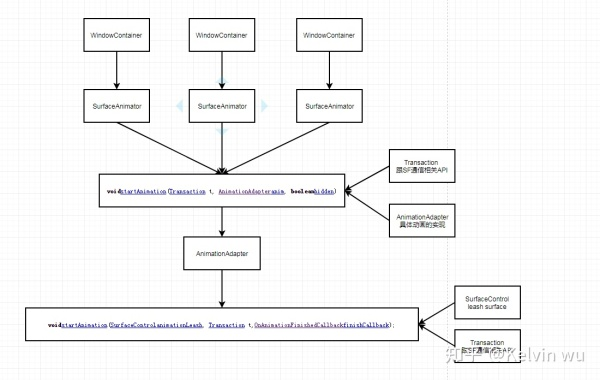
从图可以看出每一个WC对应一个SA,当一个WC需要执行一个特定动画的时候,只需要传入一个AD来指定特定的动画即可,而动画执行需要的线程都是在AD的构造中创建
SurfaceAnimationRunner
void startAnimation(AnimationSpec a, SurfaceControl animationLeash, Transaction t,
            Runnable finishCallback) {
        synchronized (mLock) {
               //step1使用spec,leash,动画结束后的回调构造一个RunningAnimation,这个类相当于是一个动画的记录
            final RunningAnimation runningAnim = new RunningAnimation(a, animationLeash,
                    finishCallback);
            mPendingAnimations.put(animationLeash, runningAnim);
               //step2往编舞者上抛一个回调
            if (!mAnimationStartDeferred) {
                mChoreographer.postFrameCallback(this::startAnimations);
            }

            // Some animations (e.g. move animations) require the initial transform to be applied
            // immediately.
            applyTransformation(runningAnim, t, 0 /* currentPlayTime */);
        }
    }
从这个来看这个Runner是可以复用的,构造一个然后将多个RunningAnimation放在上面运行,因为Runner中维护了一个列表可以存储多个Animation
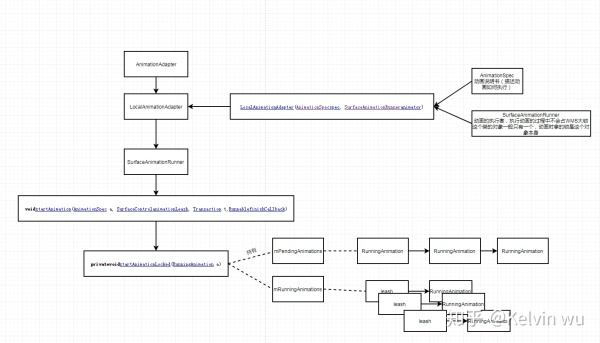
往编舞者上面抛的回调是startAnimations
230    private void startAnimations(long frameTimeNanos) {
231        synchronized (mLock) {
232            startPendingAnimationsLocked();
233        }
234    }
154    @GuardedBy("mLock")
155    private void startPendingAnimationsLocked() {
156        for (int i = mPendingAnimations.size() - 1; i >= 0; i--) {
157            startAnimationLocked(mPendingAnimations.valueAt(i));
158        }
159        mPendingAnimations.clear();
160    }
从上面可以看出,将pending的动画全部拿出来执行,然后清空掉pending的列表
162    @GuardedBy("mLock")
163    private void startAnimationLocked(RunningAnimation a) {
           //step1.创建一个valueanimator
164        final ValueAnimator anim = mAnimatorFactory.makeAnimator();
165        //step2.根据AnimationSpec设置这个VA的属性以及注册回调函数
166        // Animation length is already expected to be scaled.
167        anim.overrideDurationScale(1.0f);
168        anim.setDuration(a.mAnimSpec.getDuration());
169        anim.addUpdateListener(animation -> {//这个是动画更新的回调
170            synchronized (mCancelLock) {
171                if (!a.mCancelled) {
172                    final long duration = anim.getDuration();
173                    long currentPlayTime = anim.getCurrentPlayTime();
174                    if (currentPlayTime > duration) {
175                        currentPlayTime = duration;
176                    }
177                    applyTransformation(a, mFrameTransaction, currentPlayTime);//根据当前的时间进行更新变换
178                }
179            }
180
181            // Transaction will be applied in the commit phase.
182            scheduleApplyTransaction();//在下一次Vsync信号到来的时候使前面的修改生效
183        });
184
185        anim.addListener(new AnimatorListenerAdapter() {
186            @Override
187            public void onAnimationStart(Animator animation) {
188                synchronized (mCancelLock) {
189                    if (!a.mCancelled) {
190                        mFrameTransaction.show(a.mLeash);//动画开始的时候显示leash这个Surface
191                    }
192                }
193            }
194
195            @Override
196            public void onAnimationEnd(Animator animation) {
197                synchronized (mLock) {
198                    mRunningAnimations.remove(a.mLeash);
199                    synchronized (mCancelLock) {
200                        if (!a.mCancelled) {
201
202                            // Post on other thread that we can push final state without jank.
203                            AnimationThread.getHandler().post(a.mFinishCallback);
204                        }
205                    }
206                }
207            }
208        });
209        a.mAnim = anim;
           //step3.加入到正在运行的动画map中
210        mRunningAnimations.put(a.mLeash, a);
211
           //step4.调用VA的start,动画的执行是依赖于VA本身的执行框架(ValueAnimation)
212        anim.start();
213        if (a.mAnimSpec.canSkipFirstFrame()) {
214            // If we can skip the first frame, we start one frame later.
215            anim.setCurrentPlayTime(mChoreographer.getFrameIntervalNanos() / NANOS_PER_MS);
216        }
217
218        // Immediately start the animation by manually applying an animation frame. Otherwise, the
219        // start time would only be set in the next frame, leading to a delay.
220        anim.doAnimationFrame(mChoreographer.getFrameTime());
221    }
step1.这里创建的是一个ValueAnimator来执行动画
step2.设置ValueAnimator的回调函数
step3.将该动画加到一个正在运行的animation map中
step4.调用start开始动画
这里VA的startAnimation中就有异步trace,也就是开始时P中执行动画的"animator"这个异步trace(这里的getNameForTrace返回的就是"animator")
1243    /**
1244     * Called internally to start an animation by adding it to the active animations list. Must be
1245     * called on the UI thread.
1246     */
1247    private void startAnimation() {
1248        if (Trace.isTagEnabled(Trace.TRACE_TAG_VIEW)) {
                //异步trace开始
1249            Trace.asyncTraceBegin(Trace.TRACE_TAG_VIEW, getNameForTrace(),
1250                    System.identityHashCode(this));
1251        }
1252
1253        mAnimationEndRequested = false;
1254        initAnimation();
1255        mRunning = true;
1256        if (mSeekFraction >= 0) {
1257            mOverallFraction = mSeekFraction;
1258        } else {
1259            mOverallFraction = 0f;
1260        }
1261        if (mListeners != null) {
1262            notifyStartListeners();
1263        }
1264    }
之后的VA执行动画的原理就不往下看了,再回到是如何发起动画的,这里也是存在差异的
这里的无锁动画主要是针对应用切换的过场动画(其实新的动画框架还支持APP修改窗口切换动画,最近任务动画,但都是依赖于这个无锁动画的框架)
在AppWindowToken的applayAnimationLocked中
boolean applyAnimationLocked(WindowManager.LayoutParams lp, int transit, boolean enter,
1723            boolean isVoiceInteraction) {
1724
            ......
1733
1734        // Only apply an animation if the display isn't frozen. If it is frozen, there is no reason
1735        // to animate and it can cause strange artifacts when we unfreeze the display if some
1736        // different animation is running.
1737        Trace.traceBegin(TRACE_TAG_WINDOW_MANAGER, "AWT#applyAnimationLocked");
1738        if (okToAnimate()) {
1739            final AnimationAdapter adapter;
1740            final TaskStack stack = getStack();
1741            mTmpPoint.set(0, 0);
1742            mTmpRect.setEmpty();
1743            if (stack != null) {
1744                stack.getRelativePosition(mTmpPoint);
1745                stack.getBounds(mTmpRect);
1746                mTmpRect.offsetTo(0, 0);
1747            }
1748
1749            // Delaying animation start isn't compatible with remote animations at all.
1750            if (mService.mAppTransition.getRemoteAnimationController() != null
1751                    && !mSurfaceAnimator.isAnimationStartDelayed()) {
1752                adapter = mService.mAppTransition.getRemoteAnimationController()
1753                        .createAnimationAdapter(this, mTmpPoint, mTmpRect);
1754            } else {
1755                final Animation a = loadAnimation(lp, transit, enter, isVoiceInteraction);
1756                if (a != null) {
                         //先构造AnimationAdapter
1757                    adapter = new LocalAnimationAdapter(
1758                            new WindowAnimationSpec(a, mTmpPoint, mTmpRect,
1759                                    mService.mAppTransition.canSkipFirstFrame(),
1760                                    mService.mAppTransition.getAppStackClipMode(),
1761                                    true /* isAppAnimation */),
1762                            mService.mSurfaceAnimationRunner);
1763                    if (a.getZAdjustment() == Animation.ZORDER_TOP) {
1764                        mNeedsZBoost = true;
1765                    }
1766                    mTransit = transit;
1767                    mTransitFlags = mService.mAppTransition.getTransitFlags();
1768                } else {
1769                    adapter = null;
1770                }
1771            }
1772            if (adapter != null) {
                    //调用WC的startAnimation启动动画,就回到了前面的分析中了
1773                startAnimation(getPendingTransaction(), adapter, !isVisible());
1774                if (adapter.getShowWallpaper()) {
1775                    mDisplayContent.pendingLayoutChanges |= FINISH_LAYOUT_REDO_WALLPAPER;
1776                }
1777            }
对比O中的相同函数实现在WindowManagerService中
2357    boolean applyAnimationLocked(AppWindowToken atoken, WindowManager.LayoutParams lp,
2358            int transit, boolean enter, boolean isVoiceInteraction) {
2359        // Only apply an animation if the display isn't frozen.  If it is
2360        // frozen, there is no reason to animate and it can cause strange
2361        // artifacts when we unfreeze the display if some different animation
2362        // is running.
2363        Trace.traceBegin(TRACE_TAG_WINDOW_MANAGER, "WM#applyAnimationLocked");
            ......
2402            if (DEBUG_APP_TRANSITIONS) Slog.d(TAG_WM, "Loading animation for app transition."
2403                    + " transit=" + AppTransition.appTransitionToString(transit) + " enter=" + enter
2404                    + " frame=" + frame + " insets=" + insets + " surfaceInsets=" + surfaceInsets);
2405            final Configuration displayConfig = displayContent.getConfiguration();
2406            Animation a = mAppTransition.loadAnimation(lp, transit, enter, displayConfig.uiMode,
2407                    displayConfig.orientation, frame, displayFrame, insets, surfaceInsets,
2408                    stableInsets, isVoiceInteraction, freeform, atoken.getTask().mTaskId);
2409            if (a != null) {
2410                if (DEBUG_ANIM) logWithStack(TAG, "Loaded animation " + a + " for " + atoken);
2411                final int containingWidth = frame.width();
2412                final int containingHeight = frame.height();
                    //这里是给AppWindowToken对应的AppWindowAnimator设置好Animation
2413                atoken.mAppAnimator.setAnimation(a, containingWidth, containingHeight, width,
2414                        height, mAppTransition.canSkipFirstFrame(),
2415                        mAppTransition.getAppStackClipMode(),
2416                        transit, mAppTransition.getTransitFlags());
2417            }
2418        } else {
O中的实现是给需要执行动画的appWindowToken设置好动画,等到WindowAniamtor执行animate的时候去遍历每一个有设置动画的窗口即可,所以之前的动画遇到其他线程持锁是会变卡的
总结起来就是将窗口的动画从WindowAnimator的animate函数中剥离出来,让APP的切换动画不受锁的限制,避免了卡顿的风险。

