

本文介绍一下利用属性动画(未使用Timer,通过动画执行次数控制倒计时)自定义一个圆形倒计时控件,比较简陋,仅做示例使用,如有需要,您可自行修改以满足您的需求。控件中所使用的素材及配色均是笔者随意选择,导致效果不佳,先上示例图片
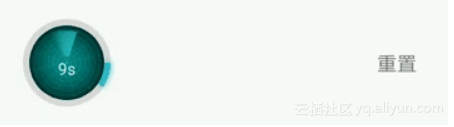
示例图片
示例中进度条底色、渐变色(仅支持两个色值)、字体大小、图片、进度条宽度及是否显示进度条等可通过xml修改,倒计时时间可通过代码设置。如果您感兴趣,可修改代码设置更丰富的渐变色值及文字变化效果,本文仅仅提供设计思路。
笔者利用属性动画多次执行实现倒计时,执行次数即为倒计时初始数值。对上述示例做一下拆解,会发现实现起来还是很容易的,需要处理的主要是以下几部分
1.绘制外部环形进度条
2.绘制中央旋转图片
3.绘制倒计时时间
一.绘制外部环形进度条,分为两部分:
1. 环形背景 canvas.drawCircle方法绘制
2. 扇形进度 canvas.drawArc方法绘制,弧度通过整体倒计时执行进度控制
二.绘制中央旋转图片:
前置描述:外层圆形直径设为d1;中央旋转图片直径设为d2;进度条宽度设为d3
1. 将设置的图片进行剪切缩放处理(也可不剪切,笔者有强迫症),使其宽高等于d1 - 2 * d3,即d2 = d1 - 2 * d3;
2. 利用Matrix将Bitmap平移至中央;
3. 利用Matrix旋转Bitmap
三.绘制倒计时时间:
通过每次动画执行进度,控制文本位置
下面上示例代码:
public class CircleCountDownView extends View {

    private CountDownListener countDownListener;


    private int width;

    private int height;

    private int padding;

    private int borderWidth;

    // 根据动画执行进度计算出来的插值,用来控制动画效果,建议取值范围为0到1

    private float currentAnimationInterpolation;

    private boolean showProgress;

    private float totalTimeProgress;

    private int processColorStart;

    private int processColorEnd;

    private int processBlurMaskRadius;


    private int initialCountDownValue;

    private int currentCountDownValue;


    private Paint circleBorderPaint;

    private Paint circleProcessPaint;

    private RectF circleProgressRectF;


    private Paint circleImgPaint;

    private Matrix circleImgMatrix;

    private Bitmap circleImgBitmap;

    private int circleImgRadius;

    private AnimationInterpolator animationInterpolator;

    private BitmapShader circleImgBitmapShader;

    private float circleImgTranslationX;

    private float circleImgTranslationY;

    private Paint valueTextPaint;


    private ValueAnimator countDownAnimator;


    public CircleCountDownView(Context context) {

        this(context, null);

    }


    public CircleCountDownView(Context context, @Nullable AttributeSet attrs) {

        this(context, attrs, 0);

    }


    public CircleCountDownView(Context context, @Nullable AttributeSet attrs, int defStyleAttr) {

        super(context, attrs, defStyleAttr);

        setLayerType(View.LAYER_TYPE_SOFTWARE, null);

        init(attrs);

    }


    private void init(AttributeSet attrs) {

        circleImgPaint = new Paint(Paint.ANTI_ALIAS_FLAG);

        circleImgPaint.setStyle(Paint.Style.FILL);

        circleImgMatrix = new Matrix();

        valueTextPaint = new Paint(Paint.ANTI_ALIAS_FLAG);


        TypedArray typedArray = getContext().obtainStyledAttributes(attrs, R.styleable.CircleCountDownView);

        // 控制外层进度条的边距

        padding = typedArray.getDimensionPixelSize(R.styleable.CircleCountDownView_padding, DisplayUtil.dp2px(5));

        // 进度条边线宽度

        borderWidth = typedArray.getDimensionPixelSize(R.styleable.CircleCountDownView_circleBorderWidth, 0);

        if (borderWidth > 0) {

            circleBorderPaint = new Paint(Paint.ANTI_ALIAS_FLAG);

            circleBorderPaint.setStyle(Paint.Style.STROKE);

            circleBorderPaint.setStrokeWidth(borderWidth);

            circleBorderPaint.setColor(typedArray.getColor(R.styleable.CircleCountDownView_circleBorderColor, Color.WHITE));


            showProgress = typedArray.getBoolean(R.styleable.CircleCountDownView_showProgress, false);

            if (showProgress) {

                circleProcessPaint = new Paint(Paint.ANTI_ALIAS_FLAG);

                circleProcessPaint.setStyle(Paint.Style.STROKE);

                circleProcessPaint.setStrokeWidth(borderWidth);

                // 进度条渐变色值

                processColorStart = typedArray.getColor(R.styleable.CircleCountDownView_processColorStart, Color.parseColor("#00ffff"));

                processColorEnd = typedArray.getColor(R.styleable.CircleCountDownView_processColorEnd, Color.parseColor("#35adc6"));

                // 进度条高斯模糊半径

                processBlurMaskRadius = typedArray.getDimensionPixelSize(R.styleable.CircleCountDownView_processBlurMaskRadius, DisplayUtil.dp2px(5));

            }

        }


        int circleImgSrc = typedArray.getResourceId(R.styleable.CircleCountDownView_circleImgSrc, R.mipmap.ic_radar);

        // 图片剪裁成正方形

        circleImgBitmap = ImageUtil.cropSquareBitmap(BitmapFactory.decodeResource(getResources(), circleImgSrc));


        valueTextPaint.setColor(typedArray.getColor(R.styleable.CircleCountDownView_valueTextColor, Color.WHITE));

        valueTextPaint.setTextSize(typedArray.getDimensionPixelSize(R.styleable.CircleCountDownView_valueTextSize, DisplayUtil.dp2px(13)));


        typedArray.recycle();


        // 初始化属性动画,周期为1秒

        countDownAnimator = ValueAnimator.ofFloat(0, 1).setDuration(1000);

        countDownAnimator.setInterpolator(new LinearInterpolator());

        countDownAnimator.addUpdateListener(new ValueAnimator.AnimatorUpdateListener() {

            @Override

            public void onAnimationUpdate(ValueAnimator animation) {

                if (countDownListener != null) {

                    // 监听剩余时间

                    long restTime = (long) ((currentCountDownValue - animation.getAnimatedFraction()) * 1000);

                    countDownListener.restTime(restTime);

                }

                // 整体倒计时进度

                totalTimeProgress = (initialCountDownValue - currentCountDownValue + animation.getAnimatedFraction()) / initialCountDownValue;

                if (animationInterpolator != null) {

                    currentAnimationInterpolation = animationInterpolator.getInterpolation(animation.getAnimatedFraction());

                } else {

                    currentAnimationInterpolation = animation.getAnimatedFraction();

                    currentAnimationInterpolation *= currentAnimationInterpolation;

                }

                invalidate();

            }

        });

        countDownAnimator.addListener(new AnimatorListenerAdapter() {

            @Override

            public void onAnimationRepeat(Animator animation) {

                currentCountDownValue--;

            }


            @Override

            public void onAnimationEnd(Animator animation) {

                if (countDownListener != null) {

                    countDownListener.onCountDownFinish();

                }

            }

        });

    }


    // 设置倒计时初始时间

    public void setStartCountValue(int initialCountDownValue) {

        this.initialCountDownValue = initialCountDownValue;

        this.currentCountDownValue = initialCountDownValue;

        // 设置重复执行次数,共执行initialCountDownValue次,恰好为倒计时总数

        countDownAnimator.setRepeatCount(currentCountDownValue - 1);

        invalidate();

    }


    public void setAnimationInterpolator(AnimationInterpolator animationInterpolator) {

        if (!countDownAnimator.isRunning()) {

            this.animationInterpolator = animationInterpolator;

        }

    }


    // 重置

    public void reset() {

        countDownAnimator.cancel();

        lastAnimationInterpolation = 0;

        totalTimeProgress = 0;

        currentAnimationInterpolation = 0;

        currentCountDownValue = initialCountDownValue;

        circleImgMatrix.setTranslate(circleImgTranslationX, circleImgTranslationY);

        circleImgMatrix.postRotate(0, width / 2, height / 2);

        invalidate();

    }


    public void restart() {

        reset();

        startCountDown();

    }


    public void pause() {

        countDownAnimator.pause();

    }


    public void setCountDownListener(CountDownListener countDownListener) {

        this.countDownListener = countDownListener;

    }


    //  启动倒计时

    public void startCountDown() {

        if (countDownAnimator.isPaused()) {

            countDownAnimator.resume();

            return;

        }

        if (currentCountDownValue > 0) {

            countDownAnimator.start();

        } else if (countDownListener != null) {

            countDownListener.onCountDownFinish();

        }

    }


    @Override

    protected void onMeasure(int widthMeasureSpec, int heightMeasureSpec) {

        super.onMeasure(widthMeasureSpec, heightMeasureSpec);

        width = getMeasuredWidth();

        height = getMeasuredHeight();

        if (width > 0 && height > 0) {

            doCalculate();

        }

    }


    private void doCalculate() {

        circleImgMatrix.reset();

        // 圆形图片绘制区域半径

        circleImgRadius = (Math.min(width, height) - 2 * borderWidth - 2 * padding) / 2;

        float actualCircleImgBitmapWH = circleImgBitmap.getWidth();

        float circleDrawingScale = circleImgRadius * 2 / actualCircleImgBitmapWH;

        // bitmap缩放处理

        Matrix matrix = new Matrix();

        matrix.setScale(circleDrawingScale, circleDrawingScale, actualCircleImgBitmapWH / 2, actualCircleImgBitmapWH / 2);

        circleImgBitmap = Bitmap.createBitmap(circleImgBitmap, 0, 0, circleImgBitmap.getWidth(), circleImgBitmap.getHeight(), matrix, true);

        // 绘制圆形图片使用

        circleImgBitmapShader = new BitmapShader(circleImgBitmap, Shader.TileMode.CLAMP, Shader.TileMode.CLAMP);

        // 平移至中心

        circleImgTranslationX = (width - circleImgRadius * 2) / 2;

        circleImgTranslationY = (height - circleImgRadius * 2) / 2;

        circleImgMatrix.setTranslate(circleImgTranslationX, circleImgTranslationY);


        if (borderWidth > 0) {

            // 外层进度条宽度(注意:需要减掉画笔宽度)

            float circleProgressWH = Math.min(width, height) - borderWidth - 2 * padding;

            float left = (width > height ? (width - height) / 2 : 0) + borderWidth / 2 + padding;

            float top = (height > width ? (height - width) / 2 : 0) + borderWidth / 2 + padding;

            float right = left + circleProgressWH;

            float bottom = top + circleProgressWH;

            circleProgressRectF = new RectF(left, top, right, bottom);

            if (showProgress) {

                // 进度条渐变及边缘高斯模糊处理

                circleProcessPaint.setShader(new LinearGradient(left, top, left + circleImgRadius * 2, top + circleImgRadius * 2, processColorStart, processColorEnd, Shader.TileMode.MIRROR));

                circleProcessPaint.setMaskFilter(new BlurMaskFilter(processBlurMaskRadius, BlurMaskFilter.Blur.SOLID)); // 设置进度条阴影效果

            }

        }

    }


    private float lastAnimationInterpolation;


    @Override

    protected void onDraw(Canvas canvas) {

        if (width == 0 || height == 0) {

            return;

        }

        int centerX = width / 2;

        int centerY = height / 2;

        if (borderWidth > 0) {

            // 绘制外层圆环

            canvas.drawCircle(centerX, centerY, Math.min(width, height) / 2 - borderWidth / 2 - padding, circleBorderPaint);

            if (showProgress) {

                // 绘制整体进度

                canvas.drawArc(circleProgressRectF, 0, 360 * totalTimeProgress, false, circleProcessPaint);

            }


        }

        // 设置图片旋转角度增量

        circleImgMatrix.postRotate((currentAnimationInterpolation - lastAnimationInterpolation) * 360, centerX, centerY);

        circleImgBitmapShader.setLocalMatrix(circleImgMatrix);

        circleImgPaint.setShader(circleImgBitmapShader);

        canvas.drawCircle(centerX, centerY, circleImgRadius, circleImgPaint);

        lastAnimationInterpolation = currentAnimationInterpolation;


        // 绘制倒计时时间

        // current

        String currentTimePoint = currentCountDownValue + "s";

        float textWidth = valueTextPaint.measureText(currentTimePoint);

        float x = centerX - textWidth / 2;

        Paint.FontMetrics fontMetrics = valueTextPaint.getFontMetrics();

        // 文字绘制基准线(圆形区域正中央)

        float verticalBaseline = (height - fontMetrics.bottom - fontMetrics.top) / 2;

        // 随动画执行进度而更新的y轴位置

        float y = verticalBaseline - currentAnimationInterpolation * (Math.min(width, height) / 2);

        valueTextPaint.setAlpha((int) (255 - currentAnimationInterpolation * 255));

        canvas.drawText(currentTimePoint, x, y, valueTextPaint);


        // next

        String nextTimePoint = (currentCountDownValue - 1) + "s";

        textWidth = valueTextPaint.measureText(nextTimePoint);

        x = centerX - textWidth / 2;

        y = y + (Math.min(width, height)) / 2;

        valueTextPaint.setAlpha((int) (currentAnimationInterpolation * 255));

        canvas.drawText(nextTimePoint, x, y, valueTextPaint);

    }


    public interface CountDownListener {

        /**

         * 倒计时结束

         */

        void onCountDownFinish();


        /**

         * 倒计时剩余时间

         *

         * @param restTime 剩余时间,单位毫秒

         */

        void restTime(long restTime);

    }


    public interface AnimationInterpolator {

        /**

         * @param inputFraction 动画执行时间因子,取值范围0到1

         */

        float getInterpolation(float inputFraction);

    }

}
自定义属性如下
<declare-styleable name="CircleCountDownView">

        <!--控件中间图片资源-->

        <attr name="circleImgSrc" format="reference" />

        <attr name="circleBorderColor" format="color" />

        <attr name="circleBorderWidth" format="dimension" />

        <attr name="valueTextSize" format="dimension" />

        <attr name="valueTextColor" format="color" />

        <attr name="padding" format="dimension" />

        <attr name="showProgress" format="boolean" />

        <attr name="processColorStart" format="color" />

        <attr name="processColorEnd" format="color" />

        <attr name="processBlurMaskRadius" format="dimension" />

    </declare-styleable>
代码比较简单,如有疑问欢迎留言
原文发布时间为:2018-10-22
本文作者:乱世白衣
本文来自云栖社区合作伙伴“安卓巴士Android开发者门户”,了解相关信息可以关注“ 安卓巴士Android开发者门户”。
