CodePush是什么?
CodePush 是一个微软开发的云服务器。通过它,开发者可以直接在用户的设备上部署手机应用更新。CodePush 相当于一个中心仓库,开发者可以推送当前的更新(包括JS/HTML/CSS/IMAGE等)到CodePush,然后应用将会查询是否有更新。
支持的平台以及系统
- iOS (7+)
- Android (4.1+)
接入CodePush
安装CodePush CLI npm install -g code-push-cli 全局安转一次即可。
注册CodePush 账号 code-push register 根据提示一步步走,账号一般选择github账号授权。授权成功后会给我们一个校验的key.将该key粘贴复制至终端相应位置,回车进行确定。
- 在CodePush服务器注册App(注意:iOS和Android 会区分成两个应用。应用添加成功后会返回对应的 production和Staging两个key,
production代表生产版的热更新部署,Staging代表开发版的热更新部署,在ios中将staging的部署key复制在info.plist的CodePushDeploymentKey值中,在android中复制在Application的getPackages的CodePush中)- 添加iOS平台应用 code-push app add <AppName> ios react-native
- 添加Android平台应用 code-push app add <AppName> Android react-native
- 查看添加的app code-push app list
- RN代码中继承CodePush
- 安装组件 npm install --save react-native-code-push
- 自动添加原生依赖 react-native link react-native-code-push
- 在原生应用中配置CodePush
- 发布更新
原生应用中配置CodePush https://github.com/Microsoft/react-native-code-push/blob/master/docs/multi-deployment-testing-ios.md
- 使用Xcode打开项目,Xcode的项目导航视图中的 PROJECT下选择你的项目,选择info标签,在Configurations节点下单击 + 按钮,选择Duplicate "Release Configaration",输入Staging
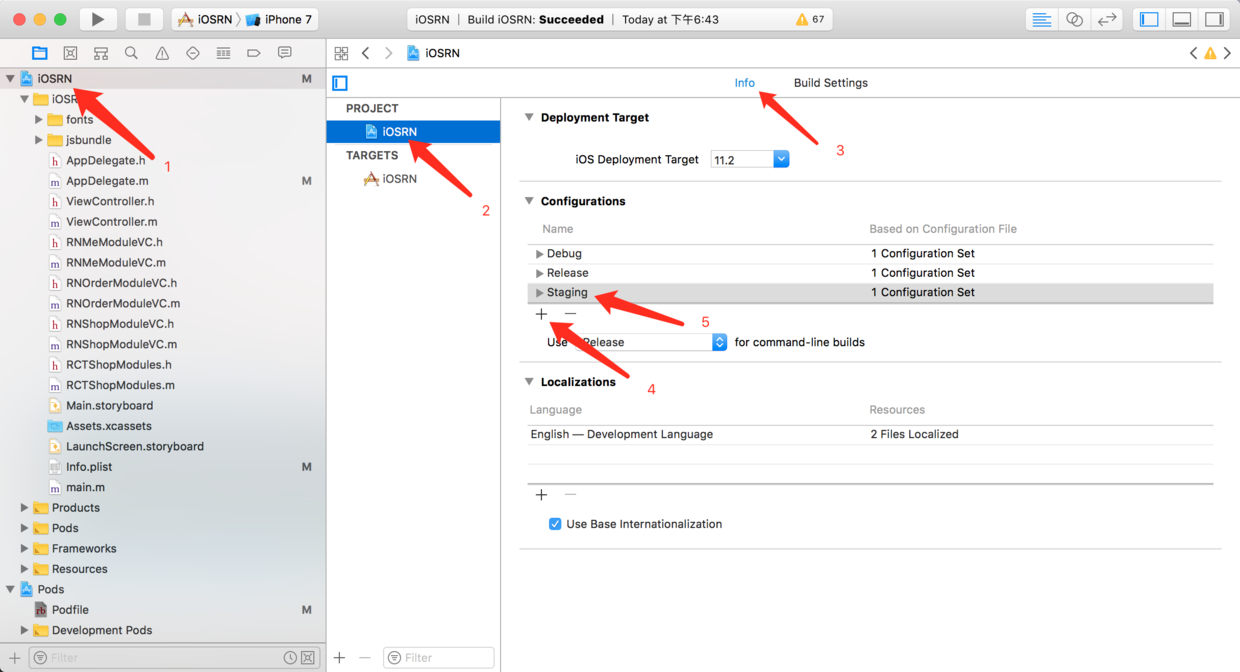
- 选择Build Settings tab,搜索Build Location -> Per-configuration Build Products Path -> Staging,将之前的值:
$(BUILD_DIR)/$(CONFIGURATION)$(EFFECTIVE_PLATFORM_NAME)改为:$(BUILD_DIR)/Release$(EFFECTIVE_PLATFORM_NAME)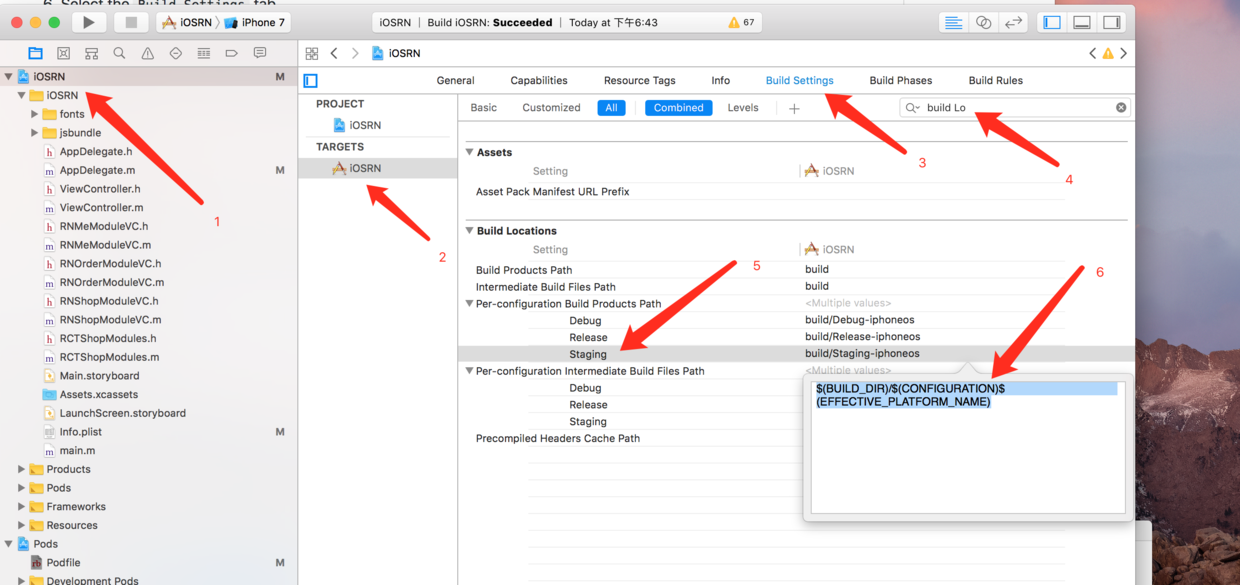
- 选择Build Settings tab,点击
+号,选择Add User-Defined Setting,将key设置为CODEPUSH_KEY,Release 和 Staging的值为前面创建的key,我们直接复制进去即可。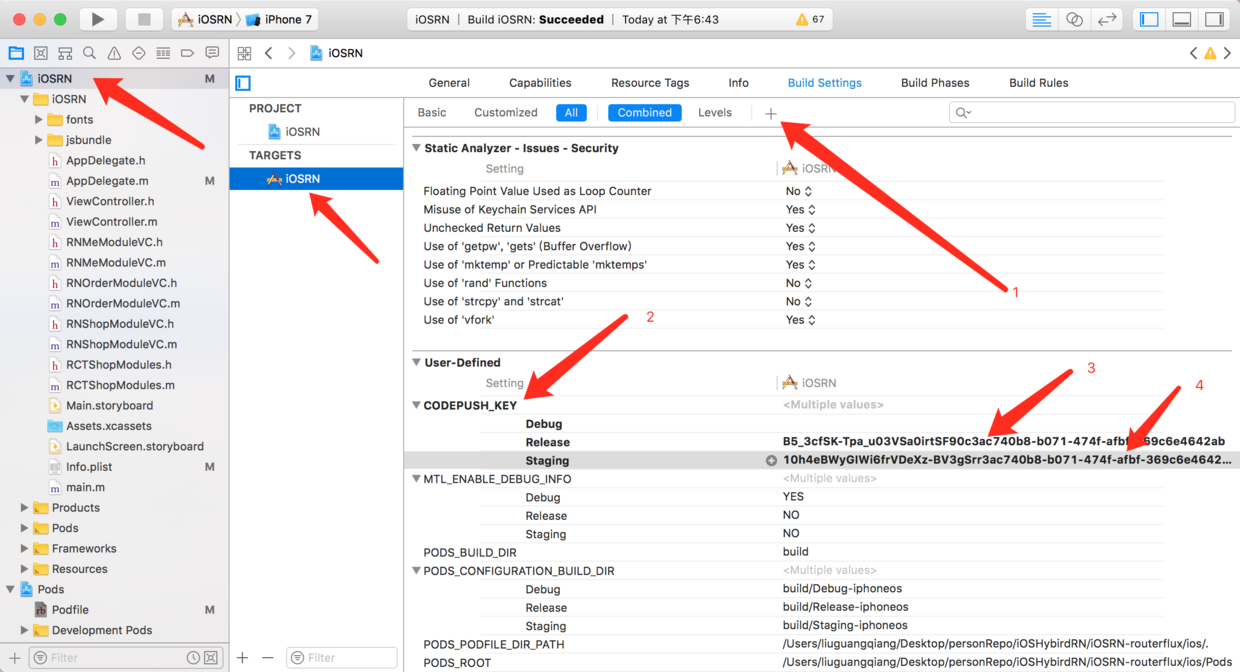
- 打开Info.plist文件,在CodePushDeploymentKey中输入
$(CODEPUSH_KEY),并修改Bundle versions为三位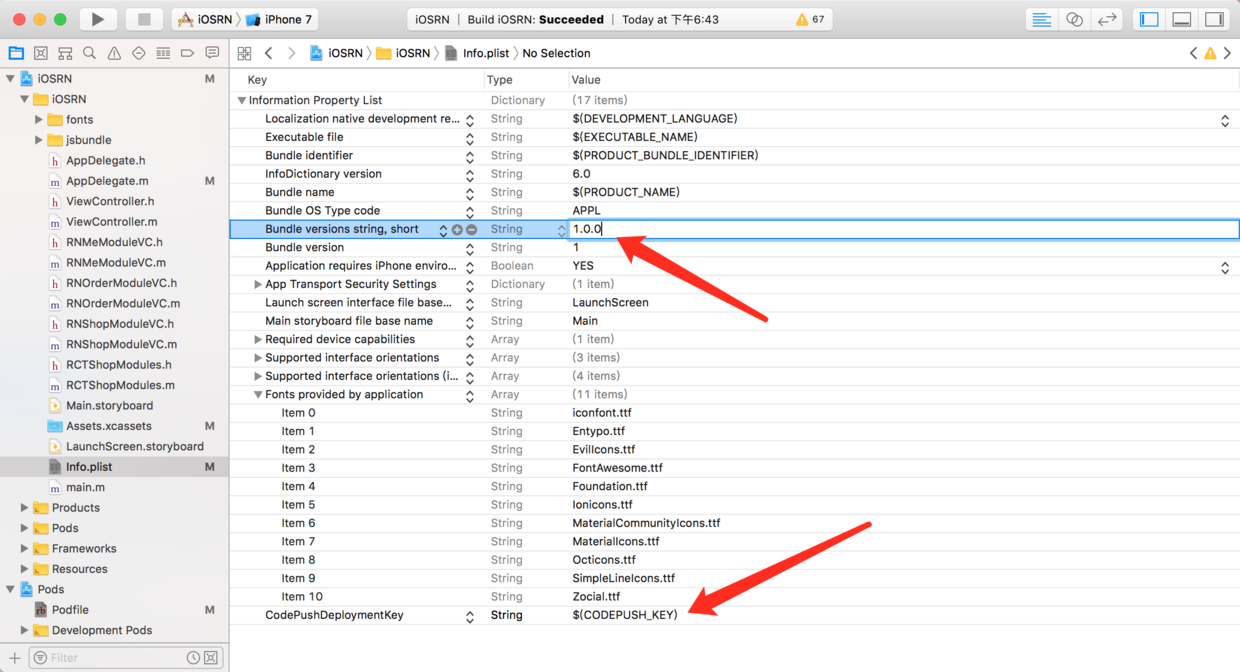
发布更新
打包并发布
code-push release-react <AppName> <Platform> --t <本更新包面向的旧版本号> --des <本次更新说明>CodePush默认是更新Staging 环境的,如果发布生产环境的更新包,需要指定--d参数:--d Production,如果发布的是强制更新包,需要加上 --m true强制更新code-push release-react iOSRNHybrid ios --t 1.0.0 --dev false --d Production --des "这是第一个更新包" --m true- 查看发布历史记录 code-push deployment history <AppName> Staging
RN相关代码
- 手动更新import CodePush from "react-native-code-push";let codePushOptions = {//设置检查更新的频率//ON_APP_RESUME APP恢复到前台的时候//ON_APP_START APP开启的时候//MANUAL 手动检查checkFrequency: CodePush.CheckFrequency.MANUAL};render中:<Button title="检查更新" onPress={() => this.update()} />update() {CodePush.checkForUpdate().then(update => {debugger;if (!update) {Alert.alert("提示", "已是最新版本--", [{text: "Ok",onPress: () => {console.log("点了OK");}}]);} else {CodePush.sync({updateDialog: {optionalIgnoreButtonLabel: "稍后",optionalInstallButtonLabel: "立即更新",optionalUpdateMessage: "有新版本了,是否更新?",mandatoryUpdateMessage: "强制更新",title: "更新提示",mandatoryContinueButtonLabel: "立即更新"},installMode: CodePush.InstallMode.IMMEDIATE, //一般更新,更新时机mandatoryInstallMode: CodePush.InstallMode.IMMEDIATE //强制更新,更新时机},status => {switch (status) {case CodePush.SyncStatus.DOWNLOADING_PACKAGE:console.log("DOWNLOADING_PACKAGE");break;case CodePush.SyncStatus.INSTALLING_UPDATE:console.log(" INSTALLING_UPDATE");break;}},progress => {console.log(progress.receivedBytes +" of " +progress.totalBytes +" received.");});}}).catch(error => {console.log(error);});}HomeScreen = CodePush(codePushOptions)(HomeScreen); //改行必不可少export default HomeScreen;
参考文章:
- [RNStudyNotes](https://github.com/crazycodeboy/RNStudyNotes/tree/master/React%20Native%E5%BA%94%E7%94%A8%E9%83%A8%E7%BD%B2%E3%80%81%E7%83%AD%E6%9B%B4%E6%96%B0-CodePush%E6%9C%80%E6%96%B0%E9%9B%86%E6%88%90%E6%80%BB%E7%BB%93)
- [CodePushDemo](https://github.com/guangqiang-liu/CodePushDemo)