相同的代码放到一个稍微不同的地方很容易导致性能数倍的差异!
每次在写业务代码的时候,喜欢把把代码按照功能职责抽象成一个函数例如一下案例:
const isPhoneNum = phoneNum=> /^(13[0-9]|14[5|7]|15[0|1|2|3|5|6|7|8|9]|18[0|1|2|3|5|6|7|8|9])\d{8}$/.test(phoneNum)
isPhoneNum('13222998778') && sendSms()
这样代码的可读性非常好,可以直接通过函数名读懂正则的含义。每次写多了,就产生了疑问,函数定义在时候的函数local本地还是定义在global区域呢?性能影响有多大?因此我写了如下两个case来验证下结果。
global.js
const add = (x, y) => {
    return x + y;
}

const test = () => {
    let result = 0;
    for (let i = 0; i < 10000000; ++i) {
        add(1, 2)
    }
    return result;
}

for (let i = 1; i <= 5; ++i) {
    console.time("global function:" + i);
    test();
    console.timeEnd("global function:" + i);
}
local.js
const test = () => {
    const add = (x, y) => {
        return x + y;
    }

    let result = 0;
    for (let i = 0; i < 10000000; ++i) {
        add(1, 2)
    }
    return result;
}

for (let i = 1; i <= 5; ++i) {
    console.time("local function:" + i);
    test();
    console.timeEnd("local function:" + i);
}
运行结果:
local function:1: 22.486ms
local function:2: 69.947ms
local function:3: 71.094ms
local function:4: 71.110ms
local function:5: 72.560ms
----------------------------
global function:1: 25.090ms
global function:2: 27.078ms
global function:3: 30.999ms
global function:4: 23.534ms
global function:5: 22.067ms
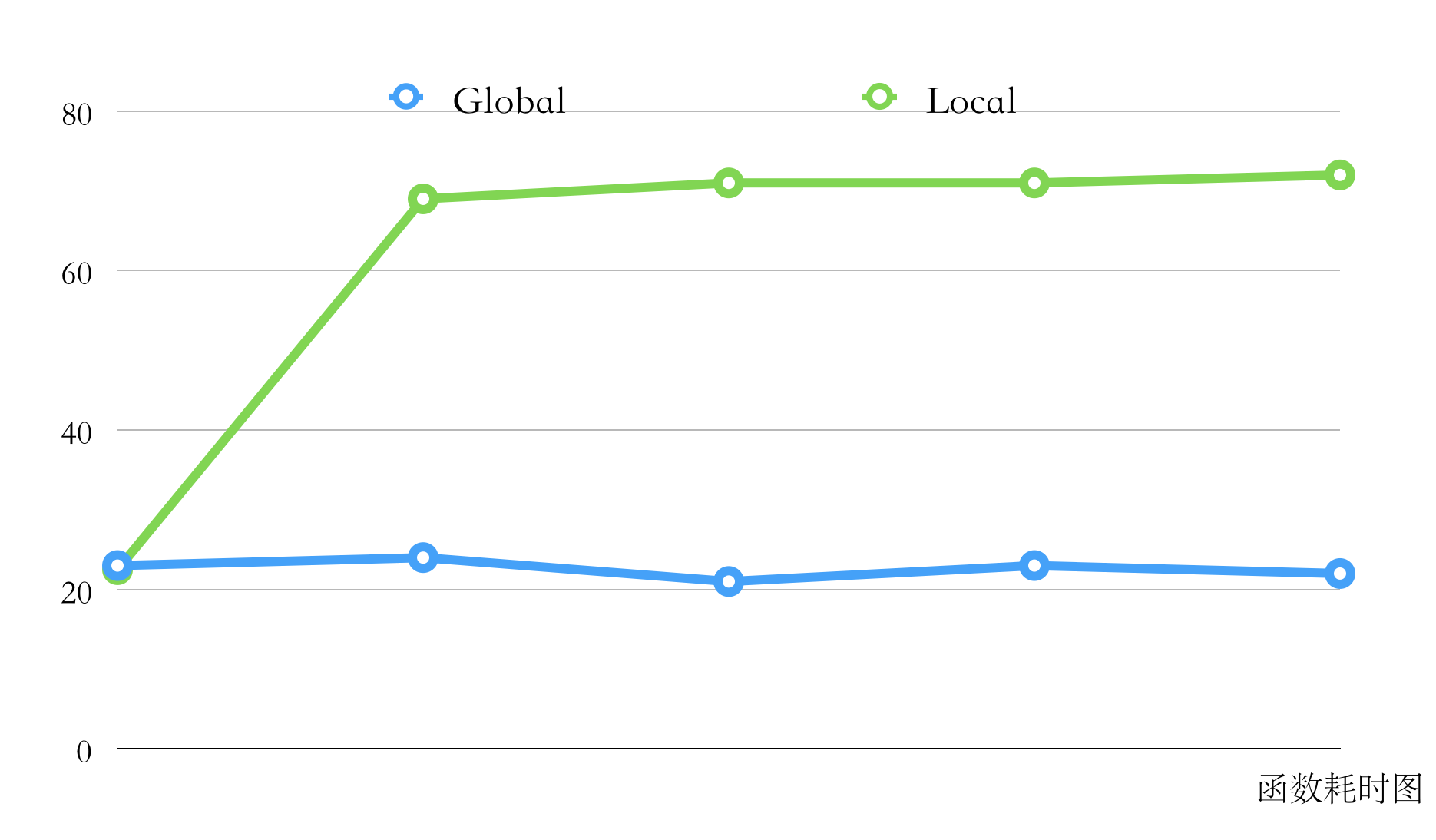
因此不要把功能函数定义在调用函数内容,比较每次调用都需要create prototype。
如有错误欢迎留言拍砖。