

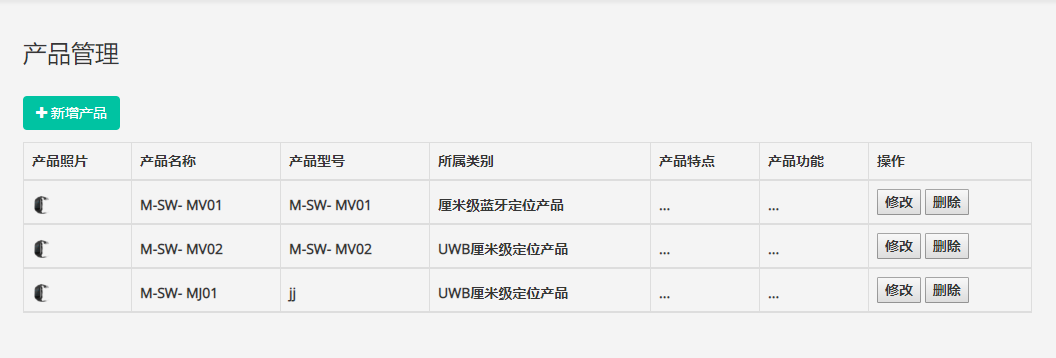
后台管理模块,添加产品照片,产品名称,产品特点等信息
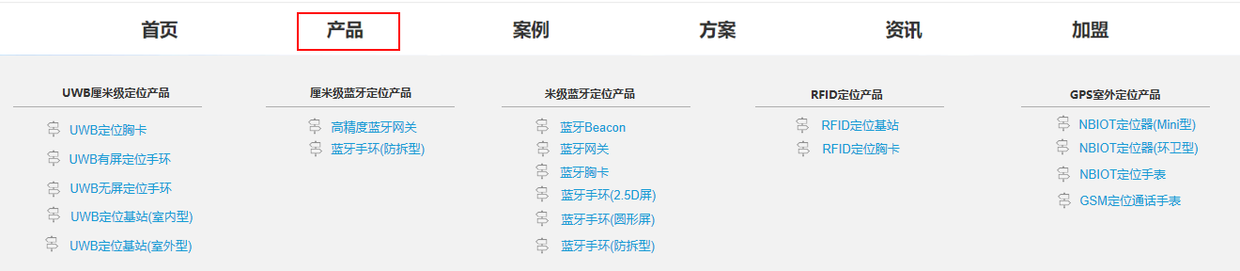
前端页面模块,根据所属类别展示信息,点击子菜单的时候,会显示出具体产品特点,产品功能介绍的界面。
<%@ page language="java" contentType="text/html; charset=UTF-8"
	pageEncoding="UTF-8"%>
<!DOCTYPE html PUBLIC "-//W3C//DTD HTML 4.01 Transitional//EN" "http://www.w3.org/TR/html4/loose.dtd">
<html>
<head>
<meta http-equiv="Content-Type" content="text/html; charset=UTF-8">
<meta name="viewport" content="width=device-width, initial-scale=1.0">


<%
	String path = request.getContextPath();
	String basePath = request.getScheme() + "://"
			+ request.getServerName() + ":" + request.getServerPort()
			+ path + "/";
%>
<base href=" <%=basePath%>">

<title>product</title>
<link rel="stylesheet" href="assets/css/amazeui.css" />
<link rel="stylesheet" href="assets/css/common.min.css" />
<link rel="stylesheet" href="assets/css/product.min.css" />
<link rel="stylesheet" href="assets/css/index.min.css" />
<link rel="stylesheet" href="assets/css/style.css" />
<link rel="stylesheet" href="assets/css/example.min.css" />
<link rel="stylesheet" href="assets/css/product.css" />
</head>
<body>
	<div class="layout">
		<!-- top  -->
		<%@include file="common/topBar.jsp"%>
        <div id="list">
			<div class="header-box  am-hide-sm" data-am-sticky
				style="background: #f2f2f2; overflow: hidden;">
				<div class="nav-contain">
					<div class="nav-inner" id="catalog">
					</div>
				</div>

			</div>

		</div>


        <!--作者:王小婷时间:2017-06-23描述:产品-->
		<div>
			<ul class=" product-show-ul" id="products">
				<!-- <li>
					<div class="product-content">
						<div class="left am-u-sm-12 am-u-md-6 am-u-lg-6 recruit-left">
							<img class="product-img"
								src="assets/images/product/M-SW- MN01.png" />
						</div>
						<div class="right am-u-sm-12 am-u-md-6 am-u-lg-6 recruit-right">

							<div class="product-show-title">
								<span>M-SW- MN01</span>
							</div>

							<div class="product-show-content">
								<div class="product-add">
									<span>产品特点:</span>
									<div>
										<p>
											支持GPS/北斗定位,Wifi定位,BLE 连接外设;<br />
										</p>
										<p>3轴IMU传感器,屏幕尺寸1.22;</p>
										<p>屏幕分辨率240*240;</p>
										<p>方形屏幕形态,350毫安电池大小,触摸屏;</p>
									</div>
								</div>
								<div class="product-add">
									<span>产品功能:</span>
									<div>
										<p>计步功能,心率检测;</p>
										<p>GSM通话功能,SOS紧急呼叫;</p>
										<p>wifi连接网络;</p>
										<p>支持网络配置,磁吸充电,语音功能;</p>
										<p>1M存储功能;</p>
										<p>环保材质,防水防尘,消费支付,电子点名,门禁结合;</p>

									</div>

								</div>
							</div>
						</div>
						<div class="clear"></div>
					</div>
				</li> -->

			</ul>
		</div>

		<!-- 底部 -->
		<%@include file="common/sideBar.jsp"%>

	</div>
	<script src="assets/js/jquery-2.1.0.js" charset="utf-8"></script>
	<script src="assets/js/amazeui.js" charset="utf-8"></script>


	<!--返回顶部-->
	<script type="text/javascript"
		src="http://hovertree.com/ziyuan/jquery/jquery-1.11.3.min.js"></script>
	<script type="text/javascript"
		src="http://hovertree.com/texiao/yestop/inc/jquery.yestop.js"></script>
	<script type="text/javascript">
		$(document).ready(function() {
			$.fn.yestop();
		});

		//加载产品目录
		$.ajax({
			url : "/intmote/productMenu.do",
			type : "get",
			success : function(data) {
				//遍历拼接html
				var htm = '';
				for (var i = 0; i < data.length; i++) {
					var type = data[i].productType;
					htm+='<ul class="product-model"  onClick="showProducts(\''+type+'\')">';
					htm+='<li class="product-title">'+data[i].productType+'</li>';
					var list = data[i].products;
					//遍历产品
					for(var j = 0; j < list.length; j++){
						htm+='<li>'+list[j].productName+'</li>';
					}
					htm+='</ul>';
				}
				$("#catalog").html(htm);
			},
			error : function(data) {
				alert("获取产品菜单失败")
			}
		});


		function showProducts(type){
			$.ajax({
				url : "/intmote/products.do?type="+type,
				type : "get",
				success : function(data) {
					//遍历拼接html
					var htm = '';
					for (var i = 0; i < data.length; i++) {
						htm+='<li><div class="product-content"><div class="left am-u-sm-12 am-u-md-6 am-u-lg-6 recruit-left">';
						htm+='<img class="product-img" src="'+data[i].productUrl+'" /></div>';
						htm+='<div class="right am-u-sm-12 am-u-md-6 am-u-lg-6 recruit-right">';
						htm+='<div class="product-show-title"><span>'+data[i].productName+'</span></div>';
						htm+='<div class="product-show-content"><div class="product-add"><span>产品特点:</span><div>';
						htm+='<p>'+data[i].productPoint+'</p>';
						htm+='</div></div><div class="product-add"><span>产品功能:</span><div>';
						htm+='<p>'+data[i].productFunc+'</p>';
						htm+='</div></div></div></div></div></li>';
					}

					$("#products").html(htm);
				},
				error : function(data) {
					alert("获取产品失败")
				}
			});
		}

		//产品菜单的显示和隐藏
		 $(function() {
			$("#list").hide();
			$("#menu").hover(function() {
				$("#list").show();
			}, function() {
				$("#list").hide();
			})
			// 鼠标移动到list的div上的时候list div不会被隐藏
			$("#list").hover(function() {
				$("#list").show();
			}, function() {
				$("#list").hide();

			})

		});
	</script>

</body>
</html>
