目录
0. 概述
1. React
2. React Native
3. 总结
React 和 React Native
是什么:
React 起源于 Facebook 的内部项目,因为该公司对市场上所有 JavaScript MVC 框架,都不满意,就决定自己写一套,用来架设 Instagram 的网站。做出来以后,发现这套东西很好用,就在2013年5月开源了。 React 不是一个 MVC 框架,仅仅是视图(V)层的库。两年后,Facebook开源了React Native。
使用JavaScript和React编写原生移动应用
React Native使你只使用JavaScript也能编写原生移动应用。 它在设计原理上和React一致,通过声明式的组件机制来搭建丰富多彩的用户界面。
React Native应用是真正的移动应用
React Native产出的并不是“网页应用”, 或者说“HTML5应用”,又或者“混合应用”。 最终产品是一个真正的移动应用,从使用感受上和用Objective-C或Java编写的应用相比几乎是无法区分的。 React Native所使用的基础UI组件和原生应用完全一致。 你要做的就是把这些基础组件使用JavaScript和React的方式组合起来。
Learn once, write anywhere(也就是一次学习,多次开发,而不是一次开发跨平台运行)
组件化开发(基于React的概念)
为什么学:
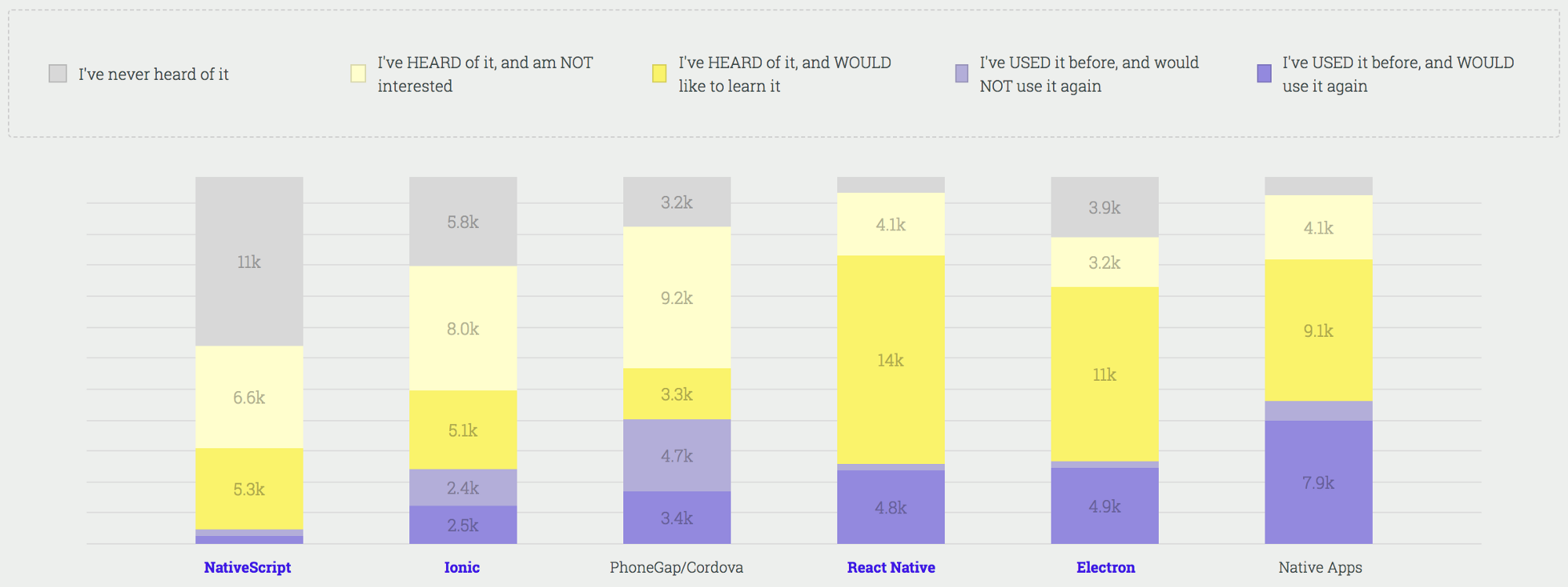
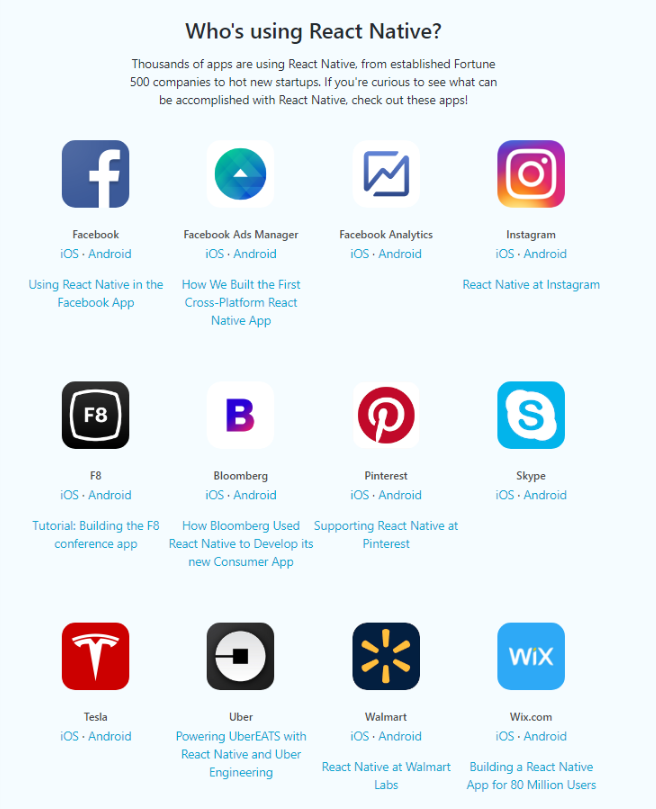
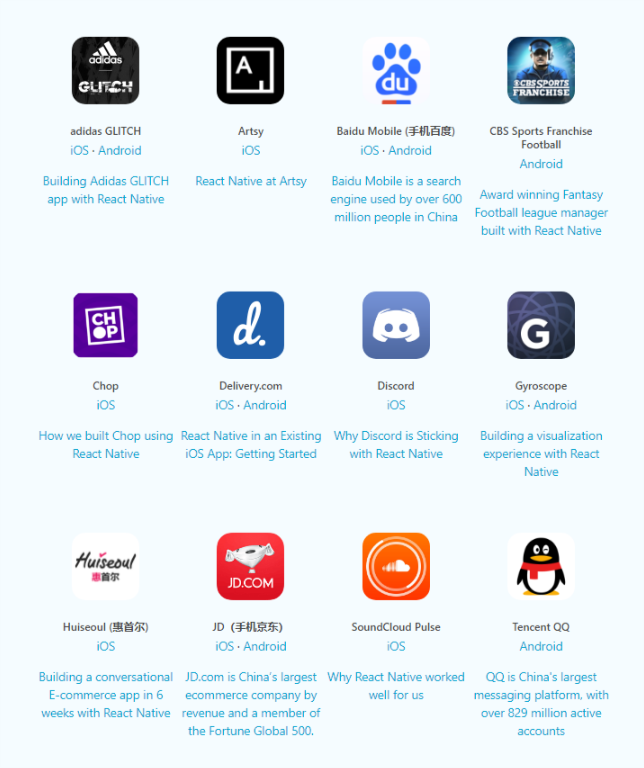
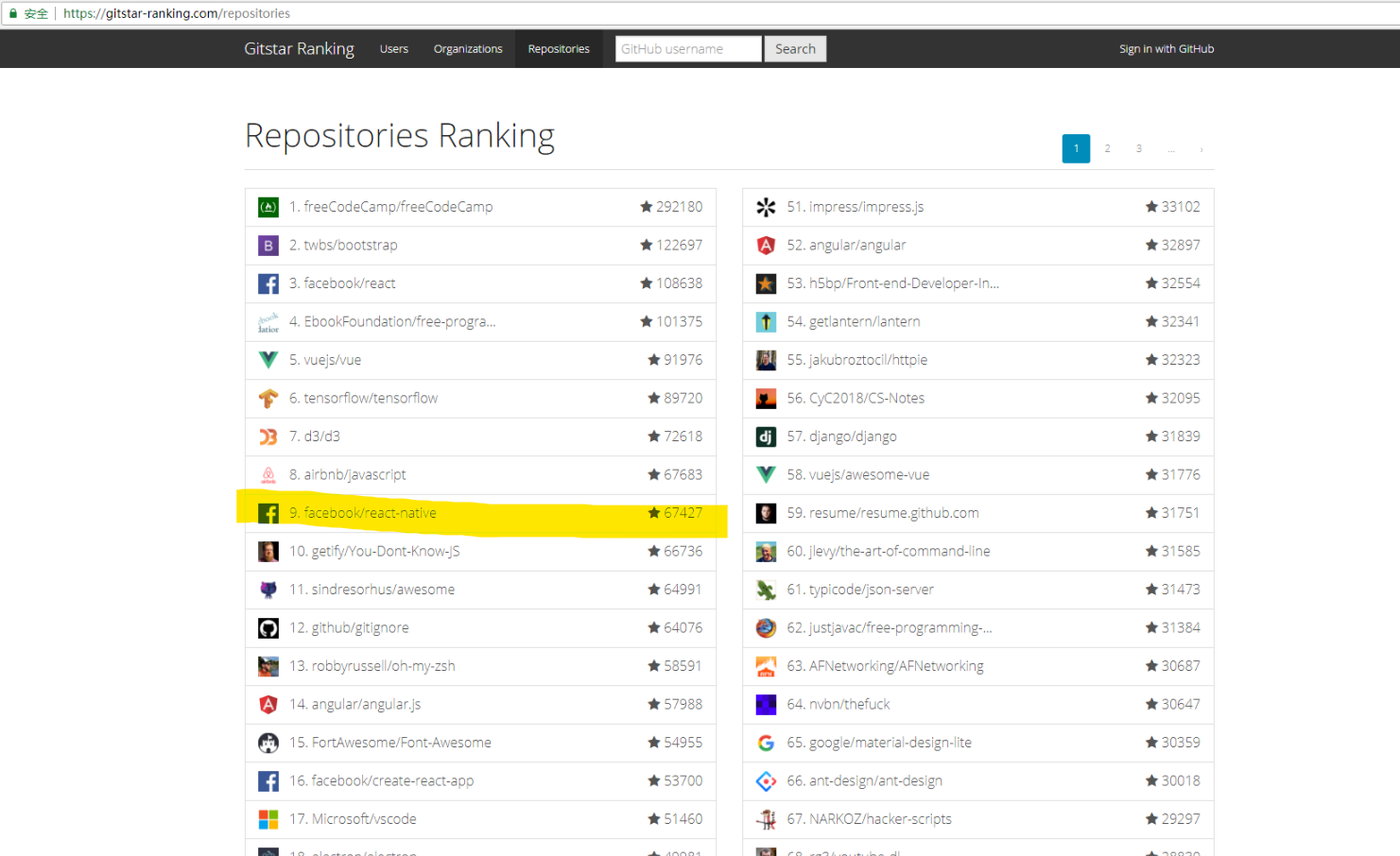
React
holle world
// 有删减,引入React,React Native,Child组件
export default class Father extends Component {
    constructor(props){
        this.state = {
            textFather: 'init'
        }
    }
    changeText(){
        this.setState({ textFather: 'hello world' })
    }
    render() {
        return (
            <View style={styles.container}>
                <Child text={this.state.textFather}></Child>
                <TouchableOpacity onPress={this.changeText.bind(this)}>
                    <Text style={styles.button}>修改Text</Text>
                </TouchableOpacity>
            </View>
        );
    }
}

export default class Child extends Component {
    render() {
        return (
            <View style={styles.container}>
                <Text style={styles.text}>
                    child:{this.props.text}
                </Text>
            </View>
        );
    }
}
View = function(Date)
虚拟DOM(Virtual DOM)
- 用 JavaScript 对象结构表示 DOM 树的结构,然后用这个树构建一个真正的 DOM 树,插到文档当中
目前,在浏览器中存在四种形态的对象
超轻量 Object.create(nulll)
轻量 一般的对象 {}
重量 带有访问器属性的对象, avalon或vue的VM对象
超重量 各种节点或window对象

有了虚拟DOM,我们是使用够轻量的对象代替超重对象作为直接操作主体,
减少对超重对象的操作
- 当状态变更的时候,重新构造一棵新的对象树。然后用新的树和旧的树进行比较,记录两棵树差异
Diff 和 Batching

Diff:
// 旧
<ul>
  <li>Duke</li>
  <li>Villanova</li>
</ul>

// 新
<ul>
  <li>Connecticut</li>
  <li>Duke</li>
  <li>Villanova</li>
</ul>

在没有key属性时执行过程:
React将改变每一个子删除重新创建,而非保持 <li>Duke</li> 和 <li>Villanova</li> 不变

// 旧
<ul>
  <li key="2015">Duke</li>
  <li key="2016">Villanova</li>
</ul>

// 新
<ul>
  <li key="2014">Connecticut</li>
  <li key="2015">Duke</li>
  <li key="2016">Villanova</li>
</ul>
执行过程:
现在 React 知道带有key '2014' 的元素是新的,对于 '2015' 和 '2016' 仅仅移动位置即可

Batching: 把所有的DOM操作搜集起来,一次性提交给真实的DOM.
- 把2所记录的差异应用到步骤1所构建的真正的DOM树上,视图就更新了
JSX
...
render() {
    return (
        <View style={styles.container}>
            <Text style={styles.text}>
                child:{this.props.text}
            </Text>
        </View>
    );
}
...
- JSX 的语法需要通过 babel-preset-react 编译后, 才能被解析执行, 点击查看
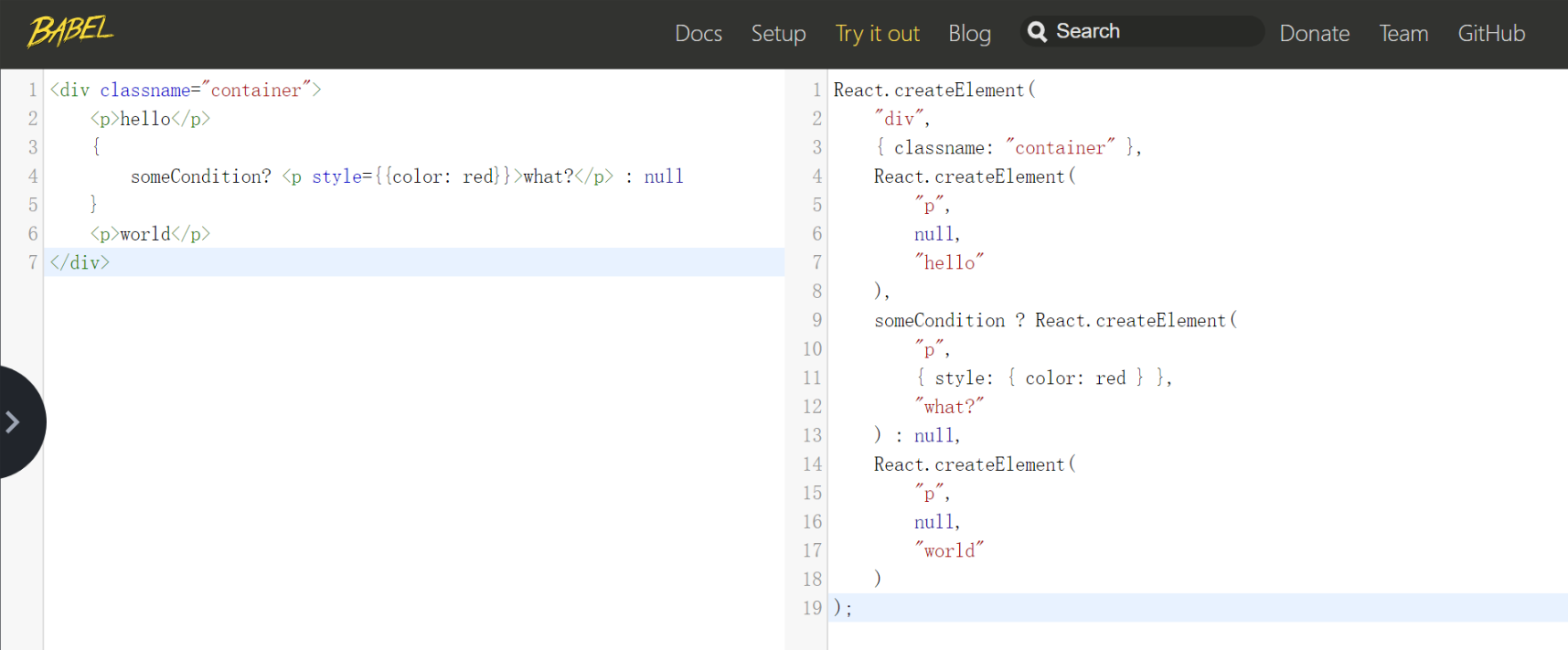
<div classname="container">
    <p>hello</p>
    {
        someCondition? <p style={{color: red}}>what?</p> : null
    }
    <p>world</p>
</div>


==>

React.createElement(
    "div",
    { classname: "container" },
    React.createElement(
        "p",
        null,
        "hello"
    ),
    someCondition ? React.createElement(
        "p",
        { style: { color: red } },
        "what?"
    ) : null,
    React.createElement(
        "p",
        null,
        "world"
    )
);
- JSX 是Javascript
- 在 JSX 中只能使用表达式,但是不能出现语句
<View>
{ list.map(item => { <Text>{item.name}</Text> }) }
</View>
- 在 JSX 中注释语法:{/* 中间是注释的内容 */}
- React 和 React Native 的 JSX 写法有些许的不同, 以及 JSX 和 HTML 也有些不同
优点:可组合型,压缩,提高抽象程度,简洁
组件
View = function(Date)
Father.js
export default class Father extends Component {
    constructor(props){
        this.state = {
            textFather: 'init'
        }
    }
    changeText(){
        this.setState({ textFather: 'hello world' })
    }
    componentWillMount() {
        console.log('Father componentWillMount')
    }
    componentDidMount() {
        console.log('Father componentDidMount')
    }
    componentWillUnmount() {
        console.log('Father componentWillUnmount')
    }
    render() {
        console.log('Father render')
        return (
            <View style={styles.container}>
                <Child text={this.state.textFather}></Child>
                <HeartBeat></HeartBeat>
                <TouchableOpacity onPress={this.changeText.bind(this)}>
                    <Text style={styles.button}>修改Text</Text>
                </TouchableOpacity>
            </View>
        );
    }
}
child.js
export default class Child extends Component {
    componentWillMount() {
        console.log('Child componentWillMount')
    }
    componentDidMount() {
        console.log('Child componentDidMount')
    }
    componentWillReceiveProps(nextProps) {
        console.log('Child componentWillReceiveProps')
        console.log(nextProps)
    }
    shouldComponentUpdate(nextProps, nextState) {
        console.log('Child shouldComponentUpdate')
        console.log(nextProps)
        console.log(nextState)
        return true;
    }
    componentWillUpdate(nextProps, nextState) {
        console.log('Child componentWillUpdate')
        console.log(nextProps)
        console.log(nextState)
    }
    componentDidUpdate(prevProps, prevState) {
        console.log('Child componentDidUpdate')
        console.log(prevProps)
        console.log(prevState)
    }
    componentWillUnmount() {
        console.log('Child componentWillUnmount')
    }
    render() {
        console.log('Child render')
        return (
            <View style={styles.container}>
                <Text style={styles.text}>
                    child:{this.props.text}
                </Text>
            </View>
        );
    }
}
heartBeat.js
export default class HeartBeat extends Component {
    componentDidMount() {
        console.log('HeartBeat componentDidMount')
        this.timer = setInterval(() => {
            console.log('HeartBeat check')
        }, 5000);
    }
    componentWillUnmount() {
        console.log('HeartBeat componentWillUnmount')
        this.timer && clearInterval(this.timer);
    }
    render() {
        return null;
    }
}
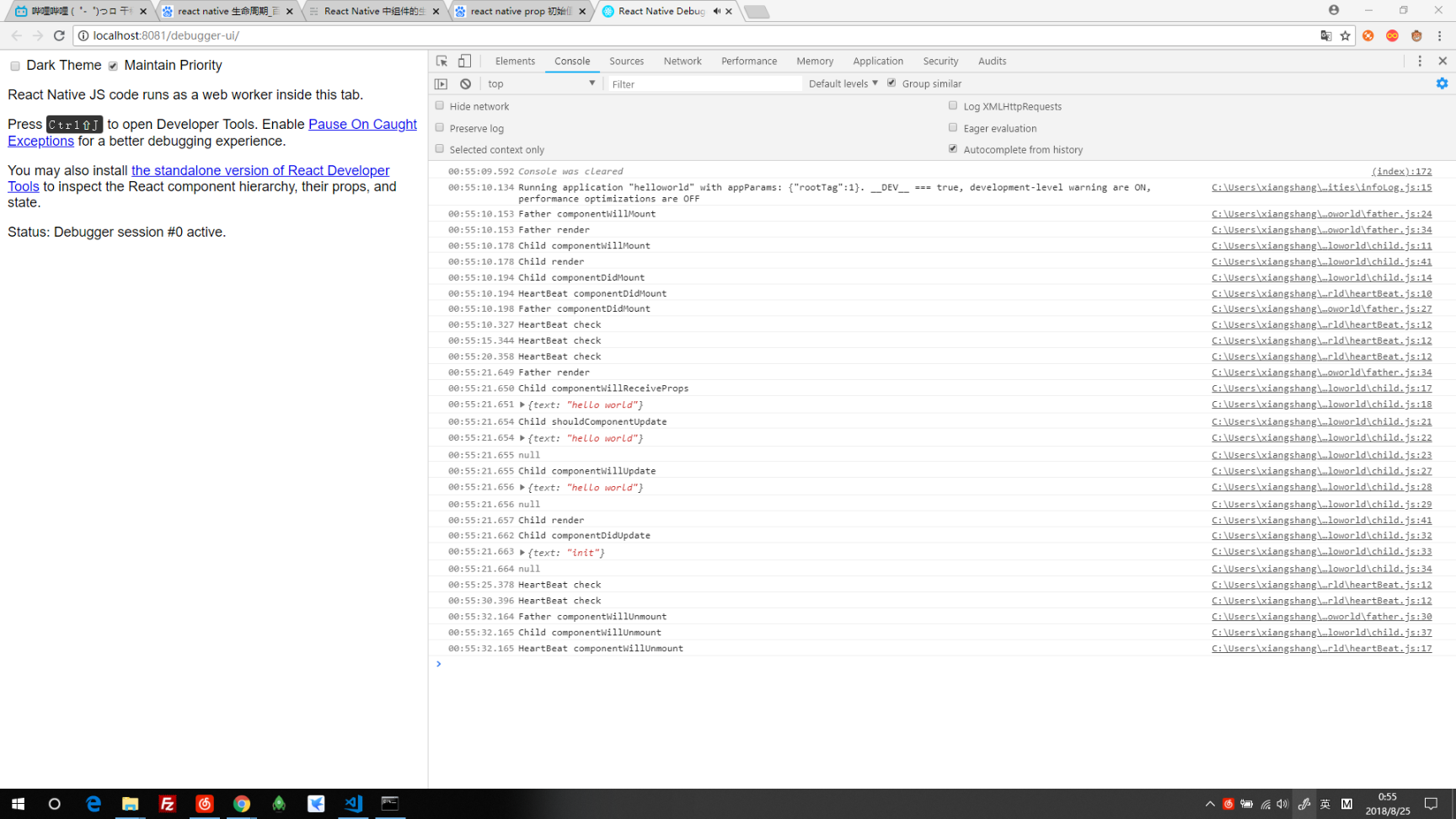
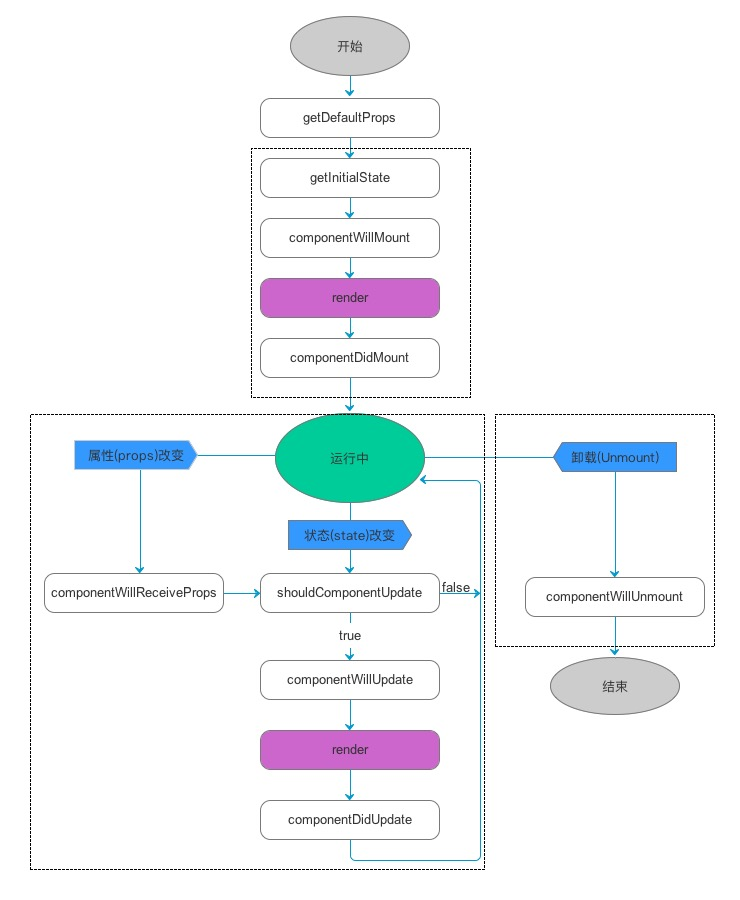
组件的生命周期
| 生命周期 | 调用次数 | 能否使用 setSate() |
|---|---|---|
| componentWillMount() | 1 | 是 |
| componentDidMount() | 1 | 是 |
| componentWillReceiveProps(nextProps ) | >=0 | 是 |
| render() | >=1 | 否 |
| shouldComponentUpdate(nextProps, nextState) | >=0 | 否 |
| componentWillUpdate(nextProps, nextState) | >=0 | 否 |
| componentDidUpdate(prevProps, prevState) | >=0 | 否 |
| componentWillUnmount() | 1 | 否 |
- 调用次数不确定的生命周期函数,一定要是一个纯函数,不能有副作用
- render的返回值是 element/Array<element>, shouldComponentUpdate返回值为bool
- 生命周期函数随RN版本可能变动,服务端渲染和浏览器运行也有区别
组件间传值
father.js
export default class Father extends Component {
    constructor(props){
        super(props);
        this.state = {
            textFather1: 'init1',
            textFather2: 'init2',
            textFather3: 'init3'
        }
    }
    changeText1(){
        this.setState({
            textFather1: 'hello world1'
        })
    }
    changeText2(){
        this._child2.updateText('hello world2');
    }
    changeText3(){
        DeviceEventEmitter.emit('update-text', 'hello world3')
    }
    render() {
        return (
            <View style={styles.container}>
                <Child1 text={this.state.textFather1}></Child1>
                <TouchableOpacity onPress={this.changeText1.bind(this)}>
                    <Text style={styles.button}>change text by props</Text>
                </TouchableOpacity>
                <Child2 text={this.state.textFather2} ref={(element) => {this._child2 = element}}></Child2>
                <TouchableOpacity onPress={this.changeText2.bind(this)}>
                    <Text style={styles.button}>change text by refs</Text>
                </TouchableOpacity>
                <Child3 text={this.state.textFather3} text={this.state.textFather3}></Child3>
                <TouchableOpacity onPress={this.changeText3.bind(this)}>
                    <Text style={styles.button}>change text by DeviceEventEmitter</Text>
                </TouchableOpacity>
            </View>
        );
    }
}
child1.js
export default class Child1 extends Component {
    constructor(props) {
        super(props)
    }
    render() {
        return (
            <View style={styles.container}>
                <Text style={styles.text}>
                    child:{this.props.text}
                </Text>
            </View>
        );
    }
}
child2.js
export default class Child2 extends Component {
    constructor(props) {
        super(props)
        this.state = {
            text: this.props.text
        }
    }
    updateText(text) {
        this.setState({
            text
        })
    }
    render() {
        return (
            <View style={styles.container}>
                <Text style={styles.text}>
                    child:{this.state.text}
                </Text>
            </View>
        );
    }
}
child3.js
export default class Child3 extends Component {
    constructor(props) {
        super(props)
        this.state = {
            text: this.props.text
        }
    }
    componentDidMount() {
        this.listener = DeviceEventEmitter.addListener('update-text', (text) => {
            this.setState({text: text})
        })
    }
    componentWillUnmount() {
        this.listener.remove();
    }
    render() {
        return (
            <View style={styles.container}>
                <Text style={styles.text}>
                    child:{this.state.text}
                </Text>
            </View>
        );
    }
}
React Native
hello world
使用 React Native 命令行工具来创建一个名为"helloworld"的新项目:
react-native init helloworld
提示:你可以使用--version参数(注意是两个杠)创建指定版本的项目。例如react-native init helloworld --version 0.55.4。注意版本号必须精确到两个小数点。今天,2018/08/27,推荐使用0.55.4,虽然新出了0.56和0.57rc,但是还有一些问题,比如windows安装不上。
没说到的东西
- 布局,flex
- 性能优化
- 路由
- 调试
- 手势
- 组件和API
对比优劣分析
VS Hybrid
- 体验极好
- 学习成本高,效率较低,跨平台八成代码公用,需要原生支持,SDK升级
VS Weex
- 不要用Weex
第三方库
- react-navigator
- react-native-router-flux
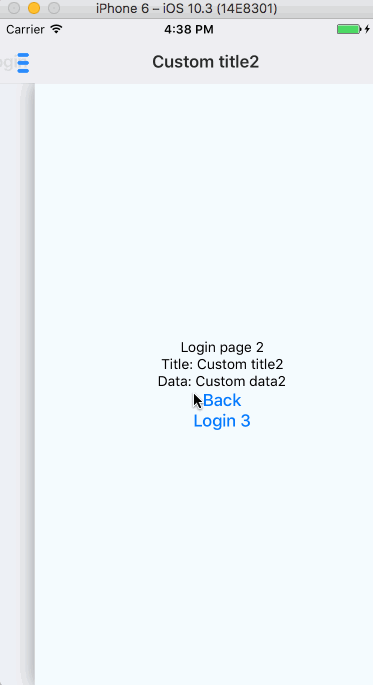
- realm

- lottie-react-native


- react-native-vector-icons

- react-native-parallax-scroll-view