

PG是一个RDBMS,由实例(instance)组成。实例(instance)包括内存(memory area)和数据库(database)
1 内存结构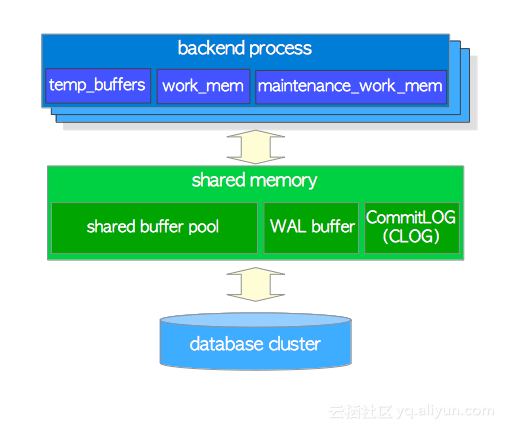
内存结构主要由两部分组成 Shared Memory Area:所有进程共享的内存区,均可访问此内存中的数据;如读取内存中的数据、生成wal buffer等 Local Memory Area:每个进程私有内存区,进程单独使用;如sql排序操作等
查看相关内存 postgres=# select name,setting,source from pg_settings where name like '%buffer%' or name like '%cache%' or name like '%mem%'; name | setting | source ----------------------------+---------+-------------------- autovacuum_work_mem | -1 | default dynamic_shared_memory_type | posix | configuration file effective_cache_size | 524288 | default maintenance_work_mem | 65536 | default shared_buffers | 16384 | configuration file temp_buffers | 1024 | default wal_buffers | 512 | override work_mem | 4096 | default (8 rows)
2 进程结构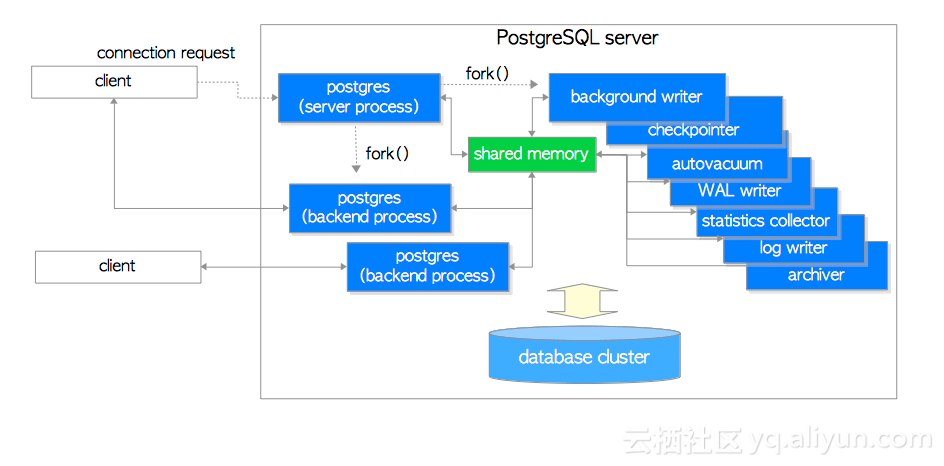
进程结构 postmaster:pg主进程,同时具有监听的能力; backed process:后台服务器进程 客户端进程申请连接数据库,postmaster监听连接,通过认真连接后,fork出后台进程backend process代替客户端进程操作数据库
writer:将共享内存中的dirty page写入到磁盘上的对象 checkpointer:写检查点信息到控制文件 logger :写错误信息到告警日志文件 WAL writer:日志写进程,将WAL buffer中的数据写入到磁盘上的WAL log Archiver:归档进程,将WAL log镜像备份,作为归档日志 autovacuum launcher:向postmaster主进程申请调用autovacuum进程 stats collector:收集统计信息 其他进程,如logical replication、pg postgres
查看进程 $ ps -ef |grep postgres pg 989 1 0 12:06 ? 00:00:00 /opt/postgres//bin/postmaster -D /opt/postgres/data pg 1011 989 0 12:06 ? 00:00:00 postgres: logger process pg 1096 989 0 12:06 ? 00:00:00 postgres: checkpointer process pg 1097 989 0 12:06 ? 00:00:00 postgres: writer process pg 1098 989 0 12:06 ? 00:00:00 postgres: wal writer process pg 1099 989 0 12:06 ? 00:00:00 postgres: autovacuum launcher process pg 1100 989 0 12:06 ? 00:00:00 postgres: archiver process pg 1101 989 0 12:06 ? 00:00:00 postgres: stats collector process pg 1102 989 0 12:06 ? 00:00:00 postgres: bgworker: logical replication launcher pg 1534 1250 0 13:56 pts/0 00:00:00 psql -d postgres pg 1535 989 0 13:56 ? 00:00:00 postgres: pg postgres [local] idle pg 1617 989 0 14:18 ? 00:00:00 postgres: pg postgres 192.168.6.1(51870) idle pg 1630 989 0 14:26 ? 00:00:00 postgres: pg postgres 192.168.6.1(51958) idle
3 存储结构
逻辑存储结构和物理存储结构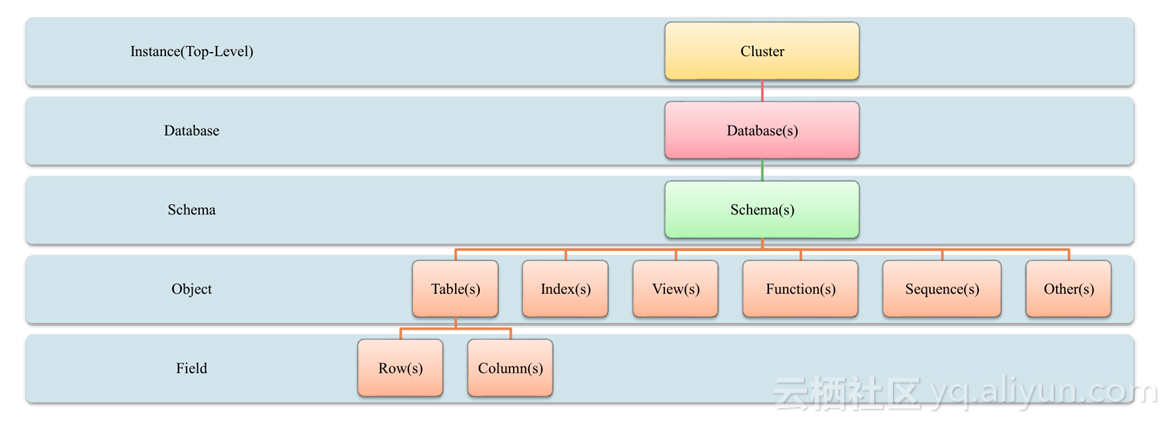
逻辑存储结构: RDBMS是由instance组成,instance下有多个database,database下可存放多个schema,schema下有多个object 物理存储结构 RDBMS是由cluster(聚簇)组成,cluster下有多个database目录,database目录下有多个schema目录,schema目录下是object对象文件
逻辑查看 查看database postgres=# select * from pg_database; datname | datdba | encoding | datcollate | datctype | datistemplate | datallowconn | datconnlimit | datlastsysoid | datfrozenxid | datminmxid | dattablespace | datacl -----------+--------+----------+-------------+-------------+---------------+--------------+--------------+---------------+--------------+------------+---------------+- ------------------ postgres | 10 | 6 | en_US.UTF-8 | en_US.UTF-8 | f | t | -1 | 13211 | 548 | 1 | 1663 | template1 | 10 | 6 | en_US.UTF-8 | en_US.UTF-8 | t | t | -1 | 13211 | 548 | 1 | 1663 | {=c/pg,pg=CTc/pg} template0 | 10 | 6 | en_US.UTF-8 | en_US.UTF-8 | t | f | -1 | 13211 | 548 | 1 | 1663 | {=c/pg,pg=CTc/pg} (3 rows) 查看数据库大小 postgres=# select pg_database_size('postgres'),pg_size_pretty(pg_database_size('postgres'));; pg_database_size | pg_size_pretty ------------------+---------------- 7812583 | 7629 kB (1 row)
查看schema postgres=# select * from pg_user; usename | usesysid | usecreatedb | usesuper | userepl | usebypassrls | passwd | valuntil | useconfig ---------+----------+-------------+----------+---------+--------------+----------+----------+----------- pg | 10 | t | t | t | t | ******** | | (1 row)
查看object pg_tables pg_views 查看对象大小 postgres=# select pg_relation_size('test'),pg_size_pretty(pg_relation_size('test')); pg_relation_size | pg_size_pretty ------------------+---------------- 8192 | 8192 bytes (1 row)
物理查看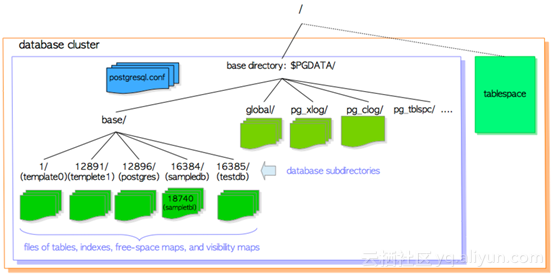
$PGHOME bin --可执行程序 data --$PGDATA include --各类.h头文件 lib --各类.so动态库文件 share --文档、配置模板文件,及扩展包的sql文件等
$PGDATA *.conf --配置文件;其中包括参数文件postgresql.auto.conf/postgresql.conf base --默认数据库存储目录;其中包括数据库的各种对象 global --包含cluster级别表 (如 pg_database 和 pg_control) 的子目录;其中包括控制文件pg_control 控制文件查看使用工具pg_controldata pg_log --数据库告警日志目录 pg_stat_tmp -统计信息的存储目录 pg_tblspc --存储了指向自定义表空间的连接文件;包括非默认表空间对象 pg_wal(Version 10 or later) --存放WAL事务日志 pg_xact(Version 10 or later) --存放事务日志,只记录事务提交的状态
其他记录日志的目录通常被废弃(Version 9.6 or earlier)
查看参数文件信息 vi postgresql.conf
查看控制文件信息 [pg@pg global]$ pg_controldata pg_control version number: 1002 Catalog version number: 201707211 Database system identifier: 6577238410286647636 Database cluster state: in production pg_control last modified: Wed 08 Aug 2018 02:06:56 PM CST Latest checkpoint location: 0/7000FF8 Prior checkpoint location: 0/7000D20 Latest checkpoint's REDO location: 0/7000FC0 Latest checkpoint's REDO WAL file: 000000010000000000000007 Latest checkpoint's TimeLineID: 1 Latest checkpoint's PrevTimeLineID: 1 Latest checkpoint's full_page_writes: on Latest checkpoint's NextXID: 0:569 Latest checkpoint's NextOID: 16387 Latest checkpoint's NextMultiXactId: 1 Latest checkpoint's NextMultiOffset: 0 Latest checkpoint's oldestXID: 548 Latest checkpoint's oldestXID's DB: 1 Latest checkpoint's oldestActiveXID: 569 Latest checkpoint's oldestMultiXid: 1 Latest checkpoint's oldestMulti's DB: 1 Latest checkpoint's oldestCommitTsXid:0 Latest checkpoint's newestCommitTsXid:0 Time of latest checkpoint: Wed 08 Aug 2018 02:06:56 PM CST Fake LSN counter for unlogged rels: 0/1 Minimum recovery ending location: 0/0 Min recovery ending loc's timeline: 0 Backup start location: 0/0 Backup end location: 0/0 End-of-backup record required: no wal_level setting: replica wal_log_hints setting: off max_connections setting: 100 max_worker_processes setting: 8 max_prepared_xacts setting: 0 max_locks_per_xact setting: 64 track_commit_timestamp setting: off Maximum data alignment: 8 Database block size: 8192 Blocks per segment of large relation: 131072 WAL block size: 8192 Bytes per WAL segment: 16777216 Maximum length of identifiers: 64 Maximum columns in an index: 32 Maximum size of a TOAST chunk: 1996 Size of a large-object chunk: 2048 Date/time type storage: 64-bit integers Float4 argument passing: by value Float8 argument passing: by value Data page checksum version: 0 Mock authentication nonce: d689960231e71d87b4ea9a8324398a84ce89709786d3c2cb1a18bbede989b1db [pg@pg global]$
查看对象object All the database objects in PostgreSQL are internally managed by respective object identifiers (OIDs), 小于1G的文件,文件命名为relfilenode 大于1G的文件,文件命名为relfilenode、relfilenode.1、relfilenode.2......
查找数据库的OID postgres=# SELECT datname, oid FROM pg_database WHERE datname = 'postgres'; datname | oid ----------+------- postgres | 13212 (1 row)
查找对象object的OID postgres=# SELECT relname, relowner,oid, relfilenode FROM pg_class WHERE relname = 'test'; relname | relowner | oid | relfilenode ---------+----------+-------+------------- test | 10 | 16384 | 16384 (1 row)
test这个object的物理路径为$PGDATA/base/13212/16384
postgres=# SELECT pg_relation_filepath('test'); pg_relation_filepath ---------------------- base/13212/16384 (1 row)
每个表对象都有2个关联的文件 分别为 "_fsm" 和 "_vm" 后缀,他们分别记录free space map and visibility map
表空间 创建新的表空间时需要指定目录,如: postgres=# create tablespace tb1 location '/opt/postgres/data/tb1';
其命名规则为 PG _ 'Major version' _ 'Catalogue version number'
PG_10_201707211
在pg_tblspc目录中会有一个软连接指向此目录
reference: http://www.interdb.jp/pg/
1 内存结构
内存结构主要由两部分组成 Shared Memory Area:所有进程共享的内存区,均可访问此内存中的数据;如读取内存中的数据、生成wal buffer等 Local Memory Area:每个进程私有内存区,进程单独使用;如sql排序操作等
查看相关内存 postgres=# select name,setting,source from pg_settings where name like '%buffer%' or name like '%cache%' or name like '%mem%'; name | setting | source ----------------------------+---------+-------------------- autovacuum_work_mem | -1 | default dynamic_shared_memory_type | posix | configuration file effective_cache_size | 524288 | default maintenance_work_mem | 65536 | default shared_buffers | 16384 | configuration file temp_buffers | 1024 | default wal_buffers | 512 | override work_mem | 4096 | default (8 rows)
2 进程结构
进程结构 postmaster:pg主进程,同时具有监听的能力; backed process:后台服务器进程 客户端进程申请连接数据库,postmaster监听连接,通过认真连接后,fork出后台进程backend process代替客户端进程操作数据库
writer:将共享内存中的dirty page写入到磁盘上的对象 checkpointer:写检查点信息到控制文件 logger :写错误信息到告警日志文件 WAL writer:日志写进程,将WAL buffer中的数据写入到磁盘上的WAL log Archiver:归档进程,将WAL log镜像备份,作为归档日志 autovacuum launcher:向postmaster主进程申请调用autovacuum进程 stats collector:收集统计信息 其他进程,如logical replication、pg postgres
查看进程 $ ps -ef |grep postgres pg 989 1 0 12:06 ? 00:00:00 /opt/postgres//bin/postmaster -D /opt/postgres/data pg 1011 989 0 12:06 ? 00:00:00 postgres: logger process pg 1096 989 0 12:06 ? 00:00:00 postgres: checkpointer process pg 1097 989 0 12:06 ? 00:00:00 postgres: writer process pg 1098 989 0 12:06 ? 00:00:00 postgres: wal writer process pg 1099 989 0 12:06 ? 00:00:00 postgres: autovacuum launcher process pg 1100 989 0 12:06 ? 00:00:00 postgres: archiver process pg 1101 989 0 12:06 ? 00:00:00 postgres: stats collector process pg 1102 989 0 12:06 ? 00:00:00 postgres: bgworker: logical replication launcher pg 1534 1250 0 13:56 pts/0 00:00:00 psql -d postgres pg 1535 989 0 13:56 ? 00:00:00 postgres: pg postgres [local] idle pg 1617 989 0 14:18 ? 00:00:00 postgres: pg postgres 192.168.6.1(51870) idle pg 1630 989 0 14:26 ? 00:00:00 postgres: pg postgres 192.168.6.1(51958) idle
3 存储结构
逻辑存储结构和物理存储结构
逻辑存储结构: RDBMS是由instance组成,instance下有多个database,database下可存放多个schema,schema下有多个object 物理存储结构 RDBMS是由cluster(聚簇)组成,cluster下有多个database目录,database目录下有多个schema目录,schema目录下是object对象文件
逻辑查看 查看database postgres=# select * from pg_database; datname | datdba | encoding | datcollate | datctype | datistemplate | datallowconn | datconnlimit | datlastsysoid | datfrozenxid | datminmxid | dattablespace | datacl -----------+--------+----------+-------------+-------------+---------------+--------------+--------------+---------------+--------------+------------+---------------+- ------------------ postgres | 10 | 6 | en_US.UTF-8 | en_US.UTF-8 | f | t | -1 | 13211 | 548 | 1 | 1663 | template1 | 10 | 6 | en_US.UTF-8 | en_US.UTF-8 | t | t | -1 | 13211 | 548 | 1 | 1663 | {=c/pg,pg=CTc/pg} template0 | 10 | 6 | en_US.UTF-8 | en_US.UTF-8 | t | f | -1 | 13211 | 548 | 1 | 1663 | {=c/pg,pg=CTc/pg} (3 rows) 查看数据库大小 postgres=# select pg_database_size('postgres'),pg_size_pretty(pg_database_size('postgres'));; pg_database_size | pg_size_pretty ------------------+---------------- 7812583 | 7629 kB (1 row)
查看schema postgres=# select * from pg_user; usename | usesysid | usecreatedb | usesuper | userepl | usebypassrls | passwd | valuntil | useconfig ---------+----------+-------------+----------+---------+--------------+----------+----------+----------- pg | 10 | t | t | t | t | ******** | | (1 row)
查看object pg_tables pg_views 查看对象大小 postgres=# select pg_relation_size('test'),pg_size_pretty(pg_relation_size('test')); pg_relation_size | pg_size_pretty ------------------+---------------- 8192 | 8192 bytes (1 row)
物理查看
$PGHOME bin --可执行程序 data --$PGDATA include --各类.h头文件 lib --各类.so动态库文件 share --文档、配置模板文件,及扩展包的sql文件等
$PGDATA *.conf --配置文件;其中包括参数文件postgresql.auto.conf/postgresql.conf base --默认数据库存储目录;其中包括数据库的各种对象 global --包含cluster级别表 (如 pg_database 和 pg_control) 的子目录;其中包括控制文件pg_control 控制文件查看使用工具pg_controldata pg_log --数据库告警日志目录 pg_stat_tmp -统计信息的存储目录 pg_tblspc --存储了指向自定义表空间的连接文件;包括非默认表空间对象 pg_wal(Version 10 or later) --存放WAL事务日志 pg_xact(Version 10 or later) --存放事务日志,只记录事务提交的状态
其他记录日志的目录通常被废弃(Version 9.6 or earlier)
查看参数文件信息 vi postgresql.conf
查看控制文件信息 [pg@pg global]$ pg_controldata pg_control version number: 1002 Catalog version number: 201707211 Database system identifier: 6577238410286647636 Database cluster state: in production pg_control last modified: Wed 08 Aug 2018 02:06:56 PM CST Latest checkpoint location: 0/7000FF8 Prior checkpoint location: 0/7000D20 Latest checkpoint's REDO location: 0/7000FC0 Latest checkpoint's REDO WAL file: 000000010000000000000007 Latest checkpoint's TimeLineID: 1 Latest checkpoint's PrevTimeLineID: 1 Latest checkpoint's full_page_writes: on Latest checkpoint's NextXID: 0:569 Latest checkpoint's NextOID: 16387 Latest checkpoint's NextMultiXactId: 1 Latest checkpoint's NextMultiOffset: 0 Latest checkpoint's oldestXID: 548 Latest checkpoint's oldestXID's DB: 1 Latest checkpoint's oldestActiveXID: 569 Latest checkpoint's oldestMultiXid: 1 Latest checkpoint's oldestMulti's DB: 1 Latest checkpoint's oldestCommitTsXid:0 Latest checkpoint's newestCommitTsXid:0 Time of latest checkpoint: Wed 08 Aug 2018 02:06:56 PM CST Fake LSN counter for unlogged rels: 0/1 Minimum recovery ending location: 0/0 Min recovery ending loc's timeline: 0 Backup start location: 0/0 Backup end location: 0/0 End-of-backup record required: no wal_level setting: replica wal_log_hints setting: off max_connections setting: 100 max_worker_processes setting: 8 max_prepared_xacts setting: 0 max_locks_per_xact setting: 64 track_commit_timestamp setting: off Maximum data alignment: 8 Database block size: 8192 Blocks per segment of large relation: 131072 WAL block size: 8192 Bytes per WAL segment: 16777216 Maximum length of identifiers: 64 Maximum columns in an index: 32 Maximum size of a TOAST chunk: 1996 Size of a large-object chunk: 2048 Date/time type storage: 64-bit integers Float4 argument passing: by value Float8 argument passing: by value Data page checksum version: 0 Mock authentication nonce: d689960231e71d87b4ea9a8324398a84ce89709786d3c2cb1a18bbede989b1db [pg@pg global]$
查看对象object All the database objects in PostgreSQL are internally managed by respective object identifiers (OIDs), 小于1G的文件,文件命名为relfilenode 大于1G的文件,文件命名为relfilenode、relfilenode.1、relfilenode.2......
查找数据库的OID postgres=# SELECT datname, oid FROM pg_database WHERE datname = 'postgres'; datname | oid ----------+------- postgres | 13212 (1 row)
查找对象object的OID postgres=# SELECT relname, relowner,oid, relfilenode FROM pg_class WHERE relname = 'test'; relname | relowner | oid | relfilenode ---------+----------+-------+------------- test | 10 | 16384 | 16384 (1 row)
test这个object的物理路径为$PGDATA/base/13212/16384
postgres=# SELECT pg_relation_filepath('test'); pg_relation_filepath ---------------------- base/13212/16384 (1 row)
每个表对象都有2个关联的文件 分别为 "_fsm" 和 "_vm" 后缀,他们分别记录free space map and visibility map
表空间 创建新的表空间时需要指定目录,如: postgres=# create tablespace tb1 location '/opt/postgres/data/tb1';
其命名规则为 PG _ 'Major version' _ 'Catalogue version number'
PG_10_201707211
在pg_tblspc目录中会有一个软连接指向此目录
reference: http://www.interdb.jp/pg/

