-
nginx的下载地址: nginx.org/en/download…
- Mainline version 开发版
- Stable version 稳定版
- Legacy version 历史版
安装
- 安装环境是Centos7,所以下面的repo里面是
centos/7,如果是其他系统请自己更改 -
vi /etc/yum.repos.d/nginx.repo[nginx] name=nginx repo baseurl=http://nginx.org/packages/centos/7/$basearch/ gpgcheck=0 enabled=1 - 安装指导: nginx.org/en/linux_pa…
- 安装: yum install nginx
- 安装完成后,nginx的服务由systemctl管理
Nginx的目录说明
- 列出安装的ngnix的配置文件位置和rpm包命令 :
rpm -ql nginx
/etc/logrotate.d/nginxNginx日志轮转,用于logrotate服务的日志切割主配置文件
/etc/nginx
/etc/nginx/conf.d /etc/nginx/conf.d/default.conf/etc/nginx/nginx.conf
cgi配置相关,fastcgi配置
/etc/nginx/fastcgi_params/etc/nginx/uwsgi_params
/etc/nginx/scgi_params
编码转换映射转化文件
/etc/nginx/koi-utf/etc/nginx/koi-win
/etc/nginx/win-utf
设置http协议的Centent-Type与扩展名对应关系
/etc/nginx/mime.types
用于配置出系统守护进程管理器管理方式
/usr/lib/systemd/system/nginx-debug.service
/usr/lib/systemd/system/nginx.service/etc/sysconfig/nginx/etc/sysconfig/nginx-debug
Nginx模块目录
/usr/lib64/nginx/modules/etc/nginx/modules
Nginx服务的启动管理的终端命令
/usr/sbin/nginx
/usr/sbin/nginx-debug
Nginx的手册和帮助文件
/usr/share/doc/nginx-1.14.0/usr/share/doc/nginx-1.14.0/COPYRIGHT
/usr/share/man/man8/nginx.8.gz
Nginx的缓存目录
/var/cache/nginx
Nginx的日志目录
/var/log/nginx
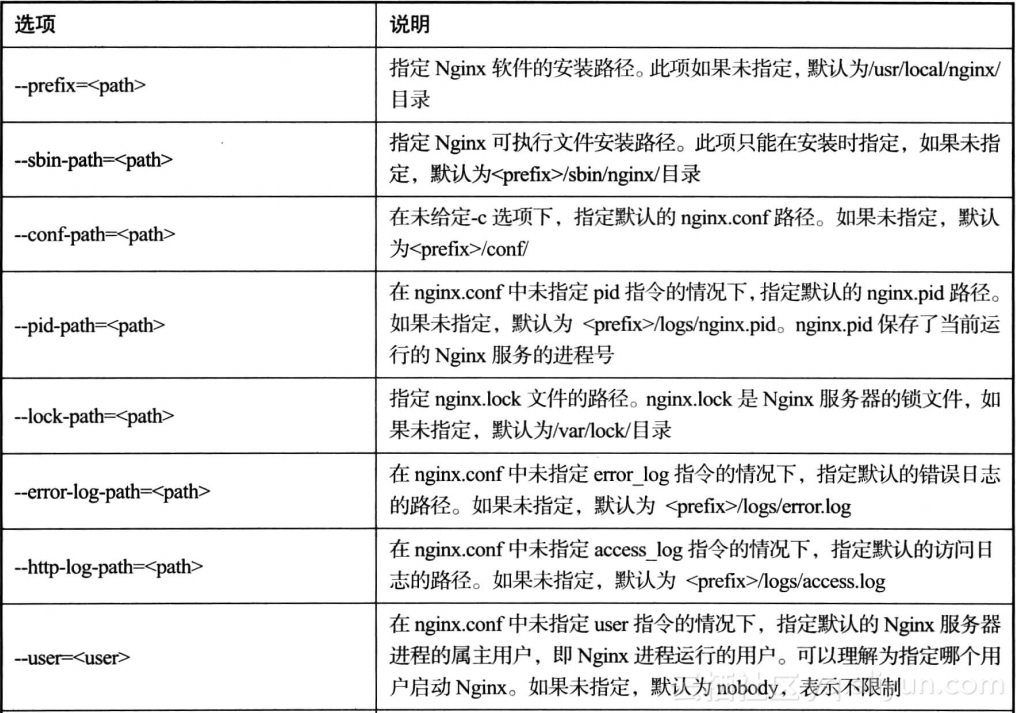
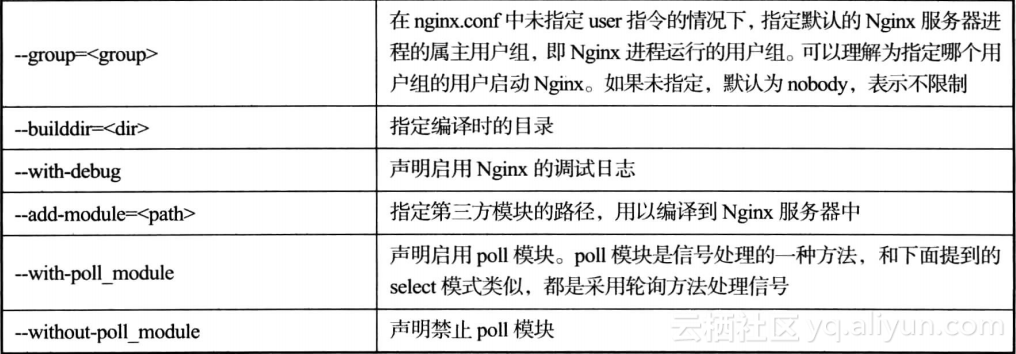
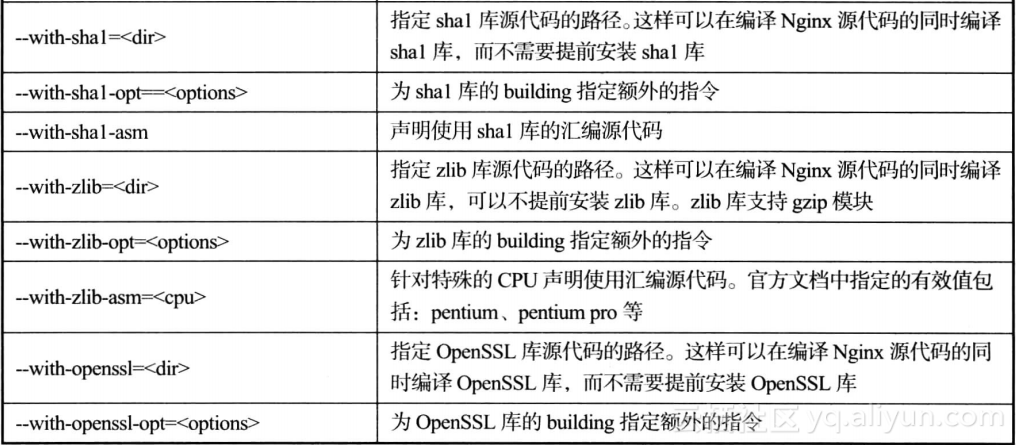
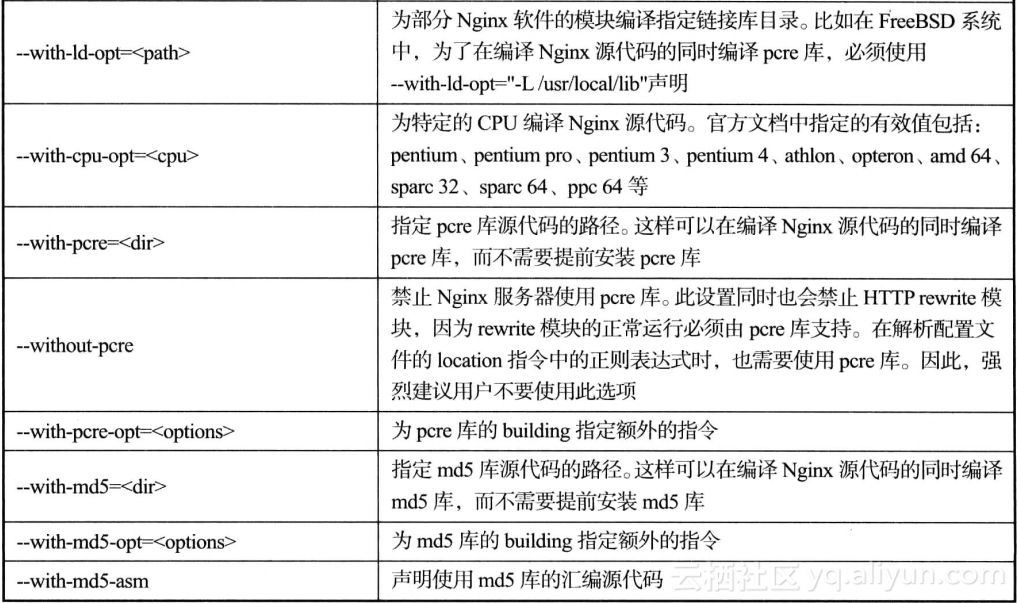
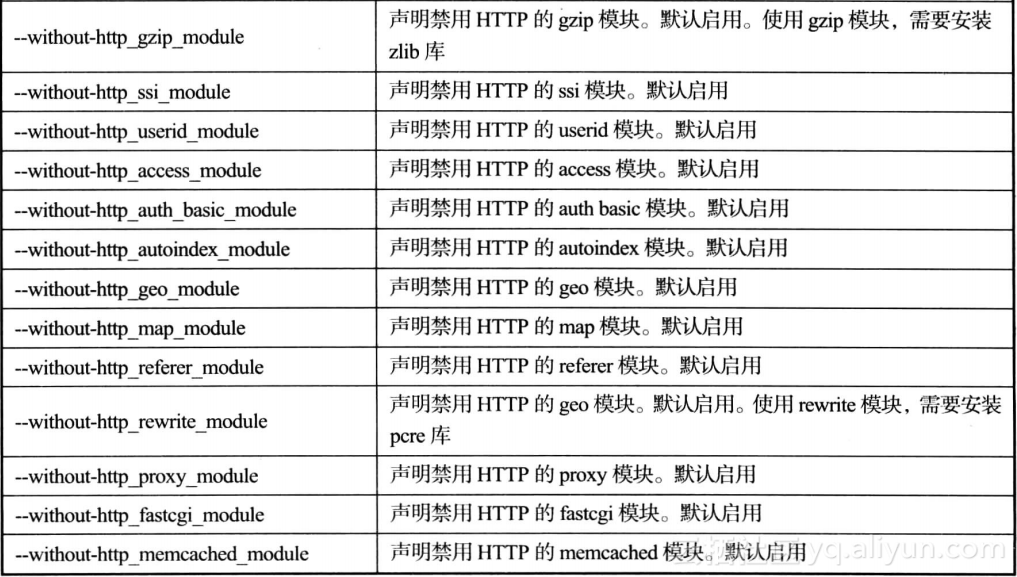
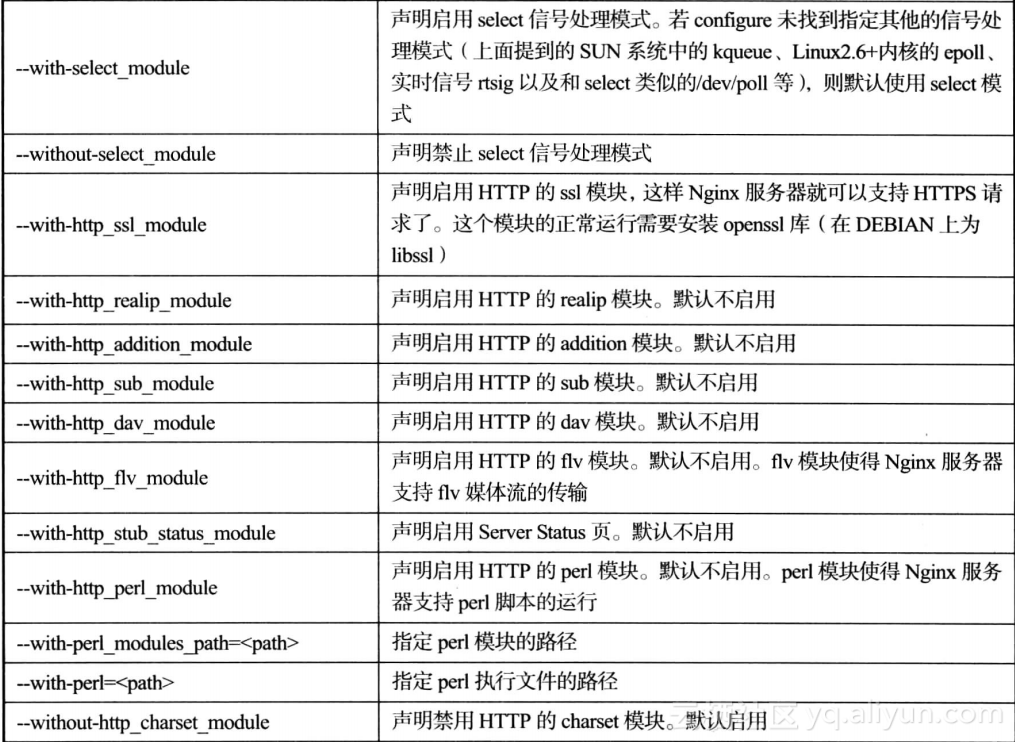
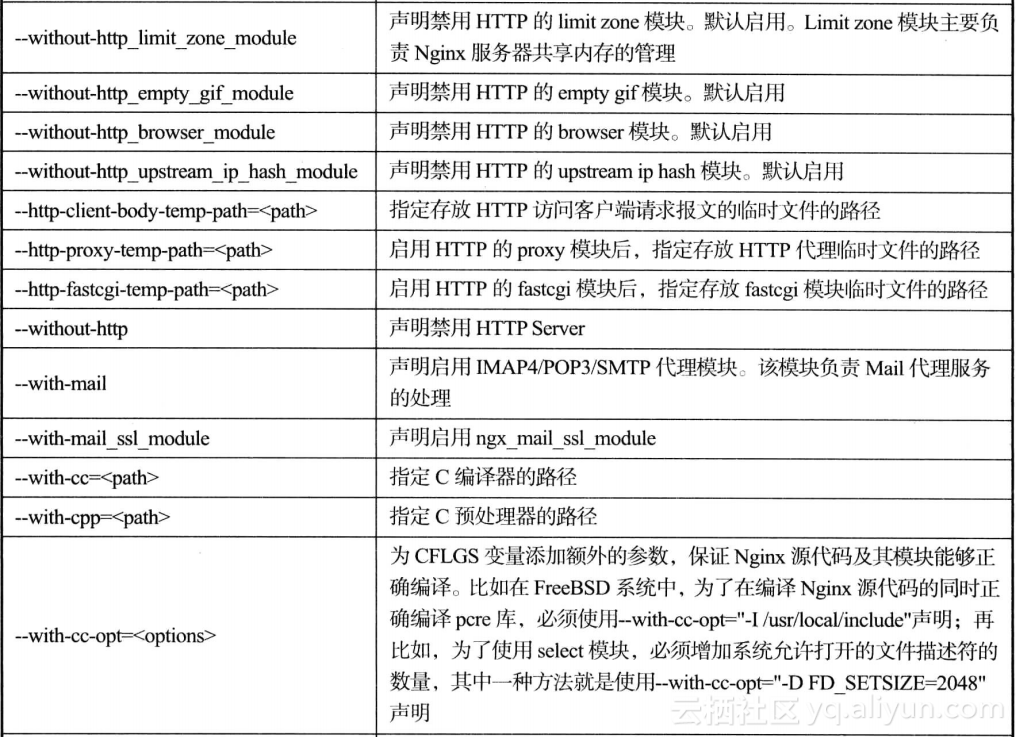
安装编译参数说明
- nginx -V 可以列出nginx安装的一些配置参数
安装目录和路径
--prefix=/etc/nginx主目录
--sbin-path=/usr/sbin/nginx 执行目录 --modules-path=/usr/lib64/nginx/modules 模块目录 --conf-path=/etc/nginx/nginx.conf 配置文件 --error-log-path=/var/log/nginx/error.log 错误日志 --http-log-path=/var/log/nginx/access.log 访问日志--pid-path=/var/run/nginx.pid pid 文件位置--lock-path=/var/run/nginx.lock nginx 放在那个路径下
执行对应模块时,Nginx所保留的临时性文件
--http-client-body-temp-path=/var/cache/nginx/client_temp--http-proxy-temp-path=/var/cache/nginx/proxy_temp--http-fastcgi-temp-path=/var/cache/nginx/fastcgi_temp--http-uwsgi-temp-path=/var/cache/nginx/uwsgi_temp--http-scgi-temp-path=/var/cache/nginx/scgi_temp
设定Nginx进程启动的用户和组用户
--user=nginx谁来跑
--group=nginx
这些就是nginx开启的模块
--with-file-aio
--with-threads
--with-http_addition_module
--with-http_auth_request_module
--with-http_dav_module
--with-http_flv_module
--with-http_gunzip_module
--with-http_gzip_static_module
--with-http_mp4_module
--with-http_random_index_module
目录中随机选择一个主页
--with-http_realip_module
--with-http_secure_link_module
--with-http_slice_module
--with-http_ssl_module
--with-http_stub_status_module Nginx客户端的状态
--with-http_sub_module HTTP内容替换
--with-http_v2_module
--with-mail
--with-mail_ssl_module
--with-stream
--with-stream_realip_module
--with-stream_ssl_module
--with-stream_ssl_preread_module
--param=ssp-buffer-size=4
-grecord-gcc-switches -m64
-mtune=generic -fPIC'
--with-cc-opt='-O2 -g -pipe -Wall -Wp,-D_FORTIFY_SOURCE=2 -fexceptions-fstack-protector-strong设定额外的参数将被添加到CFLAGS变量
--with-ld-opt='-Wl,-z,relro -Wl,-z,now -pie'设置附加的参数,连接系统库
Nginx默认配置语法
- user 设置nginx服务的系统使用用户
- worker_processes 机器核心数
- error_log 错误日志输出目录
- pid 启动pid
- worker_connections 进程最大连接数,最大65535
-
use nginx使用哪种内核模型
  http{
    server{
listen 80;
server_name localhost;
localhost/ {
root /usr/share/nginx/html;
index index.html index.html;
}
error_page 500 502 503 504 /50x.html;
location = /50x.html{
root /usr/share/nginx/html;
}
    }
    server{
...
    }
  }
- 下面是一些参数对应的意思