MacOS X APK 最新版本 反编译
文件准备
##环境准备
- apktool
- 下载保存文件名为 apktool
- 重命名apktool-xxx.jar 为apktool.jar
- 拷贝 (apktool.jar & apktool) 倒 /usr/local/bin
cd /usr/local/binsudo chmod +x apktoolsudo chmod +x apktool.jar
- dex2jar
将dex2jar-2.0.zip 解压然后拷贝其中的所有sh文件和lib倒/usr/local/bin
sudo chmod +x apktool
- jd-gui
tar xf jd-gui-osx-1.4.0.tar将JD-GUI.app文件拷到应用程序中
开始反编译
apktool d -s XXX.apk
可以得到
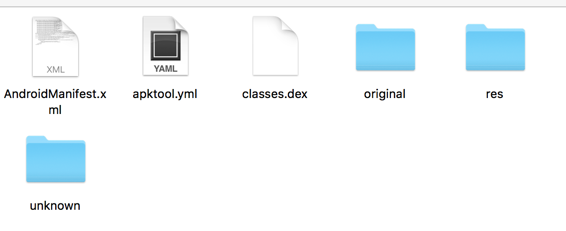
- res文件夹就是我们Android中的res文件夹
d2j-dex2jar.sh classes.dex
得到classes-dex2jar.jar 文件
- 打开JD-GUI 将classes-dex2jar.jar 文件 丢到 gui中
整个流程就完成了
其中apktool 有如下选项我们在decode的时候不添加-s选项可以直接解压出smail文件,我们也可以直接用d2j的工具将smail文件转化为java文件,这也是一个反编译的思路
usage: apktool -advance,--advanced prints advance information. -version,--version prints the version then exits usage: apktool if|install-framework [options] <framework.apk> -p,--frame-path
Stores framework files into . -t,--tag Tag frameworks using . usage: apktool d[ecode] [options] <file_apk> -f,--force Force delete destination directory. -o,--output The name of folder that gets written. Default is apk.out -p,--frame-path Uses framework files located in . -r,--no-res Do not decode resources. -s,--no-src Do not decode sources. -t,--frame-tag Uses framework files tagged by . usage: apktool b[uild] [options] <app_path> -f,--force-all Skip changes detection and build all files. -o,--output The name of apk that gets written. Default is dist/name.apk -p,--frame-path Uses framework files located in .