问题:
按照UI的设计稿完成后,产品看到实现效果忙不迭的跑来了,说我配的图,都被截断了,这不是他想要的啊。然后忙不迭的又跑去找UI了。UI说,我的锅,这就改设计图,结果:开发就得无条件的改改改!!
调研:
web端的同事告诉我,width:100%,height不设,图片就会自动撑起来拉,so easy。但是。。。,easy出来的并没有效果!!然后去查了文档,image标签给的定义是这样的:
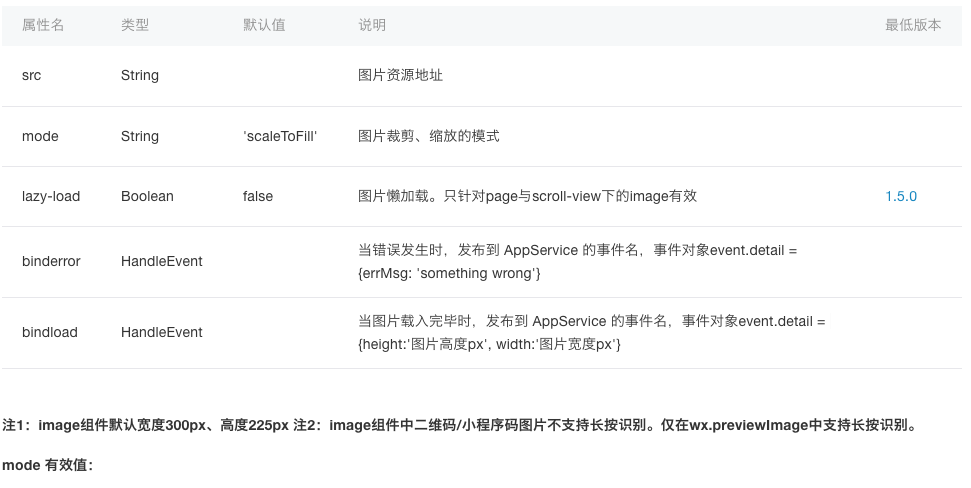
定义中有个函数叫bindload,这个函数会返回具体的图片高度,只要加载完成后,重新设置下这个style,就可以达到效果了。
实现
下面是具体的实现代码,仅供参考:
    let width = event.detail.width
    let height = event.detail.height

    let windowWidth = wx.getSystemInfoSync().windowWidth
    let imageWith = windowWidth - 30
    let percent = (height / width) * 100 * (windowWidth - 30) / windowWidth
    let imageHeight = height * imageWith / width

    let detailIndex = event.currentTarget.dataset.key

    let list = this.data.detailImageLoadList || []
    let imageValue = {
      loaded: true,
      width: imageWith,
      height: imageHeight
    }
    list[detailIndex] = imageValue
    this.setData({
      detailImageLoadList: list
    })
在wxml中,设置style:
<image style="{{detailImageLoadList[index].width ? detailImageLoadList[index].width : 0}}px; height:{{detailImageLoadList[index].height ? detailImageLoadList[index].height : 0}}px" src="" mode="aspectFill" bindload="detailPicLoad" data-key="{{index}}"/>
OK,Done!
PS: 上面设置style的长语句,看着非常丑,可有优化的方法?(来自一个初学web的小伙伴)