这是一篇关于如何在Rancher 2.0上创建OpenFaaS栈的文章。我假设你已经准备好了Rancher 2.0集群,如果没有请按照官方文档创建一个。
下面的视频展示了如何创建OpenFaaS栈,并在实际中使用:
这里是创建栈的compose.yml文件:
version: "2"
services:
  alertmanager:
    image: functions/alertmanager:latest
    labels:
      io.rancher.container.pull_image: always
    stop_signal: SIGTERM
    restart: always
    stdin_open: true
    tty: true
    scale: 1
  faas-rancher:
    environment:
    - CATTLE_URL=${CATTLE_URL}
    - CATTLE_ACCESS_KEY=${CATTLE_ACCESS_KEY}
    - CATTLE_SECRET_KEY=${CATTLE_SECRET_KEY}
    - FUNCTION_STACK_NAME=faas-functions
    image: kenfdev/faas-rancher:v3
    labels:
      io.rancher.container.pull_image: always
    stop_signal: SIGTERM
    restart: always
    stdin_open: true
    tty: true
    scale: 1
  gateway:
    environment:
    - functions_provider_url=http://faas-rancher:8080/
    image: functions/gateway:0.6.6-beta1
    labels:
      io.rancher.container.pull_image: always
    ports:
    - 8080:8080/tcp
    stop_signal: SIGTERM
    restart: always
    stdin_open: true
    tty: true
    scale: 1
  prometheus:
    command: [-config.file=/etc/prometheus/prometheus.yml, -storage.local.path=/prometheus,
      -storage.local.memory-chunks=10000, '--alertmanager.url=http://alertmanager:9093']
    image: kenfdev/prometheus:latest-cattle
    labels:
      io.rancher.container.pull_image: always
    stop_signal: SIGTERM
    restart: always
    stdin_open: true
    tty: true
    scale: 1
我在Rancher 2.0中找到一个比较酷的点是compose.yml文件中的变量都可以在UI中进行配置,如下图所示:
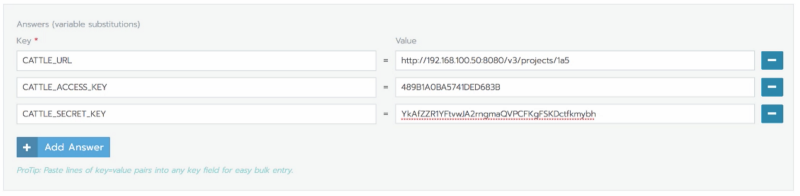
新的faas-rancher项目已经转换为使用Rancher的v3版本的API,而且基本上已经通过了测试。欢迎贡献和反馈。
openfaas-cn是由一群openfaas的中文爱好者建立维护,Github地址,欢迎小伙伴们一起贡献。