 Kong
Kong
Kong可以说是API的得力助手。对需要从事API管理的广大开发员来说,它是最出色的工具之一。Kong是开源工具,具有可扩展性和模块性,可以在任何一种基础设施上运行。多年来,Kong一直在支持优秀的开发项目,比如Mashape(世界上规模最大的API市场)。最棒的是,Kong得到了强大的Nginx的支持。
主要功能
-
Kong可灵活扩展:只要增添更多的服务器实例,它就能横向扩展,毫无问题,那样你可以支持更多流量,同时确保网络延迟很短。
-
Kong可在任何地方运行:它可以部署在单个或多个数据中心环境的私有云或公有云上。它还支持大多数流行的操作系统,比如Linux、Mac和Windows。Kong包括许多实用技巧,以便针对大多数现代平台完成安装和配置工作。
- Kong具有模块性:它可以与新的插件协同运行,扩展基本功能。可将你的API与许多不同的插件整合起来,以增强安全、分析、验证、日志及/或监测机制。最好的例子之一就是Nginx Plus插件(getkong.org/plugins/ngi…
- 开源及企业:虽然Kong是开源工具,可供每个人免费使用,但你也能获得企业版,企业版通过电子邮件、电话和聊天提供了快速支持,此外还提供初始安装、从第三方API管理工具来迁移、紧急补丁、热修复程序及更多特性。
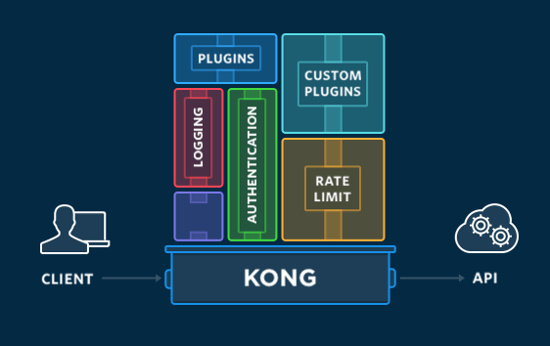 Kong
Api管理解决方案
Kong
Api管理解决方案
工作原理
Kong可与两种不同的组件协同工作:
- Nginx:Kong使用经过修改的Nginx web服务器作为代理服务器,该服务器负责处理API请求。
- Apache Cassandra 或者 Postgresql:这用作数据存储(Datastore)服务器,负载存储来自Kong操作的数据。
Kong安装
从下载Kong的配置
yum install https://bintray.com/kong/kong-community-edition-rpm/download_file?file_path=centos/7/kong-community-edition-0.14.0.el7.noarch.rpm
安装Kong
yum install epel-release
yum install yum install kong-community-edition-0.14.0.*.noarch.rpm
数据库安装
kong支持2种数据库存储(postgreSQL 和 Cassandra )
postgreSQL官网:www.postgresql.org/download/
Cassandra官网:cassandra.apache.org/download/
postgreSQL
安装 Repository RPMyum install https://download.postgresql.org/pub/repos/yum/9.6/redhat/rhel-7-x86_64/pgdg-centos96-9.6-3.noarch.rpm
安装客户端 Packages
yum install postgresql96
安装服务端 Packages
yum install postgresql96-server
初始化数据库
/usr/pgsql-9.6/bin/postgresql96-setup initdb
切换用户(不能使用root启动postgresql)
su - postgres
启动数据库
systemctl enable postgresql-9.6
systemctl start postgresql-9.6
创建Kong所需要的库
#su - postgres
-bash-4.2$ psql
postgres=# CREATE USER kong; CREATE DATABASE kong OWNER kong;
postgres=# \
修改postgreSQL配置文件
vim /var/lib/pgsql/9.6/data/postgresql.conf
修改为:
listen_addresses = '*'
修改认证:
vim /var/lib/pgsql/9.6/data/pg_hba.conf
# "local" is for Unix domain socket connections only
local   all             all              trust
Kong配置
cp /etc/kong/kong.conf.default /etc/kong/kong.conf
初始化Kong Database
kong migrations up
启动Kong
kong start
验证是否启动成功
curl -i http://localhost:8001/
FQA
Docker中安装postgresql报错
在Docker中初始化的时候报
Failed to get D-Bus connection: Operation not permitted
failed to find PGDATA setting in postgresql-9.6.service
原因
Docker 中没有 systemctl 命令,postgresql96-setup中的脚本使用了systemctl 查找数据路径
解决办法
通过阅读代码可以得出 数据路径为 /var/lib/pgsql/9.6/data/
然后 将 PGDATA注释 重新赋值 PGDATA=/var/lib/pgsql/9.6/data/
#PGDATA=`systemctl show -p Environment "${SERVICE_NAME}.service" |
#                sed 's/^Environment=//' | tr ' ' '\n' |
#                sed -n 's/^PGDATA=//p' | tail -n 1`
#if [ x"$PGDATA" = x ]; then
#    echo "failed to find PGDATA setting in ${SERVICE_NAME}.service"
#    exit 1
#fi
PGDATA=/var/lib/pgsql/9.6/data/
然后在执行
/usr/pgsql-9.6/bin/postgresql96-setup initdb
/usr/pgsql-9.6/bin/pg_ctl -D /var/lib/pgsql/9.6/data/ -l logfile start
提示 server starting 服务启动
没有修改数据库配置认证
Error: [postgres error] could not retrieve server_version: FATAL: Ident authentication failed for user "kong"

  Run with --v (verbose) or --vv (debug) for more details
没有Kong初始化数据库
如果数据库版本过低也会提示
[root@kong kong]# kong start
 [warn] postgres database 'kong' is missing migration: (response-transformer) 2016-05-04-160000_resp_trans_schema_changes
Error: /usr/local/share/lua/5.1/kong/cmd/start.lua:37: [postgres error] the current database schema does not match this version of Kong. Please run `kong migrations up` to update/initialize the database schema. Be aware that Kong migrations should only run from a single node, and that nodes running migrations concurrently will conflict with each other and might corrupt your database schema!

  Run with --v (verbose) or --vv (debug) for more details