序言:
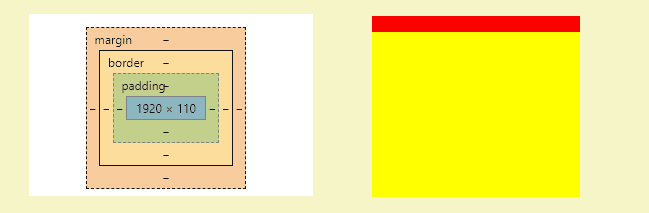
最近在慕课网学了一些视频,顺便整理下css盒模型知识点
感觉视频还可以,如果也想看视频的话,可以留言或者私信
CSS盒模型
- 基本概念:标准模型+IE模型
- 标准模型和E模型区别
- CSS如何设置这两种模型
- JS如何设置获取盒模型对应的宽和高
- 实例题(根据盒模型解释边距重叠)
- BFC(边距重叠解决方案)
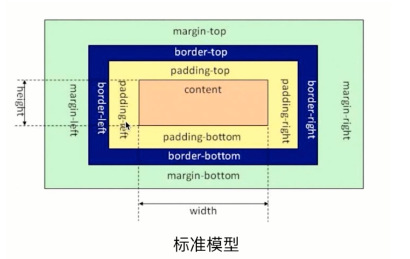
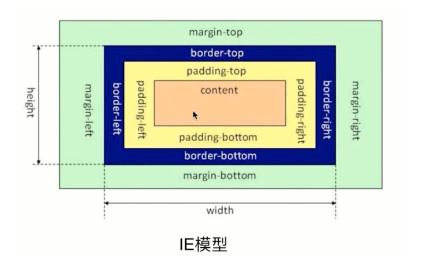
区别:
标准模型中,盒模型的宽高只是内容(content)的宽高
而在IE模型中盒模型的宽高是内容(content)+填充(padding)+边框(border)的总宽高。
css如何设置两种模型
CSS3 的属性 box-sizing

    /* 标准模型 */

box-sizing:content-box;

    /*IE模型*/

box-sizing:border-box;
JS如何设置获取盒模型对应的宽和高
dom.style.width/height    //局限在内联样式

dom.currentStyle.width/height    //渲染后的样式,局限IE支持

window.getComputedStyle(dom).width/height    兼容Firefox、chrome会好一些

dom.getBoundingClientRect().width/height    // 根据元素在视窗中的绝对位置来获取宽高的

dom.offsetWidth/offsetHeight
边距重叠解决方案
BFC(简称:块级格式化上下文)
BFC原理(BFC的渲染机制)
- 元素的垂直方向的间距会发生重叠
- bfc的区域不会与浮动区域的box重叠用来清除浮动的,
- bfc是一个页面上的独立的容器,外面的元素不会影响bfc里的元素,反过来,里面的也不会影响外面的
- 计算bfc高度的时候,浮动元素也会参与计算
如何创建BFC
- float属性不为none(脱离文档流)
- position为absolute或fixed
- display为inline-block,table-cell,table-caption,flex,inine-flex
- overflow不为visible
- 根元素
BFC使用场景
- 自适应多栏布局
- 清除内部浮动
- 垂直margin重叠
例子---两个相邻box的margin会发生重叠,取最大值
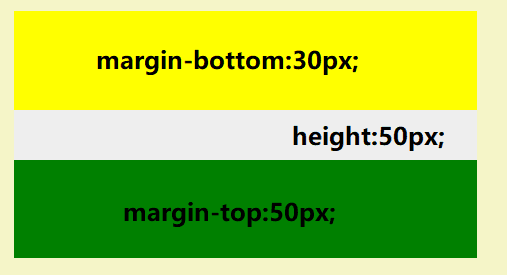
创建BFC后
<article style="overflow: hidden;"></article>
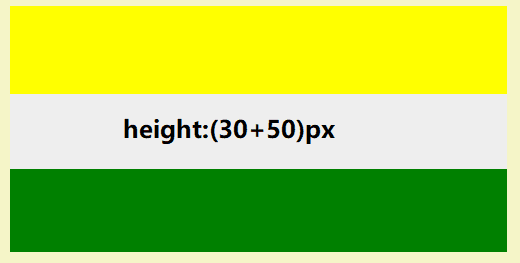
源码css
            .child1 {
                height: 100px;
                margin-bottom: 30px;
                background: yellow;
            }

            .child2 {
                height: 100px;
                margin-top: 50px;
                background: green;
            }
源码html
        <article>
            <div class="child1"></div>
        </article>
        <article>
            <div class="child2"></div>
        </article>
例二
看完代码,想下父盒子的高度到底是100px还是110px;
<!DOCTYPE html>
<html>

<head>
    <meta charset="utf-8">
    <title>CSS盒模型</title>
    <style media="screen">
        html * {
            margin: 0;
            padding: 0;
        }
    </style>
</head>

<body>
    <section class="box" id="sec">
        <style media="screen">
            #sec {
                background: #f00;
            }

            .child {
                height: 100px;
                margin-top: 10px;
                background: yellow;
            }
        </style>
        <article class="child"></article>
    </section>
</body>

</html>
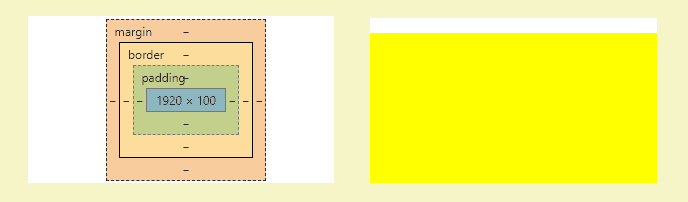
创建BFC后
 #sec {
                background: #f00;
                overflow:hidden;
      }