

通过上一文章分析我们找到了ViewRootImpl类中的performTraversals方法是测量布局和绘制的起点。并且由Activity中的setContentView触发。这一篇我们将从performTraversals方法分析View的测量过程。
  private void performTraversals() {
        ...
        //测量
        if (!mStopped) {
            int childWidthMeasureSpec = getRootMeasureSpec(mWidth, lp.width);
            int childHeightMeasureSpec = getRootMeasureSpec(mHeight, lp.height);
            performMeasure(childWidthMeasureSpec, childHeightMeasureSpec);
        }
    }
    //布局
    if (didLayout) {
        performLayout(lp, desiredWindowWidth, desiredWindowHeight);
        ...
    }


    if (!cancelDraw && !newSurface) {
        if (!skipDraw || mReportNextDraw) {
            if (mPendingTransitions != null && mPendingTransitions.size() > 0) {
                for (int i = 0; i < mPendingTransitions.size(); ++i) {
                    mPendingTransitions.get(i).startChangingAnimations();
                }
                mPendingTransitions.clear();
            }
            //绘制
            performDraw();
        }
    }
    ...
}每个View的MeasureSpec都是由父容器的MeasureSpec+自己的LayoutParams转换成自己的MeasureSpec。转换的源码在View基础看过。这里我们主要看对于DecorView来说,它已经是顶层view了,没有父容器,那么它的MeasureSpec怎么来的?
回到源码我们看通过getRootMeasureSpec方法获取的
/**
 * @param windowSize 屏幕的宽或者高
 *
 * @param rootDimension 下边展开这个参数
 *
 * @return 根视图的度量规范
 */
private static int getRootMeasureSpec(int windowSize, int rootDimension) {
    int measureSpec;
    switch (rootDimension) {

        case ViewGroup.LayoutParams.MATCH_PARENT:
            //这种模式就是撑满布局,大小是布局大小windowSize。模式的EXACTLY
            measureSpec = MeasureSpec.makeMeasureSpec(windowSize, MeasureSpec.EXACTLY);
            break;
        case ViewGroup.LayoutParams.WRAP_CONTENT:
            //包裹内容,最大大小势能超过windowSize,模式是AT_MOST
            measureSpec = MeasureSpec.makeMeasureSpec(windowSize, MeasureSpec.AT_MOST);
            break;
        default:
            // 确定的值,那么就是吧确定的rootDimension给他
            measureSpec = MeasureSpec.makeMeasureSpec(rootDimension, MeasureSpec.EXACTLY);
            break;
    }
    return measureSpec;
}
第二个参数是中的值是获取的这个对象的宽度和高度
final WindowManager.LayoutParams mWindowAttributes = new WindowManager.LayoutParams();他在默认情况下都是match_parment,也就意味着根视图能给子类全部的屏幕大小区域。
到目前为止,就已经获得了一份DecorView的MeasureSpec,然后调用performMeasure方法
private void performMeasure(int childWidthMeasureSpec, int childHeightMeasureSpec) {
    Trace.traceBegin(Trace.TRACE_TAG_VIEW, "measure");
    try {
        mView.measure(childWidthMeasureSpec, childHeightMeasureSpec);
    } finally {
        Trace.traceEnd(Trace.TRACE_TAG_VIEW);
    }
}
这个方法很简单,直接调用mView的measure方法,并且传入根布局的度量规范,那么这个mView是谁呢?
通过查看源码可以知道这个mView就是DecorView
这是ViewRootImpl#setView
public void setView(View view, WindowManager.LayoutParams attrs, View panelParentView) {
    synchronized (this) {
        if (mView == null) {
            mView = view;
到此:
- 我们得到了DecorView的MeasureSpec
- 调用了DecorView中的measure方法并传入DecorView的MeasureSpec
现在我们去找DecorView中的measure方法
由于DecorView继承自FrameLayout,而FrameLayout和DecorView和ViewGroup中没有measure方法(final表示不能重写,所以它的子类不可能有measure方法),因此调用的是父类View的measure方法,我们直接看它的源码
public final void measure(int widthMeasureSpec, int heightMeasureSpec) {

    onMeasure(widthMeasureSpec, heightMeasureSpec);
}onMeasure(widthMeasureSpec, heightMeasureSpec)方法。并且DecorView重写了onMeasure方法,在DecorView#onMeasure方法中主要是进一步确定自己的
widthMeasureSpec、heightMeasureSpec,并调用super.onMeasure(widthMeasureSpec, heightMeasureSpec)即FrameLayout#onMeasure方法由于不同的ViewGroup有着不同的性质,那么它们的onMeasure必然是不同的,因此这里不可能把所有布局方式的onMeasure方法都分析一遍,因此这里选择了FrameLayout的onMeasure方法来进行分析,其它的布局方式读者可以自行分析。那么我们继续来看看这个方法:
注意:这里没有调用super.onMeasure方法
@Override
protected void onMeasure(int widthMeasureSpec, int heightMeasureSpec) {
    //获取当前布局内的子View数量
    int count = getChildCount();
    ////遍历所有类型不为GONE的子View,
    for (int i = 0; i < count; i++) {
        final View child = getChildAt(i);
        if (mMeasureAllChildren || child.getVisibility() != GONE) {
            // 这个方法的作用:结合layoutparmas(使用者参数)生成子类的测量规范
            //调用测量子类的方法,传入上边生成的测量规范
            measureChildWithMargins(child, widthMeasureSpec, 0, heightMeasureSpec, 0);
        }
    }

    //这两个方法都是View中的方法,
    //设置DecorView的大小 这里设置的是屏幕的宽高
    setMeasuredDimension(resolveSizeAndState(maxWidth, widthMeasureSpec, childState),
            resolveSizeAndState(maxHeight, heightMeasureSpec,
                    childState << MEASURED_HEIGHT_STATE_SHIFT));

}
protected void measureChildWithMargins(View child,
                                       int parentWidthMeasureSpec, int widthUsed,
                                       int parentHeightMeasureSpec, int heightUsed) {
    //获取子类的布局参数
    final MarginLayoutParams lp = (MarginLayoutParams) child.getLayoutParams();

    //使用者和父布局共同商量的结果
    final int childWidthMeasureSpec = getChildMeasureSpec(parentWidthMeasureSpec,
            mPaddingLeft + mPaddingRight + lp.leftMargin + lp.rightMargin
                    + widthUsed, lp.width);
    final int childHeightMeasureSpec = getChildMeasureSpec(parentHeightMeasureSpec,
            mPaddingTop + mPaddingBottom + lp.topMargin + lp.bottomMargin
                    + heightUsed, lp.height);
    //调用测量子类的方法
    child.measure(childWidthMeasureSpec, childHeightMeasureSpec);
}
child对象调用的measure是View中的measure,而View中的measure又调用线性布局中的onMeasure方法,那么我们去找线性布局中的onMeasure方法
@Override
protected void onMeasure(int widthMeasureSpec, int heightMeasureSpec) {
    if (mOrientation == VERTICAL) {
        measureVertical(widthMeasureSpec, heightMeasureSpec);
    } else {
        measureHorizontal(widthMeasureSpec, heightMeasureSpec);
    }
}
这里我们要画一张图片来表示DecorView的布局
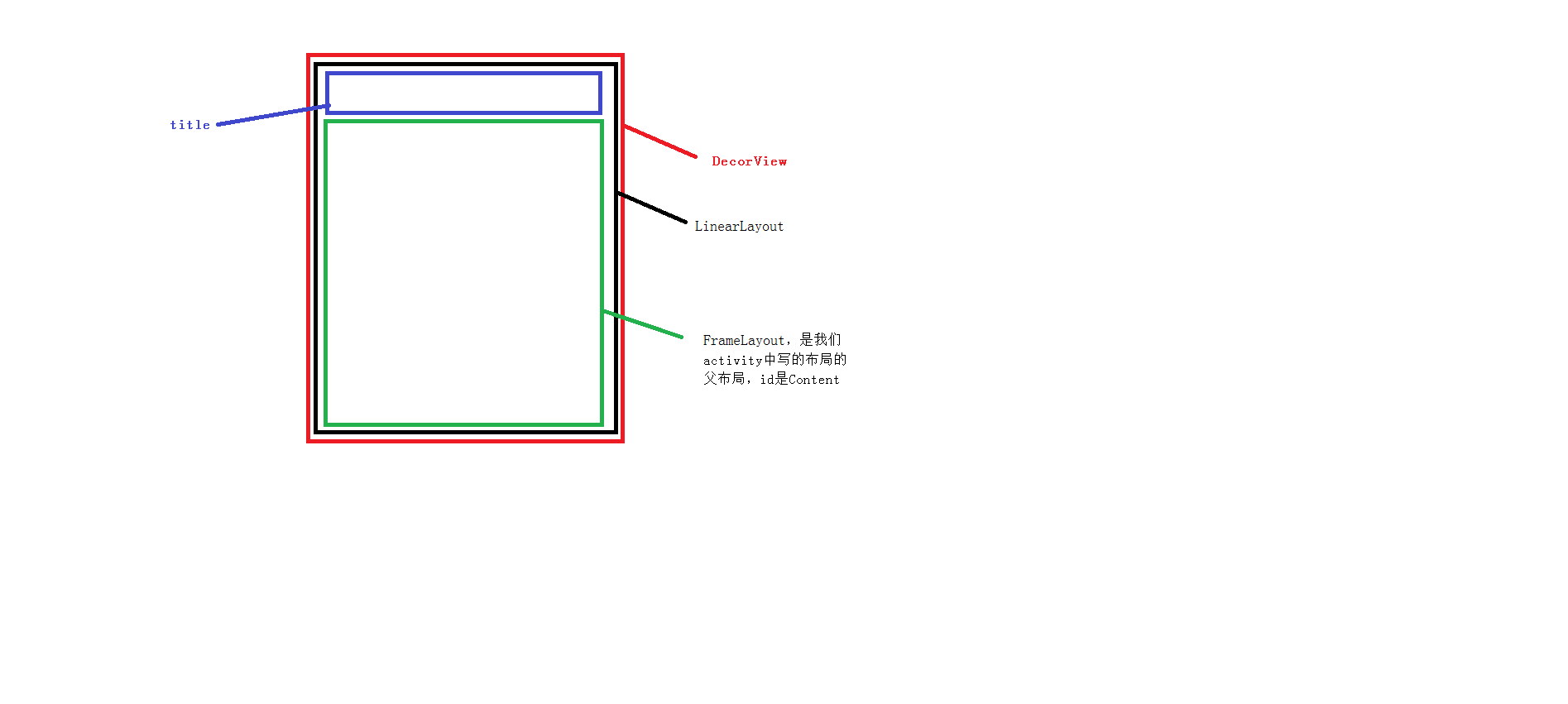
所以我们需要继续去看measureVertical的源码里边的关键代码
父容器的MeasureSpec+自己的LayoutParams转换成自己的MeasureSpec
final int childWidthMeasureSpec = getChildMeasureSpec(widthMeasureSpec,
        mPaddingLeft + mPaddingRight +
                lp.leftMargin + lp.rightMargin, lp.width);
继续调用子类的测量
child.measure(childWidthMeasureSpec,
        MeasureSpec.makeMeasureSpec(childHeight, MeasureSpec.EXACTLY));
同时设置自己大小
setMeasuredDimension(resolveSizeAndState(maxWidth, widthMeasureSpec, childState),
heightSizeAndState);当子View是基本View的时候,他不会再去调用子类的测量方法,仅仅去获取父容器的MeasureSpec+自己的LayoutParams转换成自己的MeasureSpec,然后只需要设置自己的大小即可。
到此关于VIew的测量分析完毕。
梳理一下测量流程:
1.Activity中的setContentView方法触发ViewRootImpl中的performTraversals方法执行
2.performTraversals方法触发performMeasure方法执行(注意这里的MeasureSpec生成方法是make创建的)
3.DecorView对象调用View#measure方法执行
4.View#measure方法调用不同的onMeasure方法执行(因为子类重写了)
5.在继承ViewGroup的onMeasure方法中会做两件事
- 获取父容器的MeasureSpec+子ViewLayoutParams转换成自己的MeasureSpec然后调用子View的测量方法(measureChildWithMargins方法内逻辑即使)
- 通过setMeasuredDimension方法设置自己的大小
6.在继承View的onMeasure方法中只会做一件事,参考父容器的MeasureSpec,然后通过setMeasuredDimension方法设置自己的大小
分析源码需要注意:
- 调用measure方法是同一个方法
- 调用onMeasure确是不同的onMeasure方法。
而且可以发现:测量的时候是先去测量子View的大小,之后再去测量自己的大小
,
