

如上图所示,在vue组件生命周期内一共经历:
- beforeCreate:组件创建前
- created:组件创建
- beforeMount:组件挂载前
- mounted:组件挂载
- beforeUpdate:组件更新前
- updated:组件更新
- beforeDestroy:组件销毁前
- destroyed:组件销毁
上面分别是对于组件生命周期的一些概述,但是并没有去结合代码去看,感觉带入感并没有这么强,下面就用代码引入的方法详细的向大家介绍二、代码解读
<template>
  <div ref="myapp" id="app">
    <img src="./assets/logo.png">
    <div>{{message}}</div>
    <button @click="tokenMsg">说点什么</button>
  </div>
</template>

<script>
  export default {
    data(){
      return{
        message: '我是一个菜鸟'
      }
    },
    methods: {
      tokenMsg(){
        this.message += "+1";
      }
    },
    beforeCreate() {
      console.group('beforeCreate 创建前状态===============》');
      console.log("%c%s", "color:red" , "el     : " + this.$refs.myapp);
      console.log("%c%s", "color:red","data   : " + this.$data);
      console.log("%c%s", "color:red","message: " + this.message)
    },
    created: function () {
      console.group('created 创建完毕状态===============》');
      console.log("%c%s", "color:red","el     : " + this.$refs.myapp);
      console.log("%c%s", "color:red","data   : " + this.$data);
      console.log("%c%s", "color:red","message: " + this.message);
    },
    beforeMount: function () {
      console.group('beforeMount 挂载前状态===============》');
      console.log("%c%s", "color:red","el     : " + (this.$refs.myapp));
      console.log(this.$refs.myapp);
      console.log("%c%s", "color:red","data   : " + this.$data);
      console.log("%c%s", "color:red","message: " + this.message);
    },
    mounted: function () {
      console.group('mounted 挂载结束状态===============》');
      console.log("%c%s", "color:red","el     : " + this.$refs.myapp);
      console.log(this.$refs.myapp);
      console.log("%c%s", "color:red","data   : " + this.$data);
      console.log("%c%s", "color:red","message: " + this.message);
    },
    beforeUpdate: function () {
      console.group('beforeUpdate 更新前状态===============》');
      console.log("%c%s", "color:red","el     : " + this.$refs.myapp);
      console.log(this.$refs.myapp);
      console.log("%c%s", "color:red","data   : " + this.$data);
      console.log("%c%s", "color:red","message: " + this.message);
    },
    updated: function () {
      console.group('updated 更新完成状态===============》');
      console.log("%c%s", "color:red","el     : " + this.$refs.myapp);
      console.log(this.$refs.myapp);
      console.log("%c%s", "color:red","data   : " + this.$data);
      console.log("%c%s", "color:red","message: " + this.message);
    },
    beforeDestroy: function () {
      console.group('beforeDestroy 销毁前状态===============》');
      console.log("%c%s", "color:red","el     : " + this.$refs.myapp);
      console.log(this.$refs.myapp);
      console.log("%c%s", "color:red","data   : " + this.$data);
      console.log("%c%s", "color:red","message: " + this.message);
    },
    destroyed: function () {
      console.group('destroyed 销毁完成状态===============》');
      console.log("%c%s", "color:red","el     : " + this.$refs.myapp);
      console.log(this.$refs.myapp);
      console.log("%c%s", "color:red","data   : " + this.$data);
      console.log("%c%s", "color:red","message: " + this.message)
    }
  }
</script>
上面的项目就是我用vue-cli脚手架新建的一个vue项目。并且改代码只要拷贝进项目可以直接去查看。运行效果如下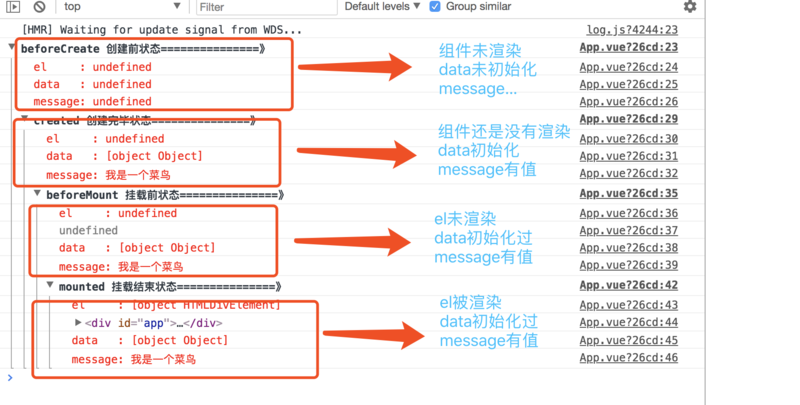
从上面的log上面其实可以看出来:
1、 beforecreate data和组件都没有被初始化的状态
2、create data里面的内容已经可以访问到了
3、 mounted 页面已经被挂载成功了。
那么结合代码,当点击button的时候,发现console会发生变化
作者:
链接:https://www.imooc.com/article/44527
来源:慕课网
本文原创发布于慕课网 ,转载请注明出处,谢谢合作

