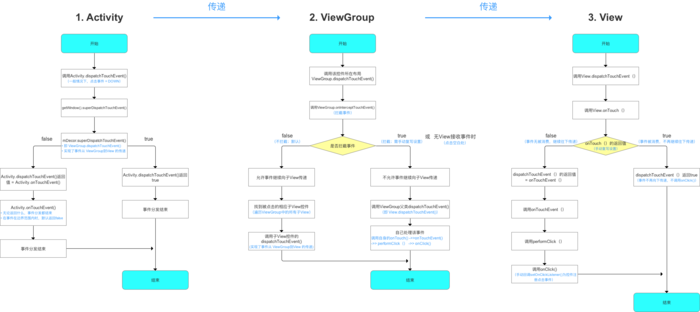
Android事件分发机制
什么是事件分发?
所谓点击事件(Touch)的事件分发,其实就是对MotionEvent(Touch的封装)事件的分发过程,即当一个MotionEvent产生以后,系统需要把这这个事件传递给那个具体的View。这个传递的过程就是事件分发过程。
1.MotionEvent
这个对象记录手指接触屏幕后所产生的一系列的事件(也就是说我们事件分发其实就是分发MotionEvent这个对象)。这个类里包含了一系列的事件。事件的类型与含义如下:
| 事件类型 | 具体动作 |
|---|---|
| MotionEvent.ACTION_DOWN | 手指按下事件(所有事件的开始) |
| MotionEvent.ACTION_UP | 手指抬起事件(与DOWN事件对应) |
| MotionEvent.ACTION_MOVE | 手指移动(中间穿插着无数个该事件) |
| MotionEvent.ACTION_CANCLE | 结束事件(非人为原因) |
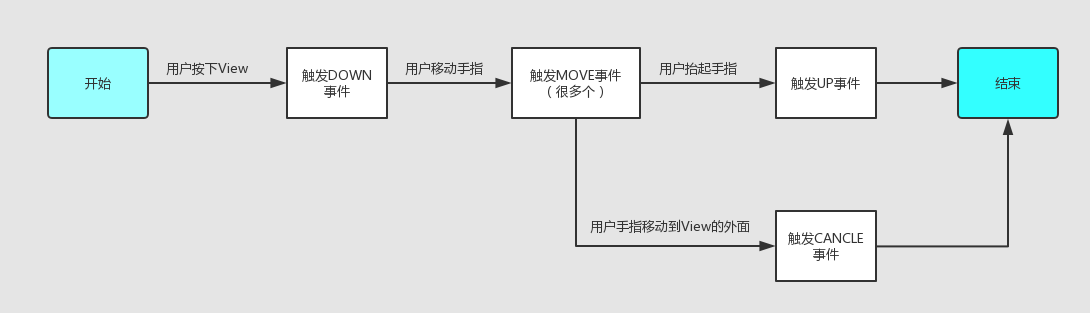
一般常见的2种点击事件序列:
- DOWN->UP 点击屏幕后松开,常见的点击事件
- DOWN->MOVE->MOVE->....->MOVE->UP 点击屏幕后滑动再松开,常见的滑屏事件
用图概况如下:
==2.事件分发的顺序==
事件分发的顺序是Activity->ViewGroup->View,默认情况下最后消费事件的都是View。
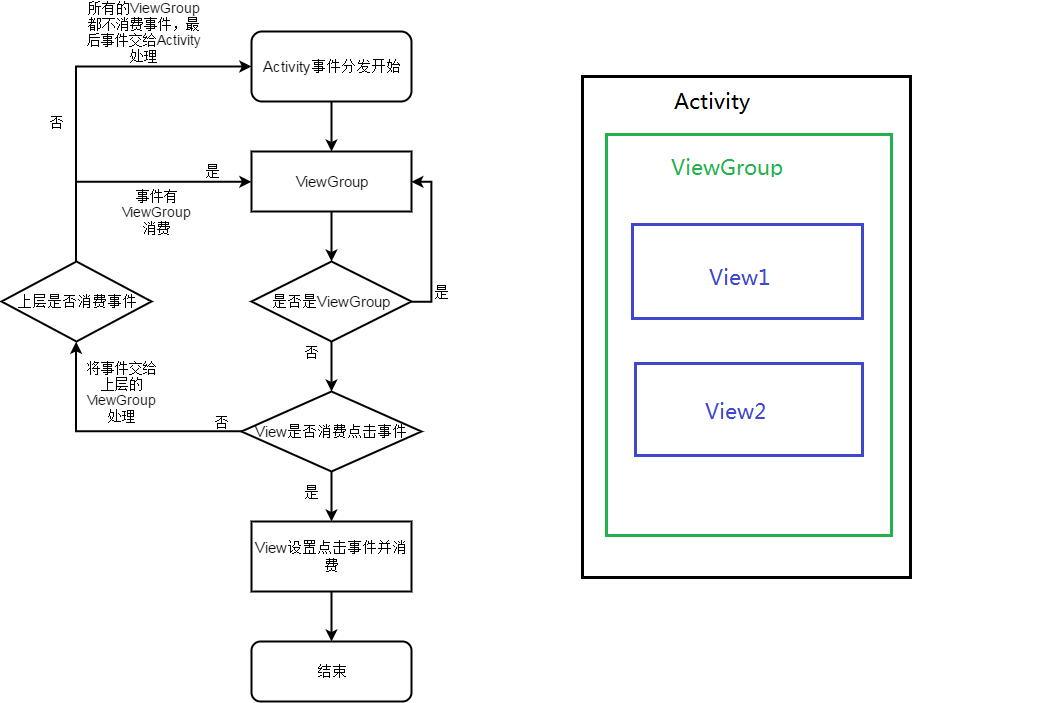
为什么Activity第一个分发事件的就是ViewGroup呢?如果我们布局中没有ViewGroup,只有一个简单的TextView呢?上述流程图是否还适用?
下面我们来看看Activity视图层架构:
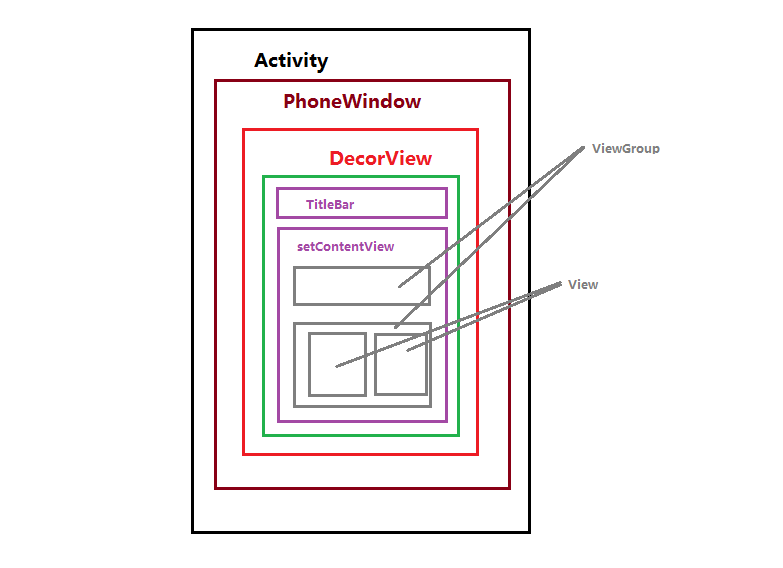
每一个Activity都包含一个Window对象,在Android中Window是一个抽象类,我们通过源码可以看到PhoneWindow是Window对象的唯一实现类,PhoneWindow将一个DecorView设置为整个应用窗口的根View。DecorView作为窗口界面的顶级视图,封装了一些操作窗口的基本方法。DecorView继承FrameLayout,FrameLayout又继承ViewGroup,这就是为什么Activity第一个事件分发对象就是ViewGroup的原因。
2.事件分发的核心方法
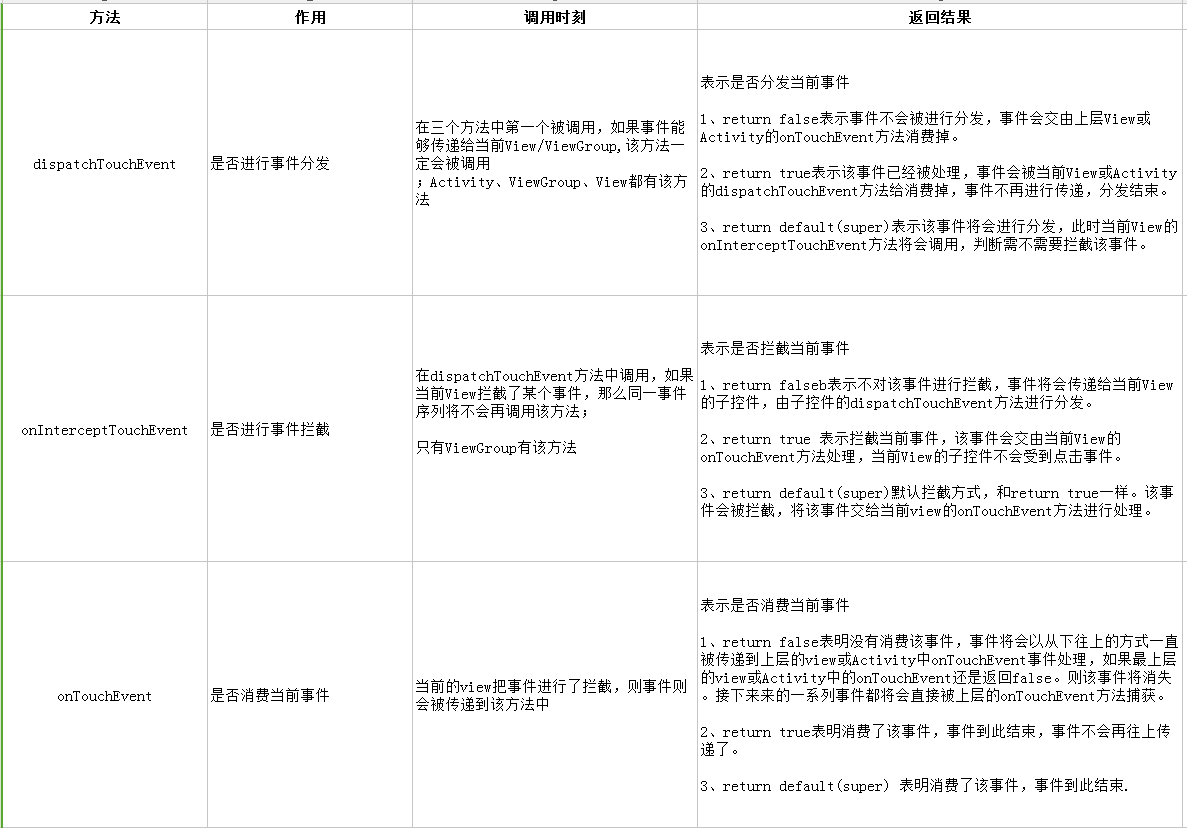
这三个方法是事件分发机制的核心方法,下面源码中将会重点分析这三个方法,下面用一段伪代码来概况这三个方法的关系:
 /**
     * 点击事件产生后
     * 步骤1:调用dispatchTouchEvent方法
     * */
    public boolean dispatchTouchEvent(MotionEvent ev) {

        boolean consume = false;//表示是否消费事件
        /**
         * 步骤2:判断是否拦截事件
         * */
        if (onInterceptTouchEvent(ev)) {
            /**
             * 若拦截,则该事件交给当前View进行处理
             * 即调用onTouchEvent方法,处理点击事件
             * */
            consume = onTouchEvent(ev);
        } else {
            /**
             *不拦截,则当前点击事件传递到下层
             *即下层View的dispatchTouchEvent方法会被调用,重复上述过程
             * 直到点击事件最终被处理掉为止
             * */
            consume = child.dispatchTouchEvent(ev);
        }
        /**
         * 最终返回通知,该事件是否被消费/处理
         * */
        return consume;
    }
该伪代码很好的解释了上面事件分发顺序的流程图。对于上述三个方法的解释加上该伪代码我们可以得出三者之间的关系是:对于一个ViewGroup,当点击事件产生后,首先会调用它的dispatchTouchEvent方法开始事件分发,首先会进行判断,判断当前ViewGroup是否进行了拦截操作,如果进行了拦截,那么点击事件MotionEvent会交个当前ViewGroup去处理,事件不再往下传递,事件分发结束。如果不拦截,则会调用ViewGroup中子控件的dispatchTouchEvent分发,并将事件MotionEvent往下传递,如果子控件依然是ViewGroup继续上面的循环。直至事件被最终消费掉。
源码分析
下面我们将从源码对Activity、ViewGroup、View事件分发进行分析
1.Activity事件分发
/**
     * Called to process touch screen events.  You can override this to
     * intercept all touch screen events before they are dispatched to the
     * window.  Be sure to call this implementation for touch screen events
     * that should be handled normally.
     *
     * @param ev The touch screen event.
     *
     * @return boolean Return true if this event was consumed.
     */
    public boolean dispatchTouchEvent(MotionEvent ev) {
        if (ev.getAction() == MotionEvent.ACTION_DOWN) {
            onUserInteraction();
        }
        if (getWindow().superDispatchTouchEvent(ev)) {
            return true;
        }
        return onTouchEvent(ev);
    }
这个是Activity的dispatchTouchEvent方法,这个方法非常短,我们对方法内两个if块进行分析:
        //一般事件都是由down开始,按下事件,这里肯定返回true
        if (ev.getAction() == MotionEvent.ACTION_DOWN) {
            onUserInteraction();
        }
看看onUserInteraction()方法:
/**
     * Called whenever a key, touch, or trackball event is dispatched to the
     * activity.  Implement this method if you wish to know that the user has
     interacted with the device in some way while your activity is running.
     * This callback and {@link #onUserLeaveHint} are intended to help
     * activities manage status bar notifications intelligently; specifically,
     * for helping activities determine the proper time to cancel a notfication.
     *
     * <p>All calls to your activity's {@link #onUserLeaveHint} callback will
     * be accompanied by calls to {@link #onUserInteraction}.  This
     * ensures that your activity will be told of relevant user activity such
     * as pulling down the notification pane and touching an item there.
     *
     * <p>Note that this callback will be invoked for the touch down action
     * that begins a touch gesture, but may not be invoked for the touch-moved
     * and touch-up actions that follow.
     *
     * @see #onUserLeaveHint()
     */
    public void onUserInteraction() {
    }
onUserInteraction()是一个空方法,当Activity位于前台的时候,用户点击home、back、menu键都会触发该方法。
再往下看第二个if代码块:
        if (getWindow().superDispatchTouchEvent(ev)) {
            return true;
        }
我们点击进去会发现window的superDispatchTouchEvent是一个抽象方法,我们知道PhoneWindow是Window的唯一实现类,查看PhoneWindow的superDispatchTouchEvent:
    @Override
    public boolean superDispatchTouchEvent(MotionEvent event) {
        return mDecor.superDispatchTouchEvent(event);
    }
这个mDecor就是DecorView,下面我们再看看DecorView的superDispatchTouchEvent方法:
    public boolean superDispatchTouchEvent(MotionEvent event) {
        return super.dispatchTouchEvent(event);
    }
DecorView的superDispatchTouchEvent也是走的父类的superDispatchTouchEvent方法,DecorView继承FrameLayout,FrameLayout本身就是一个ViewGroup,所以最后走的是ViewGroup的dispatchTouchEvent方法。
可以看到Activity的事件分发过程最后是交给顶级DecorView去进行事件分发。然后它又会调用ViewGroup的dispatchTouchEvent方法,到这里就完成了将点击事件由Activity传递到ViewGroup的过程,并将返回值设置成true,表示这个事件已经被我们消费掉了。
再来看看Activity的onTouchEvent方法,当getWindow().superDispatchTouchEvent返回false的时候,事件会交由上层的View或者Activity的onTouchEvent方法进行处理。
Activity的onTouchEvent方法:
/**
     * Called when a touch screen event was not handled by any of the views
     * under it.  This is most useful to process touch events that happen
     * outside of your window bounds, where there is no view to receive it.
     *
     * @param event The touch screen event being processed.
     *
     * @return Return true if you have consumed the event, false if you haven't.
     * The default implementation always returns false.
     */
    public boolean onTouchEvent(MotionEvent event) {
        if (mWindow.shouldCloseOnTouch(this, event)) {
            finish();
            return true;
        }

        return false;
    }
看方法注释我们知道,当点击事件未被当前View或其子控件处理时就会调用该方法;当触碰到窗口边缘时,这时候没有任何View能够接受到当前点击事件,该方法也会被调用。下面看看window的shouldCloseOnTouch方法:
/** @hide */
    public boolean shouldCloseOnTouch(Context context, MotionEvent event) {
        //主要判断是否点击在window边界外,是否是down事件,触碰点是否在边界外
        if (mCloseOnTouchOutside && event.getAction() == MotionEvent.ACTION_DOWN
                && isOutOfBounds(context, event) && peekDecorView() != null) {
            return true;
        }
        return false;
    }
所以Activity的onTouchEvent方法执行条件有以下两种情况:
- 当点击事件未被View或者其子View处理时,View和Activity的onTouchEvent方法会被调用。
- 当点击事件触碰发生在window的边界外时就会调用,返回值为true。
2.ViewGroup事件分发
通过上面的分析,现在事件从Activity传递到ViewGroup了,下面我们就分析ViewGroup的dispatchTouchEvent方法:
@Override
    public boolean dispatchTouchEvent(MotionEvent ev) {
        ....

        boolean handled = false;
        if (onFilterTouchEventForSecurity(ev)) {
            final int action = ev.getAction();
            final int actionMasked = action & MotionEvent.ACTION_MASK;

            // Handle an initial down.
            if (actionMasked == MotionEvent.ACTION_DOWN) {
                // Throw away all previous state when starting a new touch gesture.
                // The framework may have dropped the up or cancel event for the previous gesture
                // due to an app switch, ANR, or some other state change.
                cancelAndClearTouchTargets(ev);
                //mFirstTouchTarget表示事件是否有子View消费掉了;!=null表示有子View消费了
                //每次down事件开始时会调用方法,清空mFirstTouchTarget
                resetTouchState();
            }

            // Check for interception.
            //检测是否拦截事件
            //1、当事件为Action_down时
            //2、当ViewGroup不拦截事件交给子元素处理 条件成立 即mFirstTouchTarget != null
            final boolean intercepted;
            if (actionMasked == MotionEvent.ACTION_DOWN
                    || mFirstTouchTarget != null) {
                //标记FLAG_DISALLOW_INTERCEPT作用就是子View干涉父容器对事件的分发,如果子View设置了这个标记就不会走onInterceptTouchEvent方法了
                final boolean disallowIntercept = (mGroupFlags & FLAG_DISALLOW_INTERCEPT) != 0;
                //是否禁用事件拦截的功能(默认是false),可通过调用requestDisallowInterceptTouchEvent()修改
                if (!disallowIntercept) {
                    //调用事件拦截方法
                    intercepted = onInterceptTouchEvent(ev);
                    ev.setAction(action); // restore action in case it was changed
                } else {
                    intercepted = false;
                }
            } else {
                // There are no touch targets and this action is not an initial down
                // so this view group continues to intercept touches.
                intercepted = true;
            }

           .....


            // Check for cancelation.
            final boolean canceled = resetCancelNextUpFlag(this)
                    || actionMasked == MotionEvent.ACTION_CANCEL;

            // Update list of touch targets for pointer down, if needed.
            final boolean split = (mGroupFlags & FLAG_SPLIT_MOTION_EVENTS) != 0;
            TouchTarget newTouchTarget = null;
            boolean alreadyDispatchedToNewTouchTarget = false;
            //非MotionEvent.ACTION_CANCEL并且没有拦截事件
            //进入if语句,对ViewGroup的子元素进行遍历
            if (!canceled && !intercepted) {

                // If the event is targeting accessiiblity focus we give it to the
                // view that has accessibility focus and if it does not handle it
                // we clear the flag and dispatch the event to all children as usual.
                // We are looking up the accessibility focused host to avoid keeping
                // state since these events are very rare.
                View childWithAccessibilityFocus = ev.isTargetAccessibilityFocus()
                        ? findChildWithAccessibilityFocus() : null;

                if (actionMasked == MotionEvent.ACTION_DOWN
                        || (split && actionMasked == MotionEvent.ACTION_POINTER_DOWN)
                        || actionMasked == MotionEvent.ACTION_HOVER_MOVE) {
                    final int actionIndex = ev.getActionIndex(); // always 0 for down
                    final int idBitsToAssign = split ? 1 << ev.getPointerId(actionIndex)
                            : TouchTarget.ALL_POINTER_IDS;

                    // Clean up earlier touch targets for this pointer id in case they
                    // have become out of sync.
                    removePointersFromTouchTargets(idBitsToAssign);

                    final int childrenCount = mChildrenCount;
                    if (newTouchTarget == null && childrenCount != 0) {
                        final float x = ev.getX(actionIndex);
                        final float y = ev.getY(actionIndex);
                        // Find a child that can receive the event.
                        // Scan children from front to back.
                        final ArrayList<View> preorderedList = buildTouchDispatchChildList();
                        final boolean customOrder = preorderedList == null
                                && isChildrenDrawingOrderEnabled();
                        final View[] children = mChildren;
                        //对子元素进行遍历
                        for (int i = childrenCount - 1; i >= 0; i--) {
                            //1.得到的是当前ViewGroup内正在绘制子View的索引 ViewGroup绘制顺序默认是从上往下的
                            final int childIndex = getAndVerifyPreorderedIndex(
                                    childrenCount, i, customOrder);
                            //2.点击事件是否在子View内
                            final View child = getAndVerifyPreorderedView(
                                    preorderedList, children, childIndex);

                            // If there is a view that has accessibility focus we want it
                            // to get the event first and if not handled we will perform a
                            // normal dispatch. We may do a double iteration but this is
                            // safer given the timeframe.
                             //接受点击事件的View根据1.2条件判断
                            //是否能够接受点击事件
                            if (childWithAccessibilityFocus != null) {
                                if (childWithAccessibilityFocus != child) {
                                    //不符合条件,则执行下一个循环
                                    continue;
                                }
                                childWithAccessibilityFocus = null;
                                i = childrenCount - 1;
                            }

                            if (!canViewReceivePointerEvents(child)
                                    || !isTransformedTouchPointInView(x, y, child, null)) {
                                ev.setTargetAccessibilityFocus(false);
                                continue;
                            }

                            newTouchTarget = getTouchTarget(child);
                            if (newTouchTarget != null) {
                                // Child is already receiving touch within its bounds.
                                // Give it the new pointer in addition to the ones it is handling.
                                newTouchTarget.pointerIdBits |= idBitsToAssign;
                                break;
                            }

                            resetCancelNextUpFlag(child);
                            //将ViewGroup的子元素进行遍历后,找到能够处理点击事件的子元素并调用dispatchTransformedTouchEvent()方法,进行事件的分发
                            if (dispatchTransformedTouchEvent(ev, false, child, idBitsToAssign)) {
                                // Child wants to receive touch within its bounds.
                                mLastTouchDownTime = ev.getDownTime();
                                if (preorderedList != null) {
                                    // childIndex points into presorted list, find original index
                                    for (int j = 0; j < childrenCount; j++) {
                                        if (children[childIndex] == mChildren[j]) {
                                            mLastTouchDownIndex = j;
                                            break;
                                        }
                                    }
                                } else {
                                    mLastTouchDownIndex = childIndex;
                                }
                                mLastTouchDownX = ev.getX();
                                mLastTouchDownY = ev.getY();
                                //对mFirstTouchTarget 进行赋值
                                newTouchTarget = addTouchTarget(child, idBitsToAssign);
                                alreadyDispatchedToNewTouchTarget = true;
                                break;
                            }

                            // The accessibility focus didn't handle the event, so clear
                            // the flag and do a normal dispatch to all children.
                            ev.setTargetAccessibilityFocus(false);
                        }
                       .....
                    }
                }
            }

            // Dispatch to touch targets.
            //!canceled && !intercepted 不成立,mFirstTouchTarget没有被赋值 mFirstTouchTarget==null成立
            if (mFirstTouchTarget == null) {
                // No touch targets so treat this as an ordinary view.
                handled = dispatchTransformedTouchEvent(ev, canceled, null,
                        TouchTarget.ALL_POINTER_IDS);
            } else {
               .....
                }
            }


            // Update list of touch targets for pointer up or cancel, if needed.
            if (canceled
                    || actionMasked == MotionEvent.ACTION_UP
                    || actionMasked == MotionEvent.ACTION_HOVER_MOVE) {
                //MotionEvent.ACTION_UP 后 清空mFirstTouchTarget
                resetTouchState();
            } else if (split && actionMasked == MotionEvent.ACTION_POINTER_UP) {
                final int actionIndex = ev.getActionIndex();
                final int idBitsToRemove = 1 << ev.getPointerId(actionIndex);
                removePointersFromTouchTargets(idBitsToRemove);
            }
        }

        if (!handled && mInputEventConsistencyVerifier != null) {
            mInputEventConsistencyVerifier.onUnhandledEvent(ev, 1);
        }
        return handled;
    }
上述对ViewGroup的dispatchTouchEvent方法分析完成了,下面我们来看看它内部的dispatchTransformedTouchEvent方法:
/**
     * Transforms a motion event into the coordinate space of a particular child view,
     * filters out irrelevant pointer ids, and overrides its action if necessary.
     * If child is null, assumes the MotionEvent will be sent to this ViewGroup instead.
     */
    private boolean dispatchTransformedTouchEvent(MotionEvent event, boolean cancel,
            View child, int desiredPointerIdBits) {
        final boolean handled;

        // Canceling motions is a special case.  We don't need to perform any transformations
        // or filtering.  The important part is the action, not the contents.
        final int oldAction = event.getAction();
        if (cancel || oldAction == MotionEvent.ACTION_CANCEL) {
            event.setAction(MotionEvent.ACTION_CANCEL);
            if (child == null) {
                handled = super.dispatchTouchEvent(event);
            } else {
                handled = child.dispatchTouchEvent(event);
            }
            event.setAction(oldAction);
            return handled;
        }

        .....
    }
是ViewGroup#dispatchTransformedTouchEvent()方法,其他方法省略。可以可看到,如果ViewGroup有子元素同时子元素可以处理点击事件。那么就会调用子元素的child.dispatchTouchEvent(event);方法。如果是child是ViewGroup继续上面的循环,如果子元素是View,那么就会调用View.dispatchTouchEvent(event)方法。关于这个方法我们后面分析。如果child为空,那么就会调用super.dispatchTouchEvent(event)方法,那么就会调用ViewGroup父类的,即View.dispatchTouchEvent(event)方法,ViewGroup自己处理点击事件。最后都会默认(是默认不是一定) 调用onTounchEvent()方法。
3.View事件分发
由上面dispatchTransformedTouchEvent()方法可知,最后方法无论是ViewGroup消耗还是View消耗都会调用View#dispatchTouchEvent()方法。那么我们就来看这个方法:
/**
     * Pass the touch screen motion event down to the target view, or this
     * view if it is the target.
     *
     * @param event The motion event to be dispatched.
     * @return True if the event was handled by the view, false otherwise.
     */
    public boolean dispatchTouchEvent(MotionEvent event) {
        ....

        if (onFilterTouchEventForSecurity(event)) {

            if ((mViewFlags & ENABLED_MASK) == ENABLED && handleScrollBarDragging(event)) {
                result = true;
            }
            //noinspection SimplifiableIfStatement
            ListenerInfo li = mListenerInfo;
            //view是否是enable可点击的
            if (li != null && li.mOnTouchListener != null
                    && (mViewFlags & ENABLED_MASK) == ENABLED
                    && li.mOnTouchListener.onTouch(this, event)) {
                result = true;
            }

            //调用onTouchEvent(event)方法,该方法的方法值直接影响dispatchTouchEvent的返回值
            if (!result && onTouchEvent(event)) {
                result = true;
            }
        }

        .....

        return result;
    }
我们主要看上面这部分代码。首先判断mOnTouchListener!=null同时li.mOnTouchListener.onTouch(this, event)返回为true那么result = true;那么下面的onTouchEvent方法就不会执行。所以我们可以看到onTouch方法优先级高于onTouchEvent方法。
下面我们来看看onTouchEvent方法源码:
/**
     * Implement this method to handle touch screen motion events.
     * <p>
     * If this method is used to detect click actions, it is recommended that
     * the actions be performed by implementing and calling
     * {@link #performClick()}. This will ensure consistent system behavior,
     * including:
     * <ul>
     * <li>obeying click sound preferences
     * <li>dispatching OnClickListener calls
     * <li>handling {@link AccessibilityNodeInfo#ACTION_CLICK ACTION_CLICK} when
     * accessibility features are enabled
     * </ul>
     *
     * @param event The motion event.
     * @return True if the event was handled, false otherwise.
     */
    public boolean onTouchEvent(MotionEvent event) {
        final float x = event.getX();
        final float y = event.getY();
        final int viewFlags = mViewFlags;
        final int action = event.getAction();

        final boolean clickable = ((viewFlags & CLICKABLE) == CLICKABLE
                || (viewFlags & LONG_CLICKABLE) == LONG_CLICKABLE)
                || (viewFlags & CONTEXT_CLICKABLE) == CONTEXT_CLICKABLE;

        //首先判断当前View是不是DISABLED不可用状态
        if ((viewFlags & ENABLED_MASK) == DISABLED) {
            if (action == MotionEvent.ACTION_UP && (mPrivateFlags & PFLAG_PRESSED) != 0) {
                setPressed(false);
            }
            //如果不可用 同时当前控件的clickable与long_clickable
            //与CONTEXT_CLICKABLE全是false
            //那么才返回false
            mPrivateFlags3 &= ~PFLAG3_FINGER_DOWN;
            // A disabled view that is clickable still consumes the touch
            // events, it just doesn't respond to them.
            return clickable;
        }
        //mTouchDelegate触摸代理,如果view有代理会执行该方法
        if (mTouchDelegate != null) {
            if (mTouchDelegate.onTouchEvent(event)) {
                return true;
            }
        }

        //只要控件的clickable与long_clickable
        //与CONTEXT_CLICKABLE 有一个为true 就进入次循环
        //这个TOOLTIP标记表示悬浮的View可以长按点击,其实也就是可点击状态
        if (clickable || (viewFlags & TOOLTIP) == TOOLTIP) {
            switch (action) {
                case MotionEvent.ACTION_UP:
                   ....

                        if (!mHasPerformedLongPress && !mIgnoreNextUpEvent) {
                            // This is a tap, so remove the longpress check
                            //up事件执行,移除长按点击事件回调
                            removeLongPressCallback();

                            // Only perform take click actions if we were in the pressed state
                            if (!focusTaken) {
                                // Use a Runnable and post this rather than calling
                                // performClick directly. This lets other visual state
                                // of the view update before click actions start.
                                if (mPerformClick == null) {
                                    mPerformClick = new PerformClick();
                                }
                                if (!post(mPerformClick)) {
                                    //onClickListener监听在此方法中
                                    performClick();
                                }
                            }
                        }

                    ....
                    break;

                case MotionEvent.ACTION_DOWN:
                    if (event.getSource() == InputDevice.SOURCE_TOUCHSCREEN) {
                        mPrivateFlags3 |= PFLAG3_FINGER_DOWN;
                    }
                    mHasPerformedLongPress = false;

                    if (!clickable) {
                        checkForLongClick(0, x, y);
                        break;
                    }

                    if (performButtonActionOnTouchDown(event)) {
                        break;
                    }

                    // Walk up the hierarchy to determine if we're inside a scrolling container.
                    boolean isInScrollingContainer = isInScrollingContainer();

                    // For views inside a scrolling container, delay the pressed feedback for
                    // a short period in case this is a scroll.
                    if (isInScrollingContainer) {
                        mPrivateFlags |= PFLAG_PREPRESSED;
                        if (mPendingCheckForTap == null) {
                            mPendingCheckForTap = new CheckForTap();
                        }
                        mPendingCheckForTap.x = event.getX();
                        mPendingCheckForTap.y = event.getY();
                        postDelayed(mPendingCheckForTap, ViewConfiguration.getTapTimeout());
                    } else {
                        // Not inside a scrolling container, so show the feedback right away
                        setPressed(true, x, y);
                        checkForLongClick(0, x, y);
                    }
                    break;

                case MotionEvent.ACTION_CANCEL:
                    if (clickable) {
                        setPressed(false);
                    }
                    removeTapCallback();
                    removeLongPressCallback();
                    mInContextButtonPress = false;
                    mHasPerformedLongPress = false;
                    mIgnoreNextUpEvent = false;
                    mPrivateFlags3 &= ~PFLAG3_FINGER_DOWN;
                    break;

                case MotionEvent.ACTION_MOVE:
                    if (clickable) {
                        drawableHotspotChanged(x, y);
                    }

                    // Be lenient about moving outside of buttons
                    if (!pointInView(x, y, mTouchSlop)) {
                        // Outside button
                        // Remove any future long press/tap checks
                        removeTapCallback();
                        removeLongPressCallback();
                        if ((mPrivateFlags & PFLAG_PRESSED) != 0) {
                            setPressed(false);
                        }
                        mPrivateFlags3 &= ~PFLAG3_FINGER_DOWN;
                    }
                    break;
            }

            //若该控件可点击一定会返回true,表示该控件已经消费该事件
            return true;
        }
        // 若该控件不可点击,就一定返回false
        return false;
    }
总结
下面用流程图再来总结下: