

安装xhprof扩展
wget http://pecl.php.net/get/xhprof-0.9.4.tgz
tar zxf xhprof-0.9.4.tgz
cd xhprof-0.9.4/extension/
sudo phpize
./configure
sudo make
sudo make install
cd ../
配置php.ini
[xhprof]
extension=xhprof.so
xhprof.output_dir=/tmp
注:xhprof已经很久没有更新过了,截至目前还不支持php7,php7可以使用 https://github.com/phacility/xhprof.git。
配置xhprof环境
需要把xhprof压缩包里的两个目录复制到指定目录(假设定义到 /work/xhprof/):
-
mkdir
/work/
xhprof/
-
cp
-a xhprof_html/ /
work/xhprof
/
-
cp
-a xhprof_lib/ /
work/xhprof
/
然后在项目框架的入口文件添加:
xhprof_enable(XHPROF_FLAGS_MEMORY | XHPROF_FLAGS_CPU);
register_shutdown_function(function() {
$xhprof_data = xhprof_disable();
if (function_exists('fastcgi_finish_request')){
fastcgi_finish_request();
}
include_once "/work/xhprof/xhprof_lib/utils/xhprof_lib.php";
include_once "/work/xhprof/xhprof_lib/utils/xhprof_runs.php";
$xhprof_runs = new XHProfRuns_Default();
$run_id = $xhprof_runs->save_run($xhprof_data, 'xhprof');
});
代码解析:$xhprof_data中记录了程序运行过程中所有的函数调用时间及CPU内存消耗,具体记录哪些指标可以通过xhprof_enable的参数控制,目前支持的参数有:
-
HPROF_FLAGS_NO_BUILTINS跳过所有内置(内部)函数。 -
XHPROF_FLAGS_CPU输出的性能数据中添加 CPU 数据。 -
XHPROF_FLAGS_MEMORY输出的性能数据中添加内存数据。
之后的处理已经与xhprof扩展无关,大致是编写一个存储类 XHProfRuns_Default,将 $xhprof_data序列化并保存到某个目录,可以通过 XHProfRuns_Default(__DIR__)将结果输出到当前目录,如果不指定则会读取 php.
ini
配置文件中的 xhprof.output_dir,仍然没有指定则会输出到 /tmp。
xhprof_enable和 xhprof_disable是成对出现的,一个是代码运行最前面,一个是最后面。中间是要分析的代码。
经过上面的配置后,我们后续请求项目的接口,xhprof就会分析请求过程中的CPU、内存、耗时等内容。日志保存在 xhprof.output_dir目录。
配置web
配置好了,怎么查看日志呢?我们可以搭建一个简单的web server:
xhprof.test.com.conf
server {
listen 80;
server_name xhprof.test.com;
root /work/xhprof/xhprof_html;
index index.html index.php;
location ~ \.php$ {
fastcgi_pass 127.0.0.1:9000;
fastcgi_index index.php;
fastcgi_param SCRIPT_FILENAME $document_root$fastcgi_script_name;
include fastcgi_params;
}
}
然后配置虚拟主机xhprof.test.com。重启nginx,打开 xhprof.test.com就可以看到效果了:

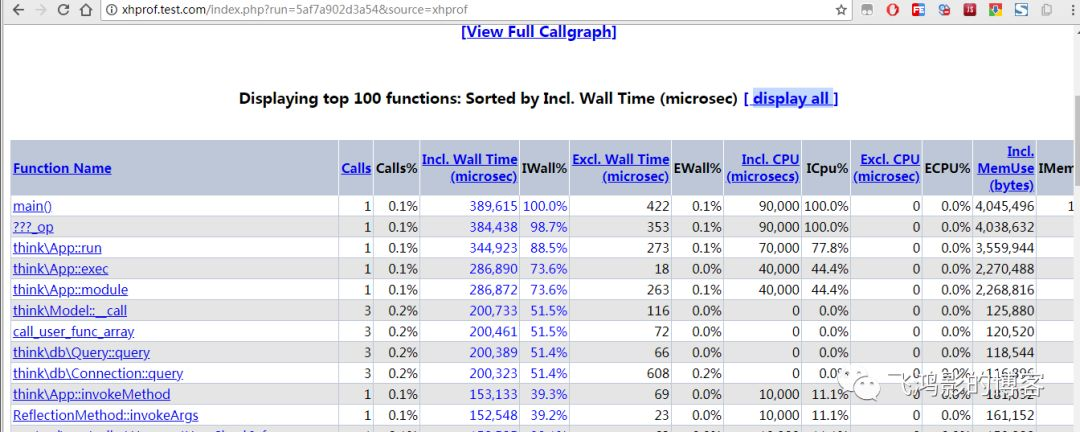
默认的UI里列出了:
-
funciton name : 函数名
-
calls: 调用次数
-
Incl. Wall Time (microsec): 函数运行时间(包括子函数)
-
IWall%:函数运行时间(包括子函数)占比
-
Excl. Wall Time(microsec):函数运行时间(不包括子函数)
-
EWall%:函数运行时间(不包括子函数)
在web中还可以看到 [View Full Callgraph] 链接,点击后可以绘制出一张可视化的性能分析图,如果点击后报错的话,可能是缺少依赖graphviz。graphviz是一个绘制图形的工具,可以更为直观的让你查看性能的瓶颈。如果需要可以安装:
yum install -y libpng
yum install -y graphviz
效果: 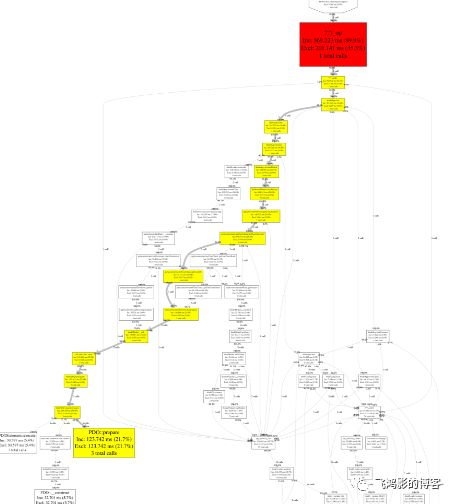
非侵入式引入xhprof
前面我们是通过在项目入口文件添加代码实现了分析的功能。更优雅的方式是新建一个额外的文件 xhprof.inc.php,保存在 /work/xhprof/目录下:
-
xhprof_enable
(XHPROF_FLAGS_MEMORY | XHPROF_FLAGS_CPU
);
-
register_shutdown_function
(function()
{
-
$xhprof_data
= xhprof_disable();
-
if (
function_exists('fastcgi_finish_request')){
-
fastcgi_finish_request
();
-
}
-
include_once
"/work/xhprof/xhprof_lib/utils/xhprof_lib.php";
-
include_once
"/work/xhprof/xhprof_lib/utils/xhprof_runs.php";
-
$xhprof_runs
= new
XHProfRuns_Default();
-
$run_id
= $xhprof_runs->
save_run($xhprof_data
, 'xhprof'
);
-
});
利用PHP的自动加载功能,在执行代码前注入此文件,编辑php.ini:
auto_prepend_file = /work/xhprof/xhprof.inc.php
然后重启PHP服务。这样所有使用该php环境的都会生效。
或者写到指定项目的nginx配置里也行: jifen.cc.conf
location ~ \.php$ {
fastcgi_pass 127.0.0.1:9000;
fastcgi_index index.php;
fastcgi_param SCRIPT_FILENAME $document_root$fastcgi_script_name;
fastcgi_param PHP_VALUE "auto_prepend_file=/work/xhprof/xhprof.inc.php";
include fastcgi_params;
}
然后重启nginx服务。这样仅该项目生效。
通过 autoprependfile 和 autoappendfile包含的文件在此模式下会被解析,但有些限制,例如函数必须在被调用之前定义。
修改采样频率
默认情况下,xhprof每次都会运行,线上环境如果这么设置,会对性能有影响。
xhprof.inc.php
<?php
$profiling = !(mt_rand()%9);
if($profiling) xhprof_enable(XHPROF_FLAGS_MEMORY | XHPROF_FLAGS_CPU);
register_shutdown_function(function() use($profiling) {
if($profiling){
$xhprof_data = xhprof_disable();
if (function_exists('fastcgi_finish_request')){
fastcgi_finish_request();
}
include_once "/work/xhprof/xhprof_lib/utils/xhprof_lib.php";
include_once "/work/xhprof/xhprof_lib/utils/xhprof_runs.php";
$xhprof_runs = new XHProfRuns_Default();
$xhprof_runs->save_run($xhprof_data, 'xhprof');
}
});
总结
本篇文章里,我们介绍了如何基于xhprof扩展来分析PHP性能,并记录到日志里,最后使用xhprof扩展自带的UI在web里展示出来。主要知识点:
-
安装xhprof扩展
-
在应用里注入xhprof
-
基于nginx展示分析结果
参考
1、Xhprof 的配置和使用方法 - 简书 https://www.jianshu.com/p/38e3ae81970c 2、使用XHProf查找PHP性能瓶颈 - 程序猿成长计划 - SegmentFault 思否 https://segmentfault.com/a/1190000003509917 3、PHP性能追踪及分析工具xhprof的安装与使用 - 马新才的技术博客 - SegmentFault 思否 https://segmentfault.com/a/1190000007288664 4、Tideways和xhgui打造PHP非侵入式监控平台 | 我是大熊 http://blog.it2048.cn/article-tideways-xhgui/

