

项目需求要做一个工具栏,然后百度找了很多资料慢慢做了一个,结果发现各种bug,一个就是中英文切换的时候键盘高度会变,然而打印出来高度确实一点都没变?!但是确实是变了,第二个就是切换页面的时候,比如我要的键盘只是在输入网址的时候出来,普通的输入我不需要这个工具条,这就蛋疼了。于是写了一个通用的版本。。。。 代码全贴,我就不多解释了
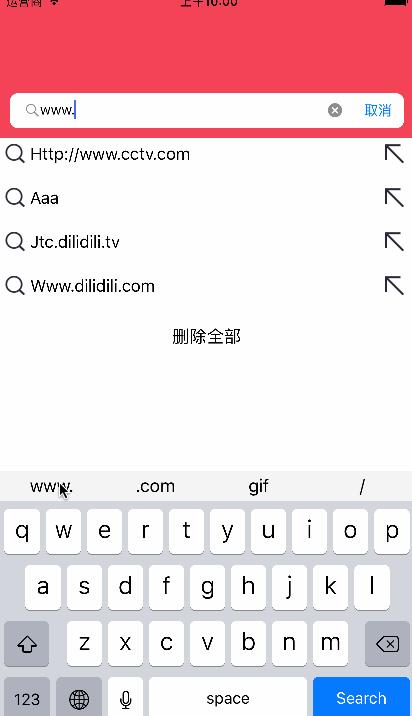
封装的工具条.h文件
#import <UIKit/UIKit.h>
typedef void (^KeyBoardBackBlock)(NSString *str);
@interface KeyBoardView : UIView
@property(nonatomic,copy)KeyBoardBackBlock backBlock;
@end
.m文件
#import "KeyBoardView.h"
@interface KeyBoardView ()

@end
@implementation KeyBoardView

- (instancetype)initWithFrame:(CGRect)frame
{
    self = [super initWithFrame:frame];
    if (self) {
        NSArray * nameArr = @[@"www.",@".com",@"gif",@"/"];
        self.backgroundColor = [UIColor colorWithRed:245/255.0 green:245/255.0 blue:245/255.0 alpha:1];
        for (int i=0; i<4; i++) {
            UIButton * btn = [[UIButton alloc]initWithFrame:CGRectMake([UIScreen mainScreen].bounds.size.width*i/4, 0, [UIScreen mainScreen].bounds.size.width/4, 30)];
            [btn setTitle:nameArr[i] forState:UIControlStateNormal];
            [btn setTitleColor:[UIColor blackColor] forState:UIControlStateNormal];
            btn.tag = i+11;
            [btn addTarget: self action:@selector(btnClick:) forControlEvents:UIControlEventTouchUpInside];
            [self addSubview:btn];
        }
    }
    return self;
}
-(void)btnClick:(UIButton*)sender
{
    switch (sender.tag) {
        case 11:
            self.backBlock(@"www.");
            break;
        case 12:
            self.backBlock(@".com");
            break;
        case 13:
            self.backBlock(@"gif");
            break;
        case 14:
            self.backBlock(@"/");
            break;

        default:
            break;
    }
}
@end
然后在你的viewController的viewDidLoad里写下通知和初始化view
//监听键盘
    [[NSNotificationCenter defaultCenter] addObserver:self selector:@selector(changeContentViewPoint:) name:UIKeyboardWillChangeFrameNotification object:nil];
//监听输入法
    [[NSNotificationCenter defaultCenter] addObserver:self selector:@selector(changeInputMode:) name:UITextInputCurrentInputModeDidChangeNotification object:nil];
    _keyBoardView = [[KeyBoardView alloc]initWithFrame:CGRectMake(0, ScreenHeight, ScreenWidth, 30)];
//键盘工具条
- (void) changeContentViewPoint:(NSNotification *)notification{
    if ([[[UIApplication sharedApplication]textInputMode].primaryLanguage isEqualToString:@"zh-Hans"]==NO&&_mySearch.isFirstResponder == YES) {
        [self.view addSubview:_keyBoardView];
    }
    NSDictionary *userInfo = [notification userInfo];
    NSValue *value = [userInfo objectForKey:UIKeyboardFrameEndUserInfoKey];
    CGFloat keyBoardEndY = value.CGRectValue.origin.y; // 得到键盘弹出后的键盘视图所在y坐标 NSNumber *duration = [userInfo objectForKey:UIKeyboardAnimationDurationUserInfoKey];
    NSNumber *curve = [userInfo objectForKey:UIKeyboardAnimationCurveUserInfoKey]; // 添加移动动画,使视图跟随键盘移动
    __weak typeof (_mySearch)weakSearch = _mySearch;
    _keyBoardView.backBlock= ^(NSString*str){
        weakSearch.text = [weakSearch.text stringByAppendingString:str];
    };
    if (_keyBoardView != nil) {
        [UIView animateWithDuration:2.5 animations:^{
            [UIView setAnimationBeginsFromCurrentState:YES];
            [UIView setAnimationCurve:[curve intValue]];
            if (keyBoardEndY<ScreenHeight) {
                _keyBoardView.center = CGPointMake(_keyBoardView.center.x, keyBoardEndY - _keyBoardView.bounds.size.height/2.0);
            }
            else{
                _keyBoardView.center = CGPointMake(_keyBoardView.center.x, keyBoardEndY + 30);
            }
        }completion:^(BOOL finished) {
        }];
    }
}
-(void)changeInputMode:(NSNotification*)notify
{
    if ([[[UIApplication sharedApplication]textInputMode].primaryLanguage isEqualToString:@"zh-Hans"]) {
        _keyBoardView.center = CGPointMake(self.view.center.x, ScreenHeight+30);
    }
    else{
        if (_keyBoardView != nil&&_mySearch.isFirstResponder ==YES) {
            [self.view addSubview:_keyBoardView];
        }
    }
}
大功告成,尚有不足,希望大神指正
