在今天的前端面试中,vue的双向数据绑定已经成为了一个非常容易考到的点,即使不能当场写出来,至少也要能说出原理。鄙人自己根据vue官方文档理解以及一些deom的练习个人的总结。
个人理解
Vue的双向数据绑定的原理相信大家也都十分了解了,主要是通过Object对象的defineProperty属性,重写data的set和get函数来实现的,这里对原理不做过多描述,主要还是来实现一个实例。为了使代码更加的清晰,这里只会实现最基本的内容,主要实现v-model,v-bind 和v-click三个命令,其他命令也可以自行补充。
网上的一张图片
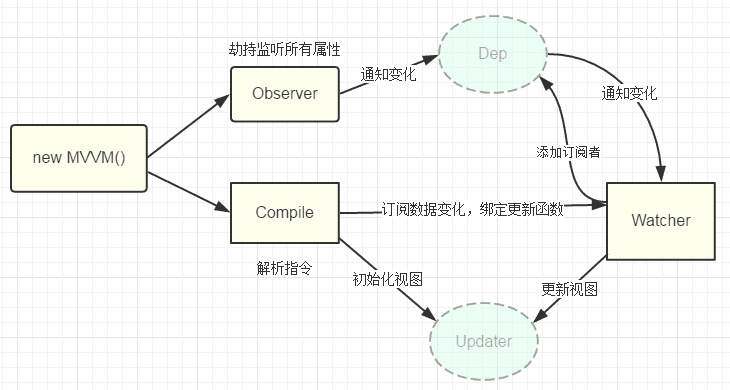
实现
页面结构很简单,如下
<div id="app">
    <form>
      <input type="text"  v-model="number">
      <button type="button" v-click="increment">增加</button>
    </form>
    <h3 v-bind="number"></h3>
  </div>
包含:
1. 一个input,使用v-model指令
2. 一个button,使用v-click指令
3. 一个h3,使用v-bind指令。
我这里创建一个myVue根据我的自学知识以及部分前辈的代码模仿一下vue实现的双向绑定。
<!DOCTYPE html>
<head>
  <title>myVue</title>
</head>
<style>
  #app {
    text-align: center;
  }
</style>
<body>
  <div id="app">
    <form>
      <input type="text"  v-model="number">
      <button type="button" v-click="increment">增加</button>
    </form>
    <h3 v-bind="number"></h3>
    <form>
      <input type="text"  v-model="count">
      <button type="button" v-click="incre">增加</button>
    </form>
    <h3 v-bind="count"></h3>
  </div>
</body>

<script>
  function myVue(options) {
    this._init(options);
  }

  myVue.prototype._init = function (options) {
    this.$options = options;
    this.$el = document.querySelector(options.el);
    this.$data = options.data;
    this.$methods = options.methods;

    this._binding = {};
    this._obverse(this.$data);
    this._complie(this.$el);
  }

  myVue.prototype._obverse = function (obj) {
    var _this = this;
    Object.keys(obj).forEach(function (key) {
      if (obj.hasOwnProperty(key)) {
        _this._binding[key] = {
          _directives: []
        };
        console.log(_this._binding[key])
        var value = obj[key];
        if (typeof value === 'object') {
          _this._obverse(value);
        }
        var binding = _this._binding[key];
        Object.defineProperty(_this.$data, key, {
          enumerable: true,
          configurable: true,
          get: function () {
            console.log(`${key}获取${value}`);
            return value;
          },
          set: function (newVal) {
            console.log(`${key}更新${newVal}`);
            if (value !== newVal) {
              value = newVal;
              binding._directives.forEach(function (item) {
                item.update();
              })
            }
          }
        })
      }
    })
  }

  myVue.prototype._complie = function (root) {
    var _this = this;
    var nodes = root.children;
    for (var i = 0; i < nodes.length; i++) {
      var node = nodes[i];
      if (node.children.length) {
        this._complie(node);
      }

      if (node.hasAttribute('v-click')) {
        node.onclick = (function () {
          var attrVal = nodes[i].getAttribute('v-click');
          return _this.$methods[attrVal].bind(_this.$data);
        })();
      }

      if (node.hasAttribute('v-model') && (node.tagName = 'INPUT' || node.tagName == 'TEXTAREA')) {
        node.addEventListener('input', (function(key) {
          var attrVal = node.getAttribute('v-model');
          _this._binding[attrVal]._directives.push(new Watcher(
            'input',
            node,
            _this,
            attrVal,
            'value'
          ))

          return function() {
            _this.$data[attrVal] =  nodes[key].value;
          }
        })(i));
      }

      if (node.hasAttribute('v-bind')) {
        var attrVal = node.getAttribute('v-bind');
        _this._binding[attrVal]._directives.push(new Watcher(
          'text',
          node,
          _this,
          attrVal,
          'innerHTML'
        ))
      }
    }
  }

  function Watcher(name, el, vm, exp, attr) {
    this.name = name;         //指令名称,例如文本节点,该值设为"text"
    this.el = el;             //指令对应的DOM元素
    this.vm = vm;             //指令所属myVue实例
    this.exp = exp;           //指令对应的值,本例如"number"
    this.attr = attr;         //绑定的属性值,本例为"innerHTML"

    this.update();
  }

  Watcher.prototype.update = function () {
    this.el[this.attr] = this.vm.$data[this.exp];
  }

  window.onload = function() {
    var app = new myVue({
      el:'#app',
      data: {
        number: 0,
        count: 0,
      },
      methods: {
        increment: function() {
          this.number ++;
        },
        incre: function() {
          this.count ++;
        }
      }
    })
  }
</script>