position是规定元素定位类型的属性,它的值有absolute、relative、fixed、static、inherit,默认值是static。
 inherit


position是规定元素的定位类型属性,它的值有absolute、relative、fixed、static(static)、inherit。需要注意的是,绝对定位absolute和固定定位fixed元素会隐式地转换为块级元素,而不论该元素本身是什么类型。
position各属性值的含义如下:
|
值 |
描述 |
|
absolute |
生成绝对定位的元素,相对于 static 定位以外的第一个父元素进行定位。 |
|
relative |
生成相对定位的元素,相对于其正常位置进行定位。 |
|
fixed |
生成固定定位的元素,相对于浏览器窗口进行定位。 |
|
static |
默认值。没有定位,元素出现在正常的流中(忽略 top, bottom, left, right 或者 z-index 声明)。 |
|
inherit |
从父元素继承 position 属性的值。 |
接下来通过"position-demo.html"看一下各属性值的不同效果。
position-demo.html代码如下:
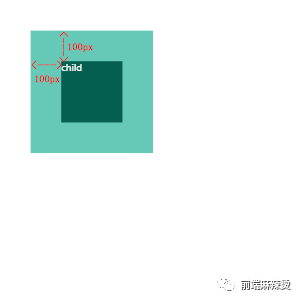
<!DOCTYPE html><html lang="en"> <head> <meta charset="UTF-8"> <title>position demo</title> <style> html, body { width: 100%; height: 100%; margin: 0; padding: 0; color: #fff; font-size: 30px; } .parent { /* 关键代码-start */ position: relative; /* 关键代码-end */ width: 400px; height: 400px; margin: 100px; background-color: #66C9B8; } .child { /* 关键代码-start */ position: absolute; left: 100px; top: 100px; /* 关键代码-end */ width: 200px; height: 200px; background-color: #055F50; } </style> </head> <body> <div class="parent"> <span class="child">child</span> </div> </body> <script></script></html>child是absolute绝对定位的元素,自动转为块级元素,相对于有relative相对定位的父元素parent定位。
效果:
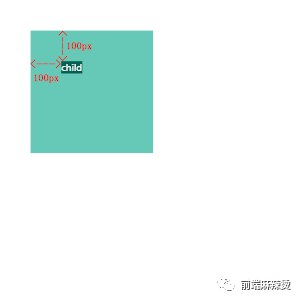
child是relative相对定位的元素,相对于原本正常的位置进行定位。
效果:
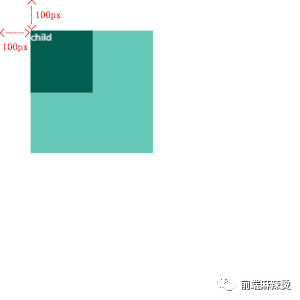
child是fixed固定定位的元素,自动转为块级元素,相对于浏览器窗口进行定位。
效果:
child是static没有定位的元素,出现在正常的流中(忽略 top, bottom, left, right 或者 z-index 声明)。
效果:
inherit
child从parent继承 position 属性的值“relative”。
效果:
扫描二维码
关注更多精彩