

原文地址 拦截器是一种监控,重写,重试请求的强大机制。下面这个例子是一个记录出发出请求和接受响应的简单的拦截器的例子。
class LoggingInterceptor implements Interceptor {
  @Override public Response intercept(Interceptor.Chain chain) throws IOException {
    Request request = chain.request();

    long t1 = System.nanoTime();
    logger.info(String.format("Sending request %s on %s%n%s",
        request.url(), chain.connection(), request.headers()));

    Response response = chain.proceed(request);

    long t2 = System.nanoTime();
    logger.info(String.format("Received response for %s in %.1fms%n%s",
        response.request().url(), (t2 - t1) / 1e6d, response.headers()));

    return response;
  }
}调用chain.proceed(request)是每个拦截器最重要的实现。这个看起来简单的方法是所有HTTP工作的地方,也是对请求响应的地方。 拦截器可以链式调用。假设你有一个压缩的拦截器和一个校验和的拦截器:你要先确定是先压缩再校验,还是先校验再压缩。OKHTTP使用列表跟踪拦截器,而且拦截器是顺序取消的。 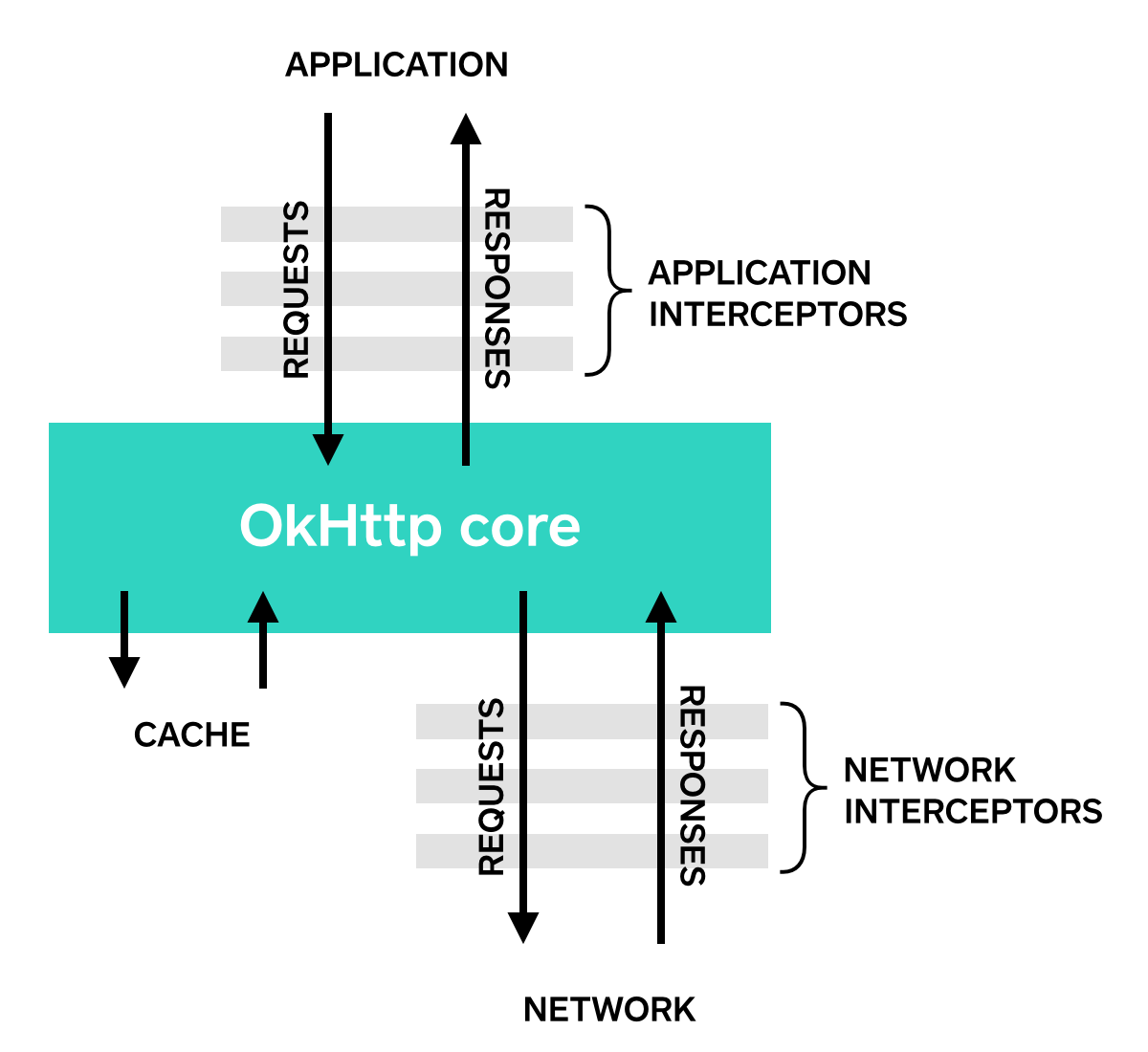
应用拦截器
拦截器注册为应用拦截器或者网络拦截器。我们将使用上面定义的LoggingInterceptor来展示这两者的不同。 通过调用OkHttpClient.Builder的addInterceptor()来注册一个应用拦截器。
OkHttpClient client = new OkHttpClient.Builder()
    .addInterceptor(new LoggingInterceptor())
    .build();

Request request = new Request.Builder()
    .url("http://www.publicobject.com/helloworld.txt")
    .header("User-Agent", "OkHttp Example")
    .build();

Response response = client.newCall(request).execute();
response.body().close();链接http://www.publicobject.com/helloworld.txt重定向到链接http://www.publicobject.com/helloworld.txt,OKHttp回自动重定向。应用拦截器只会被调用一次。chain.proceed()返回的响应是重定向之后的响应。
INFO: Sending request http://www.publicobject.com/helloworld.txt on null
User-Agent: OkHttp Example

INFO: Received response for https://publicobject.com/helloworld.txt in 1179.7ms
Server: nginx/1.4.6 (Ubuntu)
Content-Type: text/plain
Content-Length: 1759
Connection: keep-alive因为response.request().url()和request.url()获取的URL不同,所以可以得出上述结论。两行日志记录了两个不同的URL。
网络拦截器
注册网络拦截器和应用拦截器差不多,只是用addNetworkInterceptor()代替了addInterceptor()。
OkHttpClient client = new OkHttpClient.Builder()
    .addNetworkInterceptor(new LoggingInterceptor())
    .build();

Request request = new Request.Builder()
    .url("http://www.publicobject.com/helloworld.txt")
    .header("User-Agent", "OkHttp Example")
    .build();

Response response = client.newCall(request).execute();
response.body().close();当运行这段代码的时候拦截器运行了两次,一次初始的地址http://www.publicobject.com/helloworld.txt,一次是重定向的地址https://publicobject.com/helloworld.txt。
INFO: Sending request http://www.publicobject.com/helloworld.txt on Connection{www.publicobject.com:80, proxy=DIRECT hostAddress=54.187.32.157 cipherSuite=none protocol=http/1.1}
User-Agent: OkHttp Example
Host: www.publicobject.com
Connection: Keep-Alive
Accept-Encoding: gzip

INFO: Received response for http://www.publicobject.com/helloworld.txt in 115.6ms
Server: nginx/1.4.6 (Ubuntu)
Content-Type: text/html
Content-Length: 193
Connection: keep-alive
Location: https://publicobject.com/helloworld.txt

INFO: Sending request https://publicobject.com/helloworld.txt on Connection{publicobject.com:443, proxy=DIRECT hostAddress=54.187.32.157 cipherSuite=TLS_ECDHE_RSA_WITH_AES_256_CBC_SHA protocol=http/1.1}
User-Agent: OkHttp Example
Host: publicobject.com
Connection: Keep-Alive
Accept-Encoding: gzip

INFO: Received response for https://publicobject.com/helloworld.txt in 80.9ms
Server: nginx/1.4.6 (Ubuntu)
Content-Type: text/plain
Content-Length: 1759
Connection: keep-alive网络请求同时也包含了更多的数据,例如:由OKHttp添加的用来支持响应压缩的Accept-Encoding: gzipheader。网络拦截器的chain有一个非空的Connection,用来查询连接服务器的IP地址和TLS配置信息。
如何选择拦截器
每种拦截器都有优点。
应用拦截器
- 无需关心像重试,重定向等这样的中间过程。
- 即使是从缓存响应,也会调用一次。
- 只关心应用最初的目的,并不需要关心OKHttp注入的header,例如
If-None-Match - 允许短路,不执行
Chain.proceed() - 允许重试,执行多次
Chain.proceed()
网络拦截器
- 可以操作想重试,重定向这样的中间过程。
- 短路网络连接的从cache返回响应的时候不执行。
- 可以监控呗发送到网络上的数据
- 访问包含request的
Connection
重写请求
拦截器可以添加,删除,替换请求头。如果请求有请求体,拦截器也可以转换请求体。例如:如果远程连接的服务器支持压缩,可以使用应用拦截器添加压缩请求体的拦截器。
/** This interceptor compresses the HTTP request body. Many webservers can't handle this! */
final class GzipRequestInterceptor implements Interceptor {
  @Override public Response intercept(Interceptor.Chain chain) throws IOException {
    Request originalRequest = chain.request();
    if (originalRequest.body() == null || originalRequest.header("Content-Encoding") != null) {
      return chain.proceed(originalRequest);
    }

    Request compressedRequest = originalRequest.newBuilder()
        .header("Content-Encoding", "gzip")
        .method(originalRequest.method(), gzip(originalRequest.body()))
        .build();
    return chain.proceed(compressedRequest);
  }

  private RequestBody gzip(final RequestBody body) {
    return new RequestBody() {
      @Override public MediaType contentType() {
        return body.contentType();
      }

      @Override public long contentLength() {
        return -1; // We don't know the compressed length in advance!
      }

      @Override public void writeTo(BufferedSink sink) throws IOException {
        BufferedSink gzipSink = Okio.buffer(new GzipSink(sink));
        body.writeTo(gzipSink);
        gzipSink.close();
      }
    };
  }
}
重写响应
同样拦截器也可以重写响应,转化请求体。通常这样做比重写请求头更危险,因为这样做可能返回的并不是服务器预期值。 如果你处在一个比较棘手的场景,并且准备处理后果,重写响应头就是一个很好的方式处理这类问题。例如:可以修复服务器未配置的Cache-Control来获取更好的缓存响应配置。
/** Dangerous interceptor that rewrites the server's cache-control header. */
private static final Interceptor REWRITE_CACHE_CONTROL_INTERCEPTOR = new Interceptor() {
  @Override public Response intercept(Interceptor.Chain chain) throws IOException {
    Response originalResponse = chain.proceed(chain.request());
    return originalResponse.newBuilder()
        .header("Cache-Control", "max-age=60")
        .build();
  }
};
通常为了补充服务器相应的修复,这个方法是最好的。
那些可以使用拦截器
使用拦截器要求OKHttp 2.0即以上。不行的是拦截器不可以和OkUrlFactory,或者依赖于他的库同时使用,包括Retrofit1.8以下,Picasso2.4以下。
