效果展示
扫码体验

背景
下拉刷新是移动端经常会用到的功能,看了各种各样的ui库,自己想捣鼓一下,研究下其中的原理,于是便有了这个例子。
页面骨架
<template>
  <div class="pullDown">
    <!--loading-->
    <div class="pullDown__loading"></div>
    <!--scroll content-->
    <div class="pullDown__scroll">
        <ul class="pullDown__list"></ul>
    </div>
  </div>
</template>
页面基本样式
.pullDown{
    background-color: #fff;
    position: absolute;
    z-index: 1;
    width: 100%;
    height: 100%;
    overflow-y: scroll;
    /* 增加该属性,可以增加弹性 */
    -webkit-overflow-scrolling: touch;
    transform: translate3d(0, 0, 0);
    -webkit-transform: translate3d(0, 0, 0);
}
.pullDonw__loading{
    position: absolute;
    left: 0;
    top: 0;
    display: block;
    overflow: hidden;
    width: 100%;
    height: 50px;
    text-align: center;
    padding: 16px 24px;
    z-index: 2;
    background-color: #fff;
}
.pullDown__scroll{
    position: relative;
    z-index: 10;
    background-color: #fff;
    border-bottom: 1px solid #e8e8e8;
    border-top: 1px solid #e8e8e8;
}
核心实现
下拉刷新主要根据touchstart,touchmove,touchend三个事件进行判断操作。
- touchstar触发时,则判断刷新状态中和容器到达顶端的情况,否则记录当前位置信息并设置可拉动状态;
- touchemove触发时,判断刷新状态中和可拉动状态,且当前移动位置需大于开始位置,则设置容器跟随手指滚动;
- touchend触发时,判断刷新状态中和动画中,分两种情况:
- 拉动距离超过刷新情况,则执行动画,刷新动作
- 拉动距离没超过刷新情况,则返回原始状态
touchstart($event) {
    var vm= this;
    //判断是否允许下拉
    if (!vm.isPull && !vm.isLoading && vm._scrollWrap.scrollTop == vm.offsetTop) {
      vm.isPull= true;
      vm.startPos= $event.touches[0].pageY;
    };
},
touchmove($event) {
    var vm= this;
    vm.endPos= $event.touches[0].pageY;

    //是否能拉动
    if (!vm.isLoading && vm.isPull && vm.startPos<vm.endPos) {

      vm.distance= (vm.endPos- vm.startPos)*vm.modulus;
      var offsetLoading= vm._loadingWrap.offsetHeight;

      if (vm.distance >= offsetLoading) {
        vm.pullStatus = 'up'
      }else{
        vm.pullStatus = 'down'
      }
      vm.moveTransition(vm.$refs.scroll, vm.distance, 0);
    }
},
touchend($event) {
    var vm= this;
    var offsetLoading= vm._loadingWrap.offsetHeight;
    // vm.isPull= false;

    //加载中 或 移动距离小于0不能移动
    if (vm.isLoading || vm.distance<=0 || vm.isBack) {return false;}

    //拉动距离大于临界值
    if ( vm.distance>0 && vm.distance >= offsetLoading) {

      //执行刷新动作
      vm.pullTransition({
        dom: vm._scrollWrap,
        begin: offsetLoading,
        end: vm.distance,
        duration: 500
      });

      //后台刷新数据
      vm.refresh();
    }else{

      vm.isBack= true;
      // 返回back初始状态
      vm.pullTransition({
        dom: vm._scrollWrap,
        end: vm.distance,
        duration: 500,
        callback: vm.resetStatus
      });
    }
}
下拉动画实现
采用css动画,则难以精准把握动画结束的时间。故采用RequestAnimationFrame实现动画,可监听到结束状态并处理回调。有关 requestAnimationFrame参考以下资料:
/**
* [pullTransition 动画拉动]
* @param  {[type]} dom [元素]
* @param  {[type]} begin [起始值]
* @param  {[type]} end [结束值]
* @param  {[type]} duration [时间]
* @param  {[type]} callback [回调函数]
* @return {[type]}          [description]
*/
pullTransition(opt) {
    var vm= this;
    if (!opt.dom || !opt.end) {
      console.error('参数不足');
      return false;
    };

    var opt= {
      dom: opt.dom,
      currentTime: 0,
      begin: opt.begin? opt.begin: 0,
      end: opt.end,
      //相当一部分的浏览器的显示频率是16.7ms 约等于17
      duration: opt.duration? Math.ceil(opt.duration / 17) : 0,
      callback: opt.callback || false
    };

    var step= function() {

      //根据缓动算法取得值
      var value = opt.end-vm.easeInOut(opt.currentTime, opt.begin, opt.end-opt.begin, opt.duration)+opt.begin;
      opt.dom.style.transform= 'translate3d(0,'+value+'px,0)';

      opt.currentTime++;

      //判断是否到时间
      if (opt.currentTime <= opt.duration) {
           // 继续运动
           requestAnimationFrame(step);
      } else {
          // 动画结束
          if(opt.callback) opt.callback();
      }
    };
    step();
}
/**
* [Linear 缓动算法]
* @param {[type]} t [current time(当前时间)]
* @param {[type]} b [beginning value(初始值)]
* @param {[type]} c [change in value(变化量)]
* @param {[type]} d [duration(持续时间)]
*/
easeInOut(t, b, c, d) {
    if ((t /= d / 2) < 1) return c / 2 * t * t*t + b;
    return c / 2*((t -= 2) * t * t + 2) + b;
}
微信下拉显示网址处理
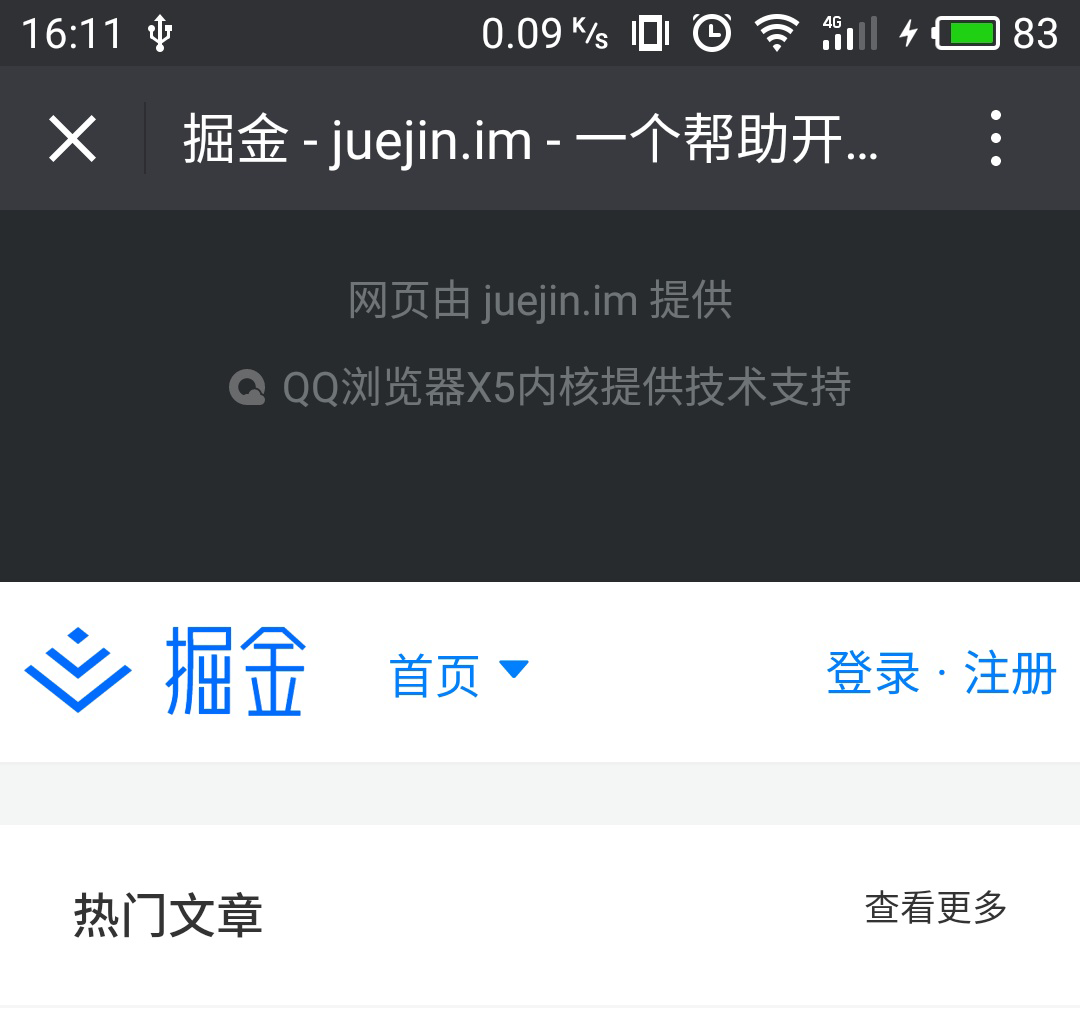
在微信打开一个页面时,在顶部用力往下拉的时候会出现如下图情况,对于下拉刷新来说体验比较差。我在网上搜索了下找到两种方式处理,供各位参考。本例子采用第一种方式,至于采用的依据目前还未深入比较,后续再深入调查。
至此,下拉刷新功能完成,任何意见和建议欢迎提出。