

-
Mint-ui是饿了么团队推出的一个基于Vue.js移动端组件库,随着时间的发展,已经逐渐成熟。Mint-ui包含丰富的JS、CSS组件,快速构造优美的界面,极大地提高了开发效率
-
Vue构建移动端App需要解决大量适配问题, 这里通过rem+ flexbile.js解决。 flexbile.js是阿里解决移动端适配推出的可行性方案
本文通过仿网易云课堂使用Vue学习构建移动端App
在线预览:手机浏览或切换谷歌浏览器移动调试
使用方案
前端
- Vue2.0 + Mint-ui快速构建前端界面(轮播图,swiper滑块) ---Mint-ui
- Vuex 可管理现非父子组件之间的通信
- 移动设备兼容:使用rem+flexible.js
- Stylus实现css预编译
- icon-font实现所有小图标的加载,减少http请求 ----Icon-font
- 路由懒加载:Vue Router结合 Vue异步组件和Webpack 的 Code Splitting
- axios做ajax请求
- sessionStorage 存储用户信息
后端
- 本地使用webpack dev-server 搭建小型express服务
- 服务器端使用express搭建静态资源资源接口
功能实现
首页
- 1、搜索框
- 1、tabbar切换
- 4、swiper滑动,切换页面
- 6、首页各个界面
分类
- 1、实现切换分类模块
- 2、右侧菜单
我的学习
- 1、判断登录状态
- 2、用户所学课程展示
个人
- 1、账户的登录
- 2、设置界面 退出当前账号
搜索界面
- 1、根据用户输入查找所有课程中符合要求的课程并显示
课程详细界面
- 1、通过router传参查找课程
- 1、根据用户是否拥有选择播放视频权限
- 2、课程介绍界面
Gif预览
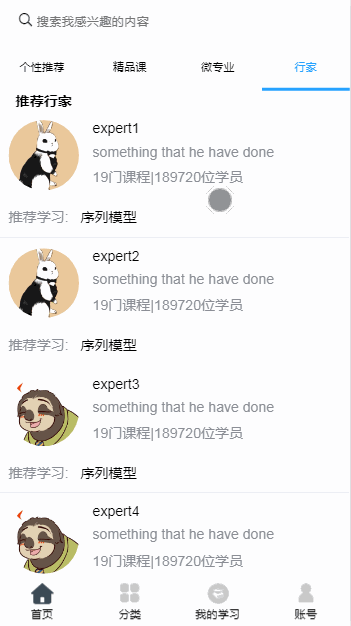

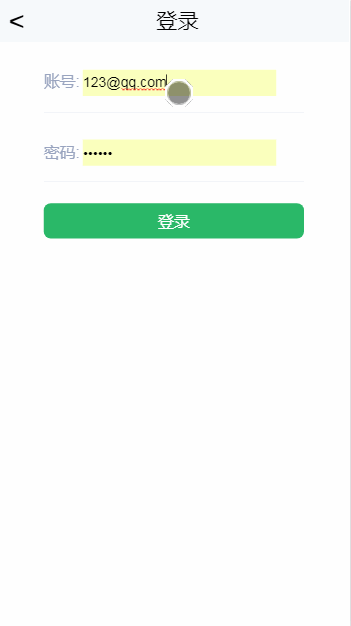
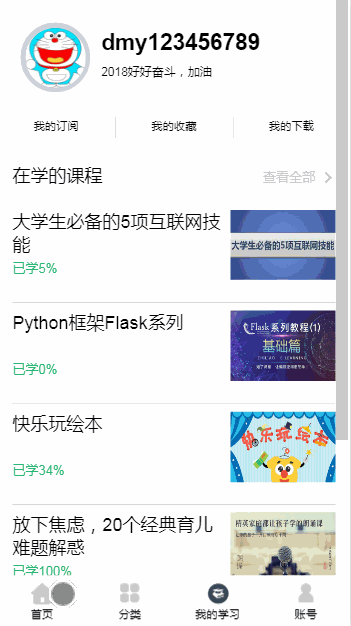
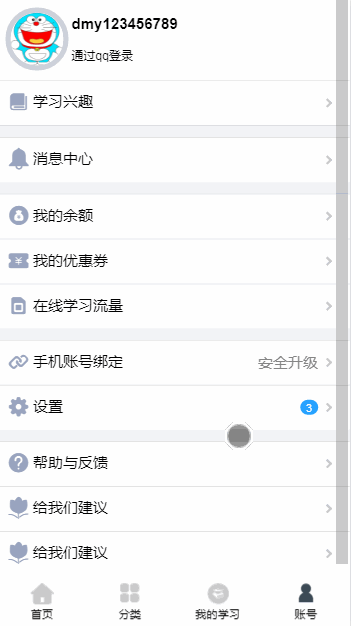
方法总结
- 1、Vue2.0 配合 mint-ui可更高效的搭建移动端app,例如轮播图和swiper滑动,如果通过原生JS实现,则会大大降低效率,通过mint-ui中css和js的组件, 可快速写出复用的界面
<mt-navbar v-model="selected">                     //可通过mint-ui快速搭建主页轮播和滑块
   <mt-tab-item id="1">个性推荐</mt-tab-item>
</mt-navbar>
<mt-tab-container v-model="selected" swipeable>
 <mt-tab-container-item id="1">
</mt-tab-container>
-
2、在构建中,注重组件分离,可以复用的组件,将会提高效率
例如star组件,根据props传入的size和score,可构造出美观实用的星级,复用到各个组件。 还有loading、notfound、search、tabbar等
-
3、对于用户信息, 可通过vuex + sessionStorage进行处理。
sessionStorage是针对一个 session的数据存储(关闭窗口,存储的数据清空),可有效的保存用户信息
-
4、iconfont的引入,iconfont是阿里巴巴的矢量图标库,项目中小图标使用iconfont,可有效的减少http请求次数,减少图片的引入, 可提高性能
-
5、为了优化界面加载,可进行路由懒加载, 同时配合mint-ui 简易的实现图片的懒加载
import { Lazyload } from 'mint-ui';
Vue.use(Lazyload);
<div id="container">
  <ul>
    <li v-for="item in list">
      <img v-lazy.container="item">
    </li>
  </ul>
</div>
-
6、webpack 的dev-server可搭建一个小型的express服务
通过vue-cli构建的项目中,build下webpack.dev.conf.js中,可以方便的设置devserver,实现前端模拟数据的接口 此处可以简易的搭建express服务
devServer: {
    before(app) {
      app.use(bodyParser.json()); // for parsing application/json
      app.use(bodyParser.urlencoded({ extended: true })); // for parsing application/x-www-form-urlencoded
      app.post('/api/login', (req, res) =>{
      });
    },
    clientLogLevel: 'warning',
    historyApiFallback: {
      rewrites: [
        { from: /.*/, to: path.posix.join(config.dev.assetsPublicPath, 'index.html') },
      ],
    },
    hot: true,
    contentBase: false, // since we use CopyWebpackPlugin.
    compress: true,
    host: HOST || config.dev.host,
    port: PORT || config.dev.port,
    open: config.dev.autoOpenBrowser,
    overlay: config.dev.errorOverlay
      ? { warnings: false, errors: true }
      : false,
    publicPath: config.dev.assetsPublicPath,
    proxy: config.dev.proxyTable,
    quiet: true, // necessary for FriendlyErrorsPlugin
    watchOptions: {
      poll: config.dev.poll,
    }
  },
实现细节
登录拦截
通过vue-router的全局钩子函数,在main.js中可实现登录的拦截
router.beforeEach((to, from, next) => {
  // NProgress.start();
  if (to.path == '/login') {
    sessionStorage.removeItem('userInfo');
  }
  let userInfo = JSON.parse(sessionStorage.getItem('userInfo'));
   if (!userInfo && to.path != '/account/login') {
     next({ path: '/account/login' })
   } else {
     next()
   }
  next()
})
路由懒加载
export default new Router({
  routes: [
    {
      path: '/home',
      name: 'Home',
      component: resolve => require(['@/views/Home/Home'], resolve),
    },
    ]
})
vue-router url传参
   changeToCoursedetails(course){
      this.$router.push({path:"/home/coursedetails" , query:{id:course.id}})
      // this.$router.push({name:"Coursedetails" , params:{id:course.id}})
      // 可使用vue.$route 获取query和params
    },
在vue-router中,params的特点是 路由后面要带参数名 并且传参的时候,参数名要跟路由后面设置的参数名对应。
刷新界面,或者跳到别的界面,参数就会消失 params一旦设置在路由,params就是路由的一部分
利用Access-Control-Allow-Origin响应头解决跨域请求原理
app.use(function (req, res, next) {
    // Website you wish to allow to connect
    res.setHeader('Access-Control-Allow-Origin', '*');
    // Request methods you wish to allow
    res.setHeader('Access-Control-Allow-Methods', 'GET, POST, OPTIONS, PUT, PATCH, DELETE');
    // Request headers you wish to allow
    res.setHeader('Access-Control-Allow-Headers', 'X-Requested-With,content-type');
    // Set to true if you need the website to include cookies in the requests sent
    // to the API (e.g. in case you use sessions)
    res.setHeader('Access-Control-Allow-Credentials', true);
    // Pass to next layer of middleware
    next();
});
文件目录
├─api
│      api.js        ---Axios请求
├─common
│  ├─font           ---iconfont
│  ├─js
│  └─stylus             ---stylus预处理和函数
├─components
│  │  loading.vue       ---加载界面组件
│  │  NotFound.vue      ---notFound组件
│  │  search.vue        ---查找组件
│  │  tabbar.vue        ---tabbar组件
│  │
│  └─star               ---星级组件
├─router
│      index.js         ---router入口文件
│
├─views
│  │  Classify.vue          ---主页分类界面
│  │  Classifydetails.vue   ---分类详细界面
│  │  Login.vue             ---登录界面
│  │  Mystudy.vue           ---主页我的学习界面
│  │
│  ├─Account                ---主页我的账号界面
│  │      Account.vue
│  │      setting.vue       ---设置界面
│  │
│  ├─Coursedetails          ---课程详细界面
│  │      catalog.vue
│  │      comment.vue
│  │      Coursedetails.vue
│  │      introduce.vue     ---暂开发课程介绍界面
│  │
│  └─Home                   ---我的主页中首页界面
│          classic.vue      ---经典课程界面
│          expert.vue       ---专家界面
│          Home.vue
│          major.vue        ---行家界面
│          recommend.vue    ---推荐界面
│
└─vuex
    │  store.js
    │  types.js
    │
    └─modules
            com.js      ---vuex 状态管理
            user.js     ---vuex 用户管理
使用
# install dependencies
npm install

# serve with hot reload at localhost:8080
npm run dev

# build for production with minification
npm run build

# build for production and view the bundle analyzer report
npm run build --report
源码地址:Github 欢迎star哦
