- 支持证书和小数的输入
- 可以指出对数字的退格删除
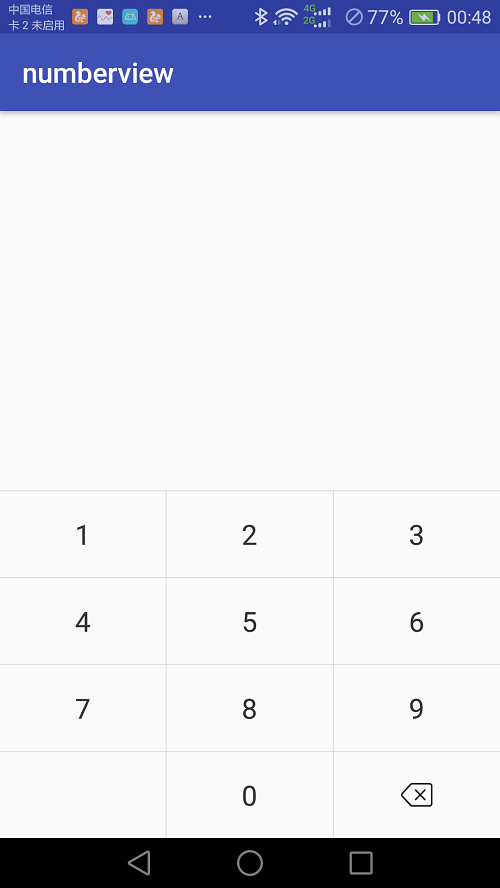
源码地址:numberview
Gradle
在Project的build.gradle中添加:
allprojects {
 	repositories {
 		maven { url 'https://jitpack.io' }
 	}
 }
添加依赖:
compile 'com.github.zhuazhu:numberview:1.0.0'
在xml中添加NumberView
    <com.zhuazhu.numberview.NumberView
        android:layout_width="match_parent"
        android:layout_height="250dp">
    </com.zhuazhu.numberview.NumberView>
方法说明
1.setCustomTextVisible
设置自定义按钮显示/隐藏
2.setCustomText
设置定义按钮的文字
3.setCustomTextSize
设置自定义按钮的字体大小(默认15sp)
4.setCustomTextColor
设置自定义按钮文字的颜色(默认#333333)
5.setBackspaceImage
设置退格图片
6.setCustomBackgroudColor
设置自定义按钮背景颜色
setCustomBackgroudColor(Color.pack("#ffffff"));
7.setCustomBackgroudResource
设置自定义按钮背景颜色
setCustomBackgroudResource(R.color.white);
监听事件
1.setOnNumberListener
监听数字键盘
2.setOnBackSpaceListener
监听退格
3.setOnCustomListener
设监听自定义按钮