

JavaScript30 为Wes Bos推出的一项为期30天的挑战,旨在帮助人们用纯JavaScript来实现效果,初学者若想在JS方面快速精进,不妨一试。
实现效果
利用JS及CSS模拟时钟,时、分、秒针实时摆动,例如现在是14:36,时钟效果如下:

解题思路
- 获取时、分、秒针;
- 获取当前时间;
- 计算当前时间下,时、分、秒针分别所需旋转角度;
- 调整当前时间下,指针在表盘的位置。
页面基础布局
  <div class="clock">
    <div class="clock-face">
      <div class="hand hour-hand"></div>
      <div class="hand min-hand"></div>
      <div class="hand second-hand"></div>
    </div>
  </div>
CSS部分代码
    html {
      background: #018DED url(http://unsplash.it/1500/1000?image=881&blur=50);
      background-size: cover;
      font-family: 'helvetica neue';
      text-align: center;
      font-size: 10px;
    }
    body {
      margin: 0;
      /* font-size: 2rem; */
      display: flex;
      flex: 1;
      min-height: 100vh;
      /* 设置段落的最小高度 */
      align-items: center;
      /* 适用于flex容器,弹性盒子元素在该行的侧轴(纵轴)上居中放置。 */
    }

    .clock {
      width: 30rem;
      height: 30rem;
      border: 20px solid white;
      border-radius: 50%;
      /*向 div 元素添加圆角边框:*/
      margin: 50px auto;
      position: relative;
      padding: 2rem;
      box-shadow: /*向div元素添加一个或多个阴影,逗号分隔*/
      0 0 0 4px rgba(0, 0, 0, 0.1),
      inset 0 0 0 3px #EFEFEF,
      inset 0 0 10px black,
      0 0 10px rgba(0, 0, 0, 0.2);
    }

    .clock-face {
      position: relative;
      width: 100%;
      height: 100%;
      transform: translateY(-3px);
      /* account for the height of the clock hands */
    }

    .hand {
      width: 50%;
      height: 6px;
      background: black;
      position: absolute;
      top: 50%;
      transform-origin: 100%;/* 该属性可以用来更改元素变形的原点,在这里可设置旋转的中心点,初始值为【50%,50%,0】。*/
      /* transform: rotate(90deg);  */
      transition: all 0.05s;
      transition-timing-function: ease-in-out;
      /* 根据时间的推进去改变属性值的变换速率。*/
    }
备注:
涉及的小知识点已经在注释中提及,不展开解释。有关CSS3 Transition的疑问,详见该网站。有关transform-origin的疑问,可参见该网站属性演示,可以帮助你更好理解。
JS部分代码
    const HourHand = document.querySelector('.hour-hand');
    const MinHand = document.querySelector('.min-hand');
    const SecondHand = document.querySelector('.second-hand');

    function setDate() {
      const now = new Date();

      const sec = now.getSeconds();
      const secdeg = (sec / 60) * 360 + 90;
      SecondHand.style.transform = `rotate(${secdeg}deg)`;

      const min = now.getMinutes();
      const mindeg = ((min / 60) * 360) + ((sec / 60) * 6 )+ 90;
      MinHand.style.transform = `rotate(${mindeg}deg)`;

      const hour = now.getHours();
      const hourdeg = ((hour / 12) * 360) + ((min / 60) * 30) + 90;
      HourHand.style.transform =`rotate(${hourdeg}deg)`;
    }

     setDate() ;
     setInterval(setDate,1000);
JS部分解析思路(以秒针为例)
- 获取秒针节点
const SecondHand = document.querySelector('.second-hand');
- 获取当前时间为几秒
      const now = new Date();
      const sec = now.getSeconds();
- 计算当前时间下,秒针旋转角度
const secdeg = (sec / 60) * 360 + 90;
- 利用
transform: rotate(deg)特性,调整秒针在表面内摆动位置
SecondHand.style.transform = `rotate(${secdeg}deg)`;
- 设置定时器,每秒调用一次
setDate()函数
     setDate();
     setInterval(setDate, 1000);
延伸思考
观察时钟,我们会发现一个小bug,当秒针转动一圈完毕,59秒至60秒时,会出现一次大回弹,角度值的变化为 444°-> 90°,逆时针回弹,0秒至1秒时,恢复顺时针旋转,角度值变化为90° ->96°,再恢复原状,这是transition特性带来的误差。
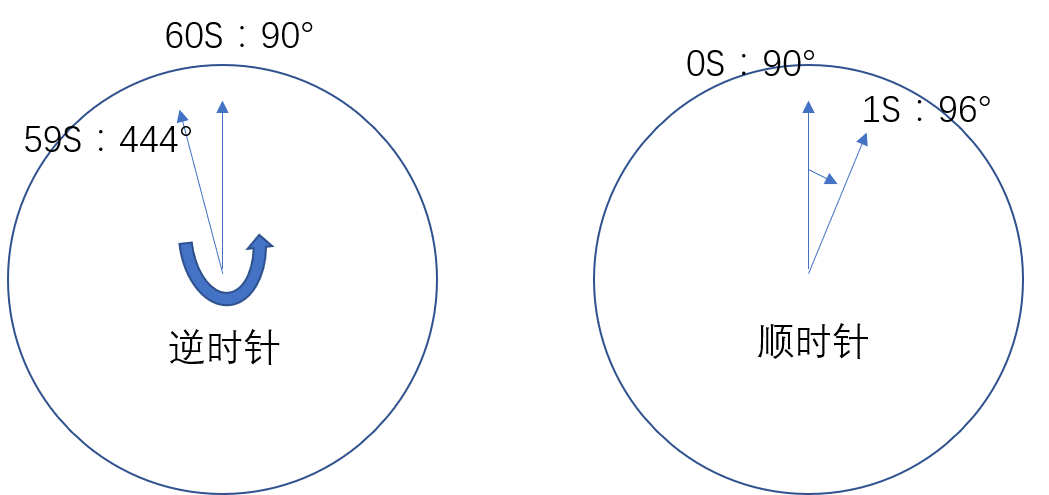
改进方法如下
第一种方法:
在发生跳顿的角度值处,将 CSS 的 transition 属性去掉,逆时针回弹的过程将在瞬间完成,可忽略不计。
    const HourHand = document.querySelector('.hour-hand');
    const MinHand = document.querySelector('.min-hand');
    const SecondHand = document.querySelector('.second-hand');

    function setDate() {
      const now = new Date();

      const sec = now.getSeconds();
      const secdeg = (sec / 60) * 360 + 90;

      const min = now.getMinutes();
      const mindeg = ((min / 60) * 360) + ((sec / 60) * 6) + 90;

      const hour = now.getHours();
      const hourdeg = ((hour / 12) * 360) + ((min / 60) * 30) + 90;

      if (secdeg === 90) {
        SecondHand.style.transition = 'all 0s'
      }
      // 在指针即将出现大摆动的那一刻,去除transition属性
      else {
        SecondHand.style.transition = 'all 0.05s'
      }

      SecondHand.style.transform = `rotate(${secdeg}deg)`;
      MinHand.style.transform = `rotate(${mindeg}deg)`;
      HourHand.style.transform = `rotate(${hourdeg}deg)`;
    }

    setDate();
    setInterval(setDate, 1000);
第二种方法是:
解决思路是,按照之前的代码所写,每秒都会new一个Date,如果让秒针角度保持一直增长的状态,而非每次重新计算,就不会出现这样的问题了。
    const HourHand = document.querySelector('.hour-hand');
    const MinHand = document.querySelector('.min-hand');
    const SecondHand = document.querySelector('.second-hand');
    let secdeg = 0; let mindeg = 100; let hourdeg = 1;

    function setDate() {
      const now = new Date();

      const sec = now.getSeconds();
      secdeg = (sec / 60) * 360 + 90;

      const min = now.getMinutes();
      mindeg = ((min / 60) * 360) + ((sec / 60) * 6) + 90;

      const hour = now.getHours();
      hourdeg = ((hour / 12) * 360) + ((min / 60) * 30) + 90;}

      function updateDate() {
        secdeg += (1 / 60) * 360;
        mindeg += ((1 / 60) / 60) * 360;
        hourdeg += (((1 / 60) / 60) / 12);

        SecondHand.style.transform = `rotate(${secdeg}deg)`;
        MinHand.style.transform = `rotate(${mindeg}deg)`;
        HourHand.style.transform = `rotate(${hourdeg}deg)`;
      }

      setDate();
      setInterval('updateDate()', 1000);
