

这个 Session 通过一个 App 实例讲解了协议和值类型在 UIKit 中的应用。
Local Reasoning
Local reasoning 是指,当看到面前的代码时,不必考虑其他代码是如何和它交互的。这让代码更容易维护,更容易编写,更容易测试。
下面通过一个实际的 App 来说明。这个 App 叫做 Lucid Dreams,它用来记录程序员做过的白日梦。
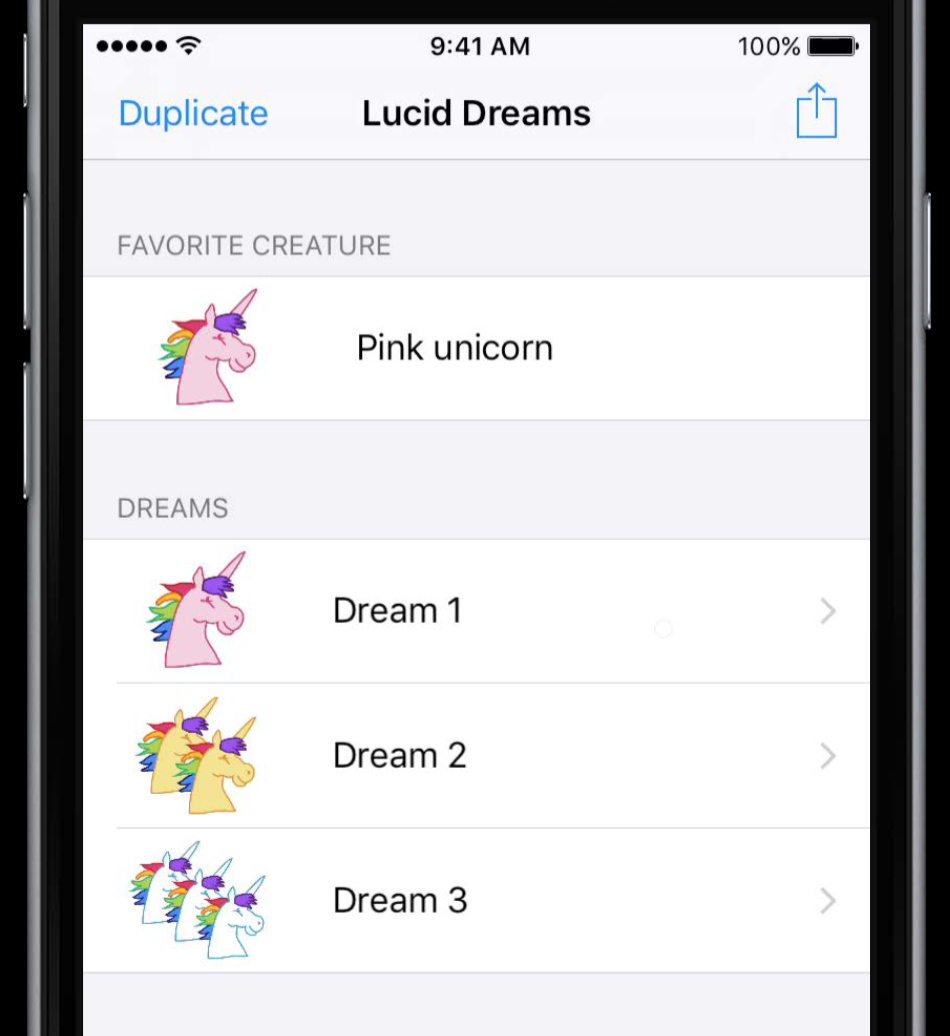
模型层
一个梦的模型可能是这样:
class Dream {
  var description: String
  var creature: Creature
  var effects: SetEffect>
  ...
}
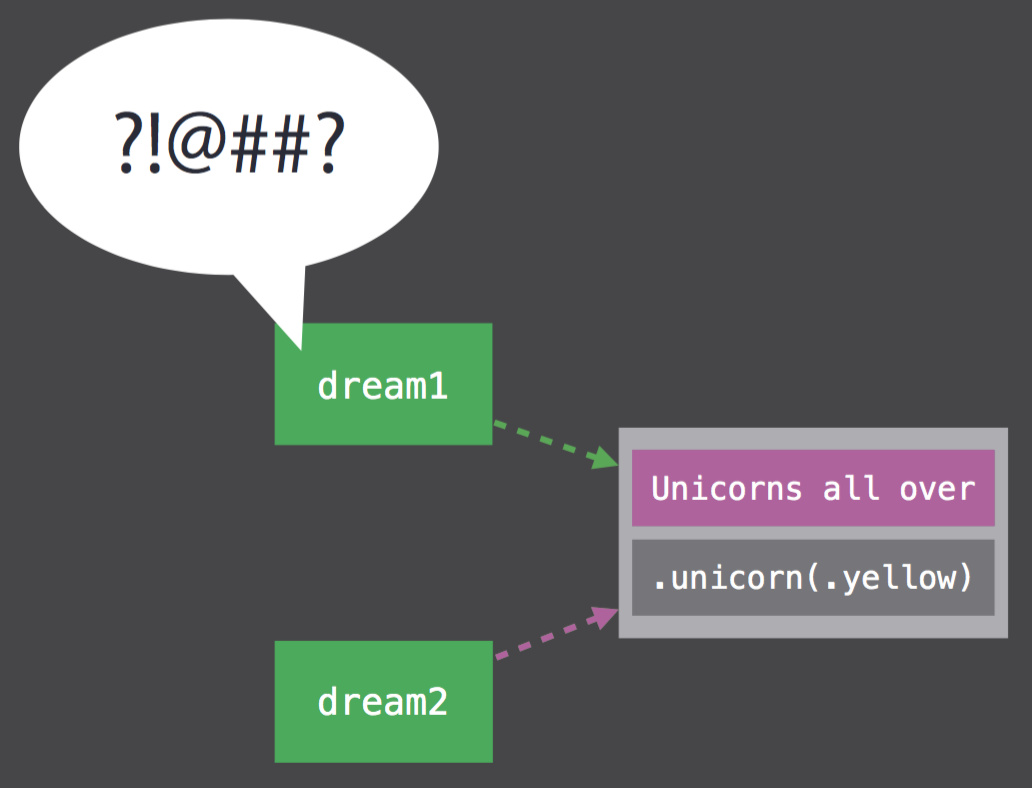
但 class 型是引用语义,这会带来一个问题:
var dream1 = Dream(...)
var dream2 = dream1
dream2.description = "Unicorns all over"
改变 dream2 会导致 dream1 一起变化:
不同的对象间关系复杂,class 的引用语义在这里会造成不小麻烦:
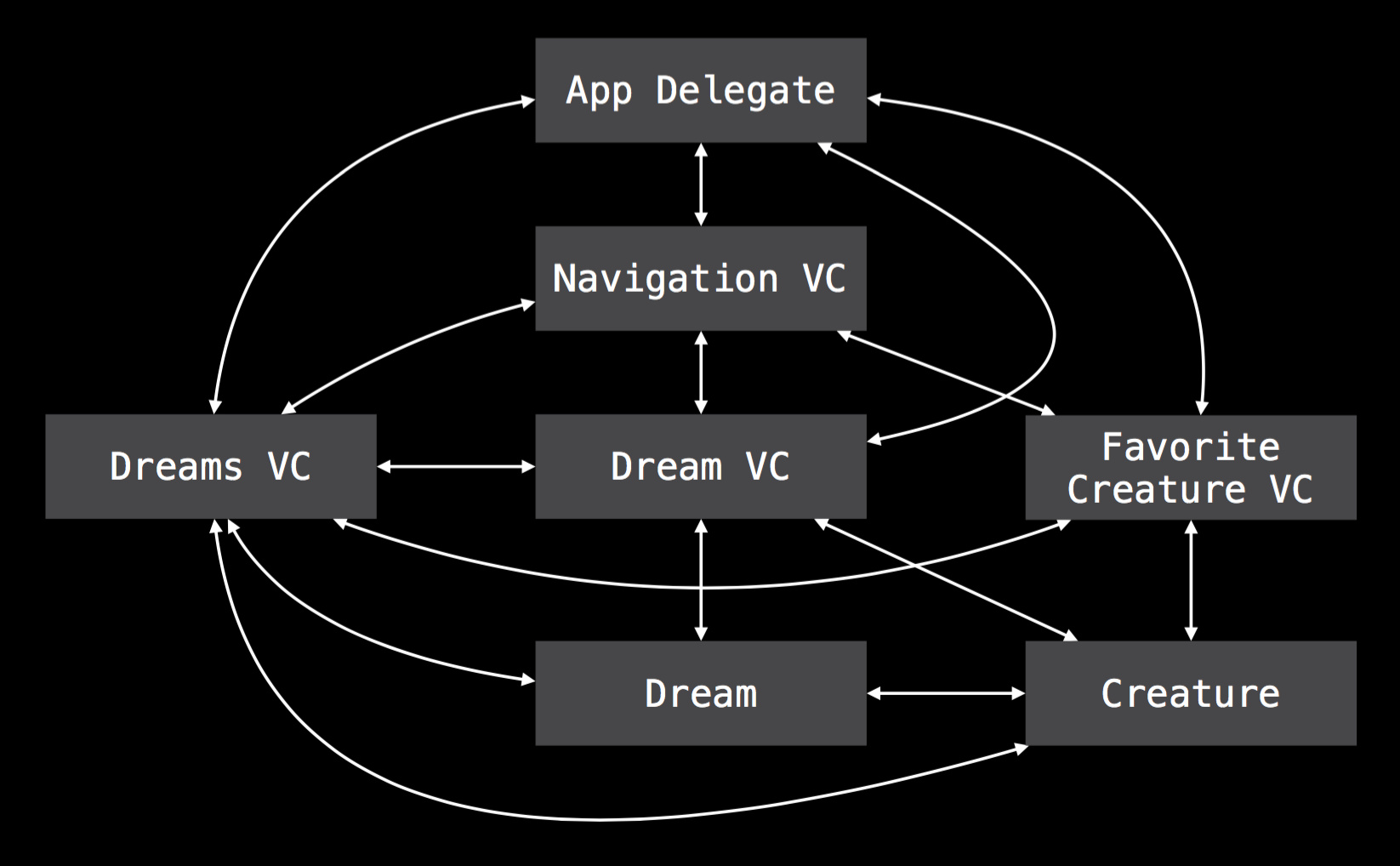
这不符合 local reasoning,可以用 struct 型来改进:
struct Dream {
  var description: String
  var creature: Creature
  var effects: SetEffect>
  ...
}
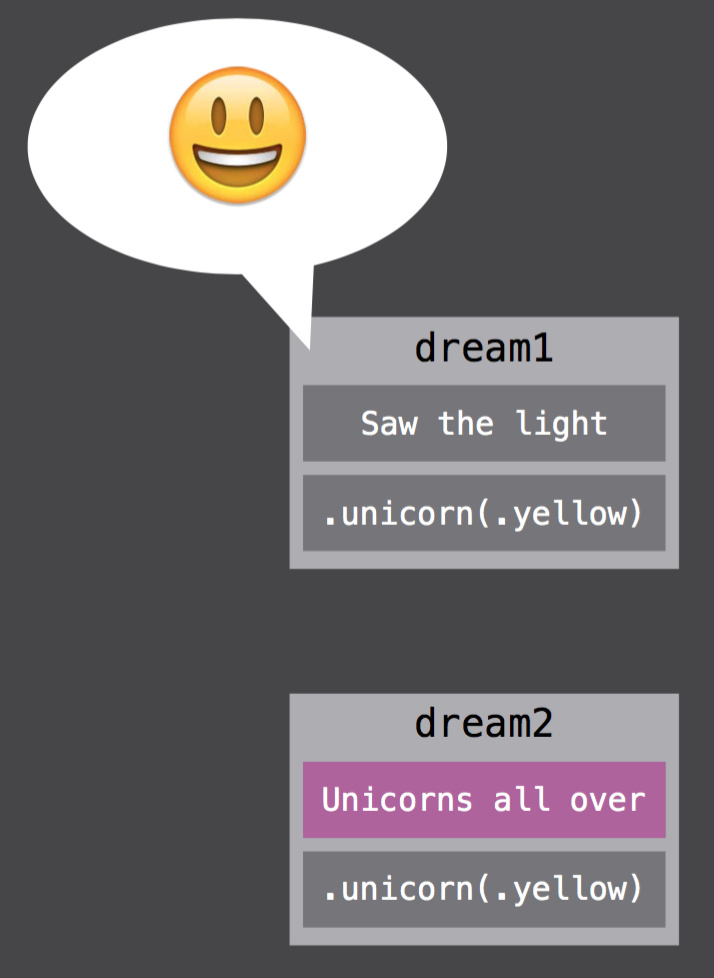
var dream1 = Dream(...)
var dream2 = dream1
此时两个 dream 是不同的:
视图层
这个 App 里有一个列表来显示做过的梦,它的 UITableViewCell 是这样的继承结构:
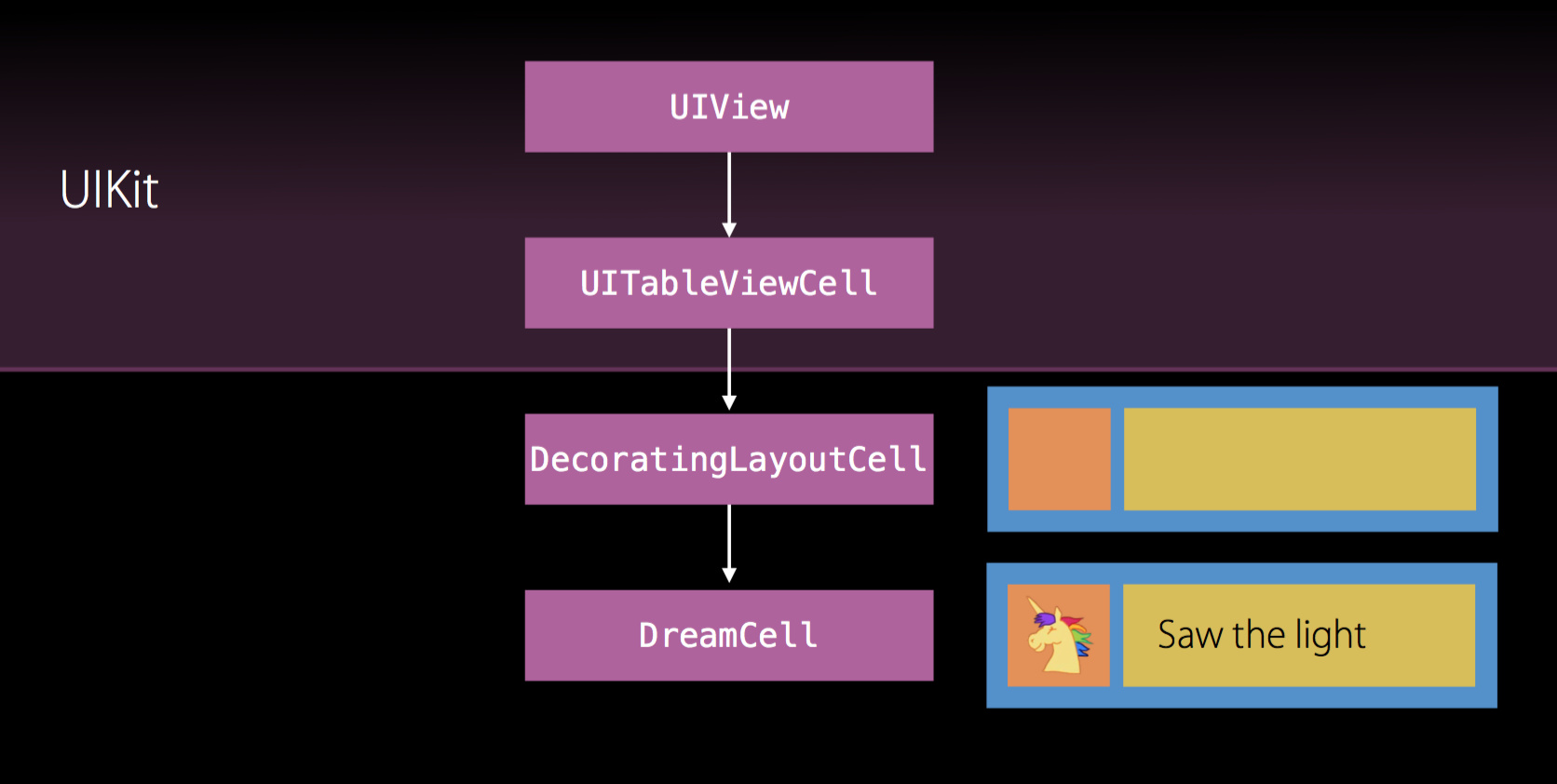
这样做层次分明,但问题来了,在梦的详情页面里有个几乎一模一样的界面来展示梦的缩略图和标题,但它是个直接继承 UIView 的视图:
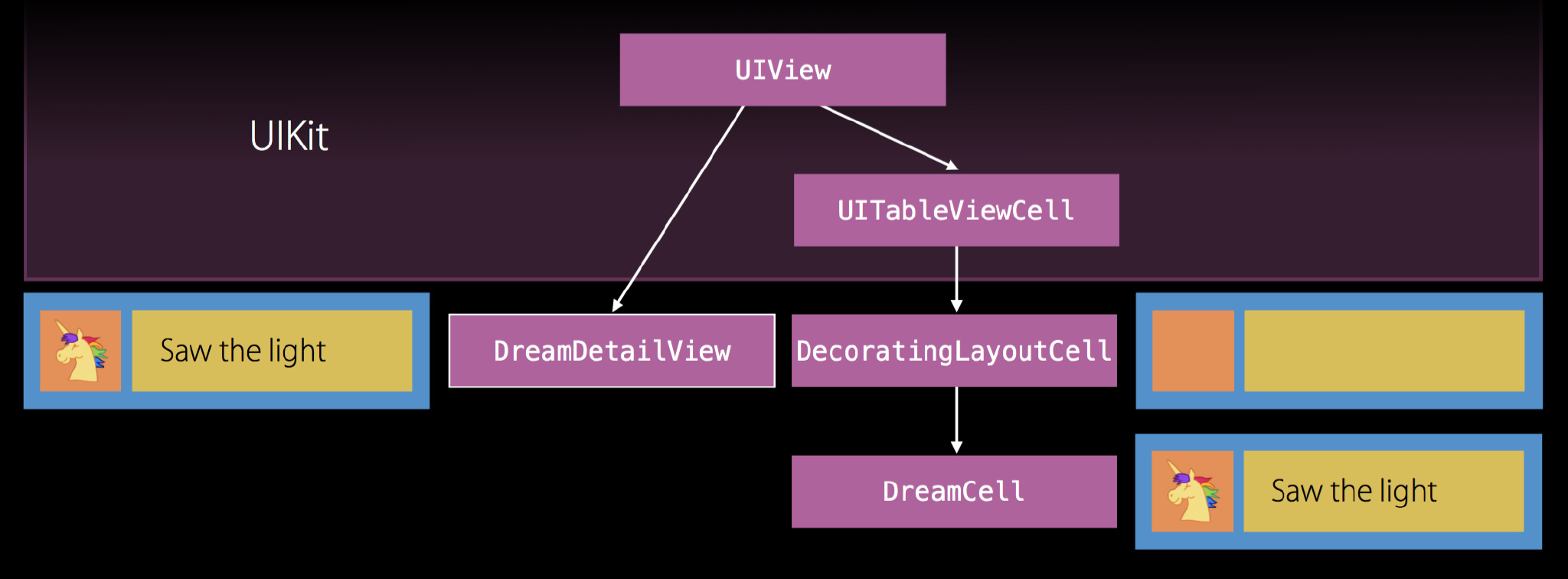
仅仅是因为子类类型的区别,相同的视图代码重复写了两次。更严重的是,之后还想用 SKNode 来展示同样的界面,只是缩略图是动态的,难道还要再复制粘贴一份代码吗?当然不是,这些界面有相似之处,即布局相同,可以把它们的布局逻辑抽象成同一个对象来减少重复:
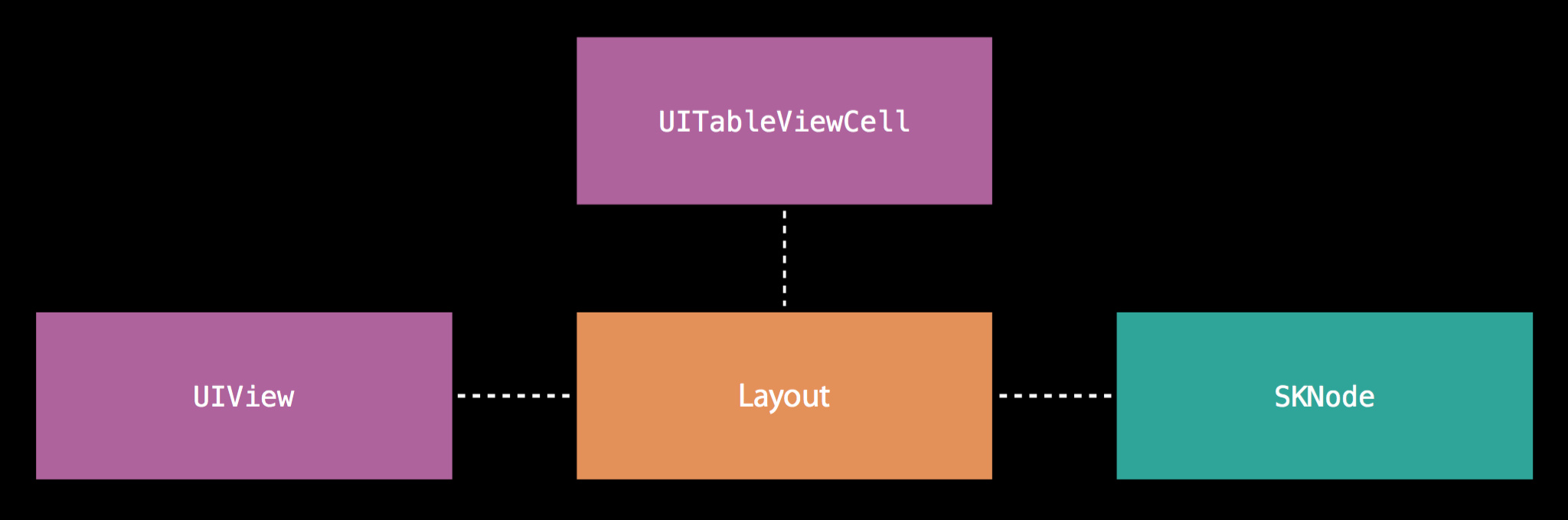
把布局代码单独抽取出来作为 DecoratingLayout,它有一个只关心如何布局的方法:
struct DecoratingLayout {
  var content: UIView
  var decoration: UIView
  mutating func layout(in rect: CGRect) {
    // Perform layout...
  }
}
这样一来布局逻辑和 UITableViewCell 解耦,可以用在 UIView 中:
class DreamCell : UITableViewCell {
  ...
  override func layoutSubviews() {
    var decoratingLayout = DecoratingLayout(content: content, decoration: decoration)
    decoratingLayout.layout(in: bounds)
  }
}

class DreamDetailView : UIView {
  ...
  override func layoutSubviews() {
    var decoratingLayout = DecoratingLayout(content: content, decoration: decoration)
    decoratingLayout.layout(in: bounds)
  }
}
这样做还有一个好处,就是测试代码更容易写,不需要创建 UITableView 就可以测试布局:
func testLayout() {
  let child1 = UIView()
  let child2 = UIView()
  var layout = DecoratingLayout(content: child1, decoration: child2)
  layout.layout(in: CGRect(x: 0, y: 0, width: 120, height: 40))
  XCTAssertEqual(child1.frame, CGRect(x: 0, y: 5, width: 35, height: 30))
  XCTAssertEqual(child2.frame, CGRect(x: 35, y: 5, width: 70, height: 30))
}
UIView 和 UITableViewCell 的问题解决了,SKNode 的问题还没有。这主要是因为在 DecoratingLayout 里强制限定了 UIView 类型,把它换成一个 protocol Layout 即可:
struct DecoratingLayoutChild: Layout> {
  var content: Child
  var decoration: Child
  mutating func layout(in rect: CGRect) {
    // Perform layout...
  }
}

protocol Layout {
  var frame: CGRect { get set }
}

extension UIView : Layout {}
extension SKNode : Layout {}
现在又有一个新的视图,它和之前的布局相似,只是缩略图变成了层叠的:
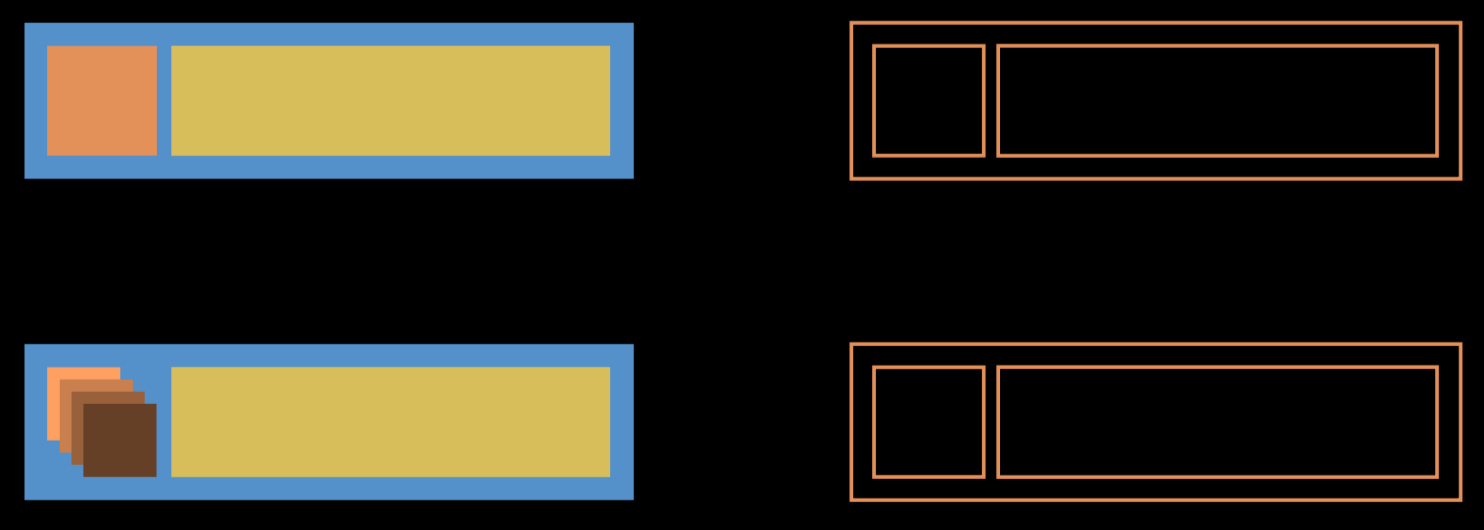
可以用组合 UIView 的方式解决这个问题,把视图分为两个部分,一个负责层叠的缩略图部分,一个负责整体的横向布局:
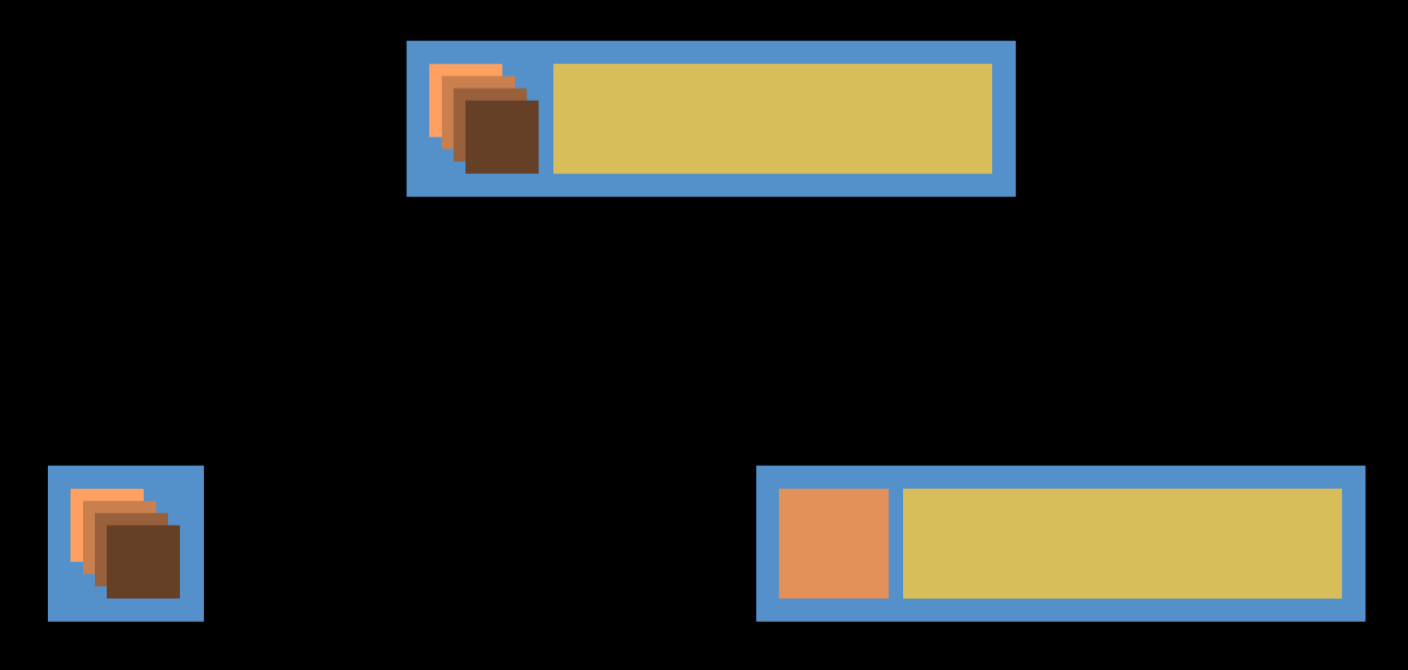
但是注意:
class实例开销很大!struct开销却很小- 组合和值类型配合得更好
所以说可以用组合 struct 来改进:
struct CascadingLayoutChild : Layout> {
  var children: [Child]
  mutating func layout(in rect: CGRect) {
    ...
  }
}
看起来不错,但 CascadingLayout 和 DecoratingLayout 都有 layout 方法,而且布局并不需要读写 frame 这么大的权限,因此可以用 protocol Layout 来泛化:
protocol Layout {
  mutating func layout(in rect: CGRect)
}

extension UIView : Layout { ... }
extension SKNode : Layout { ... }

struct DecoratingLayoutChild : Layout, ...> : Layout { ... }
struct CascadingLayoutChild : Layout> : Layout { ... }

let decoration = CascadingLayout(children: accessories)
var composedLayout = DecoratingLayout(content: content, decoration: decoration)

composedLayout.layout(in: rect)
还有个问题,层叠视图中的子视图具有先后的顺序关系,需要在 protocol 中体现它:
protocol Layout {
  mutating func layout(in rect: CGRect)
  var contents: [Layout] { get } // UIView and SKNode
}
但这样一来 content 的类型限制就没了。怎么办?用 associatedtype:
protocol Layout {
  mutating func layout(in rect: CGRect)
  associatedtype Content
  var contents: [Content] { get }
}

struct DecoratingLayoutChild : Layout> : Layout {
  var content: Child
  var decoration: Child
  mutating func layout(in rect: CGRect)
  typealias Content = Child.Content
  var contents: [Content] { get }
}
问题又来了,content 和 decoration 类型一致(Child),两个都是 UIView 时固然没错,但如果想如下布局该怎么办?
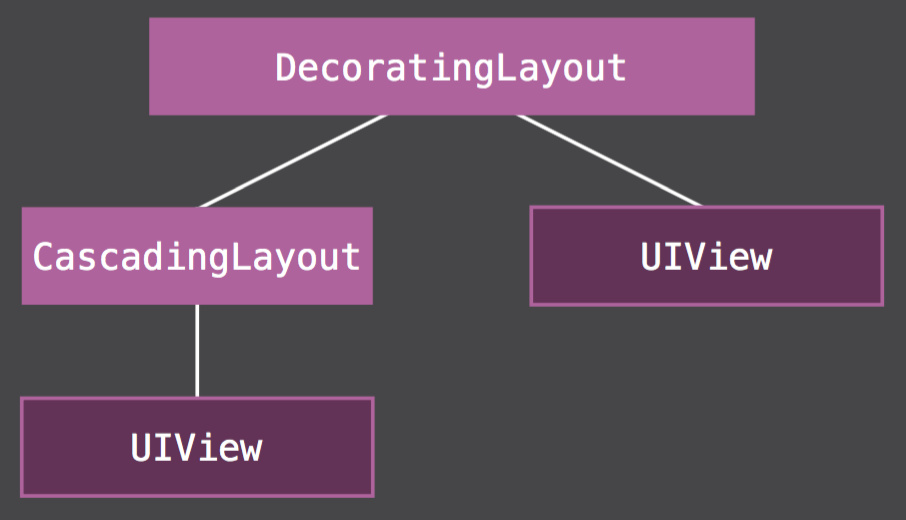
改类型,用约束:
struct DecoratingLayoutChild : Layout, Decoration : Layout
                        where Child.Content == Decoration.Content> : Layout {
  var content: Child
  var decoration: Decoration
  mutating func layout(in rect: CGRect)
  typealias Content = Child.Content
  var contents: [Content] { get }
}
终于结束了。好处也是有的,测试时不必使用真正的 UIView 类型,随便换个遵循 protocol Layout的就可以了:
func testLayout() {
  let child1 = TestLayout()
  let child2 = TestLayout()
  var layout = DecoratingLayout(content: child1, decoration: child2)
  layout.layout(in: CGRect(x: 0, y: 0, width: 120, height: 40))
  XCTAssertEqual(layout.contents[0].frame, CGRect(x: 0, y: 5, width: 35, height: 30))
  XCTAssertEqual(layout.contents[1].frame, CGRect(x: 35, y: 5, width: 70, height: 30))
}

struct TestLayout : Layout {
  var frame: CGRect
  ...
}
控制器层
这个 App 还有一个功能:摇晃撤销上次修改。相关的代码是这样写的:
class DreamListViewController : UITableViewController {
  var dreams: [Dream]
  var favoriteCreature: Creature
  ...
}
dreams 和 favoriteCreature 都要支持撤销操作,它们均被撤销管理器管理:
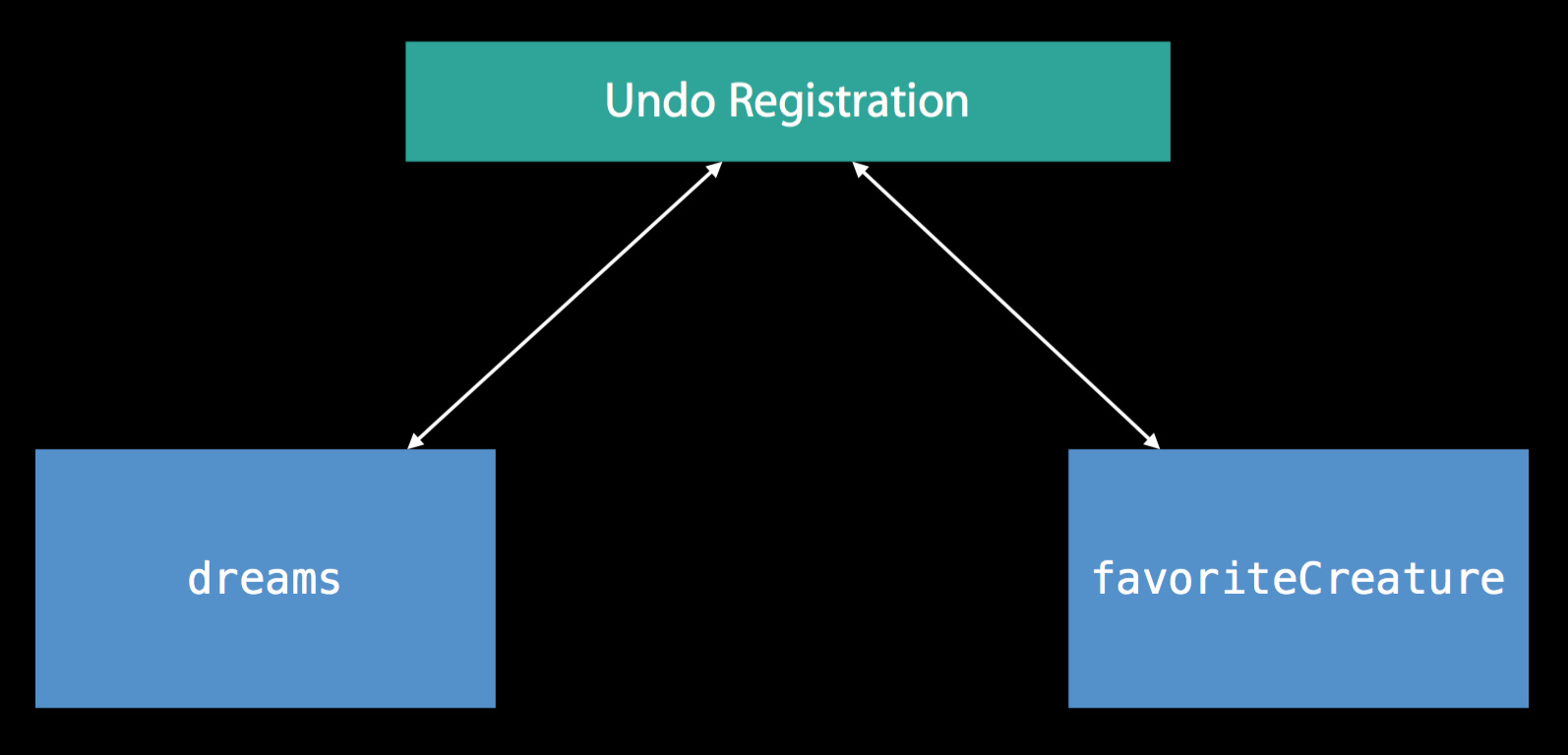
这就有问题了,每个属性都要写一份自己的撤销操作代码,如果之后有更多的属性,那就得写更多的重复代码。怎么办?可以把这些属性封装成一个整体:
class DreamListViewController : UITableViewController {
  var model: Model
  ...
}

struct Model : Equatable {
  var dreams: [Dream]
  var favoriteCreature: Creature
}
这样一来每次撤销操作都操作一个整体模型,避免了把琐碎的撤销操作分散到不同的地方:
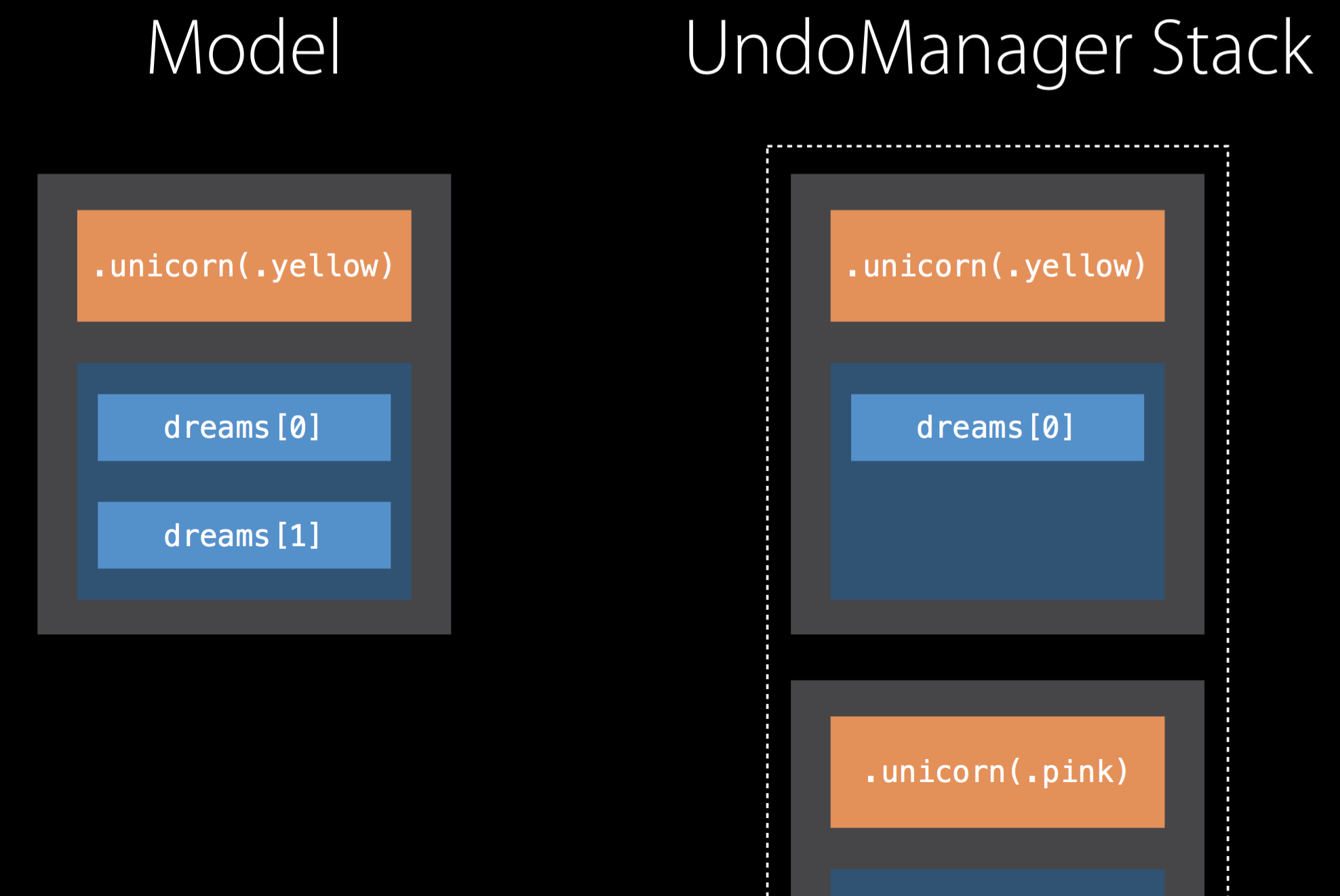
整体容易撤销操作了,但具体的界面更新怎么办?根据模型变化部分更新:
class DreamListViewController : UITableViewController {
  ...
  func modelDidChange(old: Model, new: Model) {
    if old.favoriteCreature != new.favoriteCreature {
      // Reload table view section for favorite creature.
      tableView.reloadSections(...)
    }
    ...
    undoManager?.registerUndo(withTarget: self, handler: { target in
      target.model = old
    })
  }
}
这个 App 还有三种不同的状态,浏览、选择、分享。这些状态的相关代码分成了好几个属性:
class DreamListViewController : UITableViewController {
  var isInViewingMode: Bool
  var sharingDreams: [Dream]?
  var selectedRows: IndexSet?
  ...
}
这不好,因为改变其中一个属性的同时还要记得改变相关的属性。用一个 struct 模型来改进:
class DreamListViewController : UITableViewController {
  var state: State
  ...
}

enum State {
  case viewing
  case sharing(dreams: [Dream])
  case selecting(selectedRows: IndexSet)
}
总结
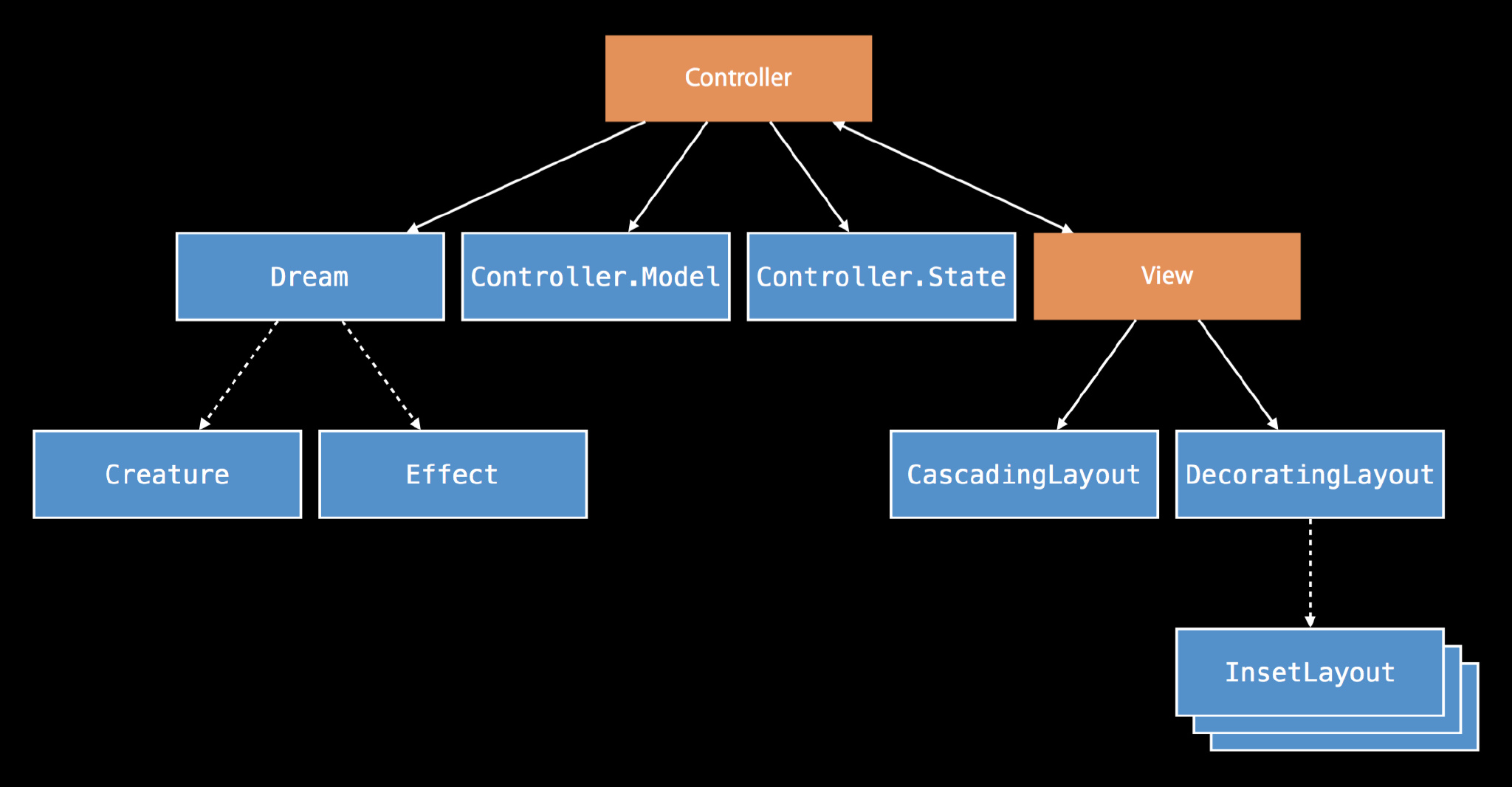
最终整体的 MVC 结构如下:
- 通过组合来自定义
- 使用
protocol来编写通用的、可重用的代码 - 多利用值语义的优点
- Local reasoning
