

Promise.prototype.finally() recently reached stage 4 of the TC39 proposal process. This means the Promise.prototype.finally() proposal was accepted and is now part of the latest draft of the ECMAScript spec,
and it is only a matter of time before it lands in Node.js. This article will show you how to use Promise.prototype.finally() and how to write your own simplified polyfill.

What is Promise.prototype.finally()?
Suppose you've created a new promise:
const promiseThatResolves = new Promise((resolve) => {
  setTimeout(() => resolve('Hello, World'), 1000);
});

const promiseThatRejects = new Promise((resolve, reject) => {
  setTimeout(() => reject(new Error('woops!')), 1000);
});
You can chain promises together using the .then() function.
promiseThatResolves.then(() => console.log('Will print after about 1 second'));
promiseThatRejects.then(null, () => console.log('Will print after about 1 second'));
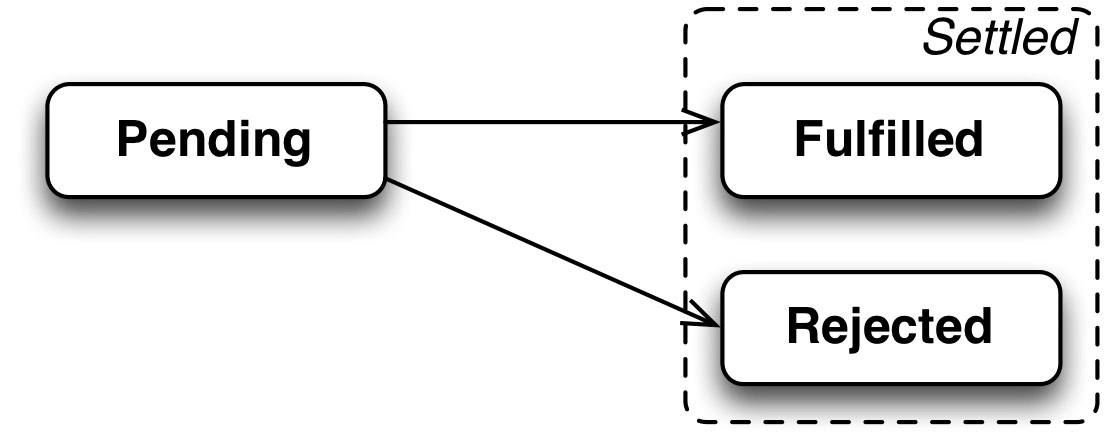
Note that .then() takes two function parameters. The first is onResolved(), which gets called if the promise resolves. The second is onRejected(), which gets called if the promise rejects. A promise is a state
machine that can be in one of 3 states:
- Pending: the underlying operation is in progress and the promise has neither resolved nor rejected yet
- Resolved: the underlying operation has completed successfully and the promise now has an associated value
- Rejected: the underlying operation failed for some reason and the promise now has an associated error
Furthermore, a promise that is resolved or rejected is called "settled."
While .then() is the core mechanism for promise chaining, it isn't the only one. Promises also have a .catch() function that is handy for error handling.
promiseThatRejects.catch(() => console.log('Will print after about 1 second'));
The .catch() function is just a convenient shorthand for .then() with an onRejected handler and no onResolved handler:
promiseThatRejects.catch(() => console.log('Will print after about 1 second'));
// Equivalent
promiseThatRejects.then(null, () => console.log('Will print after about 1 second'));
Like .catch(), the .finally() function is a convenient shorthand for .then(). The difference is that .finally() executes a function onFinally when the promise is settled, that is, when
it is either resolved or rejected. The .finally() function is not part of any Node.js release at the time of this writing, but the promise.prototype.finally module on npm has a polyfill.
const promiseFinally = require('promise.prototype.finally');

// Add `finally()` to `Promise.prototype`
promiseFinally.shim();

const promiseThatResolves = new Promise((resolve) => {
  setTimeout(() => resolve('Hello, World'), 1000);
});

const promiseThatRejects = new Promise((resolve, reject) => {
  setTimeout(() => reject(new Error('woops!')), 1000);
});

promiseThatResolves.finally(() => console.log('resolved'));
promiseThatRejects.finally(() => console.log('rejected'));
The above script will print both 'resolved' and 'rejected', because the onFinally handler gets called when the promise is settled, regardless of whether it is resolved or rejected. However, the onFinally handler does not receive any parameters, so you can't tell whether the promise was resolved or rejected.
The finally() function returns a promise, so you can chain more .then(), .catch(), and .finally() calls onto the return value. The promise that finally() returns will resolve to whatever
the promise it was chained onto would resolve to. For example, the below script will still print 'foo', even though the onFinally handler returns 'bar'.
const promiseFinally = require('promise.prototype.finally');

// Add `finally()` to `Promise.prototype`
promiseFinally.shim();

Promise.resolve('foo').
  finally(() => 'bar').
  // Will print 'foo', **not** 'bar', because `finally()` acts as a passthrough
  // for resolved values and rejected errors
  then(res => console.log(res));
Similarly, the below script will still print 'Woops!', even though the onFinally function didn't trigger any errors.
const promiseFinally = require('promise.prototype.finally');

// Add `finally()` to `Promise.prototype`
promiseFinally.shim();

Promise.reject(new Error('foo')).
  finally(() => 'bar').
  // Will print 'foo', **not** 'bar', because `finally()` acts as a passthrough
  // for resolved values and rejected errors
  catch(err => console.log(err.message));
The above script demonstrates an important detail of working with finally(): finally() does not handle promise rejections for you. How finally() handles promise rejections merits more careful
study.
Error Handling
The finally() function is not meant to handle promise rejections. As a matter of fact, it explicitly rethrows errors after your onFinally() function executes. The below script will print an unhandled promise rejection warning.
const promiseFinally = require('promise.prototype.finally');

// Add `finally()` to `Promise.prototype`
promiseFinally.shim();

const promiseThatRejects = new Promise((resolve, reject) => {
  setTimeout(() => reject(new Error('woops!')), 1000);
});

promiseThatRejects.finally(() => console.log('rejected'));
$ node finally.js
rejected
(node:5342) UnhandledPromiseRejectionWarning: Unhandled promise rejection (rejection id: 2): Error: woops!
(node:5342) [DEP0018] DeprecationWarning: Unhandled promise rejections are deprecated. In the future, promise rejections that are not handled will terminate the Node.js process with a non-zero exit code.
$
Like with try/catch/finally, you typically want to chain .finally() after a .catch().
const promiseFinally = require('promise.prototype.finally');

// Add `finally()` to `Promise.prototype`
promiseFinally.shim();

const promiseThatRejects = new Promise((resolve, reject) => {
  setTimeout(() => reject(new Error('woops!')), 1000);
});

promiseThatRejects.
  catch(() => { /* ignore the error */ }).
  finally(() => console.log('done'));
However, the finally() function returns a promise, so there's nothing stopping you from chaining .catch() after .finally(). In particular, if your onFinally handler can error out, for example if
it makes an HTTP request, you should add a .catch() at the end to handle any errors that may occur.
const promiseFinally = require('promise.prototype.finally');

// Add `finally()` to `Promise.prototype`
promiseFinally.shim();

const promiseThatRejects = new Promise((resolve, reject) => {
  setTimeout(() => reject(new Error('woops!')), 1000);
});

promiseThatRejects.
  finally(() => console.log('rejected')).
  // No unhandled promise rejection because there's a `.catch()`
  catch(() => { /* ignore the error */ });
Simplified Polyfill
I think that the easiest way to really grok something is to write your own implementation. The .finally() function is a good candidate for this because the official polyfill is only 45 lines, and most of it isn't necessary for a simple proof of concept.
Here are the test cases this simple finally() polyfill will work to address. The below script should print 'foo' 5 times.
// Return value is ignored, promise resolves normally
Promise.resolve('foo').
  finally(() => 'bar').
  then(res => console.log(res));

// Return value is ignored, promise rejects normally
Promise.reject(new Error('foo')).
  finally(() => 'bar').
  catch(err => console.log(err.message));

// Error in the `onFinally` handler, should reject with the new error
Promise.reject(new Error('bar')).
  finally(() => { throw new Error('foo'); }).
  catch(err => console.log(err.message));

// The `onFinally` handler returns a rejected promise,
// should reject with the new error
Promise.reject(new Error('bar')).
  finally(() => Promise.reject(new Error('foo'))).
  catch(err => console.log(err.message));

// The `onFinally` handler returns a promise, should wait until the promise
// settles before continuing.
const start = Date.now();
Promise.resolve('foo').
  finally(() => new Promise(resolve => setTimeout(() => resolve(), 1000))).
  then(res => console.log(res, Date.now() - start));
Below is the simplified polyfill.
// Add `finally()` to `Promise.prototype`
Promise.prototype.finally = function(onFinally) {
  return this.then(
    /* onResolved */
    res => Promise.resolve(onFinally()).then(() => res),
    /* onRejected */
    err => Promise.resolve(onFinally()).then(() => { throw err; })
  );
};
The key idea behind this implementation is that the onFinally handler may return a promise. If it does, you need to .then() on that promise and resolve or reject with what the initial promise settled to. You can explicitly
check if the return value from the onFinally handler is a promise, but Promise.resolve() already does that for you and saves you several if statements. You also need to make sure you track the value or error
the initial promise settled to, and make sure the returned promise from finally() either resolves to the initial resolved value res, or rethrow the initial rejected error err.
Moving On
The Promise.prototype.finally() function is one of 8 stage 4 TC39 proposals at the time of this writing, which means finally() and 7 other
new core language features are coming to Node.js. The finally() function is one of the most exciting of the 8 new features, because it promises to make cleaning up after async operations much cleaner. For example, below is code that
I have running in production right now that desperately needs finally() for releasing a lock after a function is done executing.

