西北野狼
我的github: https://github.com/soyoungboy
我的segmentfault: http://segmentfault.com/u/soyoungboy
【不积跬步,无以至千里;不积小流,无以成江海】
博客园 首页 新随笔 联系 订阅 管理
管理
【活动】杭州云栖·2050大会-追逐早上七八点钟的太阳-源点
【推荐】微信小程序一站式部署 多场景模板定制
 最新IT新闻:
· 7亿美元收购探探,这是陌陌保持“活力”的一种方式
· 中国智能手机行业芯片订单二季度将回升 联发科有望走出寒冬
· HTC裁撤美国团队大部分成员 离退出智能机业务恐已不远
· 惠普公布70亿美元股票回购计划并上调全年盈利预期
· 黑客正在销售合法的代码签名证书
» 更多新闻... 最新知识库文章:
· 作为一个程序员,数学对你到底有多重要
· 领域驱动设计在互联网业务开发中的实践
· 步入云计算
· 以操作系统的角度述说线程与进程
· 软件测试转型之路
» 更多知识库文章... 历史上的今天:
2017-02-23 前端学习--认识,注释,基础,进制,乱码,实体
昵称: 西北野狼
园龄: 4年6个月
粉丝:34
关注: 4 +加关注
我的github: https://github.com/soyoungboy
我的segmentfault: http://segmentfault.com/u/soyoungboy
【不积跬步,无以至千里;不积小流,无以成江海】
博客园 首页 新随笔 联系 订阅
管理
Kotlin实践记录
Kotlin中网络请求和Json解析:
Request(url).run()为Kotlin中的网络请求方式,Json解析是自己封装类的操作。Json.get().toObject(Request(url).run(), GankNewsList::class.java).results 是将返回结果转换为具体的bean对象DataLoader.kt import com.soyoungboy.kotlinapp.util.json.Json
/**
* Created by soyoungboy on 2018/1/29.
*/
class DataLoader {
fun getGankNewsList(date: String): List<GankNews> {
val url = Request.BASE_URL + date
return Json.get().toObject(Request(url).run(), GankNewsList::class.java).results
}
fun getGankPictureList(date: String): ArrayList<GankPicture> {
val url = Request.BASE_URL + date
return Json.get().toObject(Request(url).run(), GankPictureList::class.java).results
}
}Json.ktpackage com.soyoungboy.kotlinapp.util.json
abstract class Json internal constructor() {
abstract fun toJson(src: Any): String
abstract fun <T> toObject(json: String, claxx: Class<T>): T
abstract fun <T> toObject(bytes: ByteArray, claxx: Class<T>): T
abstract fun <T> toList(json: String, claxx: Class<T>): List<T>?
companion object {
private var json: Json? = null
fun get(): Json {
if (json == null) {
json = GsonImpl()
}
return json as Json
}
}
}具体的json解析封装:
package com.soyoungboy.kotlinapp.util.json

import com.google.gson.Gson
import com.google.gson.reflect.TypeToken
import java.util.*

/**
 * Created by soyoungboy on 2017/12/25.
 */

class GsonImpl : Json() {
    private val gson = Gson()


    override fun toJson(src: Any): String {
        return gson.toJson(src)
    }


    override fun <T> toObject(json: String, claxx: Class<T>): T {
        return gson.fromJson(json, claxx)
    }


    override fun <T> toObject(bytes: ByteArray, claxx: Class<T>): T {
        return gson.fromJson(String(bytes), claxx)
    }


    override fun <T> toList(json: String, claxx: Class<T>): List<T>? {
        val type = object : TypeToken<ArrayList<T>>() {

        }.type
        return gson.fromJson<List<T>>(json, type)
    }

}
bean对象:
GankNewsList.kt
package com.soyoungboy.kotlinapp.bean

/**
 * Created by soyoungboy on 2018/1/29.
 */
class GankNewsList(val error: Boolean, val results: List<GankNews>)
GankNews.kt
package com.soyoungboy.kotlinapp.bean

/**
 * Created by soyoungboy on 2018/1/29.
 */
data class GankNews(val _id: String,
                    val createdAt: String,
                    val desc: String,
                    val publishedAt: String,
                    val type: String,
                    val url: String,
                    val used: Boolean,
                    val who: String)
Kotlin异步线程和主线程之间的切换
async {}为异步代码块
uiThread {}为主线程代码块private fun getGanksNewsList() = async {
val news = DataLoader().getGankNewsList("data/all/20/2")
uiThread {
forecast_list.adapter = GankNewsAdapter(news) {
val intent = Intent()
intent.setClass(this@GankNewsListActivity, WebActivity::class.java)
intent.putExtra("url", it.url)
startActivity(intent)
}
}
}kotlin跳转和数据传递:
intent跳转并携带数据:
val intent = Intent()
intent.setClass(this@GankNewsListActivity, WebActivity::class.java)
intent.putExtra("url", it.url)
startActivity(intent)接收数据:
intent.getStringExtra("url")为接收数据操作override fun getUrl(): String {
return intent.getStringExtra("url")
}kotlin图片加载:
由于Kotlin和Java代码之间可以相互操作,所以Kotlin可以调用Android相关的图片加载库,这里用Glide举例子:
引入Glide
compile 'com.github.bumptech.glide:glide:4.1.1'
annotationProcessor 'com.github.bumptech.glide:compiler:4.1.1'
compile 'com.github.bumptech.glide:okhttp3-integration:4.0.0'
对Glide的封装
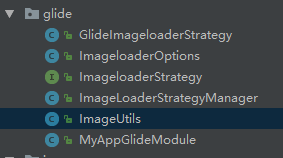
代码见:
https://github.com/soyoungboy/KotlinApp/tree/master/app/src/main/java/com/soyoungboy/kotlinapp/util/glide
调用如上ImageUtils进行图片加载缓存
class ViewHolder(val view: View, val itemClickListener: (GankPicture) -> Unit) : RecyclerView.ViewHolder(view) {
        fun bind(pictures: GankPicture) {
            val meizi = view.meizi as ImageView
            ImageUtils.loadImage(pictures.url,meizi)
            view.title.text = pictures.desc
            view.setOnClickListener {
                itemClickListener(pictures)
                view.context.longToast(pictures.url)
            }
        }
    }
kotlin之RecyclerView对应的Adapter
val items: List<GankPicture> 为要传进来进行展示的数据view.setOnClickListener {
itemClickListener(pictures)
view.context.longToast(pictures.url)
}
为点击事件
package com.soyoungboy.kotlinapp.adapter

import android.support.v7.widget.RecyclerView
import android.view.LayoutInflater
import android.view.View
import android.view.ViewGroup
import android.widget.ImageView
import com.soyoungboy.kotlinapp.R
import com.soyoungboy.kotlinapp.bean.GankPicture
import com.soyoungboy.kotlinapp.util.glide.ImageUtils
import kotlinx.android.synthetic.main.item_meizi.view.*
import org.jetbrains.anko.longToast

/**
 * Created by soyoungboy on 2018/1/29.
 */
class GankPictureAdapter(val items: List<GankPicture>, val itemClickListener: (GankPicture) -> Unit) : RecyclerView.Adapter<GankPictureAdapter.ViewHolder>() {

    override fun onCreateViewHolder(parent: ViewGroup, viewType: Int): ViewHolder {
        val view = LayoutInflater.from(parent.context).inflate(R.layout.item_meizi, parent, false)
        return ViewHolder(view, itemClickListener)
    }

    override fun getItemCount(): Int = items.size

    override fun onBindViewHolder(holder: ViewHolder, position: Int) {
        holder.bind(items[position])
    }

    class ViewHolder(val view: View, val itemClickListener: (GankPicture) -> Unit) : RecyclerView.ViewHolder(view) {
        fun bind(pictures: GankPicture) {
            val meizi = view.meizi as ImageView
            ImageUtils.loadImage(pictures.url,meizi)
            view.title.text = pictures.desc
            view.setOnClickListener {
                itemClickListener(pictures)
                view.context.longToast(pictures.url)
            }
        }
    }
}
实践的代码见我的github:https://github.com/soyoungboy/KotlinApp,里面是我学习Kotlin的一些小练习
posted on 2018-02-23 11:44 西北野狼 阅读(31) 评论(0) 编辑 收藏 刷新评论刷新页面返回顶部 注册用户登录后才能发表评论,请 登录 或 注册, 访问网站首页。 【推荐】超50万VC++源码: 大型工控、组态\仿真、建模CAD源码2018!
【活动】杭州云栖·2050大会-追逐早上七八点钟的太阳-源点
【推荐】微信小程序一站式部署 多场景模板定制
最新IT新闻:· 7亿美元收购探探,这是陌陌保持“活力”的一种方式
· 中国智能手机行业芯片订单二季度将回升 联发科有望走出寒冬
· HTC裁撤美国团队大部分成员 离退出智能机业务恐已不远
· 惠普公布70亿美元股票回购计划并上调全年盈利预期
· 黑客正在销售合法的代码签名证书
» 更多新闻...
最新知识库文章:· 作为一个程序员,数学对你到底有多重要
· 领域驱动设计在互联网业务开发中的实践
· 步入云计算
· 以操作系统的角度述说线程与进程
· 软件测试转型之路
» 更多知识库文章... 历史上的今天:
2017-02-23 前端学习--认识,注释,基础,进制,乱码,实体
昵称: 西北野狼
园龄: 4年6个月
粉丝:34
关注: 4 +加关注
|
||||||
| 日 | 一 | 二 | 三 | 四 | 五 | 六 |
|---|---|---|---|---|---|---|
| 28 | 29 | 30 | 31 | 1 | 2 | 3 |
| 4 | 5 | 6 | 7 | 8 | 9 | 10 |
| 11 | 12 | 13 | 14 | 15 | 16 | 17 |
| 18 | 19 | 20 | 21 | 22 | 23 | 24 |
| 25 | 26 | 27 | 28 | 1 | 2 | 3 |
| 4 | 5 | 6 | 7 | 8 | 9 | 10 |
搜索
常用链接
我的标签
- android 5.0(16)
- ormlite(3)
- AndroidGradle(2)
- java复习(2)
- swift object c学习(1)
- Swift or Object c(1)
随笔分类
- 【android 面试】(12)
- 【android】(195)
- 【android--bug】(33)
- 【android--openGL】(1)
- 【androidstudio--学习和使用经验】(2)
- 【android--Thread--线程池的使用】(1)
- 【android--性能优化】(19)
- 【App研发录读书笔记】(6)
- 【Effactive Java】(2)
- 【Eventbus】(7)
- 【Gradle学习】
- 【html5】(6)
- 【IOS】(3)
- 【J2EE】(22)
- 【J2EE面试题】(2)
- 【Java -- JDBC 学习】(12)
- 【java 1.8 新特性学习】
- 【Java NIO -- IO高级进阶】(7)
- 【java 基础复习】(5)
- 【JavaWeb】(2)
- 【java多线程 -- 高级进阶】(10)
- 【JDK源码学习】(3)
- 【json异常】(2)
- 【Kotlin学习和实践】(1)
- 【maven学习】(4)
- 【MySQL】(1)
- 【phoneGap学习】(1)
- 【python 学习】(11)
- 【Rxjava学习】(1)
- 【Servlet】(2)
- 【shell脚本学习】
- 【sqlite高级进阶】(1)
- 【Volley学习和源码分析】(7)
- 【Web前端 -- JavaScript 学习和复习】(8)
- 【Web前端--Html&Css学习复习】(39)
- 【产品知识学习】
- 【计划】(1)
- 【设计模式复习】(26)
- 【深入理解java虚拟机】(2)
- 【数据结构与算法】(6)
- 【移动支付】(3)
- 【重构-改善既有代码的设计】
- 【自定义控件】(7)
随笔档案
- 2018年2月 (2)
- 2017年11月 (3)
- 2017年10月 (8)
- 2017年9月 (9)
- 2017年8月 (11)
- 2017年7月 (4)
- 2017年6月 (26)
- 2017年5月 (22)
- 2017年4月 (40)
- 2017年3月 (18)
- 2017年2月 (11)
- 2017年1月 (9)
- 2016年9月 (5)
- 2016年8月 (6)
- 2016年7月 (2)
- 2016年6月 (4)
- 2016年5月 (7)
- 2016年4月 (8)
- 2016年3月 (2)
- 2016年2月 (2)
- 2016年1月 (2)
- 2015年12月 (6)
- 2015年11月 (10)
- 2015年10月 (10)
- 2015年9月 (11)
- 2015年8月 (5)
- 2015年7月 (13)
- 2015年6月 (6)
- 2015年5月 (17)
- 2015年4月 (10)
- 2015年3月 (6)
- 2015年2月 (4)
- 2015年1月 (19)
- 2014年12月 (15)
- 2014年11月 (11)
- 2014年10月 (1)
- 2014年9月 (2)
- 2014年8月 (4)
- 2014年7月 (2)
- 2014年6月 (2)
- 2014年5月 (17)
- 2014年4月 (11)
- 2014年3月 (6)
- 2014年2月 (4)
- 2014年1月 (17)
- 2013年12月 (38)
- 2013年11月 (21)
- 2013年10月 (2)
- 2013年9月 (1)
- 2013年8月 (7)
My github
我的个人博客站点
积分与排名
- 积分 - 111518
- 排名 - 2665
最新评论
- 1. Re:J2EE--常见面试题总结 -- 一
- mark
- --Jason928
- 2. Re:LinkedHashMap 源码解析
- @稻花谢谢,也欢迎多多指点和建议...
- --西北野狼
- 3. Re:LinkedHashMap 源码解析
- 非常不错
- --稻花
- 4. Re:项目实战之集成邮件开发
- 不错!
- --天边里
- 5. Re:Spring -- AOP
- @BillySir通过 ProceedingJoinPoint 或者JoinPoint...
- --西北野狼
阅读排行榜
- 1. Glide加载圆形图片(13890)
- 2. androidstudio--gsonformat--超爽的数据解析方式(9923)
- 3. android app 集成 支付宝支付 微信支付(6369)
- 4. 项目中处理android 6.0权限管理问题(4433)
- 5. Activity生命周期方法调用finish后的不同表现(4402)
评论排行榜
- 1. material design 的android开源代码整理(4)
- 2. Spring -- AOP(2)
- 3. 如何在使用eclipse的情况下,清理android项目中的冗余class文件和资源文件以及冗余图片(2)
- 4. android使用shape做selector按钮按下和弹起的动画(2)
- 5. java泛型操作复习,以及讲解在android中使用的场景(2)
推荐排行榜
- 1. material design 的android开源代码整理(8)
- 2. 某技术大牛的帖子(android项目总结)(1)
- 3. android经典开源代码集合(1)
- 4. android -- 加载gif 防止oom(1)
- 5. android 实现透明状态栏(1)