

本篇只局限于Framework层源码,源码版本为Android 8.0
SQLiteProgram
SQLite CRUD操作的执行离不开一个非常关键的类 —— SQLiteProgram。正是通过SQLiteProgram,SQLiteDatabase完成了操作API到具体执行(SQLiteSession)的解耦。 SQLiteProgram有两个实现子类,SQLiteQuery 和 SQLiteStatement。
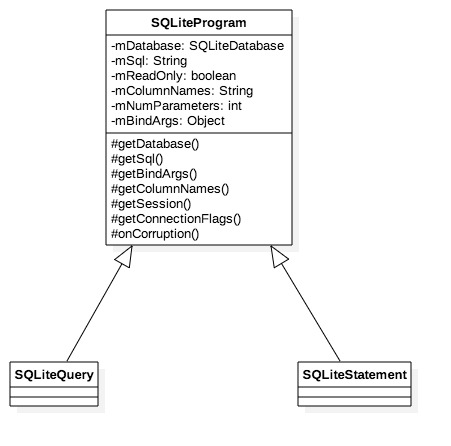
- SQLiteQuery: 负责Query的执行转发处理。
- SQLiteStatement: 负责Insert/Update/Delete的执行转发。
通过 getSession(), SQLiteDatabase的CRUD请求并转发到了 SQLiteSession 中。在 SQLiteSession中,SQLiteConnection将CRUD绑定到native去执行。
Query
SQLiteDatabase 中Query相关的API,穿透之后到了rawQueryWithFactory()中,并交由SQLiteDirectCursorDriver()执行Query。
SQLiteDirectCursorDriver.java
public Cursor query(CursorFactory factory, String[] selectionArgs) {
    final SQLiteQuery query = new SQLiteQuery(mDatabase, mSql, mCancellationSignal);
    final Cursor cursor;
    try {
        query.bindAllArgsAsStrings(selectionArgs);

        if (factory == null) {
            cursor = new SQLiteCursor(this, mEditTable, query);
        } else {
            cursor = factory.newCursor(mDatabase, this, mEditTable, query);
        }
    } catch (RuntimeException ex) {
        query.close();
        throw ex;
    }

    mQuery = query;
    return cursor;
}
可以看到,上层调用query()经过层层调用,最后只是直接返回了一个初始化的 Cursor对象,这个 Cursor对象的缓冲区是空的,这个时候还没有执行真正的 数据库query()。 SQLiteDatabase qeury() 的作用是创建了一个Cursor,并不立即往数据库执行query()语句。
什么时候执行query语句的呢?
做过SQLiteDatabase开发的App工程师一定对Cursor的moveToFirst()方法很熟悉。在该方法中,会调用到getCount()来统计Cursor中row的数目,如果当前统计的row数目为-1 (NO_COUNT),则会调用fillWindow() 来执行 query查询,并将查询的结果填充到缓冲区CursorWindow当中。后面对Cursor执行的getString()、getInt()之类的方法就仅仅是读取出CursorWindow中的内容罢了。
So…
执行query语句查询的时刻便是涉及调用到 getCount() 方法,同时当前CursorWindow不可用时(mCount = -1 )。
填充缓冲区CursorWindow
CursorWindow的填充工作都交由SQLiteQuery (SQLiteDirectCursorDriver执行query()一开始创建) 来完成,并被转发到SQLiteSession中去执行。SQLiteSession 是由SQLiteDatabase根据所获取到的SQLiteConnectionPool对象创建的一种用来操作SQLiteConnection的Client包装类。
填充CursorWindow的执行最后都会到SQLiteSession的
executeForCursorWindow():
SQLiteSession.java
public int executeForCursorWindow(String sql, Object[] bindArgs,
        CursorWindow window, int startPos, int requiredPos, boolean countAllRows,
        int connectionFlags, CancellationSignal cancellationSignal) {
    if (sql == null) {
        throw new IllegalArgumentException("sql must not be null.");
    }
    if (window == null) {
        throw new IllegalArgumentException("window must not be null.");
    }

    //执行特殊的SQL语句,主要是跟Transaction相关的begin、commit、 end....
    if (executeSpecial(sql, bindArgs, connectionFlags, cancellationSignal)) {
        window.clear();
        return 0;
    }
    //如果mConnection为空,则从ConnectionPool acquire 一个;添加引用计数
    acquireConnection(sql, connectionFlags, cancellationSignal); // might throw
    try {
        //转发到native去执行。
        return mConnection.executeForCursorWindow(sql, bindArgs,
                window, startPos, requiredPos, countAllRows,
                cancellationSignal); // might throw
    } finally {
        releaseConnection(); // might throw
    }
}
Pang、Pang、Pang,最后又去到了Native里…
Insert
insert 操作在SQLiteDatabase中,经过SQLiteStatement 的转接,最终依旧交给了SQLiteSession中去执行。
SQLiteDatabase.java
public long insertWithOnConflict(String table, String nullColumnHack,
        ContentValues initialValues, int conflictAlgorithm) {
    acquireReference();
    try {
        ......

        SQLiteStatement statement = new SQLiteStatement(this, sql.toString(), bindArgs);
        try {
            return statement.executeInsert();
        } finally {
            statement.close();
        }
    } finally {
        releaseReference();
    }
}
同Query操作差不多,在SQLiteSession中先检查Transaction相关的语句去执行,然后获取一个数据库连接,由数据库连接去操作native的insert操作
SQLiteSession.java
public long executeForLastInsertedRowId(String sql, Object[] bindArgs, int connectionFlags,
        CancellationSignal cancellationSignal) {
    if (sql == null) {
        throw new IllegalArgumentException("sql must not be null.");
    }

    if (executeSpecial(sql, bindArgs, connectionFlags, cancellationSignal)) {
        return 0;
    }
    //获取数据库连接
    acquireConnection(sql, connectionFlags, cancellationSignal); // might throw
    try {
        //转发到native去执行
        return mConnection.executeForLastInsertedRowId(sql, bindArgs,
                cancellationSignal); // might throw
    } finally {
        releaseConnection(); // might throw
    }
}
Update & Delete
Update 和 Delete 的流程极其相似,都是通过SQLiteStatement的 executeUpdateDelete() 方法并最终转发到SQLiteConnection的 executeForChangedRowCount() 中去执行,在 executeForChangedRowCount() 中执行native方法。
SQLiteDatabase.java
public int updateWithOnConflict(String table, ContentValues values,
        String whereClause, String[] whereArgs, int conflictAlgorithm) {
    if (values == null || values.isEmpty()) {
        throw new IllegalArgumentException("Empty values");
    }

    acquireReference();
    try {
        ......

        SQLiteStatement statement = new SQLiteStatement(this, sql.toString(), bindArgs);
        try {
            return statement.executeUpdateDelete();
        } finally {
            statement.close();
        }
    } finally {
        releaseReference();
    }
}

public int delete(String table, String whereClause, String[] whereArgs) {
    acquireReference();
    try {
        SQLiteStatement statement =  new SQLiteStatement(this, "DELETE FROM " + table +
                (!TextUtils.isEmpty(whereClause) ? " WHERE " + whereClause : ""), whereArgs);
        try {
            return statement.executeUpdateDelete();
        } finally {
            statement.close();
        }
    } finally {
        releaseReference();
    }
}
