

UIButton同时设置Title和Image后,默认是图片在左文字在右,如下图1,很多情况下我们希望图片在上图片在下,如下图2,只需要简单的几行代码,即可实现。
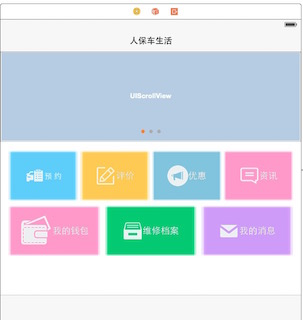
图1

(1)因为需要处理多个按钮,所以将实现代码封装为一个方法,把每个UIbutton实例作为参数传入即可,代码如下:
[objc] view plain copy print?- -(void)initButton:(UIButton*)btn{
- btn.contentHorizontalAlignment = UIControlContentHorizontalAlignmentCenter;//使图片和文字水平居中显示
- [btn setTitleEdgeInsets:UIEdgeInsetsMake(btn.imageView.frame.size .height ,-btn.imageView.frame.size.width, 0.0,0.0)];//文字距离上边框的距离增加imageView的高度,距离左边框减少imageView的宽度,距离下边框和右边框距离不变
- [btn setImageEdgeInsets:UIEdgeInsetsMake(0.0, 0 .0,0.0, -btn.titleLabel.bounds .size.width)];//图片距离右边框距离减少图片的宽度,其它不边
- }
-(void)initButton:(UIButton*)btn{
    btn.contentHorizontalAlignment = UIControlContentHorizontalAlignmentCenter;//使图片和文字水平居中显示
    [btn setTitleEdgeInsets:UIEdgeInsetsMake(btn.imageView.frame.size.height ,-btn.imageView.frame.size.width, 0.0,0.0)];//文字距离上边框的距离增加imageView的高度,距离左边框减少imageView的宽度,距离下边框和右边框距离不变
    [btn setImageEdgeInsets:UIEdgeInsetsMake(0.0, 0.0,0.0, -btn.titleLabel.bounds.size.width)];//图片距离右边框距离减少图片的宽度,其它不边
}
(2)然后把按钮传入 [objc] view plain copy print?
- [self initButton:self.btn1];
- [self initButton:self.btn2];
- [self initButton:self.btn3];
- [self initButton:self.btn4];
- [self initButton:self.btn5];
- [self initButton:self.btn6];
- [self initButton:self.btn7];
    [self initButton:self.btn1];
    [self initButton:self.btn2];
    [self initButton:self.btn3];
    [self initButton:self.btn4];
    [self initButton:self.btn5];
    [self initButton:self.btn6];
    [self initButton:self.btn7];
(3)运行查看效果。
【更新】简单封装了成JXButton,继承自UIButton,将UIButton替换为JXButton就是文字在下了,支持代码和xib方式,详见(喜欢可以给我点顶):github.com/dolacmeng/J…
