

tags: 从零开发项目
忘记密码
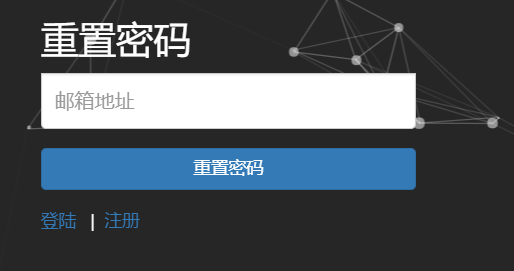
对于忘记密码这个功能并不难,就跳转到忘记密码页面,让用户输入邮箱,去邮箱所给的超链接修改密码就行了。
记住我功能
本来我是想在登陆的时候勾选“记住我”,那么下次访问的时候,就可以直接访问了(因为我设置了一些链接是需要认证后才能访问的)。
原本是想使用Shiro的rememberMe这个功能的。发现它其实并没有为我们自动实现登陆!
具体的参考链接如下:
查了挺多资料的,发现Shiro的rememberMe这个功能并不好用,但我的系统是基于Shiro来进行开发的。
根据源码的文档说明:
public interface RememberMeAuthenticationToken extends AuthenticationToken {

    /**
     * Returns {@code true} if the submitting user wishes their identity (principal(s)) to be remembered
     * across sessions, {@code false} otherwise.
     *
     * @return {@code true} if the submitting user wishes their identity (principal(s)) to be remembered
     *         across sessions, {@code false} otherwise.
     */
    boolean isRememberMe();

}
只有在当前用户的session(Shiro的Session)存储了已认证的用户,那么才承认当前的用户是已登陆的。
我也想要实现rememberMe这个功能,那么只能手动去弄了。
我是通过拦截器来实现的:
public class LoginInterceptor implements HandlerInterceptor {
    @Autowired
    private UserService userService;

    public boolean preHandle(HttpServletRequest httpServletRequest, HttpServletResponse httpServletResponse, Object o) throws Exception {


        Subject currentUser = SecurityUtils.getSubject();

        //如果 isAuthenticated 为 false 证明不是登录过的,同时 isRememberd 为true 证明是没登陆直接通过记住我功能进来的
        if (!currentUser.isAuthenticated() && currentUser.isRemembered()) {

            ActiveUser activeUser = (ActiveUser) SecurityUtils.getSubject().getPrincipal();


            //获取session看看是不是空的
            Session session = currentUser.getSession();
            if (session.getAttribute("currentUser") == null) {

                User user = userService.validateUserExist(activeUser.getUsercEmail());

                UsernamePasswordToken token = new UsernamePasswordToken(user.getUserEmail(), activeUser.getPassword(), currentUser.isRemembered());

                //把当前用户放入session
                currentUser.login(token);

                session.setAttribute("currentUser",user);
                //设置会话的过期时间--ms,默认是30分钟,设置负数表示永不过期
                session.setTimeout(-1000l);

				//这是httpSession、用户页面获取数据的。
                httpServletRequest.getSession().setAttribute("activeUser", activeUser);

            }
        }

        return true;
    }

    public void postHandle(HttpServletRequest httpServletRequest, HttpServletResponse httpServletResponse, Object o, ModelAndView modelAndView) throws Exception {

    }

    public void afterCompletion(HttpServletRequest httpServletRequest, HttpServletResponse httpServletResponse, Object o, Exception e) throws Exception {

    }
}
那么就可以实现当用户即使关闭了浏览器之后,再次打开浏览器访问我们的页面还是登陆状态!
对登陆注册优化
最开始在页面使用路径都是自己手写:http://localhost:8080/zhongfucheng/这样子的。这样并不通用。想要做得通用的话,那么就要使用变量了。而我又不想使用JSP页面。于是我的项目统一使用freemarker。
跳转到某个url的逻辑其实是一样的,没必要为每个跳转都写一个方法。于是我将其抽取出来:
    /**
     * 通用的页面跳转
     *
     * @param folder 模块
     * @param file   具体文件
     * @return
     */
    @RequestMapping("/goURL/{folder}/{file}.do")
    public String goURL(@PathVariable("folder") String folder, @PathVariable("file") String file) {

        return "/" + folder + "/" + file + ".ftl";
    }
对于首页而言我们可以使用监听器来对其进行初始化:
public class ProjectListener implements ServletContextListener {


    /**
     * 当项目启动的时候,我们就根据模版生成我们的index页面
     *
     * @param servletContextEvent
     */
    public void contextInitialized(ServletContextEvent servletContextEvent) {

        System.out.println(servletContextEvent.getServletContext().getRealPath("/"));
        try {
            FreeMarkerUtils markerUtils = new FreeMarkerUtils();
            Map map = new HashMap();
            map.put("path", ReadPropertiesUtil.readProp("projectPath"));
            markerUtils.ouputFile("index.ftl", "index.html", map);
        } catch (Exception e) {
            e.printStackTrace();
        }

    }

    public void contextDestroyed(ServletContextEvent servletContextEvent) {

    }
}
在JavaScript中可能也需要用到http://localhost:8080/zhongfucheng/路径,我们可以使用JavaScript来获取项目的该路径,而不用写死:
    <!--使用JS获取项目根路径-->
    <script>
        var path = "";
        $(function () {
            var strFullPath = window.document.location.href;
            var strPath = window.document.location.pathname;
            var pos = strFullPath.indexOf(strPath);
            var prePath = strFullPath.substring(0, pos);
            var postPath = strPath.substring(0, strPath.substr(1).indexOf('/') + 1);
            path = prePath + postPath;
        });
    </script>
比如我们在获取用户信息的时候就很方便了。

在代码会重复的情况下封装一些常用的Utils,或者使用别人写好的Utils

如果您觉得这篇文章帮助到了您,可以给作者一点鼓励

