Android控件点击圆形阴影反馈解决方案
愿景
对于手机App而言,没有反馈效果的按钮使用体验是不舒服的。最近在深入学习Material Design,对其中的ripple效果比较感兴趣。我想着尝试给可点击的图形按钮一个简单的触摸动态反馈效果,这样不至于太生硬。
想实现的效果如下:

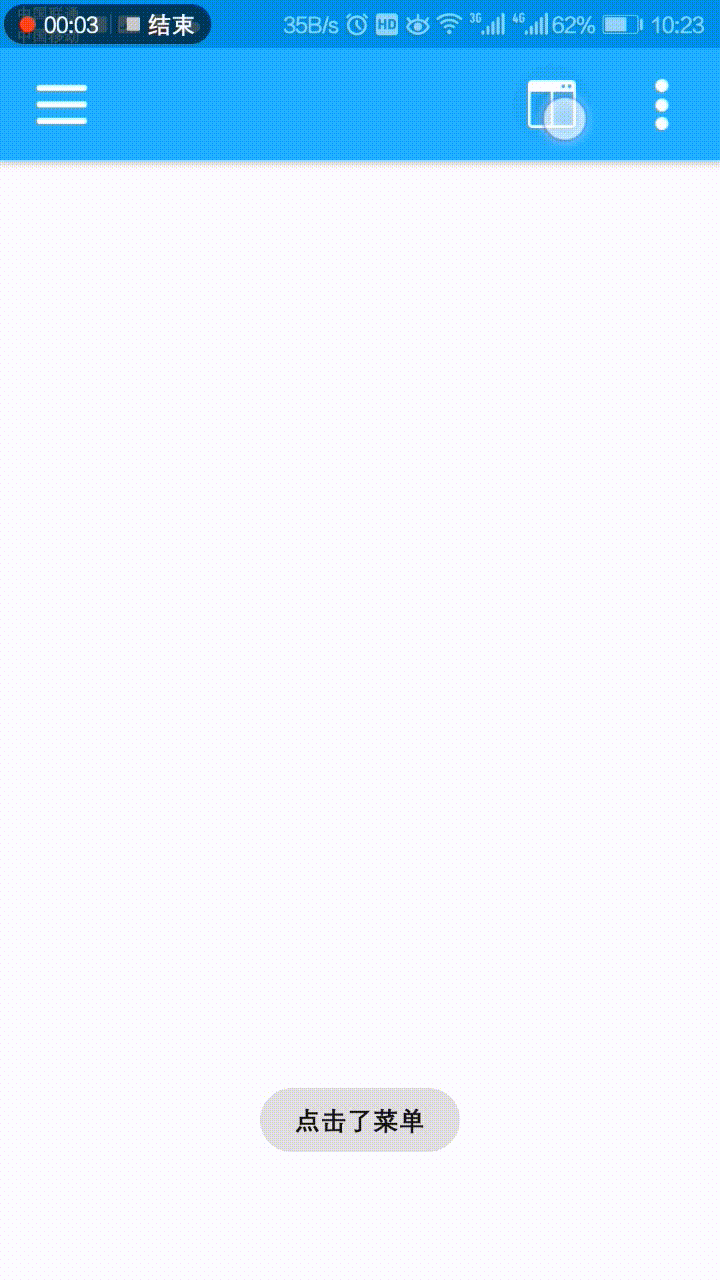
实现
经过查找相关资料和自己实践,发现了一个简单的方式,链接如下:
https://yq.aliyun.com/articles/12407
波纹效果(Ripple):
当你使用了Material主题后,波纹动画会自动应用在所有的控件上,我们当然可以来设置其属性来调整到我们需要的效果。 可以通过如下代码设置波纹的背景:
android:background="?android:attr/selectableItemBackground"波纹有边界
android:background="?android:attr/selectableItemBackgroundBorderless"波纹超出边界
使用效果如下:
B1是不设任何背景的按钮
B2设置了?android:attr/selectableItemBackground
B3设置了?android:attr/selectableItemBackgroundBorderless
详情可以点击上面的链接看看。
问题
我个人觉得这样的反馈效果还是比较OK的,可是试验之后发现了这个属性在5.0以上系统运行一切正常,但在5.0以下系统运行是会导致程序崩溃的,对的,即使在布局的xml中对控件添加tools:targetApi="LOLLIPOP",在4.1系统的模拟器中运行也还是会崩溃的!!!真机没有测试。
<ImageView
    android:layout_width="30dp"
    android:layout_height="30dp"
    android:background="?android:selectableItemBackgroundBorderless"
    android:clickable="true"
    android:src="@mipmap/ic_launcher_round"
    tools:targetApi="LOLLIPOP" />
错误如下:
android.view.InflateException: Binary XML file line #0: Error inflating class ImageView
应该是5.0以下系统的主题中没有这个属性,导致xml解析出错。
为解决这个问题,我想着在代码中动态添加该属性,可以解决这个问题,只不过在5.0以下系统会没有触摸反馈(反正现在大部分Android手机都是5.0以上系统的)。
解决
解决方案如下:
activity_main.xml代码如下:
<RelativeLayout
    android:layout_width="match_parent"
    android:layout_height="?attr/actionBarSize"
    android:background="@color/colorPrimary"
    android:elevation="4dp"
    tools:targetApi="LOLLIPOP">

    <ImageView
        android:id="@+id/iv_menu"
        android:layout_width="30dp"
        android:layout_height="30dp"
        android:layout_centerVertical="true"
        android:layout_marginLeft="16dp"
        android:padding="2dp"
        android:src="@drawable/ic_menu" />

    <ImageView
        android:id="@+id/iv_split_screen"
        android:layout_width="28dp"
        android:layout_height="28dp"
        android:layout_alignParentRight="true"
        android:layout_centerVertical="true"
        android:layout_marginRight="70dp"
        android:padding="2dp"
        android:src="@drawable/ic_split_screen" />

    <ImageView
        android:id="@+id/iv_settings"
        android:layout_width="26dp"
        android:layout_height="26dp"
        android:layout_alignParentRight="true"
        android:layout_centerVertical="true"
        android:layout_marginRight="16dp"
        android:src="@drawable/ic_settings" />


</RelativeLayout>
MainActivity.java代码如下:
public class MainActivity extends AppCompatActivity implements View.OnClickListener {
private ImageView iv_menu;
private ImageView iv_split_screen;
private ImageView iv_settings;

@Override
protected void onCreate(Bundle savedInstanceState) {
    super.onCreate(savedInstanceState);
    setContentView(R.layout.activity_main);
    initView();
}

private void initView() {
    iv_menu = (ImageView) findViewById(R.id.iv_menu);
    iv_split_screen = (ImageView) findViewById(R.id.iv_split_screen);
    iv_settings = (ImageView) findViewById(R.id.iv_settings);

    if (Build.VERSION.SDK_INT >= 21) {//5.0以上系统判断
        int[] attrs = {android.R.attr.selectableItemBackgroundBorderless};
        TypedArray typedArray = getTheme().obtainStyledAttributes(attrs);
        int resourceId = typedArray.getResourceId(0, 0);
        iv_menu.setBackgroundResource(resourceId);
        iv_split_screen.setBackgroundResource(resourceId);
        iv_settings.setBackgroundResource(resourceId);
    }

    iv_menu.setOnClickListener(this);
    iv_split_screen.setOnClickListener(this);
    iv_settings.setOnClickListener(this);
}

@Override
public void onClick(View v) {
    switch (v.getId()) {
        case R.id.iv_menu:
            ToastUtils.showToast("点击了菜单");
            break;
        case R.id.iv_split_screen:
            ToastUtils.showToast("点击了分屏");
            break;
        case R.id.iv_settings:
            ToastUtils.showToast("点击了设置");
            break;
    }
}
}
总结
开发中遇到的问题,在此记录一下,关键代码如下:
    if (Build.VERSION.SDK_INT >= 21) {//5.0以上系统判断
        int[] attrs = {android.R.attr.selectableItemBackgroundBorderless};
        TypedArray typedArray = getTheme().obtainStyledAttributes(attrs);
        int resourceId = typedArray.getResourceId(0, 0);
        iv_menu.setBackgroundResource(resourceId);
        iv_split_screen.setBackgroundResource(resourceId);
        iv_settings.setBackgroundResource(resourceId);
    }

    iv_menu.setOnClickListener(this);
    iv_split_screen.setOnClickListener(this);
    iv_settings.setOnClickListener(this);