先看效果图
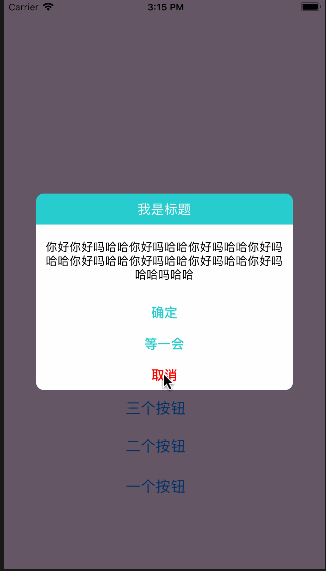
直接上代码 很简单
    PTLAlertView *alertView = [[PTLAlertView alloc]initWithTitle:@"我是标题" message:@"你好你好吗哈哈你好吗哈哈你好吗哈哈你好吗哈哈你好吗哈哈你好吗哈哈你好吗哈哈你好吗哈哈吗哈哈你好你好吗哈哈你好吗哈哈你好吗哈哈你好吗哈哈你好吗哈哈你好吗哈哈你好吗哈哈你好吗哈哈吗哈哈你好你好吗哈哈你好你好吗哈哈你好吗哈哈你好吗哈哈你好吗哈哈你好吗哈哈你好吗哈哈你好吗哈哈你好吗哈哈吗哈哈" cancelButtonTitle:@"取消" otherButtonTitles:@"确定",@"等一会", nil];

    [alertView setSelctBtnBlock:^(NSInteger index, NSString * _Nullable btnCurrentTitle) {
        NSLog(@"hha- %zd ---- %@", index, btnCurrentTitle);
    }];

// 修改属性
//    alertView.titleBackgroundColor = [UIColor redColor];
//    alertView.titleTextColor = [UIColor greenColor];
//    alertView.titleTextFont = [UIFont systemFontOfSize:20];
//    alertView.messageTextColor = [UIColor redColor];
//    alertView.messageTextFont = [UIFont systemFontOfSize:15];
    alertView.cancelBtnTextColor = [UIColor redColor];
//    alertView.cancelBtnTextFont = [UIFont systemFontOfSize:20];
//    alertView.otherBtnTextColor = [UIColor yellowColor];
//    alertView.otherBtnTextFont = [UIFont systemFontOfSize:20];

    [alertView show];