

微信小程序尺寸设置可使用rpx来标记尺寸,类同rem可在微信小程序中自适应兼容换算不同的机型尺寸。
但在小程序canvas中,尺寸换算会无效(由于绘画的滞后),因此需要自适应计算canvas尺寸。
一.解决方案
使用小程序提供的getSystemInfo可以获取当前设备的系统信息,通过获取当前的设备尺寸,来换算所需要设置的canvas尺寸,从而使得canvas绘图可以适用于所有设备。
wx.getSystemInfo(OBJECT)
获取系统信息。
OBJECT参数说明:
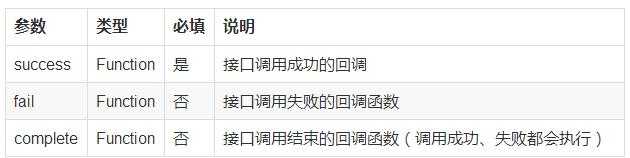
success回调参数说明:
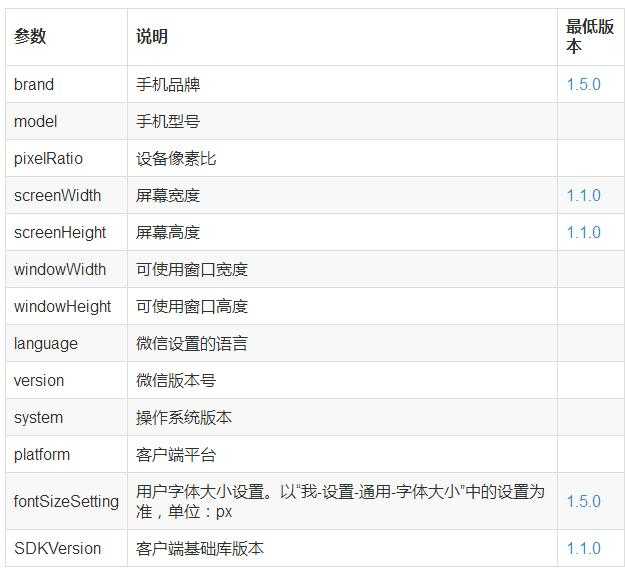
示例代码:
wx.getSystemInfo({
 success: function(res) {
   console.log(res.model)
   console.log(res.pixelRatio)
   console.log(res.windowWidth)
   console.log(res.windowHeight)
   console.log(res.language)
   console.log(res.version)
   console.log(res.platform)
}
})
二.计算示例
获取当前窗口宽、高以动态换算需要的canvas尺寸
wx.getSystemInfo({
//获取系统信息成功,将系统窗口的宽高赋给页面的宽高
   success: function (res) {
       that.width = res.windowWidth
       that.height = res.windowHeight
       that.radius = 105 / 602 * that.height
}
本文作者:楠倏之语
原文地址:微信小程序canvas尺寸设置-教程-小程序社区-微信小程序-微信小程序开发社区-小程序开发论坛-微信小程序联盟
