一、OkHttp基本用法:
1、异步get请求
OkHttpClient okHttpClient = new OkHttpClient();
final Request request = new Request.Builder()
        .url("")
        .build();
Call call = okHttpClient.newCall(request);
call.enqueue(new Callback() {
    @Override
    public void onFailure(Call call, IOException e) {

    }
    @Override
    public void onResponse(Call call, Response response) throws IOException {
        Log.d("OkHttp", "onResponse: "+response.body().toString());
    }
});
2、异步post请求
OkHttpClient okHttpClient = new OkHttpClient();
RequestBody requestBody = new FormBody.Builder()
        .add("name","my")
        .build();
final Request request = new Request.Builder()
        .url("")
        .post(requestBody)
        .build();
Call call = okHttpClient.newCall(request);
call.enqueue(new Callback() {
    @Override
    public void onFailure(Call call, IOException e) {

    }
    @Override
    public void onResponse(Call call, Response response) throws IOException {
        Log.d("OkHttp", "onResponse: "+response.body().toString());
    }
});
3、OkHttp简单封装
(1)定义回调接口
public interface ResultCallback {
    //请求失败回调
    void onError(Exception e);
    //请求成功回调
    void onResponse(Response response);
}
(2)封装OkHttp
public class OkHttpEngine {
    private static volatile OkHttpEngine mInstance;
    private OkHttpClient mOkHttpClient;
    private Handler mHandler;

    public static OkHttpEngine getInstance(Context context) {
        if (mInstance == null) {
            synchronized (OkHttpEngine.class) {
                if (mInstance == null) {
                    mInstance = new OkHttpEngine(context);
                }
            }
        }
        return mInstance;
    }

    public OkHttpEngine(Context context) {
        mHandler = new Handler();
        //缓存路径
        File file = context.getExternalCacheDir();
        //缓存大小
        int cacheSize = 10 * 1024 * 1024;
        mOkHttpClient = new OkHttpClient.Builder()
                .connectTimeout(20, TimeUnit.MILLISECONDS) //超时时间
                .readTimeout(20, TimeUnit.MILLISECONDS)
                .writeTimeout(20, TimeUnit.MILLISECONDS)
                .addInterceptor(new HttpLoggingInterceptor()) //log日志
                .cache(new Cache(file.getAbsoluteFile(), cacheSize))
                .build();
    }

    /**
     * 异步get请求
     */
    public void getAsynHttp(String url, final ResultCallback callback) {
        Request request = new Request.Builder()
                .url(url)
                .build();
        asyncRequest(request, callback);
    }

    /**
     * 异步post请求
     *
     * @param url
     * @param requestMap 请求参数
     * @param callback   回调接口
     */
    public void postAsynHttp(String url, Map<String, String> requestMap, final ResultCallback callback) {
        FormBody.Builder builder = new FormBody.Builder();
        if (requestMap != null && requestMap.size() > 0) {
            for (Map.Entry<String, String> entry : requestMap.entrySet()) {
                builder.add(entry.getKey(), entry.getValue());
            }
        }
        Request request = new Request.Builder()
                .url(url)
                .post(builder.build())
                .build();
        asyncRequest(request, callback);
    }


    public void asyncRequest(Request request, final ResultCallback callback) {
        Call call = mOkHttpClient.newCall(request);
        call.enqueue(new Callback() {
            @Override
            public void onFailure(okhttp3.Call call, final IOException e) {
                if (callback != null) {
                    mHandler.post(new Runnable() {
                        @Override
                        public void run() {
                            callback.onError(e);
                        }
                    });
                }
            }

            @Override
            public void onResponse(okhttp3.Call call, final Response response) throws IOException {
                if (callback != null) {
                    mHandler.post(new Runnable() {
                        @Override
                        public void run() {
                            callback.onResponse(response);
                        }
                    });
                }
            }
        });
    }

}
二、OkHttp源码解析
1、流程图:
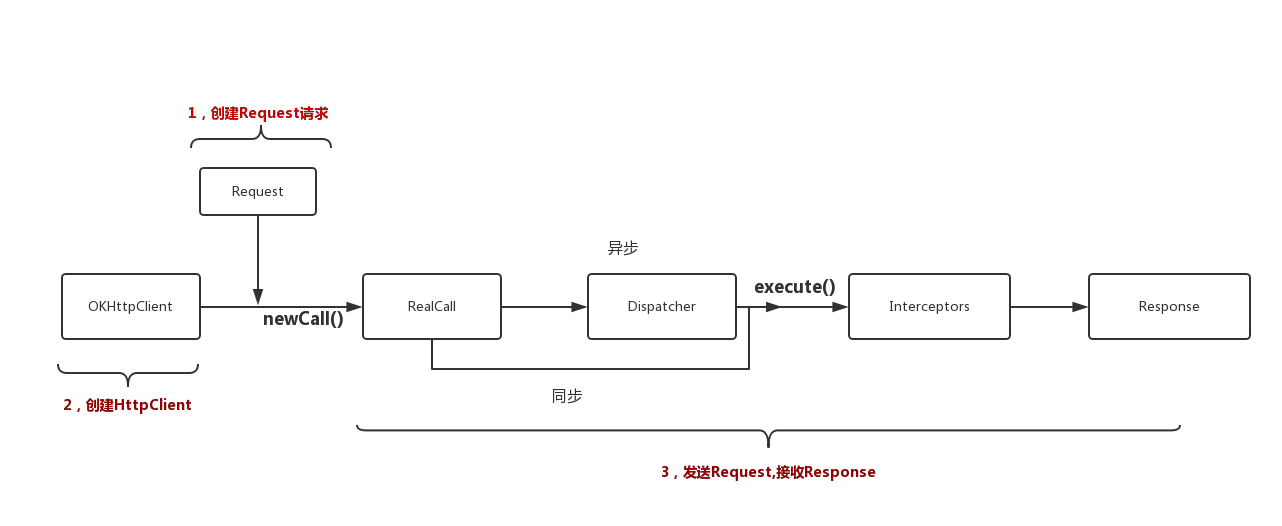
2、创建OkHttpClient:
public Builder() {
  dispatcher = new Dispatcher();
  protocols = DEFAULT_PROTOCOLS;
  connectionSpecs = DEFAULT_CONNECTION_SPECS;
  eventListenerFactory = EventListener.factory(EventListener.NONE);
  proxySelector = ProxySelector.getDefault();
  cookieJar = CookieJar.NO_COOKIES;
  socketFactory = SocketFactory.getDefault();
  hostnameVerifier = OkHostnameVerifier.INSTANCE;
  certificatePinner = CertificatePinner.DEFAULT;
  proxyAuthenticator = Authenticator.NONE;
  authenticator = Authenticator.NONE;
  connectionPool = new ConnectionPool();
  dns = Dns.SYSTEM;
  followSslRedirects = true;
  followRedirects = true;
  retryOnConnectionFailure = true;
  connectTimeout = 10_000;
  readTimeout = 10_000;
  writeTimeout = 10_000;
  pingInterval = 0;
}3、创建Request:
public final class Request {
  final HttpUrl url;
  final String method;
  final Headers headers;
  final @Nullable RequestBody body;
  final Object tag;
...
Request类封装了请求报文信息:请求的Url地址、请求的方法(如GET、POST等)、各种请求头(如Content-Type、Cookie)以及可选的请求体。一般通过内部类Request.Builder的链式调用生成Request对象。
4、创建RealCall对象:
(1)Call接口:
public interface Call extends Cloneable {
    //返回当前Call的request对象
    Request request();
    //同步请求
    Response execute() throws IOException;
    //异步请求
    void enqueue(Callback responseCallback);
    //取消请求
    void cancel();
    //是否执行过
    boolean isExecuted();
    //是否取消请求
    boolean isCanceled();

    interface Factory {
        okhttp3.Call newCall(Request request);
    }
}
Call是一个接口,主要定义了进行请求和取消请求等的方法 。内部有一个newCall方法,传入一个Request返回一个Call。
(2)RealCall对象:
final class RealCall implements Call {
    final OkHttpClient client;
    final RetryAndFollowUpInterceptor retryAndFollowUpInterceptor;

    private EventListener eventListener;

    final Request originalRequest;
    final boolean forWebSocket;
    // Guarded by this.
    private boolean executed;
...
    static okhttp3.RealCall newRealCall(OkHttpClient client, Request originalRequest, boolean forWebSocket) {
        // Safely publish the Call instance to the EventListener.
        okhttp3.RealCall call = new okhttp3.RealCall(client, originalRequest, forWebSocket);
        call.eventListener = client.eventListenerFactory().create(call);
        return call;
    }
}
RealCall发起请求的真正类,实现了Call接口
(3)创建RealCall:
@Override public Call newCall(Request request) {
  return RealCall.newRealCall(this, request, false);
}
通过调用OkHttpClient newCall方法创建,内部是通过RealCall的newRealCall方法
5、进行异步请求:
(1) Realcall的enqueue方法:
@Override public void enqueue(Callback responseCallback) {
  synchronized (this) {
    if (executed) throw new IllegalStateException("Already Executed");
    executed = true;
  }
  captureCallStackTrace();
  eventListener.callStart(this);
  client.dispatcher().enqueue(new AsyncCall(responseCallback));
}
client.dispatcher返回的是Dispatcher,最终调用了Dispatcher的enqueue方法
(2)Dispatcher任务调度:
public final class Dispatcher {
    //最大并发请求数64
    private int maxRequests = 64;
    //每个主机的最大请求数
    private int maxRequestsPerHost = 5;
    private @Nullable
    Runnable idleCallback;
    //消费者线程池
    private @Nullable
    ExecutorService executorService;
    //将会开始的异步任务队列
    private final Deque<RealCall.AsyncCall> readyAsyncCalls = new ArrayDeque<>();
    //正在进行的异步任务队列
    private final Deque<RealCall.AsyncCall> runningAsyncCalls = new ArrayDeque<>();
    //正在运行的同步任务队列
    private final Deque<RealCall> runningSyncCalls = new ArrayDeque<>();

    public Dispatcher(ExecutorService executorService) {
        this.executorService = executorService;
    }

    public Dispatcher() {
    }

    public synchronized ExecutorService executorService() {
        if (executorService == null) {
            executorService = new ThreadPoolExecutor(0, Integer.MAX_VALUE, 60, TimeUnit.SECONDS,
                    new SynchronousQueue<Runnable>(), Util.threadFactory("OkHttp Dispatcher", false));
        }
        return executorService;
    }
    ...
}
可以在构造函数中传入自定义线程池
(3)调用enqueue方法:
synchronized void enqueue(AsyncCall call) {
  if (runningAsyncCalls.size() < maxRequests && runningCallsForHost(call) < maxRequestsPerHost) {
    runningAsyncCalls.add(call);
    executorService().execute(call);
  } else {
    readyAsyncCalls.add(call);
  }
}
请求队列请求数小于64,正在运行请求主机数小于5,将请求加入正在运行的队列并在线程池中执行。否则加入准备队列。(传入的参数为AsyncCall类型对象)
(4)调用AsyncCall的execute方法
final class AsyncCall extends NamedRunnableAsyncCall为RealCall内部类,继承了NamedRunnable,也是一个Runnable实现类
@Override protected void execute() {
    boolean signalledCallback = false;
    try {
      //返回request
      Response response = getResponseWithInterceptorChain();
      if (retryAndFollowUpInterceptor.isCanceled()) {
        signalledCallback = true;
        //请求失败回调
        responseCallback.onFailure(RealCall.this, new IOException("Canceled"));
      } else {
        signalledCallback = true;
        //请求成功回调
        responseCallback.onResponse(RealCall.this, response);
      }
    } catch (IOException e) {
      if (signalledCallback) {
        // Do not signal the callback twice!
        Platform.get().log(INFO, "Callback failure for " + toLoggableString(), e);
      } else {
        eventListener.callFailed(RealCall.this, e);
        responseCallback.onFailure(RealCall.this, e);
      }
    } finally {
      //完成操作后,调用Dispatcher的finished方法
      client.dispatcher().finished(this);
    }
  }
}
(5)调用Dispatcher的finished方法:
finished内部调用了promoteCalls方法
private void promoteCalls() {
  if (runningAsyncCalls.size() >= maxRequests) return; // Already running max capacity.
  if (readyAsyncCalls.isEmpty()) return; // No ready calls to promote.

  for (Iterator<AsyncCall> i = readyAsyncCalls.iterator(); i.hasNext(); ) {
    AsyncCall call = i.next();

    if (runningCallsForHost(call) < maxRequestsPerHost) {
      i.remove();
      runningAsyncCalls.add(call);
      executorService().execute(call);
    }

    if (runningAsyncCalls.size() >= maxRequests) return; // Reached max capacity.
  }
}
进行迭代下个请求,在准备队列移除并加入到正在运行的队列,并执行线程池。
(6)请求是通过调用getResponseWithInterceptorChain,返回Response
Response response = getResponseWithInterceptorChain();Response getResponseWithInterceptorChain() throws IOException {
// Build a full stack of interceptors.
List<Interceptor> interceptors = new ArrayList<>();
interceptors.addAll(client.interceptors());
interceptors.add(retryAndFollowUpInterceptor);
interceptors.add(new BridgeInterceptor(client.cookieJar()));
interceptors.add(new CacheInterceptor(client.internalCache()));
interceptors.add(new ConnectInterceptor(client));
if (!forWebSocket) {
interceptors.addAll(client.networkInterceptors());
}
interceptors.add(new CallServerInterceptor(forWebSocket));
Interceptor.Chain chain = new RealInterceptorChain(interceptors, null, null, null, 0,
originalRequest, this, eventListener, client.connectTimeoutMillis(),
client.readTimeoutMillis(), client.writeTimeoutMillis());
return chain.proceed(originalRequest);
}创建拦截器集合,并添加自定义拦截器、失败重连、缓存等拦截器。创建RealInterceptorChain对象,并调用proceed方法
@Override public Response proceed(Request request) throws IOException {
    return proceed(request, streamAllocation, httpCodec, connection);
  }

  public Response proceed(Request request, StreamAllocation streamAllocation, HttpCodec httpCodec,
      RealConnection connection) throws IOException {
    if (index >= interceptors.size()) throw new AssertionError();

    calls++;

    ...

    // Call the next interceptor in the chain.
    RealInterceptorChain next = new RealInterceptorChain(interceptors, streamAllocation, httpCodec,
        connection, index + 1, request, call, eventListener, connectTimeout, readTimeout,
        writeTimeout);
    Interceptor interceptor = interceptors.get(index);
    Response response = interceptor.intercept(next);
    ...
    return response;
  }
}
创建一个新的RealInterceptorChain用于把Request传递给下一个Interceptor去处理 ,最终以链式调用的方式完成所有拦截器的处理工作,最终返回Response对象。
6、进行同步请求:
调用RealCall的execute方法:
@Override public Response execute() throws IOException {
  synchronized (this) {
    if (executed) throw new IllegalStateException("Already Executed");
    executed = true;
  }
  captureCallStackTrace();
  eventListener.callStart(this);
  try {
    client.dispatcher().executed(this);
    Response result = getResponseWithInterceptorChain();
    if (result == null) throw new IOException("Canceled");
    return result;
  } catch (IOException e) {
    eventListener.callFailed(this, e);
    throw e;
  } finally {
    client.dispatcher().finished(this);
  }
}
直接调用了Diapatcher的executed方法,将RealCall加入正在运行的同步任务队列中
synchronized void executed(RealCall call) {
  runningSyncCalls.add(call);
}
然后通过调用getResponseWithInterceptorChain方法,通过拦截器处理后返回Response对象。
最终调用finished方法,开始下一个任务请求工作。