Android Stuido 升级到3.0后,发生了如下的错误。
 Error:Execution failed for task ':app:compileDebugNdk'.
 > Error: Flag android.useDeprecatedNdk is no longer supported and will be removed in the next version of Android Studio.  Please switch to a supported build system.
 Consider using CMake or ndk-build integration. For more information, go to:
 https://d.android.com/r/studio-ui/add-native-code.html#ndkCompile
 To get started, you can use the sample ndk-build script the Android
 plugin generated for you at:
 C:\AS_Project\SoundBar\app\build\intermediates\ndk\debug\Android.mk
 Alternatively, you can use the experimental plugin:
  https://developer.android.com/r/tools/experimental-plugin.html
  To continue using the deprecated NDK compile for another 60 days, set
 android.deprecatedNdkCompileLease=1514534777834 in gradle.properties
由此可知useDeprecatedNdk宣告废弃使用,只有Cmake 和 ndk-build两条路可以走了。
android.deprecatedNdkCompileLease=1514534777834
经测试,改方法已经无效。
根据需要选择下载,ndk-build选择NDK + LLDB,Cmake选择 CMake + LLDB。
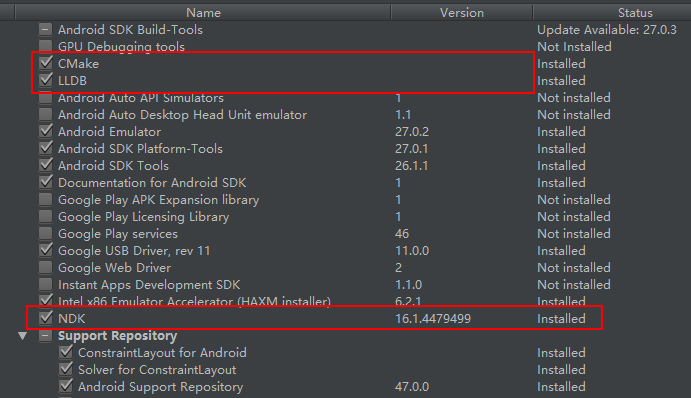
ndk-build
需要在原有的jni目录下,添加Android.mk,Application.mk两个文件
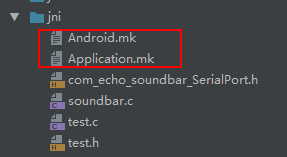
NDK路径为
xxx\Android\sdk\ndk-bundle
右键New --> file --> xxx.mk
Android.mk文件的写法参照
YourProject\app\build\intermediates\ndk\debug\Android.mk
Application.mk写法
//选择不同的 ABI,多个使用空格作为分隔符,全部是all
APP_ABI := all
//指定要使用的运行时
APP_STL := gnustl_static
在build.gradle(moudle)下,defaultConfig{...}中添加
 externalNativeBuild {
        ndkBuild {
            //指定 Application.mk 的路径
            arguments "NDK_APPLICATION_MK:=src/main/jni/Application.mk"
            //指定生成哪些平台的 so 文件
            //abiFilters "armeabi-v7a", "armeabi"
            //cFlags 和 cppFlags 是用来设置环境变量的, 一般不需要动
            cFlags "-DTEST_C_FLAG1", "-DTEST_C_FLAG2"
            cppFlags "-DTEST_CPP_FLAG2", "-DTEST_CPP_FLAG2"
        }
    }
在android{...}中添加
externalNativeBuild {
    ndkBuild {
        //指定 Android.mk 的路径
        path "src/main/jni/Android.mk"
    }
}
Sync之后项目即可重新运行。 如需要重新编译so,添加以下代码,生成出来的.so文件位置位于Android-jnilibs
    android {
//……
sourceSets.main {
    jni.srcDirs = []
    jniLibs.srcDir 'src/main/libs'
}
}